// Finance app UI
Mobile Banking App UI Design in Expo
Orbit is a mobile banking app UI built around three everyday jobs: checking a balance, sending money and saving towards a goal.
- Screens
- 3
- Built with
- Expo SDK 58
- Fonts
- Manrope
- License
- Free (MIT)
Orbit Banking app screens
Banking home
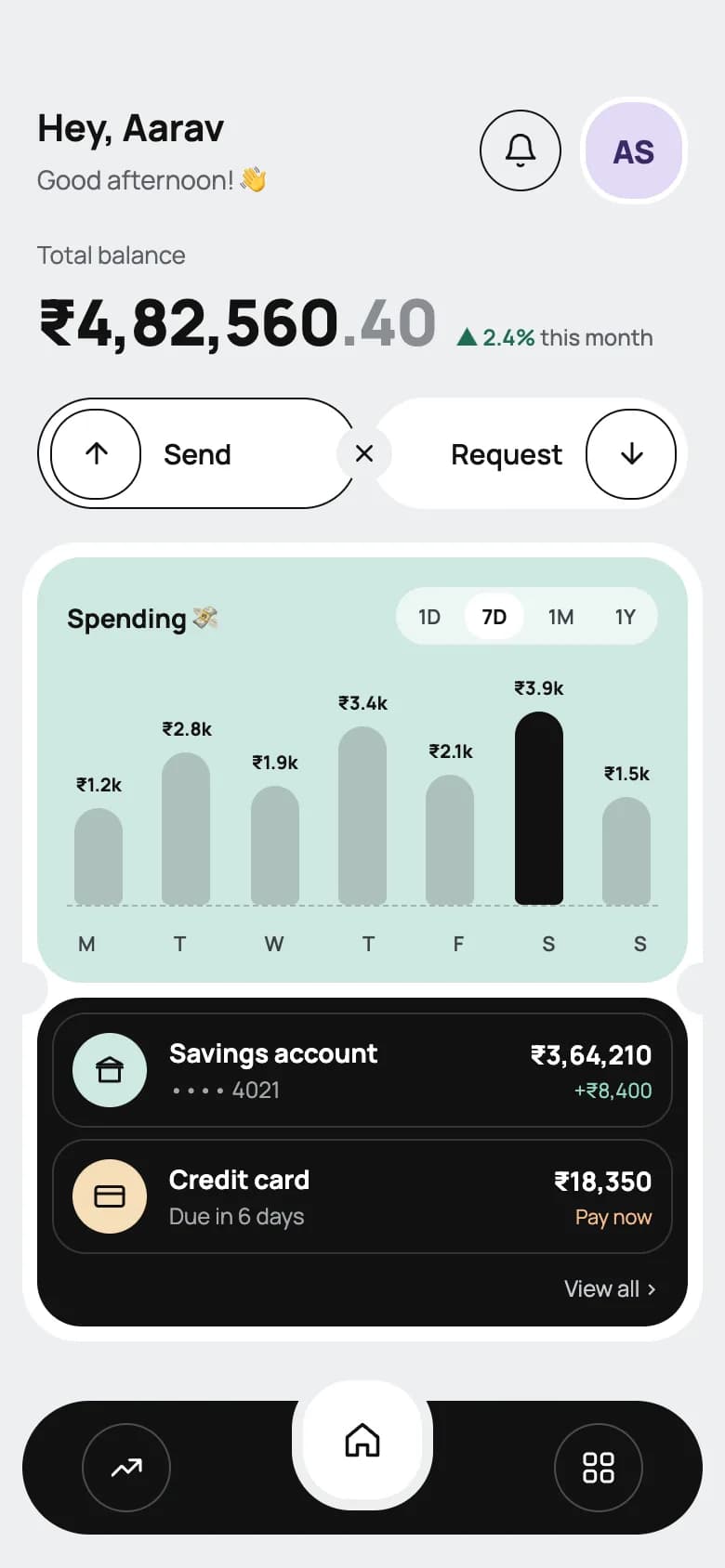
Total balance, send and request actions, a weekly spending chart and account rows in a black card, above a floating tab bar.
Send money
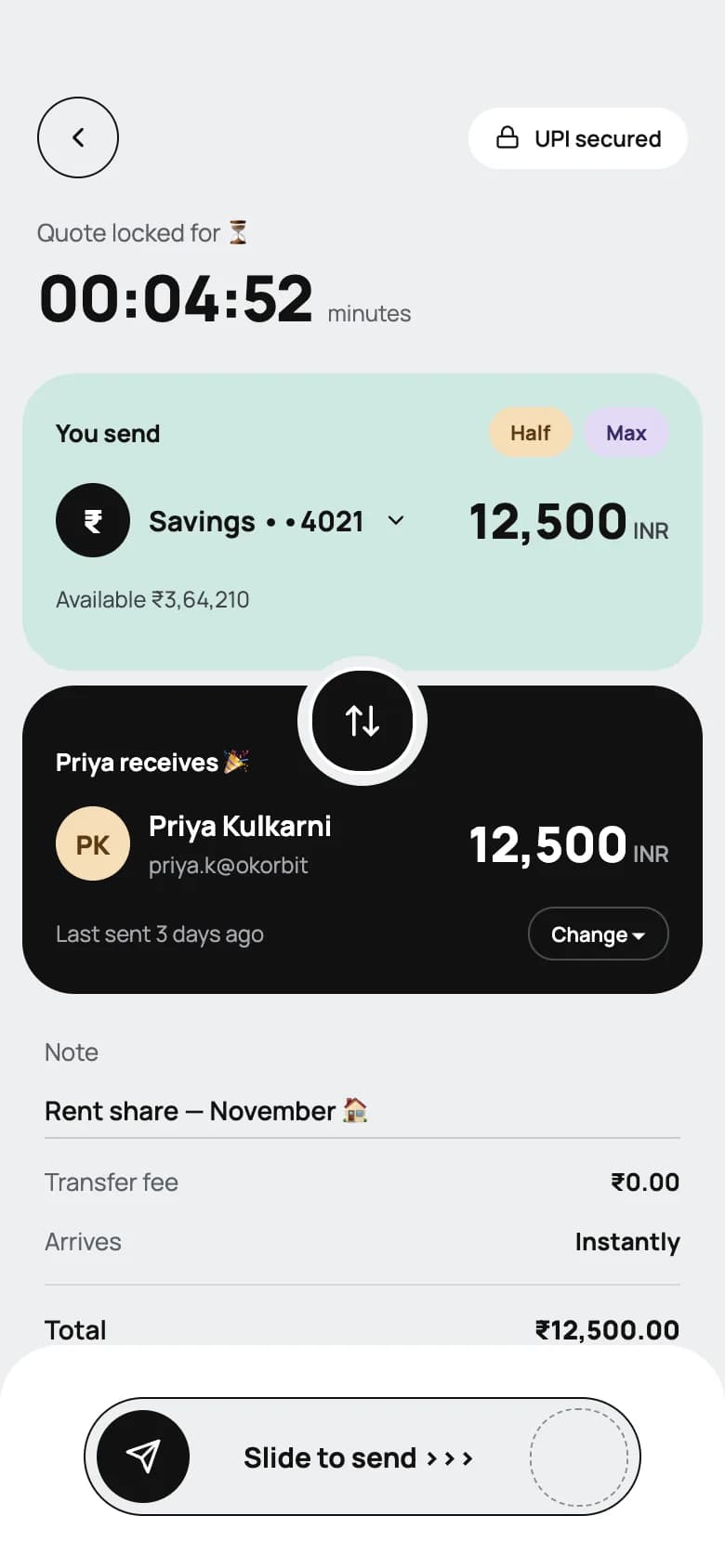
A quote timer, paired send and receive cards with a swap button, a note field, fee summary and slide-to-send.
Savings goal
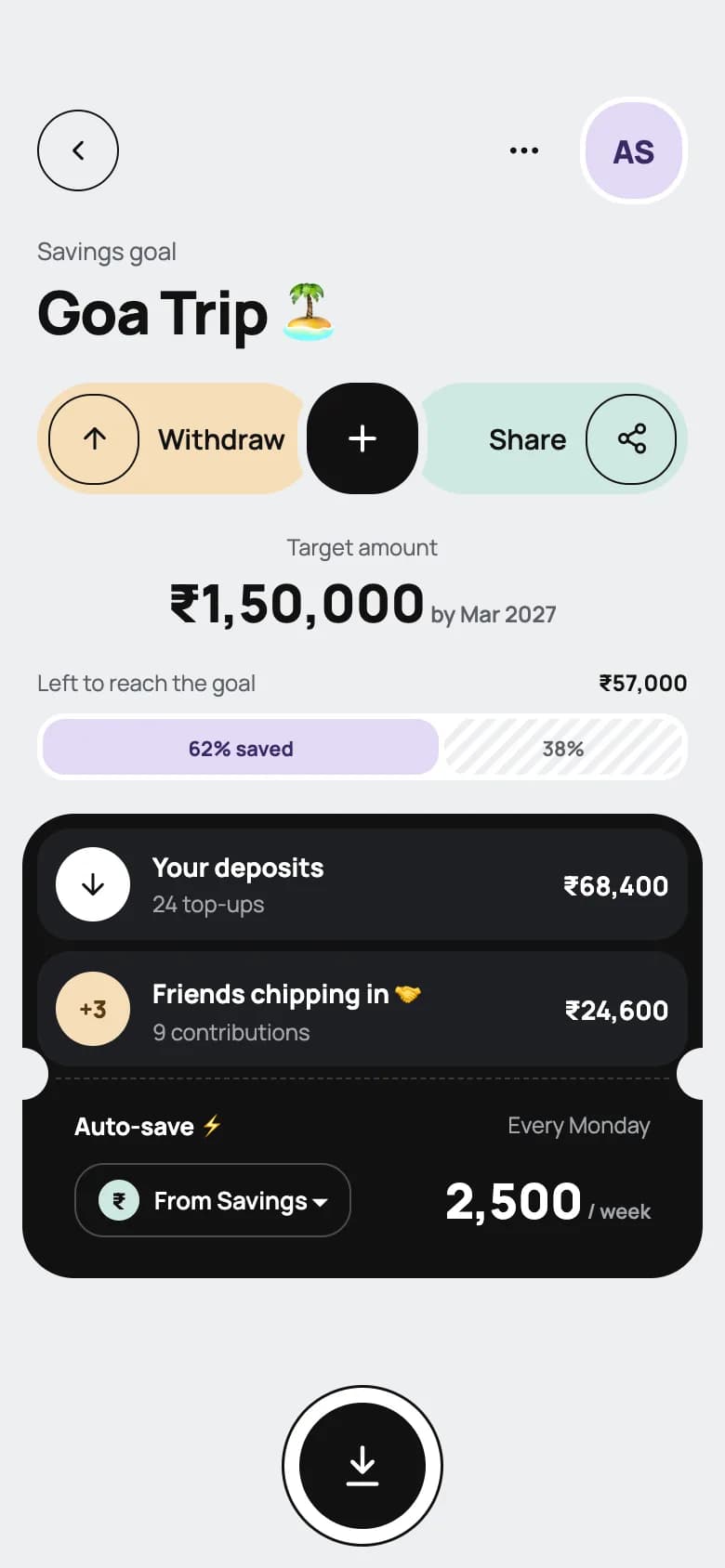
Goal name, target amount, a striped progress bar, deposit and friend contributions, and a weekly auto-save rule.
Copy the Orbit Banking kit
Use the artifact as a design brief, the skill to generate the UI with an AI agent, or the code to run it right away.
Design artifact
The full design: tokens, screens and source
# Orbit Banking: design artifact
Orbit is a mobile banking app UI built around three everyday jobs: checking a balance, sending money and saving towards a goal.
- Type: Finance mobile app UI
- Screens: 3
- Artboard: 390 × 844
- Target: Expo SDK 58, Expo Router, TypeScript, react-native-svg
- Live page: https://developermill.com/app-designs/mobile-banking-app-ui-design
## Design direction
Soft grey ground with ticket-shaped cards, pale mint and peach panels, black contrast blocks and small notched cut-outs.
- Weekly spending bars with highlighted peak
- Send and receive panels joined by a swap control
- Savings goal with progress and auto-save
- Notched ticket cards throughout
## Foundations
### Colour
| Token | Hex |
| --- | --- |
| Graphite | `#121212` |
| Fog | `#EEEFF1` |
| Mint | `#CFE8E2` |
| Peach | `#F6DDB8` |
| Lilac | `#E3D9F5` |
| Slate | `#5C5F66` |
### Typography
- Typefaces: Manrope
- Common sizes (px): 11, 12, 13, 14, 15, 17, 26, 34
### Shape and depth
- Common corner radii (px): 12, 14, 20, 22, 23, 30
- Shadows: `0 0 0 1.5px #121212`
## Screens
### 1. Banking home
Total balance, send and request actions, a weekly spending chart and account rows in a black card, above a floating tab bar.
Preview: https://developermill.com/app-designs/mobile-banking-app-ui-design/home.webp
Copy on this screen:
- Hey, Aarav
- Good afternoon! 👋
- AS
- Total balance
- ₹4,82,560
- .40
- ▲ 2.4%
- this month
- Send
- Request
- Spending 💸
- 1D
- 7D
- 1M
- 1Y
- M
- T
- W
- F
- S
- Savings account
- •••• 4021
- ₹3,64,210
- +₹8,400
- Credit card
- Due in 6 days
- ₹18,350
- Pay now
- View all ›
### 2. Send money
A quote timer, paired send and receive cards with a swap button, a note field, fee summary and slide-to-send.
Preview: https://developermill.com/app-designs/mobile-banking-app-ui-design/transfer.webp
Copy on this screen:
- UPI secured
- Quote locked for ⏳
- 00:04:52
- minutes
- You send
- Half
- Max
- ₹
- Savings ••4021
- 12,500
- INR
- Available ₹3,64,210
- Priya receives 🎉
- PK
- Priya Kulkarni
- priya.k@okorbit
- Last sent 3 days ago
- Change ▾
- Note
- Transfer fee
- ₹0.00
- Arrives
- Instantly
- Total
- ₹12,500.00
- Slide to send ›››
### 3. Savings goal
Goal name, target amount, a striped progress bar, deposit and friend contributions, and a weekly auto-save rule.
Preview: https://developermill.com/app-designs/mobile-banking-app-ui-design/goal.webp
Copy on this screen:
- AS
- Savings goal
- Goa Trip 🏝️
- Withdraw
- Share
- Target amount
- ₹1,50,000
- by Mar 2027
- Left to reach the goal
- ₹57,000
- 62% saved
- 38%
- Your deposits
- 24 top-ups
- ₹68,400
- +3
- Friends chipping in 🤝
- 9 contributions
- ₹24,600
- Auto-save ⚡
- Every Monday
- ₹
- From Savings ▾
- 2,500
- / week
## Full source
The complete design source for each screen. Images point at hosted demo files.
### Main
```html
<!doctype html>
<html lang="en">
<head>
<meta charset="utf-8">
<title>Orbit — Home</title>
<script src="./support.js"></script>
</head>
<body>
<x-dc>
<helmet>
<link rel="preconnect" href="https://fonts.googleapis.com">
<link href="https://fonts.googleapis.com/css2?family=Manrope:wght@400;500;600;700;800&display=swap" rel="stylesheet">
<style>
body{margin:0}
a{color:#121212}a:hover{color:#444}
button{font-family:inherit;cursor:pointer}
</style>
</helmet>
<div style="width: 390px; height: 844px; box-sizing: border-box; background: #EEEFF1; font-family: Manrope, system-ui, sans-serif; color: #121212; position: relative; overflow: hidden; display: flex; flex-direction: column">
<div style="padding: 52px 20px 0; display: flex; flex-direction: column; gap: 18px">
<div style="display: flex; align-items: center; justify-content: space-between">
<div style="display: flex; flex-direction: column; gap: 2px">
<div style="font-size: 20px; font-weight: 700">Hey, Aarav</div>
<div style="font-size: 14px; color: #5C5F66">Good afternoon! 👋</div>
</div>
<div style="display: flex; align-items: center; gap: 10px">
<button aria-label="Notifications" style="width: 44px; height: 44px; border-radius: 22px; border: 1.5px solid #121212; background: transparent; display: flex; align-items: center; justify-content: center; padding: 0">
<svg aria-hidden="true" width="20" height="20" viewBox="0 0 24 24" fill="none" stroke="#121212" stroke-width="1.8" stroke-linecap="round" stroke-linejoin="round"><path d="M6 8a6 6 0 0 1 12 0c0 7 3 9 3 9H3s3-2 3-9"></path><path d="M10.3 21a1.94 1.94 0 0 0 3.4 0"></path></svg>
</button>
<div aria-label="Profile, Aarav Shah" role="img" style="width: 52px; height: 52px; border-radius: 26px; background: #E3D9F5; border: 3px solid #FFFFFF; display: flex; align-items: center; justify-content: center; font-weight: 800; font-size: 17px; color: #3B2A66">AS</div>
</div>
</div>
<div style="display: flex; flex-direction: column; gap: 4px">
<div style="font-size: 13px; color: #5C5F66">Total balance</div>
<div style="display: flex; align-items: baseline; gap: 10px">
<div style="font-size: 34px; font-weight: 800; letter-spacing: -0.02em">₹4,82,560<span style="color: #8A8D93">.40</span></div>
<div style="font-size: 12px; font-weight: 600; color: #1E6B55">▲ 2.4% <span style="color: #5C5F66; font-weight: 500">this month</span></div>
</div>
</div>
<div style="display: flex; align-items: center; position: relative; height: 60px">
<button style="flex: 1; height: 60px; border-radius: 30px; border: 1.5px solid #121212; background: #FFFFFF; display: flex; align-items: center; gap: 12px; padding: 0 22px 0 6px; font-size: 15px; font-weight: 600; color: #121212">
<span style="width: 46px; height: 46px; border-radius: 23px; border: 1.5px solid #121212; display: flex; align-items: center; justify-content: center"><svg aria-hidden="true" width="18" height="18" viewBox="0 0 24 24" fill="none" stroke="#121212" stroke-width="2" stroke-linecap="round" stroke-linejoin="round"><path d="M12 19V5"></path><path d="m5 12 7-7 7 7"></path></svg></span>
Send
</button>
<div aria-hidden="true" style="width: 30px; height: 30px; margin: 0 -12px; z-index: 2; border-radius: 15px; background: #EEEFF1; display: flex; align-items: center; justify-content: center">
<svg width="18" height="18" viewBox="0 0 24 24" fill="none" stroke="#121212" stroke-width="2" stroke-linecap="round"><path d="M7 7l10 10M17 7 7 17"></path></svg>
</div>
<button style="flex: 1; height: 60px; border-radius: 30px; border: none; background: #FFFFFF; display: flex; align-items: center; justify-content: flex-end; gap: 12px; padding: 0 6px 0 22px; font-size: 15px; font-weight: 600; color: #121212">
Request
<span style="width: 46px; height: 46px; border-radius: 23px; border: 1.5px solid #121212; display: flex; align-items: center; justify-content: center"><svg aria-hidden="true" width="18" height="18" viewBox="0 0 24 24" fill="none" stroke="#121212" stroke-width="2" stroke-linecap="round" stroke-linejoin="round"><path d="M12 5v14"></path><path d="m19 12-7 7-7-7"></path></svg></span>
</button>
</div>
</div>
<div style="margin: 18px 12px 0; background: #FFFFFF; border-radius: 30px; padding: 8px; display: flex; flex-direction: column; gap: 8px; position: relative">
<div aria-hidden="true" style="position: absolute; top: 226px; left: -14px; width: 28px; height: 28px; border-radius: 14px; background: #EEEFF1; z-index: 3"></div>
<div aria-hidden="true" style="position: absolute; top: 226px; right: -14px; width: 28px; height: 28px; border-radius: 14px; background: #EEEFF1; z-index: 3"></div>
<div style="background: {{accent}}; border-radius: 24px; padding: 16px 16px 14px; display: flex; flex-direction: column; gap: 12px">
<div style="display: flex; align-items: center; justify-content: space-between">
<div style="font-size: 14px; font-weight: 700">Spending 💸</div>
<div style="display: flex; gap: 4px; background: rgba(255,255,255,0.6); border-radius: 16px; padding: 3px">
<button style="border: none; background: transparent; font-size: 11px; font-weight: 600; color: #3E4248; padding: 5px 9px; border-radius: 12px">1D</button>
<button style="border: none; background: #FFFFFF; font-size: 11px; font-weight: 700; color: #121212; padding: 5px 9px; border-radius: 12px">7D</button>
<button style="border: none; background: transparent; font-size: 11px; font-weight: 600; color: #3E4248; padding: 5px 9px; border-radius: 12px">1M</button>
<button style="border: none; background: transparent; font-size: 11px; font-weight: 600; color: #3E4248; padding: 5px 9px; border-radius: 12px">1Y</button>
</div>
</div>
<div style="display: flex; align-items: flex-end; justify-content: space-between; height: 128px; padding: 0 4px; border-bottom: 1px dashed rgba(18,18,18,0.25)">
<sc-for list="{{bars}}" as="bar" hint-placeholder-count="7">
<div style="display: flex; flex-direction: column; align-items: center; gap: 6px">
<div style="font-size: 10px; font-weight: 700; color: #121212">{{bar.label}}</div>
<div style="width: 26px; height: {{bar.h}}px; border-radius: 13px 13px 4px 4px; background: {{bar.fill}}"></div>
</div>
</sc-for>
</div>
<div style="display: flex; justify-content: space-between; padding: 0 6px; font-size: 11px; color: #3E4248; font-weight: 600">
<span>M</span><span>T</span><span>W</span><span>T</span><span>F</span><span>S</span><span>S</span>
</div>
</div>
<div style="background: #121212; border-radius: 24px; padding: 8px; display: flex; flex-direction: column; gap: 6px">
<div style="display: flex; align-items: center; gap: 12px; padding: 10px; border: 1px solid #34363A; border-radius: 18px">
<div aria-hidden="true" style="width: 40px; height: 40px; border-radius: 20px; background: #CFE8E2; display: flex; align-items: center; justify-content: center"><svg width="18" height="18" viewBox="0 0 24 24" fill="none" stroke="#121212" stroke-width="2" stroke-linecap="round" stroke-linejoin="round"><path d="M3 10h18"></path><path d="M5 10V20h14V10"></path><path d="M12 3 3 8h18z"></path></svg></div>
<div style="flex: 1; display: flex; flex-direction: column; gap: 2px">
<div style="font-size: 14px; font-weight: 700; color: #FFFFFF">Savings account</div>
<div style="font-size: 12px; color: #A4A7AD">•••• 4021</div>
</div>
<div style="display: flex; flex-direction: column; align-items: flex-end; gap: 2px">
<div style="font-size: 14px; font-weight: 700; color: #FFFFFF">₹3,64,210</div>
<div style="font-size: 11px; color: #8FD6BD">+₹8,400</div>
</div>
</div>
<div style="display: flex; align-items: center; gap: 12px; padding: 10px; border: 1px solid #34363A; border-radius: 18px">
<div aria-hidden="true" style="width: 40px; height: 40px; border-radius: 20px; background: #F6DDB8; display: flex; align-items: center; justify-content: center"><svg width="18" height="18" viewBox="0 0 24 24" fill="none" stroke="#121212" stroke-width="2" stroke-linecap="round" stroke-linejoin="round"><rect x="2" y="5" width="20" height="14" rx="2"></rect><path d="M2 10h20"></path></svg></div>
<div style="flex: 1; display: flex; flex-direction: column; gap: 2px">
<div style="font-size: 14px; font-weight: 700; color: #FFFFFF">Credit card</div>
<div style="font-size: 12px; color: #A4A7AD">Due in 6 days</div>
</div>
<div style="display: flex; flex-direction: column; align-items: flex-end; gap: 2px">
<div style="font-size: 14px; font-weight: 700; color: #FFFFFF">₹18,350</div>
<div style="font-size: 11px; color: #F3B98A">Pay now</div>
</div>
</div>
<a href="#" style="align-self: flex-end; font-size: 12px; color: #C7CAD0; text-decoration: none; padding: 4px 8px">View all ›</a>
</div>
</div>
<nav aria-label="Main" style="position: absolute; left: 12px; right: 12px; bottom: 18px; height: 72px; background: #121212; border-radius: 36px; display: flex; align-items: center; justify-content: space-around">
<button aria-label="Insights" style="width: 48px; height: 48px; border-radius: 24px; border: 1.5px solid #4A4D52; background: transparent; display: flex; align-items: center; justify-content: center; padding: 0"><svg aria-hidden="true" width="20" height="20" viewBox="0 0 24 24" fill="none" stroke="#FFFFFF" stroke-width="1.8" stroke-linecap="round" stroke-linejoin="round"><path d="m3 17 6-6 4 4 8-8"></path><path d="M14 7h7v7"></path></svg></button>
<button aria-label="Home" aria-current="page" style="width: 64px; height: 64px; margin-top: -30px; border-radius: 32px; border: 6px solid #EEEFF1; background: #FFFFFF; display: flex; align-items: center; justify-content: center; padding: 0; box-sizing: content-box"><svg aria-hidden="true" width="22" height="22" viewBox="0 0 24 24" fill="none" stroke="#121212" stroke-width="2" stroke-linecap="round" stroke-linejoin="round"><path d="M3 10.5 12 3l9 7.5V21h-6v-6H9v6H3z"></path></svg></button>
<button aria-label="Cards and services" style="width: 48px; height: 48px; border-radius: 24px; border: 1.5px solid #4A4D52; background: transparent; display: flex; align-items: center; justify-content: center; padding: 0"><svg aria-hidden="true" width="20" height="20" viewBox="0 0 24 24" fill="none" stroke="#FFFFFF" stroke-width="1.8"><rect x="3" y="3" width="7" height="7" rx="2"></rect><rect x="14" y="3" width="7" height="7" rx="2"></rect><rect x="3" y="14" width="7" height="7" rx="2"></rect><rect x="14" y="14" width="7" height="7" rx="2"></rect></svg></button>
</nav>
</div>
</x-dc>
<script type="text/x-dc" data-dc-script data-props='{"accent":{"editor":"color","default":"#CFE8E2","options":["#CFE8E2","#F6DDB8","#E3D9F5","#D6E4F7"]},"$preview":{"width":390,"height":844}}'>
class Component extends DCLogic {
renderVals() {
var raw = [
{ label: '₹1.2k', h: 52 }, { label: '₹2.8k', h: 82 }, { label: '₹1.9k', h: 64 },
{ label: '₹3.4k', h: 96 }, { label: '₹2.1k', h: 70 }, { label: '₹3.9k', h: 104, hi: true }, { label: '₹1.5k', h: 58 }
];
return {
accent: this.props.accent ?? '#CFE8E2',
bars: raw.map(function (b) { return { label: b.label, h: b.h, fill: b.hi ? '#121212' : 'rgba(18,18,18,0.18)' }; })
};
}
}
</script>
</body>
</html>
```
### Transfer
```html
<!doctype html>
<html lang="en">
<head>
<meta charset="utf-8">
<title>Orbit — Send money</title>
<script src="./support.js"></script>
</head>
<body>
<x-dc>
<helmet>
<link rel="preconnect" href="https://fonts.googleapis.com">
<link href="https://fonts.googleapis.com/css2?family=Manrope:wght@400;500;600;700;800&display=swap" rel="stylesheet">
<style>
body{margin:0}
a{color:#121212}a:hover{color:#444}
button{font-family:inherit;cursor:pointer}
</style>
</helmet>
<div style="width: 390px; height: 844px; box-sizing: border-box; background: #EEEFF1; font-family: Manrope, system-ui, sans-serif; color: #121212; position: relative; overflow: hidden; display: flex; flex-direction: column">
<div style="padding: 52px 20px 0; display: flex; flex-direction: column; gap: 18px">
<div style="display: flex; align-items: center; justify-content: space-between">
<button aria-label="Back" style="width: 44px; height: 44px; border-radius: 22px; border: 1.5px solid #121212; background: transparent; display: flex; align-items: center; justify-content: center; padding: 0"><svg aria-hidden="true" width="18" height="18" viewBox="0 0 24 24" fill="none" stroke="#121212" stroke-width="2" stroke-linecap="round" stroke-linejoin="round"><path d="m15 18-6-6 6-6"></path></svg></button>
<div style="display: flex; align-items: center; gap: 8px; background: #FFFFFF; border-radius: 20px; padding: 8px 14px; font-size: 12px; font-weight: 600">
<svg aria-hidden="true" width="14" height="14" viewBox="0 0 24 24" fill="none" stroke="#121212" stroke-width="2" stroke-linecap="round" stroke-linejoin="round"><rect x="3" y="11" width="18" height="10" rx="2"></rect><path d="M7 11V7a5 5 0 0 1 10 0v4"></path></svg>
UPI secured
</div>
</div>
<div style="display: flex; flex-direction: column; gap: 2px">
<div style="font-size: 13px; color: #5C5F66">Quote locked for ⏳</div>
<div style="display: flex; align-items: baseline; gap: 8px">
<div style="font-size: 34px; font-weight: 800; letter-spacing: -0.02em">00:04:52</div>
<div style="font-size: 12px; color: #5C5F66">minutes</div>
</div>
</div>
</div>
<div style="margin: 18px 12px 0; display: flex; flex-direction: column; position: relative">
<div aria-hidden="true" style="position: absolute; top: 148px; left: -14px; width: 28px; height: 28px; border-radius: 14px; background: #EEEFF1; z-index: 3"></div>
<div aria-hidden="true" style="position: absolute; top: 148px; right: -14px; width: 28px; height: 28px; border-radius: 14px; background: #EEEFF1; z-index: 3"></div>
<div style="background: {{accent}}; border-radius: 28px; padding: 18px 18px 30px; display: flex; flex-direction: column; gap: 14px">
<div style="display: flex; align-items: center; justify-content: space-between">
<div style="font-size: 13px; font-weight: 700">You send</div>
<div style="display: flex; gap: 6px">
<button style="border: none; background: #F6DDB8; font-size: 11px; font-weight: 700; color: #5A3A10; padding: 6px 12px; border-radius: 14px">Half</button>
<button style="border: none; background: #E3D9F5; font-size: 11px; font-weight: 700; color: #3B2A66; padding: 6px 12px; border-radius: 14px">Max</button>
</div>
</div>
<div style="display: flex; align-items: center; justify-content: space-between">
<button style="display: flex; align-items: center; gap: 10px; border: none; background: transparent; padding: 0; font-size: 15px; font-weight: 700; color: #121212">
<span aria-hidden="true" style="width: 40px; height: 40px; border-radius: 20px; background: #121212; color: #FFFFFF; display: flex; align-items: center; justify-content: center; font-size: 17px; font-weight: 800">₹</span>
Savings ••4021
<svg aria-hidden="true" width="14" height="14" viewBox="0 0 24 24" fill="none" stroke="#121212" stroke-width="2.2" stroke-linecap="round"><path d="m6 9 6 6 6-6"></path></svg>
</button>
<div style="font-size: 26px; font-weight: 800">12,500<span style="font-size: 12px; font-weight: 600; color: #3E4248; margin-left: 4px">INR</span></div>
</div>
<div style="font-size: 12px; color: #3E4248">Available ₹3,64,210</div>
</div>
<div aria-hidden="true" style="position: absolute; left: 50%; top: 152px; transform: translateX(-50%); width: 70px; height: 70px; border-radius: 35px; background: #EEEFF1; display: flex; align-items: center; justify-content: center; z-index: 2">
<div style="width: 54px; height: 54px; border-radius: 27px; background: #121212; border: 2px solid #FFFFFF; display: flex; align-items: center; justify-content: center">
<svg width="22" height="22" viewBox="0 0 24 24" fill="none" stroke="#FFFFFF" stroke-width="2" stroke-linecap="round" stroke-linejoin="round"><path d="M7 4v16"></path><path d="m3 8 4-4 4 4"></path><path d="M17 20V4"></path><path d="m21 16-4 4-4-4"></path></svg>
</div>
</div>
<div style="background: #121212; color: #FFFFFF; border-radius: 28px; padding: 30px 18px 18px; margin-top: 8px; display: flex; flex-direction: column; gap: 14px">
<div style="font-size: 13px; font-weight: 700">Priya receives 🎉</div>
<div style="display: flex; align-items: center; justify-content: space-between">
<div style="display: flex; align-items: center; gap: 10px">
<span aria-hidden="true" style="width: 40px; height: 40px; border-radius: 20px; background: #F6DDB8; color: #5A3A10; display: flex; align-items: center; justify-content: center; font-size: 14px; font-weight: 800">PK</span>
<div style="display: flex; flex-direction: column; gap: 2px">
<div style="font-size: 15px; font-weight: 700">Priya Kulkarni</div>
<div style="font-size: 12px; color: #A4A7AD">priya.k@okorbit</div>
</div>
</div>
<div style="font-size: 26px; font-weight: 800">12,500<span style="font-size: 12px; font-weight: 600; color: #A4A7AD; margin-left: 4px">INR</span></div>
</div>
<div style="display: flex; align-items: center; justify-content: space-between">
<div style="font-size: 12px; color: #A4A7AD">Last sent 3 days ago</div>
<button style="border: 1px solid #4A4D52; background: transparent; color: #FFFFFF; font-size: 11px; font-weight: 600; padding: 6px 12px; border-radius: 14px">Change ▾</button>
</div>
</div>
</div>
<div style="padding: 22px 24px 0; display: flex; flex-direction: column; gap: 14px; font-size: 13px">
<label style="display: flex; flex-direction: column; gap: 6px">
<span style="color: #5C5F66">Note</span>
<input type="text" value="Rent share — November 🏠" style="font-family: inherit; font-size: 14px; font-weight: 600; color: #121212; border: none; border-bottom: 1px solid #C9CBD0; background: transparent; padding: 6px 0; outline: none">
</label>
<div style="display: flex; justify-content: space-between"><span style="color: #5C5F66">Transfer fee</span><span style="font-weight: 700">₹0.00</span></div>
<div style="display: flex; justify-content: space-between"><span style="color: #5C5F66">Arrives</span><span style="font-weight: 700">Instantly</span></div>
<div style="height: 1px; background: #D6D8DC"></div>
<div style="display: flex; justify-content: space-between; font-size: 14px"><span style="font-weight: 600">Total</span><span style="font-weight: 800">₹12,500.00</span></div>
</div>
<div style="position: absolute; left: 0; right: 0; bottom: 0; height: 120px; background: #FFFFFF; border-radius: 32px 32px 0 0; display: flex; align-items: center; justify-content: center">
<button aria-label="Slide to send ₹12,500" style="width: 300px; height: 64px; border-radius: 32px; border: 1.5px solid #121212; background: #EEEFF1; display: flex; align-items: center; justify-content: space-between; padding: 6px; box-sizing: border-box">
<span aria-hidden="true" style="width: 50px; height: 50px; border-radius: 25px; background: #121212; display: flex; align-items: center; justify-content: center"><svg width="20" height="20" viewBox="0 0 24 24" fill="none" stroke="#FFFFFF" stroke-width="2" stroke-linecap="round" stroke-linejoin="round"><path d="M22 2 11 13"></path><path d="M22 2 15 22l-4-9-9-4z"></path></svg></span>
<span style="font-size: 15px; font-weight: 700; color: #121212">Slide to send ›››</span>
<span aria-hidden="true" style="width: 50px; height: 50px; border-radius: 25px; border: 1.5px dashed #8A8D93"></span>
</button>
</div>
</div>
</x-dc>
<script type="text/x-dc" data-dc-script data-props='{"accent":{"editor":"color","default":"#CFE8E2","options":["#CFE8E2","#F6DDB8","#E3D9F5","#D6E4F7"]},"$preview":{"width":390,"height":844}}'>
class Component extends DCLogic {
renderVals() {
return { accent: this.props.accent ?? '#CFE8E2' };
}
}
</script>
</body>
</html>
```
### Goal
```html
<!doctype html>
<html lang="en">
<head>
<meta charset="utf-8">
<title>Orbit — Savings goal</title>
<script src="./support.js"></script>
</head>
<body>
<x-dc>
<helmet>
<link rel="preconnect" href="https://fonts.googleapis.com">
<link href="https://fonts.googleapis.com/css2?family=Manrope:wght@400;500;600;700;800&display=swap" rel="stylesheet">
<style>
body{margin:0}
a{color:#121212}a:hover{color:#444}
button{font-family:inherit;cursor:pointer}
</style>
</helmet>
<div style="width: 390px; height: 844px; box-sizing: border-box; background: #EEEFF1; font-family: Manrope, system-ui, sans-serif; color: #121212; position: relative; overflow: hidden; display: flex; flex-direction: column">
<div style="padding: 52px 20px 0; display: flex; flex-direction: column; gap: 16px">
<div style="display: flex; align-items: center; justify-content: space-between">
<button aria-label="Back" style="width: 44px; height: 44px; border-radius: 22px; border: 1.5px solid #121212; background: transparent; display: flex; align-items: center; justify-content: center; padding: 0"><svg aria-hidden="true" width="18" height="18" viewBox="0 0 24 24" fill="none" stroke="#121212" stroke-width="2" stroke-linecap="round" stroke-linejoin="round"><path d="m15 18-6-6 6-6"></path></svg></button>
<div style="display: flex; align-items: center; gap: 8px">
<button aria-label="More options" style="width: 44px; height: 44px; border-radius: 22px; border: none; background: transparent; display: flex; align-items: center; justify-content: center; padding: 0"><svg aria-hidden="true" width="20" height="20" viewBox="0 0 24 24" fill="#121212"><circle cx="5" cy="12" r="2"></circle><circle cx="12" cy="12" r="2"></circle><circle cx="19" cy="12" r="2"></circle></svg></button>
<div aria-label="Profile, Aarav Shah" role="img" style="width: 52px; height: 52px; border-radius: 26px; background: #E3D9F5; border: 3px solid #FFFFFF; display: flex; align-items: center; justify-content: center; font-weight: 800; font-size: 17px; color: #3B2A66">AS</div>
</div>
</div>
<div style="display: flex; flex-direction: column; gap: 2px">
<div style="font-size: 13px; color: #5C5F66">Savings goal</div>
<div style="font-size: 32px; font-weight: 800; letter-spacing: -0.02em">Goa Trip 🏝️</div>
</div>
<div style="display: flex; align-items: center; height: 60px">
<button style="flex: 1; height: 60px; border-radius: 30px; border: none; background: #F6DDB8; display: flex; align-items: center; gap: 10px; padding: 0 20px 0 6px; font-size: 15px; font-weight: 600; color: #121212">
<span aria-hidden="true" style="width: 46px; height: 46px; border-radius: 23px; border: 1.5px solid #121212; display: flex; align-items: center; justify-content: center"><svg width="18" height="18" viewBox="0 0 24 24" fill="none" stroke="#121212" stroke-width="2" stroke-linecap="round" stroke-linejoin="round"><path d="M12 19V5"></path><path d="m5 12 7-7 7 7"></path></svg></span>
Withdraw
</button>
<button aria-label="Add money" style="width: 60px; height: 60px; margin: 0 -10px; z-index: 2; border-radius: 30px; border: 5px solid #EEEFF1; background: #121212; display: flex; align-items: center; justify-content: center; padding: 0; box-sizing: content-box"><svg aria-hidden="true" width="22" height="22" viewBox="0 0 24 24" fill="none" stroke="#FFFFFF" stroke-width="2.2" stroke-linecap="round"><path d="M12 5v14M5 12h14"></path></svg></button>
<button style="flex: 1; height: 60px; border-radius: 30px; border: none; background: {{accent}}; display: flex; align-items: center; justify-content: flex-end; gap: 10px; padding: 0 6px 0 20px; font-size: 15px; font-weight: 600; color: #121212">
Share
<span aria-hidden="true" style="width: 46px; height: 46px; border-radius: 23px; border: 1.5px solid #121212; display: flex; align-items: center; justify-content: center"><svg width="18" height="18" viewBox="0 0 24 24" fill="none" stroke="#121212" stroke-width="2" stroke-linecap="round" stroke-linejoin="round"><circle cx="18" cy="5" r="3"></circle><circle cx="6" cy="12" r="3"></circle><circle cx="18" cy="19" r="3"></circle><path d="m8.6 13.5 6.8 4M15.4 6.5l-6.8 4"></path></svg></span>
</button>
</div>
<div style="display: flex; flex-direction: column; align-items: center; gap: 2px; padding-top: 4px">
<div style="font-size: 12px; color: #5C5F66">Target amount</div>
<div style="font-size: 28px; font-weight: 800">₹1,50,000<span style="font-size: 12px; font-weight: 600; color: #5C5F66; margin-left: 4px">by Mar 2027</span></div>
</div>
<div style="display: flex; flex-direction: column; gap: 8px">
<div style="display: flex; justify-content: space-between; font-size: 12px"><span style="color: #5C5F66">Left to reach the goal</span><span style="font-weight: 700">₹57,000</span></div>
<div role="img" aria-label="62% saved" style="display: flex; height: 30px; background: #FFFFFF; border-radius: 15px; padding: 3px; gap: 3px">
<div style="width: 62%; background: #E3D9F5; border-radius: 12px; display: flex; align-items: center; justify-content: center; font-size: 11px; font-weight: 700; color: #3B2A66">62% saved</div>
<div style="flex: 1; border-radius: 12px; background: repeating-linear-gradient(135deg, #EEEFF1 0 4px, #FFFFFF 4px 8px); display: flex; align-items: center; justify-content: center; font-size: 11px; font-weight: 600; color: #5C5F66">38%</div>
</div>
</div>
</div>
<div style="margin: 18px 12px 0; background: #121212; color: #FFFFFF; border-radius: 28px; padding: 8px; display: flex; flex-direction: column; gap: 6px; position: relative">
<div aria-hidden="true" style="position: absolute; top: 126px; left: -14px; width: 28px; height: 28px; border-radius: 14px; background: #EEEFF1; z-index: 3"></div>
<div aria-hidden="true" style="position: absolute; top: 126px; right: -14px; width: 28px; height: 28px; border-radius: 14px; background: #EEEFF1; z-index: 3"></div>
<div style="display: flex; align-items: center; gap: 12px; padding: 10px; background: #1E1F22; border-radius: 18px">
<span aria-hidden="true" style="width: 40px; height: 40px; border-radius: 20px; background: #FFFFFF; display: flex; align-items: center; justify-content: center"><svg width="18" height="18" viewBox="0 0 24 24" fill="none" stroke="#121212" stroke-width="2" stroke-linecap="round" stroke-linejoin="round"><path d="M12 5v14"></path><path d="m19 12-7 7-7-7"></path></svg></span>
<div style="flex: 1; display: flex; flex-direction: column; gap: 2px"><div style="font-size: 14px; font-weight: 700">Your deposits</div><div style="font-size: 12px; color: #A4A7AD">24 top-ups</div></div>
<div style="font-size: 14px; font-weight: 700">₹68,400</div>
</div>
<div style="display: flex; align-items: center; gap: 12px; padding: 10px; background: #1E1F22; border-radius: 18px">
<span aria-hidden="true" style="width: 40px; height: 40px; border-radius: 20px; background: #F6DDB8; color: #5A3A10; display: flex; align-items: center; justify-content: center; font-size: 13px; font-weight: 800">+3</span>
<div style="flex: 1; display: flex; flex-direction: column; gap: 2px"><div style="font-size: 14px; font-weight: 700">Friends chipping in 🤝</div><div style="font-size: 12px; color: #A4A7AD">9 contributions</div></div>
<div style="font-size: 14px; font-weight: 700">₹24,600</div>
</div>
<div style="display: flex; flex-direction: column; gap: 10px; padding: 14px 10px 14px; margin: 0 10px; border-top: 1.5px dashed #3A3C40">
<div style="display: flex; justify-content: space-between; align-items: center">
<div style="font-size: 13px; font-weight: 700">Auto-save ⚡</div>
<div style="font-size: 12px; color: #A4A7AD">Every Monday</div>
</div>
<div style="display: flex; justify-content: space-between; align-items: center">
<button style="display: flex; align-items: center; gap: 8px; border: 1px solid #4A4D52; background: transparent; color: #FFFFFF; font-size: 13px; font-weight: 600; padding: 8px 12px; border-radius: 16px">
<span aria-hidden="true" style="width: 22px; height: 22px; border-radius: 11px; background: #CFE8E2; color: #121212; display: flex; align-items: center; justify-content: center; font-size: 12px; font-weight: 800">₹</span>
From Savings ▾
</button>
<div style="font-size: 26px; font-weight: 800">2,500<span style="font-size: 11px; font-weight: 600; color: #A4A7AD; margin-left: 4px">/ week</span></div>
</div>
</div>
</div>
<div style="position: absolute; left: 0; right: 0; bottom: 0; height: 110px; display: flex; align-items: center; justify-content: center">
<button aria-label="Top up goal" style="width: 84px; height: 84px; border-radius: 42px; border: 8px solid #FFFFFF; background: #121212; display: flex; align-items: center; justify-content: center; padding: 0; box-shadow: 0 0 0 1.5px #121212">
<svg aria-hidden="true" width="26" height="26" viewBox="0 0 24 24" fill="none" stroke="#FFFFFF" stroke-width="2" stroke-linecap="round" stroke-linejoin="round"><path d="M12 3v12"></path><path d="m7 10 5 5 5-5"></path><path d="M5 21h14"></path></svg>
</button>
</div>
</div>
</x-dc>
<script type="text/x-dc" data-dc-script data-props='{"accent":{"editor":"color","default":"#CFE8E2","options":["#CFE8E2","#F6DDB8","#E3D9F5","#D6E4F7"]},"$preview":{"width":390,"height":844}}'>
class Component extends DCLogic {
renderVals() {
return { accent: this.props.accent ?? '#CFE8E2' };
}
}
</script>
</body>
</html>
```SKILL.md
Save as .claude/skills/mobile-banking-app-ui/SKILL.md
---
name: mobile-banking-app-ui
description: Build the Orbit Banking mobile app UI in Expo React Native. Use when asked to create a mobile banking app UI or a new screen in this visual style.
---

# Orbit Banking app UI

Build this UI in an Expo SDK 58 app with Expo Router and strict TypeScript. Match the spec below rather than inventing a new look. The finished reference lives at https://developermill.com/app-designs/mobile-banking-app-ui-design

## Visual direction

Soft grey ground with ticket-shaped cards, pale mint and peach panels, black contrast blocks and small notched cut-outs.

Keep these signature details:

- Weekly spending bars with highlighted peak
- Send and receive panels joined by a swap control
- Savings goal with progress and auto-save
- Notched ticket cards throughout

## Set up

```bash
npx expo install react-native-svg @expo-google-fonts/manrope expo-font
```

## Tokens

| Token | Hex |
| --- | --- |
| Graphite | `#121212` |
| Fog | `#EEEFF1` |
| Mint | `#CFE8E2` |
| Peach | `#F6DDB8` |
| Lilac | `#E3D9F5` |
| Slate | `#5C5F66` |

- Typefaces: Manrope
- Common sizes (px): 11, 12, 13, 14, 15, 17, 26, 34
- Common corner radii (px): 12, 14, 20, 22, 23, 30

Define these once and reuse them. Do not add new colours.

## Screens

Build one Expo Router route per screen, in this order:

1. **Banking home**: Total balance, send and request actions, a weekly spending chart and account rows in a black card, above a floating tab bar.
2. **Send money**: A quote timer, paired send and receive cards with a swap button, a note field, fee summary and slide-to-send.
3. **Savings goal**: Goal name, target amount, a striped progress bar, deposit and friend contributions, and a weekly auto-save rule.

## Build rules

- Design on a 390 × 844 artboard, then scale to the device width so layouts match on every phone.
- Load each custom font weight by its own family name with expo-font. Do not rely on `fontWeight` with custom fonts.
- Draw icons, charts and illustrations with react-native-svg rather than image files or chart libraries.
- Use `Pressable` with an `accessibilityLabel` for every icon-only control, and keep touch targets at 44 px or larger.
- Wire navigation with `router.navigate`, and keep sample data in constants at the top of each file so it is easy to replace.
- Use expo-image for photos, with `contentFit` set explicitly.

## Done when

- Every screen above exists as a route and they link together.
- Colours, type and radii match the tokens exactly.
- `npx tsc --noEmit` and `npx expo lint` both pass.
- Layouts hold up on small and large phones.
Set up the project
npx create-expo-app@latest mobile-banking-app --template default
cd mobile-banking-app
rm -rf src
npx expo install react-native-svg @expo-google-fonts/manrope expo-font
src/app/_layout.tsx
import {
  Manrope_400Regular,
  Manrope_500Medium,
  Manrope_600SemiBold,
  Manrope_700Bold,
  Manrope_800ExtraBold,
} from '@expo-google-fonts/manrope';
import { useFonts } from 'expo-font';
import { Stack } from 'expo-router';

export default function RootLayout() {
  const [fontsLoaded] = useFonts({
    Manrope_400Regular,
    Manrope_500Medium,
    Manrope_600SemiBold,
    Manrope_700Bold,
    Manrope_800ExtraBold,
  });

  if (!fontsLoaded) return null;

  return <Stack screenOptions={{ headerShown: false }} />;
}
src/app/goal.tsx
import { Pressable, Text, View } from 'react-native';
import Svg, { Circle, Path } from 'react-native-svg';
import { Screen } from '@/components/screen';
import { Stripes } from '@/components/stripes';
const accent = '#CFE8E2';
export default function GoalScreen() {
return (
<Screen background="#EEEFF1" statusBar="dark">
<View style={{ flex: 1 }}>
<View style={{ paddingTop: 52, paddingBottom: 0, paddingHorizontal: 20, gap: 16 }}>
<View
style={{ alignItems: 'center', justifyContent: 'space-between', flexDirection: 'row' }}>
<Pressable
accessibilityRole="button"
accessibilityLabel="Back"
style={{
width: 44,
height: 44,
borderRadius: 22,
borderWidth: 1.5,
borderColor: '#121212',
alignItems: 'center',
justifyContent: 'center',
padding: 0,
flexDirection: 'row',
}}>
<Svg
width="18"
height="18"
viewBox="0 0 24 24"
fill="none"
stroke="#121212"
strokeWidth="2"
strokeLinecap="round"
strokeLinejoin="round">
<Path d="m15 18-6-6 6-6" />
</Svg>
</Pressable>
<View style={{ alignItems: 'center', gap: 8, flexShrink: 1, flexDirection: 'row' }}>
<Pressable
accessibilityRole="button"
accessibilityLabel="More options"
style={{
width: 44,
height: 44,
borderRadius: 22,
borderWidth: 0,
alignItems: 'center',
justifyContent: 'center',
padding: 0,
flexDirection: 'row',
}}>
<Svg width="20" height="20" viewBox="0 0 24 24" fill="#121212">
<Circle cx="5" cy="12" r="2" />
<Circle cx="12" cy="12" r="2" />
<Circle cx="19" cy="12" r="2" />
</Svg>
</Pressable>
<View
accessibilityRole="image"
accessibilityLabel="Profile, Aarav Shah"
style={{
width: 58,
height: 58,
borderRadius: 26,
backgroundColor: '#E3D9F5',
borderWidth: 3,
borderColor: '#FFFFFF',
alignItems: 'center',
justifyContent: 'center',
flexDirection: 'row',
}}>
<Text
style={{
fontFamily: 'Manrope_800ExtraBold',
fontSize: 17,
color: '#3B2A66',
flexShrink: 1,
}}>
AS
</Text>
</View>
</View>
</View>
<View style={{ gap: 2 }}>
<Text style={{ fontFamily: 'Manrope_400Regular', fontSize: 13, color: '#5C5F66' }}>
Savings goal
</Text>
<Text
style={{
fontFamily: 'Manrope_800ExtraBold',
fontSize: 32,
color: '#121212',
letterSpacing: -0.64,
}}>
Goa Trip 🏝️
</Text>
</View>
<View style={{ alignItems: 'center', height: 60, flexDirection: 'row' }}>
<Pressable
accessibilityRole="button"
style={{
flex: 1,
height: 60,
borderRadius: 30,
borderWidth: 0,
backgroundColor: '#F6DDB8',
alignItems: 'center',
gap: 10,
paddingVertical: 0,
paddingLeft: 6,
paddingRight: 20,
flexDirection: 'row',
}}>
<View
style={{
width: 49,
height: 49,
borderRadius: 23,
borderWidth: 1.5,
borderColor: '#121212',
alignItems: 'center',
justifyContent: 'center',
flexDirection: 'row',
}}>
<Svg
width="18"
height="18"
viewBox="0 0 24 24"
fill="none"
stroke="#121212"
strokeWidth="2"
strokeLinecap="round"
strokeLinejoin="round">
<Path d="M12 19V5" />
<Path d="m5 12 7-7 7 7" />
</Svg>
</View>
<Text
style={{
fontFamily: 'Manrope_600SemiBold',
fontSize: 15,
color: '#121212',
flexShrink: 1,
}}>
Withdraw
</Text>
</Pressable>
<Pressable
accessibilityRole="button"
accessibilityLabel="Add money"
style={{
width: 70,
height: 70,
marginVertical: 0,
marginHorizontal: -10,
zIndex: 2,
borderRadius: 30,
borderWidth: 5,
borderColor: '#EEEFF1',
backgroundColor: '#121212',
alignItems: 'center',
justifyContent: 'center',
padding: 0,
flexDirection: 'row',
}}>
<Svg
width="22"
height="22"
viewBox="0 0 24 24"
fill="none"
stroke="#FFFFFF"
strokeWidth="2.2"
strokeLinecap="round">
<Path d="M12 5v14M5 12h14" />
</Svg>
</Pressable>
<Pressable
accessibilityRole="button"
style={{
flex: 1,
height: 60,
borderRadius: 30,
borderWidth: 0,
backgroundColor: accent,
alignItems: 'center',
justifyContent: 'flex-end',
gap: 10,
paddingVertical: 0,
paddingLeft: 20,
paddingRight: 6,
flexDirection: 'row',
}}>
<Text
style={{
fontFamily: 'Manrope_600SemiBold',
fontSize: 15,
color: '#121212',
flexShrink: 1,
}}>
Share
</Text>
<View
style={{
width: 49,
height: 49,
borderRadius: 23,
borderWidth: 1.5,
borderColor: '#121212',
alignItems: 'center',
justifyContent: 'center',
flexDirection: 'row',
}}>
<Svg
width="18"
height="18"
viewBox="0 0 24 24"
fill="none"
stroke="#121212"
strokeWidth="2"
strokeLinecap="round"
strokeLinejoin="round">
<Circle cx="18" cy="5" r="3" />
<Circle cx="6" cy="12" r="3" />
<Circle cx="18" cy="19" r="3" />
<Path d="m8.6 13.5 6.8 4M15.4 6.5l-6.8 4" />
</Svg>
</View>
</Pressable>
</View>
<View style={{ alignItems: 'center', gap: 2, paddingTop: 4 }}>
<Text style={{ fontFamily: 'Manrope_400Regular', fontSize: 12, color: '#5C5F66' }}>
Target amount
</Text>
<Text style={{ fontFamily: 'Manrope_800ExtraBold', fontSize: 28, color: '#121212' }}>
₹1,50,000
<Text style={{ fontFamily: 'Manrope_600SemiBold', fontSize: 12, color: '#5C5F66' }}>
{' '}
by Mar 2027
</Text>
</Text>
</View>
<View style={{ gap: 8 }}>
<View style={{ justifyContent: 'space-between', flexDirection: 'row' }}>
<Text
style={{
flexShrink: 1,
fontFamily: 'Manrope_400Regular',
fontSize: 12,
color: '#5C5F66',
}}>
Left to reach the goal
</Text>
<Text
style={{
flexShrink: 1,
fontFamily: 'Manrope_700Bold',
fontSize: 12,
color: '#121212',
}}>
₹57,000
</Text>
</View>
<View
accessibilityRole="image"
accessibilityLabel="62% saved"
style={{
height: 36,
backgroundColor: '#FFFFFF',
borderRadius: 15,
padding: 3,
gap: 3,
flexDirection: 'row',
}}>
<View
style={{
width: '62%',
backgroundColor: '#E3D9F5',
borderRadius: 12,
alignItems: 'center',
justifyContent: 'center',
flexDirection: 'row',
}}>
<Text
style={{
fontFamily: 'Manrope_700Bold',
fontSize: 11,
color: '#3B2A66',
flexShrink: 1,
}}>
62% saved
</Text>
</View>
<View
style={{
flex: 1,
borderRadius: 12,
alignItems: 'center',
justifyContent: 'center',
overflow: 'hidden',
flexDirection: 'row',
}}>
<Stripes first={'#EEEFF1'} second={'#FFFFFF'} size={4} angle={135} />
<Text
style={{
fontFamily: 'Manrope_600SemiBold',
fontSize: 11,
color: '#5C5F66',
flexShrink: 1,
}}>
38%
</Text>
</View>
</View>
</View>
</View>
<View
style={{
marginTop: 18,
marginBottom: 0,
marginHorizontal: 12,
backgroundColor: '#121212',
borderRadius: 28,
padding: 8,
gap: 6,
}}>
<View
style={{
position: 'absolute',
top: 126,
left: -14,
width: 28,
height: 28,
borderRadius: 14,
backgroundColor: '#EEEFF1',
zIndex: 3,
}}
/>
<View
style={{
position: 'absolute',
top: 126,
right: -14,
width: 28,
height: 28,
borderRadius: 14,
backgroundColor: '#EEEFF1',
zIndex: 3,
}}
/>
<View
style={{
alignItems: 'center',
gap: 12,
padding: 10,
backgroundColor: '#1E1F22',
borderRadius: 18,
flexDirection: 'row',
}}>
<View
style={{
width: 40,
height: 40,
borderRadius: 20,
backgroundColor: '#FFFFFF',
alignItems: 'center',
justifyContent: 'center',
flexDirection: 'row',
}}>
<Svg
width="18"
height="18"
viewBox="0 0 24 24"
fill="none"
stroke="#121212"
strokeWidth="2"
strokeLinecap="round"
strokeLinejoin="round">
<Path d="M12 5v14" />
<Path d="m19 12-7 7-7-7" />
</Svg>
</View>
<View style={{ flex: 1, gap: 2 }}>
<Text style={{ fontFamily: 'Manrope_700Bold', fontSize: 14, color: '#FFFFFF' }}>
Your deposits
</Text>
<Text style={{ fontFamily: 'Manrope_400Regular', fontSize: 12, color: '#A4A7AD' }}>
24 top-ups
</Text>
</View>
<Text
style={{
flexShrink: 1,
fontFamily: 'Manrope_700Bold',
fontSize: 14,
color: '#FFFFFF',
}}>
₹68,400
</Text>
</View>
<View
style={{
alignItems: 'center',
gap: 12,
padding: 10,
backgroundColor: '#1E1F22',
borderRadius: 18,
flexDirection: 'row',
}}>
<View
style={{
width: 40,
height: 40,
borderRadius: 20,
backgroundColor: '#F6DDB8',
alignItems: 'center',
justifyContent: 'center',
flexDirection: 'row',
}}>
<Text
style={{
fontFamily: 'Manrope_800ExtraBold',
fontSize: 13,
color: '#5A3A10',
flexShrink: 1,
}}>
+3
</Text>
</View>
<View style={{ flex: 1, gap: 2 }}>
<Text style={{ fontFamily: 'Manrope_700Bold', fontSize: 14, color: '#FFFFFF' }}>
Friends chipping in 🤝
</Text>
<Text style={{ fontFamily: 'Manrope_400Regular', fontSize: 12, color: '#A4A7AD' }}>
9 contributions
</Text>
</View>
<Text
style={{
flexShrink: 1,
fontFamily: 'Manrope_700Bold',
fontSize: 14,
color: '#FFFFFF',
}}>
₹24,600
</Text>
</View>
<View
style={{
gap: 10,
paddingVertical: 14,
paddingHorizontal: 10,
marginVertical: 0,
marginHorizontal: 10,
borderTopWidth: 1.5,
borderTopColor: '#3A3C40',
borderStyle: 'dashed',
}}>
<View
style={{
justifyContent: 'space-between',
alignItems: 'center',
flexDirection: 'row',
}}>
<Text
style={{
flexShrink: 1,
fontFamily: 'Manrope_700Bold',
fontSize: 13,
color: '#FFFFFF',
}}>
Auto-save ⚡
</Text>
<Text
style={{
flexShrink: 1,
fontFamily: 'Manrope_400Regular',
fontSize: 12,
color: '#A4A7AD',
}}>
Every Monday
</Text>
</View>
<View
style={{
justifyContent: 'space-between',
alignItems: 'center',
flexDirection: 'row',
}}>
<Pressable
accessibilityRole="button"
style={{
alignItems: 'center',
gap: 8,
borderWidth: 1,
borderColor: '#4A4D52',
paddingVertical: 8,
paddingHorizontal: 12,
borderRadius: 16,
flexShrink: 1,
flexDirection: 'row',
}}>
<View
style={{
width: 22,
height: 22,
borderRadius: 11,
backgroundColor: '#CFE8E2',
alignItems: 'center',
justifyContent: 'center',
flexDirection: 'row',
}}>
<Text
style={{
fontFamily: 'Manrope_800ExtraBold',
fontSize: 12,
color: '#121212',
flexShrink: 1,
}}>
₹
</Text>
</View>
<Text
style={{
fontFamily: 'Manrope_600SemiBold',
fontSize: 13,
color: '#FFFFFF',
flexShrink: 1,
}}>
From Savings ▾
</Text>
</Pressable>
<Text
style={{
flexShrink: 1,
fontFamily: 'Manrope_800ExtraBold',
fontSize: 26,
color: '#FFFFFF',
}}>
2,500
<Text style={{ fontFamily: 'Manrope_600SemiBold', fontSize: 11, color: '#A4A7AD' }}>
{' '}
/ week
</Text>
</Text>
</View>
</View>
</View>
<View
style={{
position: 'absolute',
left: 0,
right: 0,
bottom: 0,
height: 110,
alignItems: 'center',
justifyContent: 'center',
flexDirection: 'row',
}}>
<Pressable
accessibilityRole="button"
accessibilityLabel="Top up goal"
style={{
width: 84,
height: 84,
borderRadius: 42,
borderWidth: 8,
borderColor: '#FFFFFF',
backgroundColor: '#121212',
alignItems: 'center',
justifyContent: 'center',
padding: 0,
boxShadow: '0 0 0 1.5px #121212',
flexDirection: 'row',
}}>
<Svg
width="26"
height="26"
viewBox="0 0 24 24"
fill="none"
stroke="#FFFFFF"
strokeWidth="2"
strokeLinecap="round"
strokeLinejoin="round">
<Path d="M12 3v12" />
<Path d="m7 10 5 5 5-5" />
<Path d="M5 21h14" />
</Svg>
</Pressable>
</View>
</View>
</Screen>
);
}src/app/index.tsx
import { Pressable, Text, View } from 'react-native';
import Svg, { Path, Rect } from 'react-native-svg';
import { Screen } from '@/components/screen';
const accent = '#CFE8E2';
const bars = [
{ label: '₹1.2k', h: 52, fill: 'rgba(18,18,18,0.18)' },
{ label: '₹2.8k', h: 82, fill: 'rgba(18,18,18,0.18)' },
{ label: '₹1.9k', h: 64, fill: 'rgba(18,18,18,0.18)' },
{ label: '₹3.4k', h: 96, fill: 'rgba(18,18,18,0.18)' },
{ label: '₹2.1k', h: 70, fill: 'rgba(18,18,18,0.18)' },
{ label: '₹3.9k', h: 104, fill: '#121212' },
{ label: '₹1.5k', h: 58, fill: 'rgba(18,18,18,0.18)' },
];
export default function MainScreen() {
return (
<Screen background="#EEEFF1" statusBar="dark">
<View style={{ flex: 1 }}>
<View style={{ paddingTop: 52, paddingBottom: 0, paddingHorizontal: 20, gap: 18 }}>
<View
style={{ alignItems: 'center', justifyContent: 'space-between', flexDirection: 'row' }}>
<View style={{ gap: 2, flexShrink: 1 }}>
<Text style={{ fontFamily: 'Manrope_700Bold', fontSize: 20, color: '#121212' }}>
Hey, Aarav
</Text>
<Text style={{ fontFamily: 'Manrope_400Regular', fontSize: 14, color: '#5C5F66' }}>
Good afternoon! 👋
</Text>
</View>
<View style={{ alignItems: 'center', gap: 10, flexShrink: 1, flexDirection: 'row' }}>
<Pressable
accessibilityRole="button"
accessibilityLabel="Notifications"
style={{
width: 44,
height: 44,
borderRadius: 22,
borderWidth: 1.5,
borderColor: '#121212',
alignItems: 'center',
justifyContent: 'center',
padding: 0,
flexDirection: 'row',
}}>
<Svg
width="20"
height="20"
viewBox="0 0 24 24"
fill="none"
stroke="#121212"
strokeWidth="1.8"
strokeLinecap="round"
strokeLinejoin="round">
<Path d="M6 8a6 6 0 0 1 12 0c0 7 3 9 3 9H3s3-2 3-9" />
<Path d="M10.3 21a1.94 1.94 0 0 0 3.4 0" />
</Svg>
</Pressable>
<View
accessibilityRole="image"
accessibilityLabel="Profile, Aarav Shah"
style={{
width: 58,
height: 58,
borderRadius: 26,
backgroundColor: '#E3D9F5',
borderWidth: 3,
borderColor: '#FFFFFF',
alignItems: 'center',
justifyContent: 'center',
flexDirection: 'row',
}}>
<Text
style={{
fontFamily: 'Manrope_800ExtraBold',
fontSize: 17,
color: '#3B2A66',
flexShrink: 1,
}}>
AS
</Text>
</View>
</View>
</View>
<View style={{ gap: 4 }}>
<Text style={{ fontFamily: 'Manrope_400Regular', fontSize: 13, color: '#5C5F66' }}>
Total balance
</Text>
<View style={{ alignItems: 'baseline', gap: 10, flexDirection: 'row' }}>
<Text
style={{
flexShrink: 1,
fontFamily: 'Manrope_800ExtraBold',
fontSize: 34,
color: '#121212',
letterSpacing: -0.68,
}}>
₹4,82,560<Text style={{ color: '#8A8D93' }}>.40</Text>
</Text>
<Text
style={{
flexShrink: 1,
fontFamily: 'Manrope_600SemiBold',
fontSize: 12,
color: '#1E6B55',
}}>
{'▲ 2.4% '}
<Text style={{ fontFamily: 'Manrope_500Medium', color: '#5C5F66' }}>
this month
</Text>
</Text>
</View>
</View>
<View style={{ alignItems: 'center', height: 60, flexDirection: 'row' }}>
<Pressable
accessibilityRole="button"
style={{
flex: 1,
height: 60,
borderRadius: 30,
borderWidth: 1.5,
borderColor: '#121212',
backgroundColor: '#FFFFFF',
alignItems: 'center',
gap: 12,
paddingVertical: 0,
paddingLeft: 6,
paddingRight: 22,
flexDirection: 'row',
}}>
<View
style={{
width: 49,
height: 49,
borderRadius: 23,
borderWidth: 1.5,
borderColor: '#121212',
alignItems: 'center',
justifyContent: 'center',
flexDirection: 'row',
}}>
<Svg
width="18"
height="18"
viewBox="0 0 24 24"
fill="none"
stroke="#121212"
strokeWidth="2"
strokeLinecap="round"
strokeLinejoin="round">
<Path d="M12 19V5" />
<Path d="m5 12 7-7 7 7" />
</Svg>
</View>
<Text
style={{
fontFamily: 'Manrope_600SemiBold',
fontSize: 15,
color: '#121212',
flexShrink: 1,
}}>
Send
</Text>
</Pressable>
<View
style={{
width: 30,
height: 30,
marginVertical: 0,
marginHorizontal: -12,
zIndex: 2,
borderRadius: 15,
backgroundColor: '#EEEFF1',
alignItems: 'center',
justifyContent: 'center',
flexDirection: 'row',
}}>
<Svg
width="18"
height="18"
viewBox="0 0 24 24"
fill="none"
stroke="#121212"
strokeWidth="2"
strokeLinecap="round">
<Path d="M7 7l10 10M17 7 7 17" />
</Svg>
</View>
<Pressable
accessibilityRole="button"
style={{
flex: 1,
height: 60,
borderRadius: 30,
borderWidth: 0,
backgroundColor: '#FFFFFF',
alignItems: 'center',
justifyContent: 'flex-end',
gap: 12,
paddingVertical: 0,
paddingLeft: 22,
paddingRight: 6,
flexDirection: 'row',
}}>
<Text
style={{
fontFamily: 'Manrope_600SemiBold',
fontSize: 15,
color: '#121212',
flexShrink: 1,
}}>
Request
</Text>
<View
style={{
width: 49,
height: 49,
borderRadius: 23,
borderWidth: 1.5,
borderColor: '#121212',
alignItems: 'center',
justifyContent: 'center',
flexDirection: 'row',
}}>
<Svg
width="18"
height="18"
viewBox="0 0 24 24"
fill="none"
stroke="#121212"
strokeWidth="2"
strokeLinecap="round"
strokeLinejoin="round">
<Path d="M12 5v14" />
<Path d="m19 12-7 7-7-7" />
</Svg>
</View>
</Pressable>
</View>
</View>
<View
style={{
marginTop: 18,
marginBottom: 0,
marginHorizontal: 12,
backgroundColor: '#FFFFFF',
borderRadius: 30,
padding: 8,
gap: 8,
}}>
<View
style={{
position: 'absolute',
top: 226,
left: -14,
width: 28,
height: 28,
borderRadius: 14,
backgroundColor: '#EEEFF1',
zIndex: 3,
}}
/>
<View
style={{
position: 'absolute',
top: 226,
right: -14,
width: 28,
height: 28,
borderRadius: 14,
backgroundColor: '#EEEFF1',
zIndex: 3,
}}
/>
<View
style={{
backgroundColor: accent,
borderRadius: 24,
paddingTop: 16,
paddingBottom: 14,
paddingHorizontal: 16,
gap: 12,
}}>
<View
style={{
alignItems: 'center',
justifyContent: 'space-between',
flexDirection: 'row',
}}>
<Text
style={{
flexShrink: 1,
fontFamily: 'Manrope_700Bold',
fontSize: 14,
color: '#121212',
}}>
Spending 💸
</Text>
<View
style={{
gap: 4,
backgroundColor: 'rgba(255,255,255,0.6)',
borderRadius: 16,
padding: 3,
flexShrink: 1,
flexDirection: 'row',
}}>
<Pressable
accessibilityRole="button"
style={{
borderWidth: 0,
paddingVertical: 5,
paddingHorizontal: 9,
borderRadius: 12,
flexShrink: 1,
alignItems: 'center',
justifyContent: 'center',
}}>
<Text
style={{
fontFamily: 'Manrope_600SemiBold',
fontSize: 11,
color: '#3E4248',
textAlign: 'center',
}}>
1D
</Text>
</Pressable>
<Pressable
accessibilityRole="button"
style={{
borderWidth: 0,
backgroundColor: '#FFFFFF',
paddingVertical: 5,
paddingHorizontal: 9,
borderRadius: 12,
flexShrink: 1,
alignItems: 'center',
justifyContent: 'center',
}}>
<Text
style={{
fontFamily: 'Manrope_700Bold',
fontSize: 11,
color: '#121212',
textAlign: 'center',
}}>
7D
</Text>
</Pressable>
<Pressable
accessibilityRole="button"
style={{
borderWidth: 0,
paddingVertical: 5,
paddingHorizontal: 9,
borderRadius: 12,
flexShrink: 1,
alignItems: 'center',
justifyContent: 'center',
}}>
<Text
style={{
fontFamily: 'Manrope_600SemiBold',
fontSize: 11,
color: '#3E4248',
textAlign: 'center',
}}>
1M
</Text>
</Pressable>
<Pressable
accessibilityRole="button"
style={{
borderWidth: 0,
paddingVertical: 5,
paddingHorizontal: 9,
borderRadius: 12,
flexShrink: 1,
alignItems: 'center',
justifyContent: 'center',
}}>
<Text
style={{
fontFamily: 'Manrope_600SemiBold',
fontSize: 11,
color: '#3E4248',
textAlign: 'center',
}}>
1Y
</Text>
</Pressable>
</View>
</View>
<View
style={{
alignItems: 'flex-end',
justifyContent: 'space-between',
height: 129,
paddingVertical: 0,
paddingHorizontal: 4,
borderBottomWidth: 1,
borderBottomColor: 'rgba(18,18,18,0.25)',
borderStyle: 'dashed',
flexDirection: 'row',
}}>
{bars.map((bar, index) => (
<View key={index} style={{ alignItems: 'center', gap: 6, flexShrink: 1 }}>
<Text style={{ fontFamily: 'Manrope_700Bold', fontSize: 10, color: '#121212' }}>
{bar.label}
</Text>
<View
style={{
width: 26,
height: bar.h,
borderTopLeftRadius: 13,
borderTopRightRadius: 13,
borderBottomRightRadius: 4,
borderBottomLeftRadius: 4,
backgroundColor: bar.fill,
}}
/>
</View>
))}
</View>
<View
style={{
justifyContent: 'space-between',
paddingVertical: 0,
paddingHorizontal: 6,
flexDirection: 'row',
}}>
<Text
style={{
flexShrink: 1,
fontFamily: 'Manrope_600SemiBold',
fontSize: 11,
color: '#3E4248',
}}>
M
</Text>
<Text
style={{
flexShrink: 1,
fontFamily: 'Manrope_600SemiBold',
fontSize: 11,
color: '#3E4248',
}}>
T
</Text>
<Text
style={{
flexShrink: 1,
fontFamily: 'Manrope_600SemiBold',
fontSize: 11,
color: '#3E4248',
}}>
W
</Text>
<Text
style={{
flexShrink: 1,
fontFamily: 'Manrope_600SemiBold',
fontSize: 11,
color: '#3E4248',
}}>
T
</Text>
<Text
style={{
flexShrink: 1,
fontFamily: 'Manrope_600SemiBold',
fontSize: 11,
color: '#3E4248',
}}>
F
</Text>
<Text
style={{
flexShrink: 1,
fontFamily: 'Manrope_600SemiBold',
fontSize: 11,
color: '#3E4248',
}}>
S
</Text>
<Text
style={{
flexShrink: 1,
fontFamily: 'Manrope_600SemiBold',
fontSize: 11,
color: '#3E4248',
}}>
S
</Text>
</View>
</View>
<View style={{ backgroundColor: '#121212', borderRadius: 24, padding: 8, gap: 6 }}>
<View
style={{
alignItems: 'center',
gap: 12,
padding: 10,
borderWidth: 1,
borderColor: '#34363A',
borderRadius: 18,
flexDirection: 'row',
}}>
<View
style={{
width: 40,
height: 40,
borderRadius: 20,
backgroundColor: '#CFE8E2',
alignItems: 'center',
justifyContent: 'center',
flexDirection: 'row',
}}>
<Svg
width="18"
height="18"
viewBox="0 0 24 24"
fill="none"
stroke="#121212"
strokeWidth="2"
strokeLinecap="round"
strokeLinejoin="round">
<Path d="M3 10h18" />
<Path d="M5 10V20h14V10" />
<Path d="M12 3 3 8h18z" />
</Svg>
</View>
<View style={{ flex: 1, gap: 2 }}>
<Text style={{ fontFamily: 'Manrope_700Bold', fontSize: 14, color: '#FFFFFF' }}>
Savings account
</Text>
<Text style={{ fontFamily: 'Manrope_400Regular', fontSize: 12, color: '#A4A7AD' }}>
•••• 4021
</Text>
</View>
<View style={{ alignItems: 'flex-end', gap: 2, flexShrink: 1 }}>
<Text style={{ fontFamily: 'Manrope_700Bold', fontSize: 14, color: '#FFFFFF' }}>
₹3,64,210
</Text>
<Text style={{ fontFamily: 'Manrope_400Regular', fontSize: 11, color: '#8FD6BD' }}>
+₹8,400
</Text>
</View>
</View>
<View
style={{
alignItems: 'center',
gap: 12,
padding: 10,
borderWidth: 1,
borderColor: '#34363A',
borderRadius: 18,
flexDirection: 'row',
}}>
<View
style={{
width: 40,
height: 40,
borderRadius: 20,
backgroundColor: '#F6DDB8',
alignItems: 'center',
justifyContent: 'center',
flexDirection: 'row',
}}>
<Svg
width="18"
height="18"
viewBox="0 0 24 24"
fill="none"
stroke="#121212"
strokeWidth="2"
strokeLinecap="round"
strokeLinejoin="round">
<Rect x="2" y="5" width="20" height="14" rx="2" />
<Path d="M2 10h20" />
</Svg>
</View>
<View style={{ flex: 1, gap: 2 }}>
<Text style={{ fontFamily: 'Manrope_700Bold', fontSize: 14, color: '#FFFFFF' }}>
Credit card
</Text>
<Text style={{ fontFamily: 'Manrope_400Regular', fontSize: 12, color: '#A4A7AD' }}>
Due in 6 days
</Text>
</View>
<View style={{ alignItems: 'flex-end', gap: 2, flexShrink: 1 }}>
<Text style={{ fontFamily: 'Manrope_700Bold', fontSize: 14, color: '#FFFFFF' }}>
₹18,350
</Text>
<Text style={{ fontFamily: 'Manrope_400Regular', fontSize: 11, color: '#F3B98A' }}>
Pay now
</Text>
</View>
</View>
<Pressable
accessibilityRole="link"
style={{ alignSelf: 'flex-end', paddingVertical: 4, paddingHorizontal: 8 }}>
<Text style={{ fontFamily: 'Manrope_400Regular', fontSize: 12, color: '#C7CAD0' }}>
View all ›
</Text>
</Pressable>
</View>
</View>
<View
style={{
position: 'absolute',
left: 12,
right: 12,
bottom: 18,
height: 72,
backgroundColor: '#121212',
borderRadius: 36,
alignItems: 'center',
justifyContent: 'space-around',
flexDirection: 'row',
}}>
<Pressable
accessibilityRole="button"
accessibilityLabel="Insights"
style={{
width: 48,
height: 48,
borderRadius: 24,
borderWidth: 1.5,
borderColor: '#4A4D52',
alignItems: 'center',
justifyContent: 'center',
padding: 0,
flexDirection: 'row',
}}>
<Svg
width="20"
height="20"
viewBox="0 0 24 24"
fill="none"
stroke="#FFFFFF"
strokeWidth="1.8"
strokeLinecap="round"
strokeLinejoin="round">
<Path d="m3 17 6-6 4 4 8-8" />
<Path d="M14 7h7v7" />
</Svg>
</Pressable>
<Pressable
accessibilityRole="button"
accessibilityLabel="Home"
style={{
width: 76,
height: 76,
marginTop: -30,
borderRadius: 32,
borderWidth: 6,
borderColor: '#EEEFF1',
backgroundColor: '#FFFFFF',
alignItems: 'center',
justifyContent: 'center',
padding: 0,
flexDirection: 'row',
}}>
<Svg
width="22"
height="22"
viewBox="0 0 24 24"
fill="none"
stroke="#121212"
strokeWidth="2"
strokeLinecap="round"
strokeLinejoin="round">
<Path d="M3 10.5 12 3l9 7.5V21h-6v-6H9v6H3z" />
</Svg>
</Pressable>
<Pressable
accessibilityRole="button"
accessibilityLabel="Cards and services"
style={{
width: 48,
height: 48,
borderRadius: 24,
borderWidth: 1.5,
borderColor: '#4A4D52',
alignItems: 'center',
justifyContent: 'center',
padding: 0,
flexDirection: 'row',
}}>
<Svg
width="20"
height="20"
viewBox="0 0 24 24"
fill="none"
stroke="#FFFFFF"
strokeWidth="1.8">
<Rect x="3" y="3" width="7" height="7" rx="2" />
<Rect x="14" y="3" width="7" height="7" rx="2" />
<Rect x="3" y="14" width="7" height="7" rx="2" />
<Rect x="14" y="14" width="7" height="7" rx="2" />
</Svg>
</Pressable>
</View>
</View>
</Screen>
);
}src/app/transfer.tsx
import { Pressable, Text, TextInput, View } from 'react-native';
import Svg, { Path, Rect } from 'react-native-svg';
import { Screen } from '@/components/screen';
const accent = '#CFE8E2';
export default function TransferScreen() {
return (
<Screen background="#EEEFF1" statusBar="dark">
<View style={{ flex: 1 }}>
<View style={{ paddingTop: 52, paddingBottom: 0, paddingHorizontal: 20, gap: 18 }}>
<View
style={{ alignItems: 'center', justifyContent: 'space-between', flexDirection: 'row' }}>
<Pressable
accessibilityRole="button"
accessibilityLabel="Back"
style={{
width: 44,
height: 44,
borderRadius: 22,
borderWidth: 1.5,
borderColor: '#121212',
alignItems: 'center',
justifyContent: 'center',
padding: 0,
flexDirection: 'row',
}}>
<Svg
width="18"
height="18"
viewBox="0 0 24 24"
fill="none"
stroke="#121212"
strokeWidth="2"
strokeLinecap="round"
strokeLinejoin="round">
<Path d="m15 18-6-6 6-6" />
</Svg>
</Pressable>
<View
style={{
alignItems: 'center',
gap: 8,
backgroundColor: '#FFFFFF',
borderRadius: 20,
paddingVertical: 8,
paddingHorizontal: 14,
flexShrink: 1,
flexDirection: 'row',
}}>
<Svg
width="14"
height="14"
viewBox="0 0 24 24"
fill="none"
stroke="#121212"
strokeWidth="2"
strokeLinecap="round"
strokeLinejoin="round">
<Rect x="3" y="11" width="18" height="10" rx="2" />
<Path d="M7 11V7a5 5 0 0 1 10 0v4" />
</Svg>
<Text
style={{
fontFamily: 'Manrope_600SemiBold',
fontSize: 12,
color: '#121212',
flexShrink: 1,
}}>
UPI secured
</Text>
</View>
</View>
<View style={{ gap: 2 }}>
<Text style={{ fontFamily: 'Manrope_400Regular', fontSize: 13, color: '#5C5F66' }}>
Quote locked for ⏳
</Text>
<View style={{ alignItems: 'baseline', gap: 8, flexDirection: 'row' }}>
<Text
style={{
flexShrink: 1,
fontFamily: 'Manrope_800ExtraBold',
fontSize: 34,
color: '#121212',
letterSpacing: -0.68,
}}>
00:04:52
</Text>
<Text
style={{
flexShrink: 1,
fontFamily: 'Manrope_400Regular',
fontSize: 12,
color: '#5C5F66',
}}>
minutes
</Text>
</View>
</View>
</View>
<View style={{ marginTop: 18, marginBottom: 0, marginHorizontal: 12 }}>
<View
style={{
position: 'absolute',
top: 148,
left: -14,
width: 28,
height: 28,
borderRadius: 14,
backgroundColor: '#EEEFF1',
zIndex: 3,
}}
/>
<View
style={{
position: 'absolute',
top: 148,
right: -14,
width: 28,
height: 28,
borderRadius: 14,
backgroundColor: '#EEEFF1',
zIndex: 3,
}}
/>
<View
style={{
backgroundColor: accent,
borderRadius: 28,
paddingTop: 18,
paddingBottom: 30,
paddingHorizontal: 18,
gap: 14,
}}>
<View
style={{
alignItems: 'center',
justifyContent: 'space-between',
flexDirection: 'row',
}}>
<Text
style={{
flexShrink: 1,
fontFamily: 'Manrope_700Bold',
fontSize: 13,
color: '#121212',
}}>
You send
</Text>
<View style={{ gap: 6, flexShrink: 1, flexDirection: 'row' }}>
<Pressable
accessibilityRole="button"
style={{
borderWidth: 0,
backgroundColor: '#F6DDB8',
paddingVertical: 6,
paddingHorizontal: 12,
borderRadius: 14,
flexShrink: 1,
alignItems: 'center',
justifyContent: 'center',
}}>
<Text
style={{
fontFamily: 'Manrope_700Bold',
fontSize: 11,
color: '#5A3A10',
textAlign: 'center',
}}>
Half
</Text>
</Pressable>
<Pressable
accessibilityRole="button"
style={{
borderWidth: 0,
backgroundColor: '#E3D9F5',
paddingVertical: 6,
paddingHorizontal: 12,
borderRadius: 14,
flexShrink: 1,
alignItems: 'center',
justifyContent: 'center',
}}>
<Text
style={{
fontFamily: 'Manrope_700Bold',
fontSize: 11,
color: '#3B2A66',
textAlign: 'center',
}}>
Max
</Text>
</Pressable>
</View>
</View>
<View
style={{
alignItems: 'center',
justifyContent: 'space-between',
flexDirection: 'row',
}}>
<Pressable
accessibilityRole="button"
style={{
alignItems: 'center',
gap: 10,
borderWidth: 0,
padding: 0,
flexShrink: 1,
flexDirection: 'row',
}}>
<View
style={{
width: 40,
height: 40,
borderRadius: 20,
backgroundColor: '#121212',
alignItems: 'center',
justifyContent: 'center',
flexDirection: 'row',
}}>
<Text
style={{
fontFamily: 'Manrope_800ExtraBold',
fontSize: 17,
color: '#FFFFFF',
flexShrink: 1,
}}>
₹
</Text>
</View>
<Text
style={{
fontFamily: 'Manrope_700Bold',
fontSize: 15,
color: '#121212',
flexShrink: 1,
}}>
Savings ••4021
</Text>
<Svg
width="14"
height="14"
viewBox="0 0 24 24"
fill="none"
stroke="#121212"
strokeWidth="2.2"
strokeLinecap="round">
<Path d="m6 9 6 6 6-6" />
</Svg>
</Pressable>
<Text
style={{
flexShrink: 1,
fontFamily: 'Manrope_800ExtraBold',
fontSize: 26,
color: '#121212',
}}>
12,500
<Text style={{ fontFamily: 'Manrope_600SemiBold', fontSize: 12, color: '#3E4248' }}>
{' '}
INR
</Text>
</Text>
</View>
<Text style={{ fontFamily: 'Manrope_400Regular', fontSize: 12, color: '#3E4248' }}>
Available ₹3,64,210
</Text>
</View>
<View
style={{
position: 'absolute',
left: '50%',
top: 152,
transform: [{ translateX: '-50%' }],
width: 70,
height: 70,
borderRadius: 35,
backgroundColor: '#EEEFF1',
alignItems: 'center',
justifyContent: 'center',
zIndex: 2,
flexDirection: 'row',
}}>
<View
style={{
width: 58,
height: 58,
borderRadius: 27,
backgroundColor: '#121212',
borderWidth: 2,
borderColor: '#FFFFFF',
alignItems: 'center',
justifyContent: 'center',
flexDirection: 'row',
}}>
<Svg
width="22"
height="22"
viewBox="0 0 24 24"
fill="none"
stroke="#FFFFFF"
strokeWidth="2"
strokeLinecap="round"
strokeLinejoin="round">
<Path d="M7 4v16" />
<Path d="m3 8 4-4 4 4" />
<Path d="M17 20V4" />
<Path d="m21 16-4 4-4-4" />
</Svg>
</View>
</View>
<View
style={{
backgroundColor: '#121212',
borderRadius: 28,
paddingTop: 30,
paddingBottom: 18,
paddingHorizontal: 18,
marginTop: 8,
gap: 14,
}}>
<Text style={{ fontFamily: 'Manrope_700Bold', fontSize: 13, color: '#FFFFFF' }}>
Priya receives 🎉
</Text>
<View
style={{
alignItems: 'center',
justifyContent: 'space-between',
flexDirection: 'row',
}}>
<View style={{ alignItems: 'center', gap: 10, flexShrink: 1, flexDirection: 'row' }}>
<View
style={{
width: 40,
height: 40,
borderRadius: 20,
backgroundColor: '#F6DDB8',
alignItems: 'center',
justifyContent: 'center',
flexDirection: 'row',
}}>
<Text
style={{
fontFamily: 'Manrope_800ExtraBold',
fontSize: 14,
color: '#5A3A10',
flexShrink: 1,
}}>
PK
</Text>
</View>
<View style={{ gap: 2, flexShrink: 1 }}>
<Text style={{ fontFamily: 'Manrope_700Bold', fontSize: 15, color: '#FFFFFF' }}>
Priya Kulkarni
</Text>
<Text
style={{ fontFamily: 'Manrope_400Regular', fontSize: 12, color: '#A4A7AD' }}>
priya.k@okorbit
</Text>
</View>
</View>
<Text
style={{
flexShrink: 1,
fontFamily: 'Manrope_800ExtraBold',
fontSize: 26,
color: '#FFFFFF',
}}>
12,500
<Text style={{ fontFamily: 'Manrope_600SemiBold', fontSize: 12, color: '#A4A7AD' }}>
{' '}
INR
</Text>
</Text>
</View>
<View
style={{
alignItems: 'center',
justifyContent: 'space-between',
flexDirection: 'row',
}}>
<Text
style={{
flexShrink: 1,
fontFamily: 'Manrope_400Regular',
fontSize: 12,
color: '#A4A7AD',
}}>
Last sent 3 days ago
</Text>
<Pressable
accessibilityRole="button"
style={{
borderWidth: 1,
borderColor: '#4A4D52',
paddingVertical: 6,
paddingHorizontal: 12,
borderRadius: 14,
flexShrink: 1,
alignItems: 'center',
justifyContent: 'center',
}}>
<Text
style={{
fontFamily: 'Manrope_600SemiBold',
fontSize: 11,
color: '#FFFFFF',
textAlign: 'center',
}}>
Change ▾
</Text>
</Pressable>
</View>
</View>
</View>
<View style={{ paddingTop: 22, paddingBottom: 0, paddingHorizontal: 24, gap: 14 }}>
<View style={{ gap: 6 }}>
<Text style={{ fontFamily: 'Manrope_400Regular', fontSize: 13, color: '#5C5F66' }}>
Note
</Text>
<TextInput
defaultValue="Rent share — November 🏠"
style={{
borderWidth: 0,
borderBottomWidth: 1,
borderBottomColor: '#C9CBD0',
paddingVertical: 6,
paddingHorizontal: 0,
fontFamily: 'Manrope_600SemiBold',
fontSize: 14,
color: '#121212',
}}
/>
</View>
<View style={{ justifyContent: 'space-between', flexDirection: 'row' }}>
<Text
style={{
flexShrink: 1,
fontFamily: 'Manrope_400Regular',
fontSize: 13,
color: '#5C5F66',
}}>
Transfer fee
</Text>
<Text
style={{
flexShrink: 1,
fontFamily: 'Manrope_700Bold',
fontSize: 13,
color: '#121212',
}}>
₹0.00
</Text>
</View>
<View style={{ justifyContent: 'space-between', flexDirection: 'row' }}>
<Text
style={{
flexShrink: 1,
fontFamily: 'Manrope_400Regular',
fontSize: 13,
color: '#5C5F66',
}}>
Arrives
</Text>
<Text
style={{
flexShrink: 1,
fontFamily: 'Manrope_700Bold',
fontSize: 13,
color: '#121212',
}}>
Instantly
</Text>
</View>
<View style={{ height: 1, backgroundColor: '#D6D8DC' }} />
<View style={{ justifyContent: 'space-between', flexDirection: 'row' }}>
<Text
style={{
flexShrink: 1,
fontFamily: 'Manrope_600SemiBold',
fontSize: 14,
color: '#121212',
}}>
Total
</Text>
<Text
style={{
flexShrink: 1,
fontFamily: 'Manrope_800ExtraBold',
fontSize: 14,
color: '#121212',
}}>
₹12,500.00
</Text>
</View>
</View>
<View
style={{
position: 'absolute',
left: 0,
right: 0,
bottom: 0,
height: 120,
backgroundColor: '#FFFFFF',
borderTopLeftRadius: 32,
borderTopRightRadius: 32,
borderBottomRightRadius: 0,
borderBottomLeftRadius: 0,
alignItems: 'center',
justifyContent: 'center',
flexDirection: 'row',
}}>
<Pressable
accessibilityRole="button"
accessibilityLabel="Slide to send ₹12,500"
style={{
width: 300,
height: 64,
borderRadius: 32,
borderWidth: 1.5,
borderColor: '#121212',
backgroundColor: '#EEEFF1',
alignItems: 'center',
justifyContent: 'space-between',
padding: 6,
flexDirection: 'row',
}}>
<View
style={{
width: 50,
height: 50,
borderRadius: 25,
backgroundColor: '#121212',
alignItems: 'center',
justifyContent: 'center',
flexDirection: 'row',
}}>
<Svg
width="20"
height="20"
viewBox="0 0 24 24"
fill="none"
stroke="#FFFFFF"
strokeWidth="2"
strokeLinecap="round"
strokeLinejoin="round">
<Path d="M22 2 11 13" />
<Path d="M22 2 15 22l-4-9-9-4z" />
</Svg>
</View>
<Text
style={{
flexShrink: 1,
fontFamily: 'Manrope_700Bold',
fontSize: 15,
color: '#121212',
}}>
Slide to send ›››
</Text>
<View
style={{
width: 53,
height: 53,
borderRadius: 25,
borderWidth: 1.5,
borderColor: '#8A8D93',
borderStyle: 'dashed',
}}
/>
</Pressable>
</View>
</View>
</Screen>
);
}src/components/screen.tsx
import { StatusBar } from 'expo-status-bar';
import type { ReactNode } from 'react';
import { ScrollView, useWindowDimensions, View } from 'react-native';

// Every screen is drawn on a 390 x 844 artboard, then scaled to the device width.
const ARTBOARD_WIDTH = 390;
const ARTBOARD_HEIGHT = 844;

type Props = {
  background: string;
  statusBar: 'light' | 'dark';
  children: ReactNode;
};

export function Screen({ background, statusBar, children }: Props) {
  const { width, height } = useWindowDimensions();
  const scale = width / ARTBOARD_WIDTH;

  return (
    <ScrollView
      bounces={false}
      showsVerticalScrollIndicator={false}
      style={{ flex: 1, backgroundColor: background }}
      contentContainerStyle={{ height: Math.max(ARTBOARD_HEIGHT * scale, height) }}>
      <StatusBar style={statusBar} />
      <View
        style={{
          width: ARTBOARD_WIDTH,
          height: ARTBOARD_HEIGHT,
          overflow: 'hidden',
          transformOrigin: 'left top',
          transform: [{ scale }],
        }}>
        {children}
      </View>
    </ScrollView>
  );
}
src/components/stripes.tsx
import { useId } from 'react';
import { StyleSheet } from 'react-native';
import Svg, { Defs, Pattern, Rect } from 'react-native-svg';

type Props = {
  first: string;
  second: string;
  /** Width of one band in px. */
  size: number;
  /** CSS gradient angle in degrees. */
  angle: number;
};

export function Stripes({ first, second, size, angle }: Props) {
  const id = useId();

  return (
    <Svg style={StyleSheet.absoluteFill} width="100%" height="100%">
      <Defs>
        <Pattern
          id={id}
          patternUnits="userSpaceOnUse"
          width={size * 2}
          height={size * 2}
          patternTransform={`rotate(${angle - 90})`}>
          <Rect width={size} height={size * 2} fill={first} />
          <Rect x={size} width={size} height={size * 2} fill={second} />
        </Pattern>
      </Defs>
      <Rect width="100%" height="100%" fill={`url(#${id})`} />
    </Svg>
  );
}
About this design
Notched ticket cards give it a distinct shape, while the send flow keeps the amount, recipient, fee and arrival time on one screen. Figures use the Indian numbering system, and the structure works for any currency.
Soft grey ground with ticket-shaped cards, pale mint and peach panels, black contrast blocks and small notched cut-outs.
- Weekly spending bars with highlighted peak
- Send and receive panels joined by a swap control
- Savings goal with progress and auto-save
- Notched ticket cards throughout
Colour palette
Graphite
#121212
Fog
#EEEFF1
Mint
#CFE8E2
Peach
#F6DDB8
Lilac
#E3D9F5
Slate
#5C5F66
How to use this design
- 01
Pick what to copy
Copy the Orbit Banking artifact, skill or code from this page.
- 02
Run it or generate it
Paste the code into a new Expo app and start it, or give the skill to your AI coding agent.
- 03
Make it yours
Replace the demo images and sample content, then connect your own data.
Frequently asked questions
Can I change the currency from rupees?
Yes. Amounts are plain text in the screen files, so swap the symbol and number format for your market. The layout does not depend on the currency.
Is the Orbit Banking design free to use?
Yes. The design, skill and Expo code are free and MIT licensed, including for commercial apps. Replace the demo images and sample content with your own before you ship.
What is the difference between the artifact, skill and code?
The artifact is the full design: tokens, screens and source. The skill is a SKILL.md that teaches an AI coding agent to build the UI. The code is the finished Expo app you can paste in and run.
Which Expo version does the code use?
It targets Expo SDK 58 with Expo Router and TypeScript. It uses packages installed through npx expo install, with no custom native code.