// Productivity app UI
Construction Project Management App UI Design in Expo
This construction management app UI gives site managers a quick read on a job. A project snapshot leads with completion and budget, tasks show progress by building, and a forecast chart compares plan to actual.
- Screens
- 3
- Built with
- Expo SDK 58
- Fonts
- Plus Jakarta Sans
- License
- Free (MIT)
Construction Manager app screens
Project overview
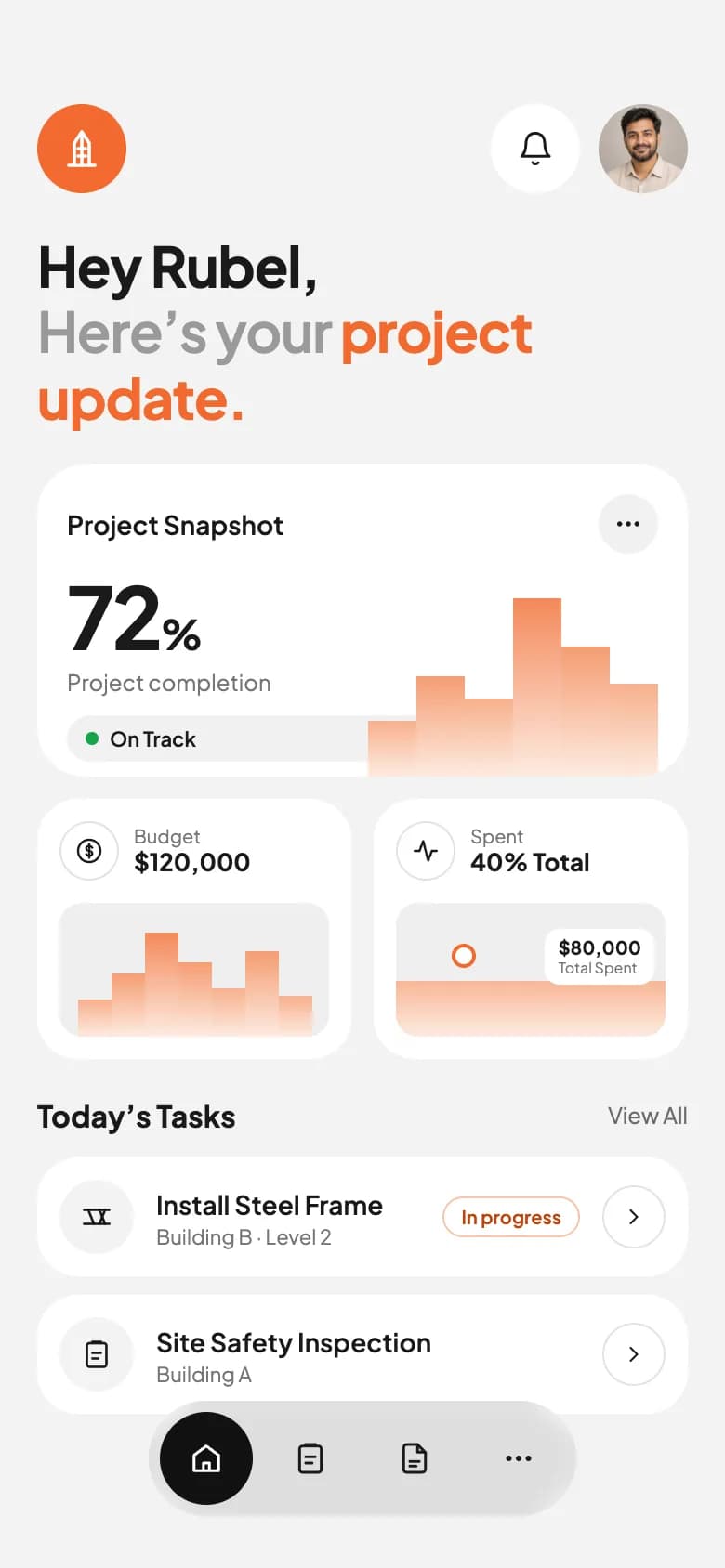
A personal update headline, project snapshot with a bar chart, budget and spend cards, and today's tasks.
Task list
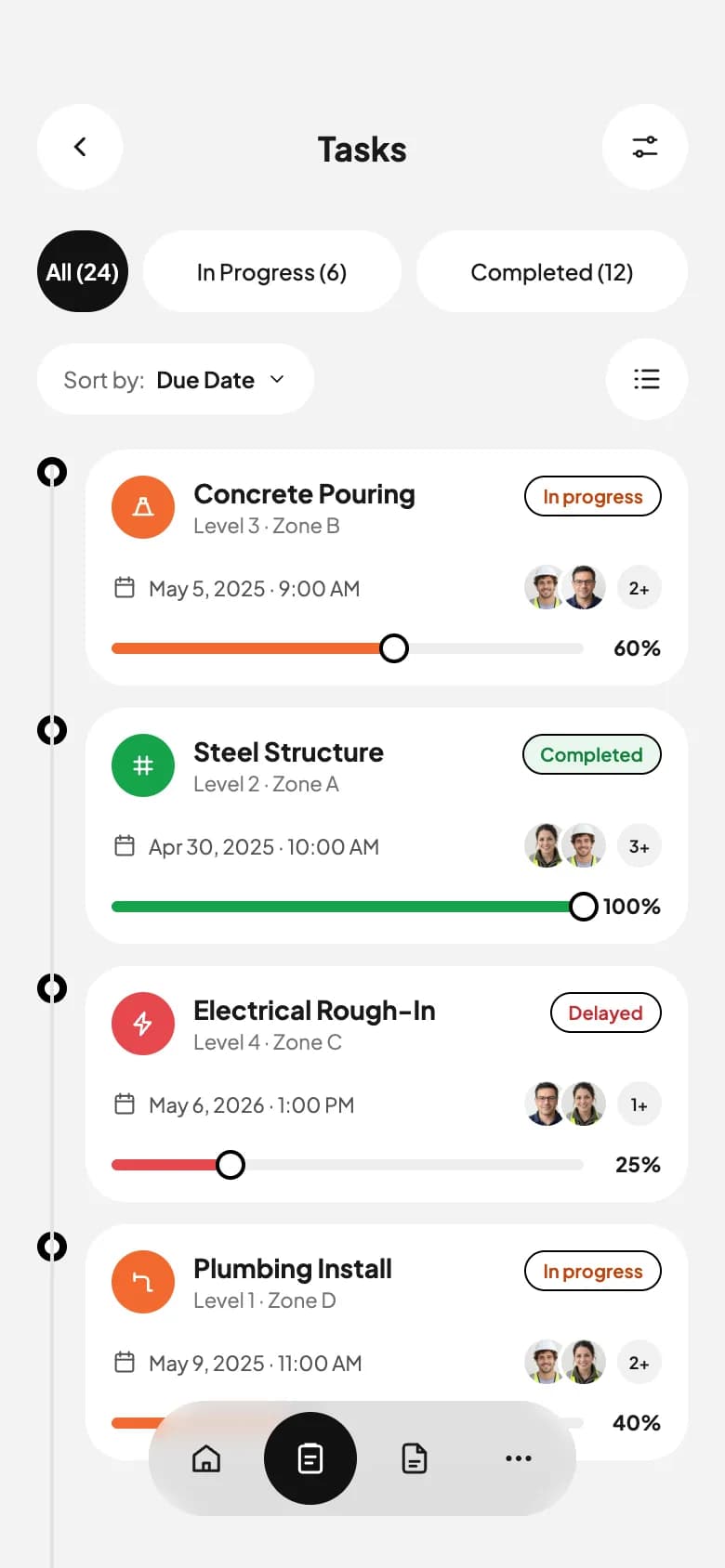
Status filters, a sort control and a timeline of tasks with due dates, assignees and progress sliders.
Progress charts
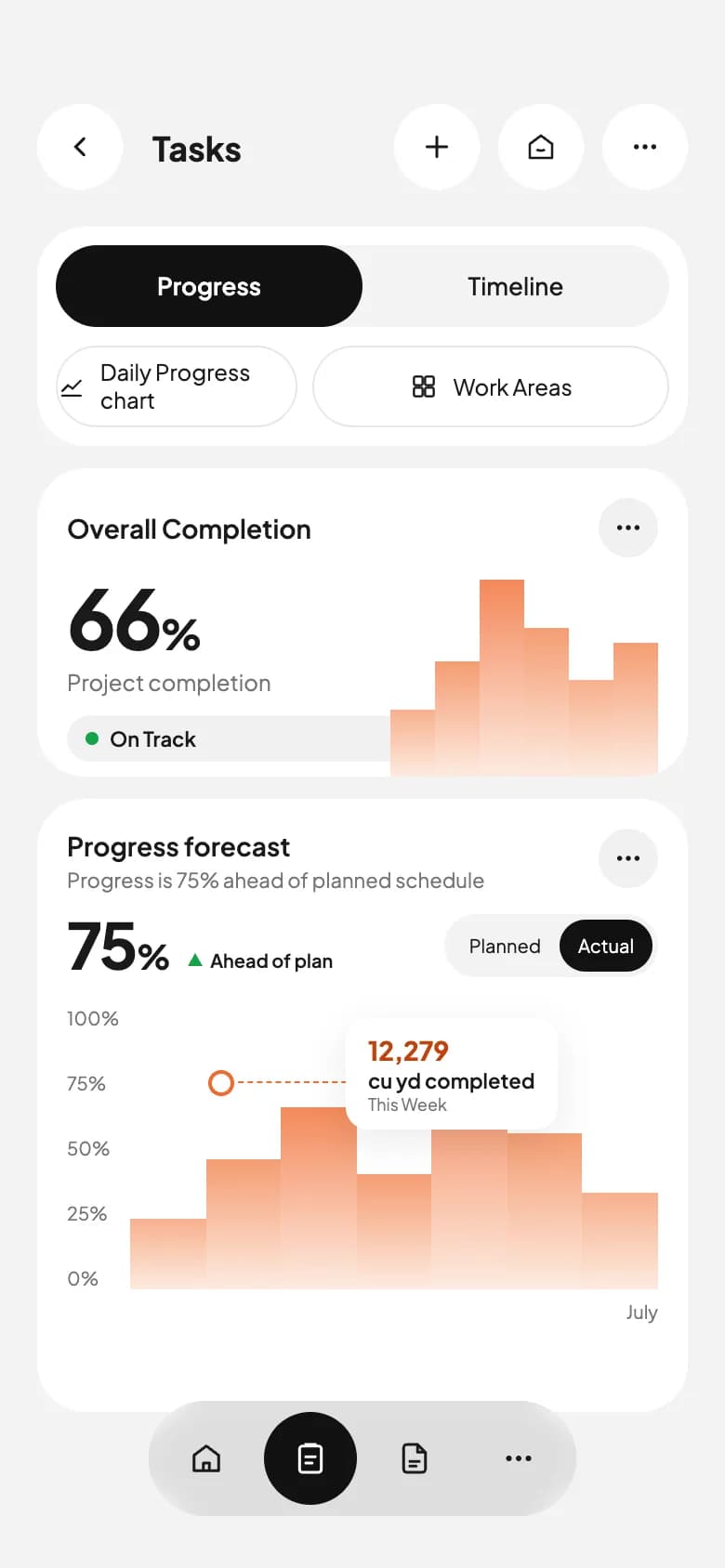
Progress and timeline tabs, overall completion and a forecast chart comparing planned and actual work.
Copy the Construction Manager kit
Use the artifact as a design brief, the skill to generate the UI with an AI agent, or the code to run it right away.
Design artifact
The full design: tokens, screens and source
# Construction Manager: design artifact
This construction management app UI gives site managers a quick read on a job. A project snapshot leads with completion and budget, tasks show progress by building, and a forecast chart compares plan to actual.
- Type: Productivity mobile app UI
- Screens: 3
- Artboard: 390 × 844
- Target: Expo SDK 58, Expo Router, TypeScript, expo-blur, expo-image, expo-linear-gradient, react-native-svg
- Live page: https://developermill.com/app-designs/construction-management-app-ui-design
## Design direction
Bright white dashboards with a safety orange gradient, large numbers, soft stacked bar charts and a dark floating navigation pill.
- Completion and budget snapshot cards
- Task cards with status, assignees and sliders
- Progress forecast chart with a data callout
- Floating dark pill navigation
## Foundations
### Colour
| Token | Hex |
| --- | --- |
| Safety orange | `#F26A2E` |
| Burnt orange | `#C2410C` |
| Apricot | `#F59D72` |
| Peach wash | `#FDEBE1` |
| Ink | `#1A1A1A` |
| Concrete | `#F3F3F3` |
### Typography
- Typefaces: Plus Jakarta Sans
- Common sizes (px): 9, 10, 11, 12, 13, 14, 18, 22
### Shape and depth
- Common corner radii (px): 8, 12, 22, 26
- Shadows: `0 6px 20px rgba(0,0,0,0.08)`
## Screens
### 1. Project overview
A personal update headline, project snapshot with a bar chart, budget and spend cards, and today's tasks.
Preview: https://developermill.com/app-designs/construction-management-app-ui-design/overview.webp
Copy on this screen:
- Hey Rubel,
- Here’s your
- project update.
- Project Snapshot
- 72
- %
- Project completion
- On Track
- Budget
- $120,000
- Spent
- 40% Total
- $80,000
- Total Spent
- Today’s Tasks
- View All
- Install Steel Frame
- Building B · Level 2
- In progress
- Site Safety Inspection
- Building A
### 2. Task list
Status filters, a sort control and a timeline of tasks with due dates, assignees and progress sliders.
Preview: https://developermill.com/app-designs/construction-management-app-ui-design/tasks.webp
Copy on this screen:
- Tasks
- All (24)
- In Progress (6)
- Completed (12)
- Sort by:
- Due Date
### 3. Progress charts
Progress and timeline tabs, overall completion and a forecast chart comparing planned and actual work.
Preview: https://developermill.com/app-designs/construction-management-app-ui-design/progress.webp
Copy on this screen:
- Tasks
- Progress
- Timeline
- Daily Progress chart
- Work Areas
- Overall Completion
- 66
- %
- Project completion
- On Track
- Progress forecast
- Progress is 75% ahead of planned schedule
- 75
- Ahead of plan
- Planned
- Actual
- 100%
- 75%
- 50%
- 25%
- 0%
- 12,279
- cu yd completed
- This Week
- July
## Full source
The original artboards as HTML. Image URLs point at the hosted demo assets.
### Project overview (Main)
```html
<!doctype html>
<html lang="en">
<head>
<meta charset="utf-8">
<title>Home — project update</title>
<script src="./support.js"></script>
</head>
<body>
<x-dc>
<helmet>
<link rel="preconnect" href="https://fonts.googleapis.com">
<link href="https://fonts.googleapis.com/css2?family=Plus+Jakarta+Sans:wght@400;500;600;700;800&display=swap" rel="stylesheet">
<style>
body{margin:0}
a{color:#1A1A1A;text-decoration:none}a:hover{color:#C2410C}
button{font-family:inherit;cursor:pointer}
</style>
</helmet>
<div style="width: 390px; height: 844px; box-sizing: border-box; position: relative; overflow: hidden; background: #F3F3F3; font-family: 'Plus Jakarta Sans', system-ui, sans-serif; color: #1A1A1A; padding: 56px 20px 0">
<header style="display: flex; align-items: center; justify-content: space-between">
<div role="img" aria-label="App logo" style="width: 48px; height: 48px; border-radius: 50%; background: {{accent}}; display: flex; align-items: center; justify-content: center">
<svg width="24" height="24" viewBox="0 0 24 24" fill="none" stroke="#FFFFFF" stroke-width="1.8" stroke-linecap="round" stroke-linejoin="round" aria-hidden="true"><path d="M12 3v18"></path><path d="M8 21V9l4-6 4 6v12"></path><path d="M5 21h14"></path><path d="M10 12h4"></path><path d="M10 16h4"></path></svg>
</div>
<div style="display: flex; gap: 10px; align-items: center">
<button aria-label="Notifications" style="width: 48px; height: 48px; border-radius: 50%; border: 0; background: #FFFFFF; display: flex; align-items: center; justify-content: center">
<svg width="20" height="20" viewBox="0 0 24 24" fill="none" stroke="#1A1A1A" stroke-width="1.8" stroke-linecap="round" stroke-linejoin="round" aria-hidden="true"><path d="M6 8a6 6 0 0 1 12 0c0 7 3 9 3 9H3s3-2 3-9"></path><path d="M10.3 21a1.94 1.94 0 0 0 3.4 0"></path></svg>
</button>
<img src="https://developermill.com/app-designs/construction-management-app-ui-design/assets/50bb5fb797.png" alt="Rubel, profile photo" style="width: 48px; height: 48px; border-radius: 50%; object-fit: cover; display: block">
</div>
</header>
<h1 style="margin: 22px 0 0; font-size: 30px; line-height: 1.18; font-weight: 700; letter-spacing: -0.6px">Hey Rubel,<br><span style="color: #9A9A9A; font-weight: 600">Here’s your </span><span style="color: {{accent}}">project update.</span></h1>
<section aria-label="Project snapshot" style="margin-top: 18px; background: #FFFFFF; border-radius: 26px; padding: 16px 16px 0; height: 168px; box-sizing: border-box; position: relative; overflow: hidden">
<div style="display: flex; justify-content: space-between; align-items: center">
<h2 style="margin: 0; font-size: 14px; font-weight: 600">Project Snapshot</h2>
<button aria-label="More options" style="width: 32px; height: 32px; border-radius: 50%; border: 0; background: #F1F1F1; display: flex; align-items: center; justify-content: center"><svg width="16" height="16" viewBox="0 0 24 24" fill="#1A1A1A" aria-hidden="true"><circle cx="5" cy="12" r="2"></circle><circle cx="12" cy="12" r="2"></circle><circle cx="19" cy="12" r="2"></circle></svg></button>
</div>
<p style="margin: 10px 0 0; font-size: 46px; font-weight: 700; letter-spacing: -1.5px; line-height: 1">72<span style="font-size: 22px; letter-spacing: 0">%</span></p>
<p style="margin: 6px 0 0; font-size: 12px; color: #767676">Project completion</p>
<p style="margin: 10px 0 0; display: inline-flex; align-items: center; gap: 6px; background: #F1F1F1; border-radius: 999px; padding: 6px 10px; font-size: 11px; font-weight: 600"><span style="width: 7px; height: 7px; border-radius: 50%; background: #16A34A"></span>On Track</p>
<div aria-hidden="true" style="position: absolute; right: 16px; bottom: 0; display: flex; align-items: flex-end; gap: 0; height: 110px">
<div style="width: 26px; height: 30px; background: linear-gradient(#F7B08C, #FDEBE1)"></div>
<div style="width: 26px; height: 54px; background: linear-gradient(#F59D72, #FDEBE1)"></div>
<div style="width: 26px; height: 42px; background: linear-gradient(#F7B08C, #FDEBE1)"></div>
<div style="width: 26px; height: 96px; background: linear-gradient(#F4895A, #FDEBE1)"></div>
<div style="width: 26px; height: 70px; background: linear-gradient(#F59D72, #FDEBE1)"></div>
<div style="width: 26px; height: 50px; background: linear-gradient(#F7B08C, #FDEBE1)"></div>
</div>
</section>
<div style="margin-top: 12px; display: grid; grid-template-columns: repeat(2, minmax(0, 1fr)); gap: 12px">
<section aria-label="Budget" style="background: #FFFFFF; border-radius: 22px; padding: 12px; height: 140px; box-sizing: border-box; display: flex; flex-direction: column">
<div style="display: flex; gap: 8px; align-items: center">
<div style="width: 30px; height: 30px; border-radius: 50%; border: 1px solid #E2E2E2; display: flex; align-items: center; justify-content: center"><svg width="16" height="16" viewBox="0 0 24 24" fill="none" stroke="#1A1A1A" stroke-width="1.8" stroke-linecap="round" aria-hidden="true"><circle cx="12" cy="12" r="9"></circle><path d="M14.5 9.5c-.5-1-1.5-1.5-2.5-1.5-1.5 0-2.5.8-2.5 2s1 1.7 2.5 2 2.5.8 2.5 2-1 2-2.5 2c-1 0-2-.5-2.5-1.5"></path><path d="M12 6.5v11"></path></svg></div>
<div><p style="margin: 0; font-size: 10px; color: #767676">Budget</p><p style="margin: 0; font-size: 13px; font-weight: 700">$120,000</p></div>
</div>
<div aria-hidden="true" style="margin-top: auto; background: #EFEFEF; border-radius: 12px; height: 72px; display: flex; align-items: flex-end; justify-content: center; overflow: hidden">
<div style="width: 18px; height: 20px; background: linear-gradient(#F7B08C, #FDEBE1)"></div>
<div style="width: 18px; height: 34px; background: linear-gradient(#F59D72, #FDEBE1)"></div>
<div style="width: 18px; height: 56px; background: linear-gradient(#F4895A, #FDEBE1)"></div>
<div style="width: 18px; height: 40px; background: linear-gradient(#F59D72, #FDEBE1)"></div>
<div style="width: 18px; height: 26px; background: linear-gradient(#F7B08C, #FDEBE1)"></div>
<div style="width: 18px; height: 46px; background: linear-gradient(#F59D72, #FDEBE1)"></div>
<div style="width: 18px; height: 22px; background: linear-gradient(#F7B08C, #FDEBE1)"></div>
</div>
</section>
<section aria-label="Spent" style="background: #FFFFFF; border-radius: 22px; padding: 12px; height: 140px; box-sizing: border-box; display: flex; flex-direction: column">
<div style="display: flex; gap: 8px; align-items: center">
<div style="width: 30px; height: 30px; border-radius: 50%; border: 1px solid #E2E2E2; display: flex; align-items: center; justify-content: center"><svg width="16" height="16" viewBox="0 0 24 24" fill="none" stroke="#1A1A1A" stroke-width="1.8" stroke-linecap="round" stroke-linejoin="round" aria-hidden="true"><path d="M3 12h4l3-8 4 16 3-8h4"></path></svg></div>
<div><p style="margin: 0; font-size: 10px; color: #767676">Spent</p><p style="margin: 0; font-size: 13px; font-weight: 700">40% Total</p></div>
</div>
<div aria-hidden="true" style="margin-top: auto; background: #EFEFEF; border-radius: 12px; height: 72px; position: relative; overflow: hidden">
<div style="position: absolute; left: 0; right: 0; bottom: 0; height: 30px; background: linear-gradient(#F8B796, #FDEBE1)"></div>
<div style="position: absolute; left: 30px; top: 22px; width: 9px; height: 9px; border-radius: 50%; border: 2px solid #F26A2E; background: #FFFFFF"></div>
<div style="position: absolute; right: 6px; top: 14px; background: #FFFFFF; border-radius: 8px; padding: 4px 7px"><p style="margin: 0; font-size: 10px; font-weight: 700">$80,000</p><p style="margin: 0; font-size: 8px; color: #767676">Total Spent</p></div>
</div>
</section>
</div>
<div style="margin-top: 20px; display: flex; justify-content: space-between; align-items: center">
<h2 style="margin: 0; font-size: 16px; font-weight: 700">Today’s Tasks</h2>
<a href="Tasks.dc.html" style="font-size: 12px; color: #6B6B6B">View All</a>
</div>
<ul style="list-style: none; margin: 12px 0 0; padding: 0; display: flex; flex-direction: column; gap: 10px">
<li style="background: #FFFFFF; border-radius: 22px; padding: 12px; display: flex; align-items: center; gap: 12px">
<div style="width: 40px; height: 40px; border-radius: 50%; background: #F3F3F3; display: flex; align-items: center; justify-content: center"><svg width="18" height="18" viewBox="0 0 24 24" fill="none" stroke="#1A1A1A" stroke-width="1.8" stroke-linecap="round" aria-hidden="true"><path d="M3 7h18"></path><path d="M3 17h18"></path><path d="M6 7l4 10"></path><path d="M14 7l4 10"></path><path d="M18 7l-4 10"></path></svg></div>
<div style="flex: 1; min-width: 0"><p style="margin: 0; font-size: 14px; font-weight: 600">Install Steel Frame</p><p style="margin: 2px 0 0; font-size: 11px; color: #767676">Building B · Level 2</p></div>
<span style="font-size: 10px; font-weight: 600; color: #C2410C; border: 1px solid #F8C4A8; border-radius: 999px; padding: 4px 9px">In progress</span>
<button aria-label="Open task" style="width: 34px; height: 34px; border-radius: 50%; border: 1px solid #E2E2E2; background: #FFFFFF; display: flex; align-items: center; justify-content: center"><svg width="14" height="14" viewBox="0 0 24 24" fill="none" stroke="#1A1A1A" stroke-width="2" stroke-linecap="round" aria-hidden="true"><path d="M9 6l6 6-6 6"></path></svg></button>
</li>
<li style="background: #FFFFFF; border-radius: 22px; padding: 12px; display: flex; align-items: center; gap: 12px">
<div style="width: 40px; height: 40px; border-radius: 50%; background: #F3F3F3; display: flex; align-items: center; justify-content: center"><svg width="18" height="18" viewBox="0 0 24 24" fill="none" stroke="#1A1A1A" stroke-width="1.8" stroke-linecap="round" aria-hidden="true"><rect x="5" y="4" width="14" height="17" rx="2"></rect><path d="M9 4V3h6v1"></path><path d="M9 11h6"></path><path d="M9 15h4"></path></svg></div>
<div style="flex: 1; min-width: 0"><p style="margin: 0; font-size: 14px; font-weight: 600">Site Safety Inspection</p><p style="margin: 2px 0 0; font-size: 11px; color: #767676">Building A</p></div>
<button aria-label="Open task" style="width: 34px; height: 34px; border-radius: 50%; border: 1px solid #E2E2E2; background: #FFFFFF; display: flex; align-items: center; justify-content: center"><svg width="14" height="14" viewBox="0 0 24 24" fill="none" stroke="#1A1A1A" stroke-width="2" stroke-linecap="round" aria-hidden="true"><path d="M9 6l6 6-6 6"></path></svg></button>
</li>
</ul>
<nav aria-label="Main" style="position: absolute; left: 50%; bottom: 28px; transform: translateX(-50%); display: flex; gap: 6px; align-items: center; background: rgba(214,214,214,0.82); backdrop-filter: blur(14px); border-radius: 999px; padding: 6px">
<a href="Main.dc.html" aria-label="Home" style="width: 50px; height: 50px; border-radius: 50%; background: #111111; display: flex; align-items: center; justify-content: center"><svg width="20" height="20" viewBox="0 0 24 24" fill="none" stroke="#FFFFFF" stroke-width="1.8" stroke-linejoin="round" aria-hidden="true"><path d="M4 10l8-6 8 6v10H4z"></path><path d="M10 20v-5h4v5"></path></svg></a>
<a href="Tasks.dc.html" aria-label="Tasks" style="width: 50px; height: 50px; border-radius: 50%; display: flex; align-items: center; justify-content: center"><svg width="20" height="20" viewBox="0 0 24 24" fill="none" stroke="#1A1A1A" stroke-width="1.8" stroke-linecap="round" aria-hidden="true"><rect x="5" y="4" width="14" height="17" rx="2"></rect><path d="M9 4V3h6v1"></path><path d="M9 11h6"></path><path d="M9 15h4"></path></svg></a>
<a href="Progress.dc.html" aria-label="Reports" style="width: 50px; height: 50px; border-radius: 50%; display: flex; align-items: center; justify-content: center"><svg width="20" height="20" viewBox="0 0 24 24" fill="none" stroke="#1A1A1A" stroke-width="1.8" stroke-linecap="round" stroke-linejoin="round" aria-hidden="true"><path d="M14 3H7a2 2 0 0 0-2 2v14a2 2 0 0 0 2 2h10a2 2 0 0 0 2-2V8z"></path><path d="M14 3v5h5"></path><path d="M9 14h6"></path><path d="M9 17h4"></path></svg></a>
<button aria-label="More" style="width: 50px; height: 50px; border-radius: 50%; border: 0; background: transparent; display: flex; align-items: center; justify-content: center"><svg width="18" height="18" viewBox="0 0 24 24" fill="#1A1A1A" aria-hidden="true"><circle cx="5" cy="12" r="2"></circle><circle cx="12" cy="12" r="2"></circle><circle cx="19" cy="12" r="2"></circle></svg></button>
</nav>
</div>
</x-dc>
<script type="text/x-dc" data-dc-script data-props='{"accent":{"editor":"color","default":"#F26A2E","options":["#F26A2E","#2563EB","#0F766E"]},"$preview":{"width":390,"height":844}}'>
class Component extends DCLogic {
renderVals() {
return { accent: this.props.accent ?? '#F26A2E' };
}
}
</script>
</body>
</html>
```
### Task list (Tasks)
```html
<!doctype html>
<html lang="en">
<head>
<meta charset="utf-8">
<title>Tasks — timeline</title>
<script src="./support.js"></script>
</head>
<body>
<x-dc>
<helmet>
<link rel="preconnect" href="https://fonts.googleapis.com">
<link href="https://fonts.googleapis.com/css2?family=Plus+Jakarta+Sans:wght@400;500;600;700;800&display=swap" rel="stylesheet">
<style>
body{margin:0}
a{color:#1A1A1A;text-decoration:none}a:hover{color:#C2410C}
button{font-family:inherit;cursor:pointer}
</style>
</helmet>
<div style="width: 390px; height: 844px; box-sizing: border-box; position: relative; overflow: hidden; background: #F3F3F3; font-family: 'Plus Jakarta Sans', system-ui, sans-serif; color: #1A1A1A; padding: 56px 20px 0">
<header style="display: flex; align-items: center; justify-content: space-between">
<a href="Main.dc.html" aria-label="Back" style="width: 46px; height: 46px; border-radius: 50%; background: #FFFFFF; display: flex; align-items: center; justify-content: center"><svg width="18" height="18" viewBox="0 0 24 24" fill="none" stroke="#1A1A1A" stroke-width="2" stroke-linecap="round" aria-hidden="true"><path d="M15 6l-6 6 6 6"></path></svg></a>
<h1 style="margin: 0; font-size: 18px; font-weight: 700">Tasks</h1>
<button aria-label="Filters" style="width: 46px; height: 46px; border-radius: 50%; border: 0; background: #FFFFFF; display: flex; align-items: center; justify-content: center"><svg width="18" height="18" viewBox="0 0 24 24" fill="none" stroke="#1A1A1A" stroke-width="1.8" stroke-linecap="round" aria-hidden="true"><path d="M4 7h10"></path><path d="M18 7h2"></path><circle cx="16" cy="7" r="2"></circle><path d="M4 17h2"></path><path d="M10 17h10"></path><circle cx="8" cy="17" r="2"></circle></svg></button>
</header>
<div role="tablist" aria-label="Task status" style="margin-top: 22px; display: flex; gap: 8px">
<button role="tab" aria-selected="true" style="flex: 1; height: 44px; border-radius: 999px; border: 0; background: #111111; color: #FFFFFF; font-size: 12px; font-weight: 600">All (24)</button>
<button role="tab" aria-selected="false" style="flex: 1.2; height: 44px; border-radius: 999px; border: 0; background: #FFFFFF; color: #1A1A1A; font-size: 12px; font-weight: 500">In Progress (6)</button>
<button role="tab" aria-selected="false" style="flex: 1.2; height: 44px; border-radius: 999px; border: 0; background: #FFFFFF; color: #1A1A1A; font-size: 12px; font-weight: 500">Completed (12)</button>
</div>
<div style="margin-top: 14px; display: flex; justify-content: space-between; align-items: center">
<button style="height: 38px; border-radius: 999px; border: 0; background: #FFFFFF; padding: 0 14px; display: flex; gap: 6px; align-items: center; font-size: 12px; color: #6B6B6B">Sort by: <span style="color: #1A1A1A; font-weight: 600">Due Date</span><svg width="12" height="12" viewBox="0 0 24 24" fill="none" stroke="#1A1A1A" stroke-width="2" stroke-linecap="round" aria-hidden="true"><path d="M6 9l6 6 6-6"></path></svg></button>
<button aria-label="List view" style="width: 44px; height: 44px; border-radius: 50%; border: 0; background: #FFFFFF; display: flex; align-items: center; justify-content: center"><svg width="18" height="18" viewBox="0 0 24 24" fill="none" stroke="#1A1A1A" stroke-width="1.8" stroke-linecap="round" aria-hidden="true"><path d="M9 6h11"></path><path d="M9 12h11"></path><path d="M9 18h11"></path><path d="M4 6h1"></path><path d="M4 12h1"></path><path d="M4 18h1"></path></svg></button>
</div>
<div style="margin-top: 16px; position: relative; padding-left: 26px">
<div aria-hidden="true" style="position: absolute; left: 7px; top: 8px; bottom: -200px; width: 2px; background: #E2E2E2"></div>
<ul style="list-style: none; margin: 0; padding: 0; display: flex; flex-direction: column; gap: 12px">
<sc-for list="{{ tasks }}" as="t" hint-placeholder-count="4">
<li style="position: relative">
<div aria-hidden="true" style="position: absolute; left: -26px; top: 4px; width: 16px; height: 16px; border-radius: 50%; background: #FFFFFF; border: 4px solid {{ t.color }}; box-sizing: border-box"></div>
<div style="background: #FFFFFF; border-radius: 22px; padding: 14px">
<div style="display: flex; gap: 10px; align-items: flex-start">
<div aria-hidden="true" style="width: 34px; height: 34px; border-radius: 50%; background: {{ t.color }}; display: flex; align-items: center; justify-content: center; flex-shrink: 0"><svg width="16" height="16" viewBox="0 0 24 24" fill="none" stroke="#FFFFFF" stroke-width="2" stroke-linecap="round" stroke-linejoin="round"><path d="{{ t.icon }}"></path></svg></div>
<div style="flex: 1; min-width: 0"><h2 style="margin: 0; font-size: 14px; font-weight: 700">{{ t.title }}</h2><p style="margin: 2px 0 0; font-size: 11px; color: #767676">{{ t.place }}</p></div>
<span style="font-size: 10px; font-weight: 600; color: {{ t.text }}; background: {{ t.soft }}; border: 1px solid {{ t.line }}; border-radius: 999px; padding: 4px 9px">{{ t.status }}</span>
</div>
<div style="margin-top: 12px; display: flex; align-items: center; justify-content: space-between">
<p style="margin: 0; display: flex; align-items: center; gap: 6px; font-size: 11px; color: #555555"><svg width="14" height="14" viewBox="0 0 24 24" fill="none" stroke="#555555" stroke-width="1.8" stroke-linecap="round" aria-hidden="true"><rect x="4" y="5" width="16" height="16" rx="2"></rect><path d="M8 3v4"></path><path d="M16 3v4"></path><path d="M4 10h16"></path></svg>{{ t.date }}</p>
<div style="display: flex; align-items: center">
<img src="{{ t.a1 }}" alt="Assignee" style="width: 24px; height: 24px; border-radius: 50%; border: 2px solid #FFFFFF; object-fit: cover; display: block">
<img src="{{ t.a2 }}" alt="Assignee" style="width: 24px; height: 24px; border-radius: 50%; border: 2px solid #FFFFFF; object-fit: cover; display: block; margin-left: -8px">
<span style="margin-left: 4px; width: 24px; height: 24px; border-radius: 50%; background: #F1F1F1; font-size: 9px; font-weight: 600; display: flex; align-items: center; justify-content: center">{{ t.more }}</span>
</div>
</div>
<div style="margin-top: 12px; display: flex; align-items: center; gap: 10px">
<div role="progressbar" aria-valuenow="{{ t.pct }}" aria-valuemin="0" aria-valuemax="100" aria-label="Progress" style="flex: 1; height: 6px; border-radius: 999px; background: #EDEDED; position: relative">
<div style="width: {{ t.width }}; height: 6px; border-radius: 999px; background: {{ t.color }}"></div>
<div aria-hidden="true" style="position: absolute; left: {{ t.knob }}; top: -5px; width: 16px; height: 16px; border-radius: 50%; background: #FFFFFF; border: 2px solid {{ t.color }}; box-sizing: border-box"></div>
</div>
<span style="font-size: 11px; font-weight: 700; min-width: 32px; text-align: right">{{ t.pct }}%</span>
</div>
</div>
</li>
</sc-for>
</ul>
</div>
<nav aria-label="Main" style="position: absolute; left: 50%; bottom: 28px; transform: translateX(-50%); display: flex; gap: 6px; align-items: center; background: rgba(214,214,214,0.82); backdrop-filter: blur(14px); border-radius: 999px; padding: 6px">
<a href="Main.dc.html" aria-label="Home" style="width: 50px; height: 50px; border-radius: 50%; display: flex; align-items: center; justify-content: center"><svg width="20" height="20" viewBox="0 0 24 24" fill="none" stroke="#1A1A1A" stroke-width="1.8" stroke-linejoin="round" aria-hidden="true"><path d="M4 10l8-6 8 6v10H4z"></path><path d="M10 20v-5h4v5"></path></svg></a>
<a href="Tasks.dc.html" aria-label="Tasks" aria-current="page" style="width: 50px; height: 50px; border-radius: 50%; background: #111111; display: flex; align-items: center; justify-content: center"><svg width="20" height="20" viewBox="0 0 24 24" fill="none" stroke="#FFFFFF" stroke-width="1.8" stroke-linecap="round" aria-hidden="true"><rect x="5" y="4" width="14" height="17" rx="2"></rect><path d="M9 4V3h6v1"></path><path d="M9 11h6"></path><path d="M9 15h4"></path></svg></a>
<a href="Progress.dc.html" aria-label="Reports" style="width: 50px; height: 50px; border-radius: 50%; display: flex; align-items: center; justify-content: center"><svg width="20" height="20" viewBox="0 0 24 24" fill="none" stroke="#1A1A1A" stroke-width="1.8" stroke-linecap="round" stroke-linejoin="round" aria-hidden="true"><path d="M14 3H7a2 2 0 0 0-2 2v14a2 2 0 0 0 2 2h10a2 2 0 0 0 2-2V8z"></path><path d="M14 3v5h5"></path><path d="M9 14h6"></path><path d="M9 17h4"></path></svg></a>
<button aria-label="More" style="width: 50px; height: 50px; border-radius: 50%; border: 0; background: transparent; display: flex; align-items: center; justify-content: center"><svg width="18" height="18" viewBox="0 0 24 24" fill="#1A1A1A" aria-hidden="true"><circle cx="5" cy="12" r="2"></circle><circle cx="12" cy="12" r="2"></circle><circle cx="19" cy="12" r="2"></circle></svg></button>
</nav>
</div>
</x-dc>
<script type="text/x-dc" data-dc-script data-props='{"$preview":{"width":390,"height":844}}'>
class Component extends DCLogic {
renderVals() {
var tone = {
progress: { color: '#F26A2E', text: '#C2410C', soft: '#FFFFFF', line: '#F8C4A8' },
done: { color: '#16A34A', text: '#15803D', soft: '#EAF7EE', line: '#B7E4C4' },
late: { color: '#E5484D', text: '#C42B30', soft: '#FFFFFF', line: '#F5B8BA' }
};
var eng = 'https://developermill.com/app-designs/construction-management-app-ui-design/assets/b26cb59928.png', mgr = 'https://developermill.com/app-designs/construction-management-app-ui-design/assets/91feabbcba.png', sup = 'https://developermill.com/app-designs/construction-management-app-ui-design/assets/2c12743178.png';
var rows = [
{ title: 'Concrete Pouring', place: 'Level 3 · Zone B', status: 'In progress', tone: 'progress', date: 'May 5, 2025 · 9:00 AM', pct: 60, a1: eng, a2: mgr, more: '2+', icon: 'M4 18h16M6 18l3-9h6l3 9M10 9V5h4v4' },
{ title: 'Steel Structure', place: 'Level 2 · Zone A', status: 'Completed', tone: 'done', date: 'Apr 30, 2025 · 10:00 AM', pct: 100, a1: sup, a2: eng, more: '3+', icon: 'M5 9h14M5 15h14M9 5v14M15 5v14' },
{ title: 'Electrical Rough-In', place: 'Level 4 · Zone C', status: 'Delayed', tone: 'late', date: 'May 6, 2026 · 1:00 PM', pct: 25, a1: mgr, a2: sup, more: '1+', icon: 'M13 3L5 13h6l-1 8 8-10h-6z' },
{ title: 'Plumbing Install', place: 'Level 1 · Zone D', status: 'In progress', tone: 'progress', date: 'May 9, 2025 · 11:00 AM', pct: 40, a1: eng, a2: sup, more: '2+', icon: 'M5 8h8a3 3 0 0 1 3 3v8M16 19h3M5 5v6' }
];
return {
tasks: rows.map(function (r) {
var t = tone[r.tone];
return Object.assign({}, r, t, { width: r.pct + '%', knob: 'calc(' + r.pct + '% - 8px)' });
})
};
}
}
</script>
</body>
</html>
```
### Progress charts (Progress)
```html
<!doctype html>
<html lang="en">
<head>
<meta charset="utf-8">
<title>Progress — overall completion</title>
<script src="./support.js"></script>
</head>
<body>
<x-dc>
<helmet>
<link rel="preconnect" href="https://fonts.googleapis.com">
<link href="https://fonts.googleapis.com/css2?family=Plus+Jakarta+Sans:wght@400;500;600;700;800&display=swap" rel="stylesheet">
<style>
body{margin:0}
a{color:#1A1A1A;text-decoration:none}a:hover{color:#C2410C}
button{font-family:inherit;cursor:pointer}
</style>
</helmet>
<div style="width: 390px; height: 844px; box-sizing: border-box; position: relative; overflow: hidden; background: #F3F3F3; font-family: 'Plus Jakarta Sans', system-ui, sans-serif; color: #1A1A1A; padding: 56px 20px 0">
<header style="display: flex; align-items: center; gap: 10px">
<a href="Tasks.dc.html" aria-label="Back" style="width: 46px; height: 46px; border-radius: 50%; background: #FFFFFF; display: flex; align-items: center; justify-content: center"><svg width="18" height="18" viewBox="0 0 24 24" fill="none" stroke="#1A1A1A" stroke-width="2" stroke-linecap="round" aria-hidden="true"><path d="M15 6l-6 6 6 6"></path></svg></a>
<h1 style="margin: 0 0 0 6px; flex: 1; font-size: 18px; font-weight: 700">Tasks</h1>
<button aria-label="Add task" style="width: 46px; height: 46px; border-radius: 50%; border: 0; background: #FFFFFF; display: flex; align-items: center; justify-content: center"><svg width="18" height="18" viewBox="0 0 24 24" fill="none" stroke="#1A1A1A" stroke-width="2" stroke-linecap="round" aria-hidden="true"><path d="M12 5v14"></path><path d="M5 12h14"></path></svg></button>
<button aria-label="Sites" style="width: 46px; height: 46px; border-radius: 50%; border: 0; background: #FFFFFF; display: flex; align-items: center; justify-content: center"><svg width="18" height="18" viewBox="0 0 24 24" fill="none" stroke="#1A1A1A" stroke-width="1.8" stroke-linejoin="round" aria-hidden="true"><path d="M4 10l8-6 8 6v10H4z"></path><path d="M9 14c1 1 5 1 6 0"></path></svg></button>
<button aria-label="More options" style="width: 46px; height: 46px; border-radius: 50%; border: 0; background: #FFFFFF; display: flex; align-items: center; justify-content: center"><svg width="16" height="16" viewBox="0 0 24 24" fill="#1A1A1A" aria-hidden="true"><circle cx="5" cy="12" r="2"></circle><circle cx="12" cy="12" r="2"></circle><circle cx="19" cy="12" r="2"></circle></svg></button>
</header>
<section style="margin-top: 20px; background: #FFFFFF; border-radius: 26px; padding: 10px">
<div role="tablist" aria-label="View" style="display: flex; background: #F3F3F3; border-radius: 999px; padding: 0">
<button role="tab" aria-selected="true" style="flex: 1; height: 44px; border-radius: 999px; border: 0; background: #111111; color: #FFFFFF; font-size: 13px; font-weight: 600">Progress</button>
<button role="tab" aria-selected="false" style="flex: 1; height: 44px; border-radius: 999px; border: 0; background: transparent; color: #1A1A1A; font-size: 13px; font-weight: 500">Timeline</button>
</div>
<div style="margin-top: 10px; display: flex; gap: 8px">
<button style="flex: 1; height: 44px; border-radius: 999px; border: 1px solid #E6E6E6; background: #FFFFFF; display: flex; gap: 8px; align-items: center; justify-content: center; font-size: 12px; color: #1A1A1A"><svg width="16" height="16" viewBox="0 0 24 24" fill="none" stroke="#1A1A1A" stroke-width="1.8" stroke-linecap="round" aria-hidden="true"><path d="M4 20h16"></path><path d="M4 16l5-5 4 3 7-7"></path></svg>Daily Progress chart</button>
<button style="flex: 0.8; height: 44px; border-radius: 999px; border: 1px solid #E6E6E6; background: #FFFFFF; display: flex; gap: 8px; align-items: center; justify-content: center; font-size: 12px; color: #1A1A1A"><svg width="16" height="16" viewBox="0 0 24 24" fill="none" stroke="#1A1A1A" stroke-width="1.8" aria-hidden="true"><rect x="4" y="4" width="7" height="7" rx="1.5"></rect><rect x="13" y="4" width="7" height="7" rx="1.5"></rect><rect x="4" y="13" width="7" height="7" rx="1.5"></rect><rect x="13" y="13" width="7" height="7" rx="1.5"></rect></svg>Work Areas</button>
</div>
</section>
<section aria-label="Overall completion" style="margin-top: 12px; background: #FFFFFF; border-radius: 26px; padding: 16px 16px 0; height: 166px; box-sizing: border-box; position: relative; overflow: hidden">
<div style="display: flex; justify-content: space-between; align-items: center">
<h2 style="margin: 0; font-size: 14px; font-weight: 600">Overall Completion</h2>
<button aria-label="More options" style="width: 32px; height: 32px; border-radius: 50%; border: 0; background: #F1F1F1; display: flex; align-items: center; justify-content: center"><svg width="16" height="16" viewBox="0 0 24 24" fill="#1A1A1A" aria-hidden="true"><circle cx="5" cy="12" r="2"></circle><circle cx="12" cy="12" r="2"></circle><circle cx="19" cy="12" r="2"></circle></svg></button>
</div>
<p style="margin: 10px 0 0; font-size: 44px; font-weight: 700; letter-spacing: -1.5px; line-height: 1">66<span style="font-size: 22px; letter-spacing: 0">%</span></p>
<p style="margin: 6px 0 0; font-size: 12px; color: #767676">Project completion</p>
<p style="margin: 10px 0 0; display: inline-flex; align-items: center; gap: 6px; background: #F1F1F1; border-radius: 999px; padding: 6px 10px; font-size: 11px; font-weight: 600"><span style="width: 7px; height: 7px; border-radius: 50%; background: #16A34A"></span>On Track</p>
<div aria-hidden="true" style="position: absolute; right: 16px; bottom: 0; display: flex; align-items: flex-end; height: 112px">
<div style="width: 24px; height: 36px; background: linear-gradient(#F7B08C, #FDEBE1)"></div>
<div style="width: 24px; height: 62px; background: linear-gradient(#F59D72, #FDEBE1)"></div>
<div style="width: 24px; height: 106px; background: linear-gradient(#F4895A, #FDEBE1)"></div>
<div style="width: 24px; height: 80px; background: linear-gradient(#F59D72, #FDEBE1)"></div>
<div style="width: 24px; height: 52px; background: linear-gradient(#F7B08C, #FDEBE1)"></div>
<div style="width: 24px; height: 72px; background: linear-gradient(#F59D72, #FDEBE1)"></div>
</div>
</section>
<section aria-label="Progress forecast" style="margin-top: 12px; background: #FFFFFF; border-radius: 26px; padding: 16px; height: 330px; box-sizing: border-box; position: relative; overflow: hidden">
<div style="display: flex; justify-content: space-between; align-items: flex-start">
<div><h2 style="margin: 0; font-size: 14px; font-weight: 600">Progress forecast</h2><p style="margin: 3px 0 0; font-size: 11px; color: #767676">Progress is 75% ahead of planned schedule</p></div>
<button aria-label="More options" style="width: 32px; height: 32px; border-radius: 50%; border: 0; background: #F1F1F1; display: flex; align-items: center; justify-content: center"><svg width="16" height="16" viewBox="0 0 24 24" fill="#1A1A1A" aria-hidden="true"><circle cx="5" cy="12" r="2"></circle><circle cx="12" cy="12" r="2"></circle><circle cx="19" cy="12" r="2"></circle></svg></button>
</div>
<div style="margin-top: 12px; display: flex; align-items: center; justify-content: space-between">
<div style="display: flex; align-items: baseline; gap: 8px"><p style="margin: 0; font-size: 34px; font-weight: 700; letter-spacing: -1px; line-height: 1">75<span style="font-size: 18px; letter-spacing: 0">%</span></p><p style="margin: 0; display: flex; align-items: center; gap: 3px; font-size: 10px; font-weight: 600"><svg width="10" height="10" viewBox="0 0 10 10" aria-hidden="true"><path d="M5 1l4 7H1z" fill="#16A34A"></path></svg>Ahead of plan</p></div>
<div role="tablist" aria-label="Series" style="display: flex; background: #F3F3F3; border-radius: 999px; padding: 3px">
<button role="tab" aria-selected="false" style="height: 28px; border-radius: 999px; border: 0; background: transparent; padding: 0 10px; font-size: 10px; color: #1A1A1A">Planned</button>
<button role="tab" aria-selected="true" style="height: 28px; border-radius: 999px; border: 0; background: #111111; padding: 0 10px; font-size: 10px; color: #FFFFFF">Actual</button>
</div>
</div>
<div style="margin-top: 16px; position: relative; height: 170px; padding-left: 34px">
<div aria-hidden="true" style="position: absolute; left: 0; top: 0; bottom: 18px; display: flex; flex-direction: column; justify-content: space-between; font-size: 10px; color: #767676"><span>100%</span><span>75%</span><span>50%</span><span>25%</span><span>0%</span></div>
<div aria-hidden="true" style="position: absolute; left: 34px; right: 0; bottom: 18px; height: 152px; display: flex; align-items: flex-end">
<div style="flex: 1; height: 38px; background: linear-gradient(#F7B08C, #FDEBE1)"></div>
<div style="flex: 1; height: 70px; background: linear-gradient(#F59D72, #FDEBE1)"></div>
<div style="flex: 1; height: 98px; background: linear-gradient(#F4895A, #FDEBE1)"></div>
<div style="flex: 1; height: 62px; background: linear-gradient(#F59D72, #FDEBE1)"></div>
<div style="flex: 1; height: 120px; background: linear-gradient(#F4895A, #FDEBE1)"></div>
<div style="flex: 1; height: 84px; background: linear-gradient(#F59D72, #FDEBE1)"></div>
<div style="flex: 1; height: 52px; background: linear-gradient(#F7B08C, #FDEBE1)"></div>
</div>
<div aria-hidden="true" style="position: absolute; left: 82px; top: 40px; width: 104px; height: 1px; border-top: 1px dashed #F26A2E"></div>
<div aria-hidden="true" style="position: absolute; left: 76px; top: 34px; width: 14px; height: 14px; border-radius: 50%; background: #FFFFFF; border: 2px solid #F26A2E; box-sizing: border-box"></div>
<div style="position: absolute; left: 150px; top: 6px; background: #FFFFFF; border-radius: 12px; padding: 8px 12px; box-shadow: 0 6px 20px rgba(0,0,0,0.08)">
<p style="margin: 0; font-size: 14px; font-weight: 700; color: #C2410C">12,279</p>
<p style="margin: 1px 0 0; font-size: 11px; font-weight: 600">cu yd completed</p>
<p style="margin: 1px 0 0; font-size: 9px; color: #767676">This Week</p>
</div>
<span style="position: absolute; right: 0; bottom: 0; font-size: 10px; color: #767676">July</span>
</div>
</section>
<nav aria-label="Main" style="position: absolute; left: 50%; bottom: 28px; transform: translateX(-50%); display: flex; gap: 6px; align-items: center; background: rgba(214,214,214,0.82); backdrop-filter: blur(14px); border-radius: 999px; padding: 6px">
<a href="Main.dc.html" aria-label="Home" style="width: 50px; height: 50px; border-radius: 50%; display: flex; align-items: center; justify-content: center"><svg width="20" height="20" viewBox="0 0 24 24" fill="none" stroke="#1A1A1A" stroke-width="1.8" stroke-linejoin="round" aria-hidden="true"><path d="M4 10l8-6 8 6v10H4z"></path><path d="M10 20v-5h4v5"></path></svg></a>
<a href="Tasks.dc.html" aria-label="Tasks" aria-current="page" style="width: 50px; height: 50px; border-radius: 50%; background: #111111; display: flex; align-items: center; justify-content: center"><svg width="20" height="20" viewBox="0 0 24 24" fill="none" stroke="#FFFFFF" stroke-width="1.8" stroke-linecap="round" aria-hidden="true"><rect x="5" y="4" width="14" height="17" rx="2"></rect><path d="M9 4V3h6v1"></path><path d="M9 11h6"></path><path d="M9 15h4"></path></svg></a>
<a href="Progress.dc.html" aria-label="Reports" style="width: 50px; height: 50px; border-radius: 50%; display: flex; align-items: center; justify-content: center"><svg width="20" height="20" viewBox="0 0 24 24" fill="none" stroke="#1A1A1A" stroke-width="1.8" stroke-linecap="round" stroke-linejoin="round" aria-hidden="true"><path d="M14 3H7a2 2 0 0 0-2 2v14a2 2 0 0 0 2 2h10a2 2 0 0 0 2-2V8z"></path><path d="M14 3v5h5"></path><path d="M9 14h6"></path><path d="M9 17h4"></path></svg></a>
<button aria-label="More" style="width: 50px; height: 50px; border-radius: 50%; border: 0; background: transparent; display: flex; align-items: center; justify-content: center"><svg width="18" height="18" viewBox="0 0 24 24" fill="#1A1A1A" aria-hidden="true"><circle cx="5" cy="12" r="2"></circle><circle cx="12" cy="12" r="2"></circle><circle cx="19" cy="12" r="2"></circle></svg></button>
</nav>
</div>
</x-dc>
<script type="text/x-dc" data-dc-script data-props='{"$preview":{"width":390,"height":844}}'>
class Component extends DCLogic {
renderVals() {
return {};
}
}
</script>
</body>
</html>
```SKILL.md
Save as .claude/skills/construction-management-app-ui/SKILL.md
---
name: construction-management-app-ui
description: Build the Construction Manager mobile app UI in Expo React Native. Use when asked to create a construction management app UI or a new screen in this visual style.
---

# Construction Manager app UI

Build this productivity app UI in an Expo Router project with TypeScript.

Reference: https://developermill.com/app-designs/construction-management-app-ui-design

## Visual direction

Bright white dashboards with a safety orange gradient, large numbers, soft stacked bar charts and a dark floating navigation pill.

Keep these signature details:

- Completion and budget snapshot cards
- Task cards with status, assignees and sliders
- Progress forecast chart with a data callout
- Floating dark pill navigation

## Set up

```bash
npx expo install expo-blur expo-image expo-linear-gradient react-native-svg @expo-google-fonts/plus-jakarta-sans expo-font
```

## Tokens

| Name | Hex |
| --- | --- |
| Safety orange | `#F26A2E` |
| Burnt orange | `#C2410C` |
| Apricot | `#F59D72` |
| Peach wash | `#FDEBE1` |
| Ink | `#1A1A1A` |
| Concrete | `#F3F3F3` |

- Typefaces: Plus Jakarta Sans
- Text sizes (px): 9, 10, 11, 12, 13, 14, 18, 22
- Corner radii (px): 8, 12, 22, 26

Define these once and reuse them. Do not add new colours.

## Screens

1. **Project overview.** A personal update headline, project snapshot with a bar chart, budget and spend cards, and today's tasks.
2. **Task list.** Status filters, a sort control and a timeline of tasks with due dates, assignees and progress sliders.
3. **Progress charts.** Progress and timeline tabs, overall completion and a forecast chart comparing planned and actual work.

## Build rules

- Draw each screen on a 390 × 844 artboard and scale it to the device width.
- Load each custom font weight by family name with expo-font. Do not set fontWeight with custom fonts.
- Draw icons, charts and illustrations with react-native-svg.
- Use Pressable with an accessibilityLabel for controls, with at least a 44px target.
- Navigate with router.navigate and keep sample data as constants at the top of the file.
- Use expo-image with contentFit for photos.

## Done when

- All routes are linked and reachable.
- Colours, type and radii match the tokens above.
- `npx tsc --noEmit` and `npx expo lint` pass.
- The layout holds up on small and large phones.
Set up the project
npx create-expo-app@latest construction-management-app --template default
cd construction-management-app
rm -rf src
npx expo install expo-blur expo-image expo-linear-gradient react-native-svg @expo-google-fonts/plus-jakarta-sans expo-font
src/app/_layout.tsx
import {
  PlusJakartaSans_400Regular,
  PlusJakartaSans_500Medium,
  PlusJakartaSans_600SemiBold,
  PlusJakartaSans_700Bold,
} from '@expo-google-fonts/plus-jakarta-sans';
import { useFonts } from 'expo-font';
import { Stack } from 'expo-router';

export default function RootLayout() {
  const [fontsLoaded] = useFonts({
    PlusJakartaSans_400Regular,
    PlusJakartaSans_500Medium,
    PlusJakartaSans_600SemiBold,
    PlusJakartaSans_700Bold,
  });

  if (!fontsLoaded) return null;

  return <Stack screenOptions={{ headerShown: false }} />;
}
src/app/index.tsx
import { BlurView } from 'expo-blur';
import { Image } from 'expo-image';
import { LinearGradient } from 'expo-linear-gradient';
import { router } from 'expo-router';
import { Pressable, StyleSheet, Text, View } from 'react-native';
import Svg, { Circle, Path, Rect } from 'react-native-svg';
import { Screen } from '@/components/screen';
import { asset } from '@/lib/assets';
const accent = '#F26A2E';
export default function MainScreen() {
return (
<Screen background="#F3F3F3" statusBar="dark">
<View style={{ paddingTop: 56, paddingBottom: 0, paddingHorizontal: 20, flex: 1 }}>
<View
style={{ alignItems: 'center', justifyContent: 'space-between', flexDirection: 'row' }}>
<View
accessibilityRole="image"
accessibilityLabel="App logo"
style={{
width: 48,
height: 48,
borderRadius: '50%',
backgroundColor: accent,
alignItems: 'center',
justifyContent: 'center',
flexDirection: 'row',
}}>
<Svg
width="24"
height="24"
viewBox="0 0 24 24"
fill="none"
stroke="#FFFFFF"
strokeWidth="1.8"
strokeLinecap="round"
strokeLinejoin="round">
<Path d="M12 3v18" />
<Path d="M8 21V9l4-6 4 6v12" />
<Path d="M5 21h14" />
<Path d="M10 12h4" />
<Path d="M10 16h4" />
</Svg>
</View>
<View style={{ gap: 10, alignItems: 'center', flexShrink: 1, flexDirection: 'row' }}>
<Pressable
accessibilityRole="button"
accessibilityLabel="Notifications"
style={{
width: 48,
height: 48,
borderRadius: '50%',
borderWidth: 0,
backgroundColor: '#FFFFFF',
alignItems: 'center',
justifyContent: 'center',
flexDirection: 'row',
}}>
<Svg
width="20"
height="20"
viewBox="0 0 24 24"
fill="none"
stroke="#1A1A1A"
strokeWidth="1.8"
strokeLinecap="round"
strokeLinejoin="round">
<Path d="M6 8a6 6 0 0 1 12 0c0 7 3 9 3 9H3s3-2 3-9" />
<Path d="M10.3 21a1.94 1.94 0 0 0 3.4 0" />
</Svg>
</Pressable>
<Image
source={{ uri: asset('50bb5fb797.png') }}
contentFit="cover"
accessibilityLabel="Rubel, profile photo"
style={{ width: 48, height: 48, borderRadius: '50%' }}
/>
</View>
</View>
<Text
style={{
marginTop: 22,
marginBottom: 0,
marginHorizontal: 0,
fontFamily: 'PlusJakartaSans_700Bold',
fontSize: 30,
color: '#1A1A1A',
letterSpacing: -0.6,
lineHeight: 35.4,
}}>
Hey Rubel,{'\n'}
<Text style={{ fontFamily: 'PlusJakartaSans_600SemiBold', color: '#9A9A9A' }}>
{'Here’s your '}
</Text>
<Text style={{ color: accent }}>project update.</Text>
</Text>
<View
style={{
marginTop: 18,
backgroundColor: '#FFFFFF',
borderRadius: 26,
paddingTop: 16,
paddingBottom: 0,
paddingHorizontal: 16,
height: 168,
overflow: 'hidden',
}}>
<View
style={{ justifyContent: 'space-between', alignItems: 'center', flexDirection: 'row' }}>
<Text
style={{
margin: 0,
flexShrink: 1,
fontFamily: 'PlusJakartaSans_600SemiBold',
fontSize: 14,
color: '#1A1A1A',
}}>
Project Snapshot
</Text>
<Pressable
accessibilityRole="button"
accessibilityLabel="More options"
style={{
width: 32,
height: 32,
borderRadius: '50%',
borderWidth: 0,
backgroundColor: '#F1F1F1',
alignItems: 'center',
justifyContent: 'center',
flexDirection: 'row',
}}>
<Svg width="16" height="16" viewBox="0 0 24 24" fill="#1A1A1A">
<Circle cx="5" cy="12" r="2" />
<Circle cx="12" cy="12" r="2" />
<Circle cx="19" cy="12" r="2" />
</Svg>
</Pressable>
</View>
<Text
style={{
marginTop: 10,
marginBottom: 0,
marginHorizontal: 0,
fontFamily: 'PlusJakartaSans_700Bold',
fontSize: 46,
color: '#1A1A1A',
letterSpacing: -1.5,
lineHeight: 46,
}}>
72<Text style={{ fontSize: 22, letterSpacing: 0, lineHeight: 22 }}>%</Text>
</Text>
<Text
style={{
marginTop: 6,
marginBottom: 0,
marginHorizontal: 0,
fontFamily: 'PlusJakartaSans_400Regular',
fontSize: 12,
color: '#767676',
}}>
Project completion
</Text>
<View
style={{
marginTop: 10,
marginBottom: 0,
marginHorizontal: 0,
alignItems: 'center',
gap: 6,
backgroundColor: '#F1F1F1',
borderRadius: 999,
paddingVertical: 6,
paddingHorizontal: 10,
flexDirection: 'row',
}}>
<View
style={{ width: 7, height: 7, borderRadius: '50%', backgroundColor: '#16A34A' }}
/>
<Text
style={{
fontFamily: 'PlusJakartaSans_600SemiBold',
fontSize: 11,
color: '#1A1A1A',
flexShrink: 1,
}}>
On Track
</Text>
</View>
<View
style={{
position: 'absolute',
right: 16,
bottom: 0,
alignItems: 'flex-end',
gap: 0,
height: 110,
flexDirection: 'row',
}}>
<View style={{ width: 26, height: 30 }}>
<LinearGradient
colors={['#F7B08C', '#FDEBE1']}
locations={[0, 1]}
start={{ x: 0.5, y: 0 }}
end={{ x: 0.5, y: 1 }}
style={StyleSheet.absoluteFill}
/>
</View>
<View style={{ width: 26, height: 54 }}>
<LinearGradient
colors={['#F59D72', '#FDEBE1']}
locations={[0, 1]}
start={{ x: 0.5, y: 0 }}
end={{ x: 0.5, y: 1 }}
style={StyleSheet.absoluteFill}
/>
</View>
<View style={{ width: 26, height: 42 }}>
<LinearGradient
colors={['#F7B08C', '#FDEBE1']}
locations={[0, 1]}
start={{ x: 0.5, y: 0 }}
end={{ x: 0.5, y: 1 }}
style={StyleSheet.absoluteFill}
/>
</View>
<View style={{ width: 26, height: 96 }}>
<LinearGradient
colors={['#F4895A', '#FDEBE1']}
locations={[0, 1]}
start={{ x: 0.5, y: 0 }}
end={{ x: 0.5, y: 1 }}
style={StyleSheet.absoluteFill}
/>
</View>
<View style={{ width: 26, height: 70 }}>
<LinearGradient
colors={['#F59D72', '#FDEBE1']}
locations={[0, 1]}
start={{ x: 0.5, y: 0 }}
end={{ x: 0.5, y: 1 }}
style={StyleSheet.absoluteFill}
/>
</View>
<View style={{ width: 26, height: 50 }}>
<LinearGradient
colors={['#F7B08C', '#FDEBE1']}
locations={[0, 1]}
start={{ x: 0.5, y: 0 }}
end={{ x: 0.5, y: 1 }}
style={StyleSheet.absoluteFill}
/>
</View>
</View>
</View>
<View style={{ marginTop: 12, flexDirection: 'row', gap: 12 }}>
<View
style={{
backgroundColor: '#FFFFFF',
borderRadius: 22,
padding: 12,
height: 140,
flex: 1,
}}>
<View style={{ gap: 8, alignItems: 'center', flexDirection: 'row' }}>
<View
style={{
width: 32,
height: 32,
borderRadius: '50%',
borderWidth: 1,
borderColor: '#E2E2E2',
alignItems: 'center',
justifyContent: 'center',
flexDirection: 'row',
}}>
<Svg
width="16"
height="16"
viewBox="0 0 24 24"
fill="none"
stroke="#1A1A1A"
strokeWidth="1.8"
strokeLinecap="round">
<Circle cx="12" cy="12" r="9" />
<Path d="M14.5 9.5c-.5-1-1.5-1.5-2.5-1.5-1.5 0-2.5.8-2.5 2s1 1.7 2.5 2 2.5.8 2.5 2-1 2-2.5 2c-1 0-2-.5-2.5-1.5" />
<Path d="M12 6.5v11" />
</Svg>
</View>
<View style={{ flexShrink: 1 }}>
<Text
style={{
margin: 0,
fontFamily: 'PlusJakartaSans_400Regular',
fontSize: 10,
color: '#767676',
}}>
Budget
</Text>
<Text
style={{
margin: 0,
fontFamily: 'PlusJakartaSans_700Bold',
fontSize: 13,
color: '#1A1A1A',
}}>
$120,000
</Text>
</View>
</View>
<View
style={{
marginTop: 'auto',
backgroundColor: '#EFEFEF',
borderRadius: 12,
height: 72,
alignItems: 'flex-end',
justifyContent: 'center',
overflow: 'hidden',
flexDirection: 'row',
}}>
<View style={{ width: 18, height: 20 }}>
<LinearGradient
colors={['#F7B08C', '#FDEBE1']}
locations={[0, 1]}
start={{ x: 0.5, y: 0 }}
end={{ x: 0.5, y: 1 }}
style={StyleSheet.absoluteFill}
/>
</View>
<View style={{ width: 18, height: 34 }}>
<LinearGradient
colors={['#F59D72', '#FDEBE1']}
locations={[0, 1]}
start={{ x: 0.5, y: 0 }}
end={{ x: 0.5, y: 1 }}
style={StyleSheet.absoluteFill}
/>
</View>
<View style={{ width: 18, height: 56 }}>
<LinearGradient
colors={['#F4895A', '#FDEBE1']}
locations={[0, 1]}
start={{ x: 0.5, y: 0 }}
end={{ x: 0.5, y: 1 }}
style={StyleSheet.absoluteFill}
/>
</View>
<View style={{ width: 18, height: 40 }}>
<LinearGradient
colors={['#F59D72', '#FDEBE1']}
locations={[0, 1]}
start={{ x: 0.5, y: 0 }}
end={{ x: 0.5, y: 1 }}
style={StyleSheet.absoluteFill}
/>
</View>
<View style={{ width: 18, height: 26 }}>
<LinearGradient
colors={['#F7B08C', '#FDEBE1']}
locations={[0, 1]}
start={{ x: 0.5, y: 0 }}
end={{ x: 0.5, y: 1 }}
style={StyleSheet.absoluteFill}
/>
</View>
<View style={{ width: 18, height: 46 }}>
<LinearGradient
colors={['#F59D72', '#FDEBE1']}
locations={[0, 1]}
start={{ x: 0.5, y: 0 }}
end={{ x: 0.5, y: 1 }}
style={StyleSheet.absoluteFill}
/>
</View>
<View style={{ width: 18, height: 22 }}>
<LinearGradient
colors={['#F7B08C', '#FDEBE1']}
locations={[0, 1]}
start={{ x: 0.5, y: 0 }}
end={{ x: 0.5, y: 1 }}
style={StyleSheet.absoluteFill}
/>
</View>
</View>
</View>
<View
style={{
backgroundColor: '#FFFFFF',
borderRadius: 22,
padding: 12,
height: 140,
flex: 1,
}}>
<View style={{ gap: 8, alignItems: 'center', flexDirection: 'row' }}>
<View
style={{
width: 32,
height: 32,
borderRadius: '50%',
borderWidth: 1,
borderColor: '#E2E2E2',
alignItems: 'center',
justifyContent: 'center',
flexDirection: 'row',
}}>
<Svg
width="16"
height="16"
viewBox="0 0 24 24"
fill="none"
stroke="#1A1A1A"
strokeWidth="1.8"
strokeLinecap="round"
strokeLinejoin="round">
<Path d="M3 12h4l3-8 4 16 3-8h4" />
</Svg>
</View>
<View style={{ flexShrink: 1 }}>
<Text
style={{
margin: 0,
fontFamily: 'PlusJakartaSans_400Regular',
fontSize: 10,
color: '#767676',
}}>
Spent
</Text>
<Text
style={{
margin: 0,
fontFamily: 'PlusJakartaSans_700Bold',
fontSize: 13,
color: '#1A1A1A',
}}>
40% Total
</Text>
</View>
</View>
<View
style={{
marginTop: 'auto',
backgroundColor: '#EFEFEF',
borderRadius: 12,
height: 72,
overflow: 'hidden',
}}>
<View style={{ position: 'absolute', left: 0, right: 0, bottom: 0, height: 30 }}>
<LinearGradient
colors={['#F8B796', '#FDEBE1']}
locations={[0, 1]}
start={{ x: 0.5, y: 0 }}
end={{ x: 0.5, y: 1 }}
style={StyleSheet.absoluteFill}
/>
</View>
<View
style={{
position: 'absolute',
left: 30,
top: 22,
width: 13,
height: 13,
borderRadius: '50%',
borderWidth: 2,
borderColor: '#F26A2E',
backgroundColor: '#FFFFFF',
}}
/>
<View
style={{
position: 'absolute',
right: 6,
top: 14,
backgroundColor: '#FFFFFF',
borderRadius: 8,
paddingVertical: 4,
paddingHorizontal: 7,
}}>
<Text
style={{
margin: 0,
fontFamily: 'PlusJakartaSans_700Bold',
fontSize: 10,
color: '#1A1A1A',
}}>
$80,000
</Text>
<Text
style={{
margin: 0,
fontFamily: 'PlusJakartaSans_400Regular',
fontSize: 8,
color: '#767676',
}}>
Total Spent
</Text>
</View>
</View>
</View>
</View>
<View
style={{
marginTop: 20,
justifyContent: 'space-between',
alignItems: 'center',
flexDirection: 'row',
}}>
<Text
style={{
margin: 0,
flexShrink: 1,
fontFamily: 'PlusJakartaSans_700Bold',
fontSize: 16,
color: '#1A1A1A',
}}>
Today’s Tasks
</Text>
<Pressable
accessibilityRole="link"
onPress={() => router.navigate('/tasks')}
style={{ flexShrink: 1 }}>
<Text
style={{ fontFamily: 'PlusJakartaSans_400Regular', fontSize: 12, color: '#6B6B6B' }}>
View All
</Text>
</Pressable>
</View>
<View style={{ marginTop: 12, marginBottom: 0, marginHorizontal: 0, padding: 0, gap: 10 }}>
<View
style={{
backgroundColor: '#FFFFFF',
borderRadius: 22,
padding: 12,
alignItems: 'center',
gap: 12,
flexDirection: 'row',
}}>
<View
style={{
width: 40,
height: 40,
borderRadius: '50%',
backgroundColor: '#F3F3F3',
alignItems: 'center',
justifyContent: 'center',
flexDirection: 'row',
}}>
<Svg
width="18"
height="18"
viewBox="0 0 24 24"
fill="none"
stroke="#1A1A1A"
strokeWidth="1.8"
strokeLinecap="round">
<Path d="M3 7h18" />
<Path d="M3 17h18" />
<Path d="M6 7l4 10" />
<Path d="M14 7l4 10" />
<Path d="M18 7l-4 10" />
</Svg>
</View>
<View style={{ flex: 1, minWidth: 0 }}>
<Text
style={{
margin: 0,
fontFamily: 'PlusJakartaSans_600SemiBold',
fontSize: 14,
color: '#1A1A1A',
}}>
Install Steel Frame
</Text>
<Text
style={{
marginTop: 2,
marginBottom: 0,
marginHorizontal: 0,
fontFamily: 'PlusJakartaSans_400Regular',
fontSize: 11,
color: '#767676',
}}>
Building B · Level 2
</Text>
</View>
<Text
style={{
borderWidth: 1,
borderColor: '#F8C4A8',
borderRadius: 999,
paddingVertical: 4,
paddingHorizontal: 9,
flexShrink: 1,
fontFamily: 'PlusJakartaSans_600SemiBold',
fontSize: 10,
color: '#C2410C',
}}>
In progress
</Text>
<Pressable
accessibilityRole="button"
accessibilityLabel="Open task"
style={{
width: 34,
height: 34,
borderRadius: '50%',
borderWidth: 1,
borderColor: '#E2E2E2',
backgroundColor: '#FFFFFF',
alignItems: 'center',
justifyContent: 'center',
flexDirection: 'row',
}}>
<Svg
width="14"
height="14"
viewBox="0 0 24 24"
fill="none"
stroke="#1A1A1A"
strokeWidth="2"
strokeLinecap="round">
<Path d="M9 6l6 6-6 6" />
</Svg>
</Pressable>
</View>
<View
style={{
backgroundColor: '#FFFFFF',
borderRadius: 22,
padding: 12,
alignItems: 'center',
gap: 12,
flexDirection: 'row',
}}>
<View
style={{
width: 40,
height: 40,
borderRadius: '50%',
backgroundColor: '#F3F3F3',
alignItems: 'center',
justifyContent: 'center',
flexDirection: 'row',
}}>
<Svg
width="18"
height="18"
viewBox="0 0 24 24"
fill="none"
stroke="#1A1A1A"
strokeWidth="1.8"
strokeLinecap="round">
<Rect x="5" y="4" width="14" height="17" rx="2" />
<Path d="M9 4V3h6v1" />
<Path d="M9 11h6" />
<Path d="M9 15h4" />
</Svg>
</View>
<View style={{ flex: 1, minWidth: 0 }}>
<Text
style={{
margin: 0,
fontFamily: 'PlusJakartaSans_600SemiBold',
fontSize: 14,
color: '#1A1A1A',
}}>
Site Safety Inspection
</Text>
<Text
style={{
marginTop: 2,
marginBottom: 0,
marginHorizontal: 0,
fontFamily: 'PlusJakartaSans_400Regular',
fontSize: 11,
color: '#767676',
}}>
Building A
</Text>
</View>
<Pressable
accessibilityRole="button"
accessibilityLabel="Open task"
style={{
width: 34,
height: 34,
borderRadius: '50%',
borderWidth: 1,
borderColor: '#E2E2E2',
backgroundColor: '#FFFFFF',
alignItems: 'center',
justifyContent: 'center',
flexDirection: 'row',
}}>
<Svg
width="14"
height="14"
viewBox="0 0 24 24"
fill="none"
stroke="#1A1A1A"
strokeWidth="2"
strokeLinecap="round">
<Path d="M9 6l6 6-6 6" />
</Svg>
</Pressable>
</View>
</View>
<View
style={{
position: 'absolute',
left: '50%',
bottom: 28,
transform: [{ translateX: '-50%' }],
gap: 6,
alignItems: 'center',
backgroundColor: 'rgba(214,214,214,0.82)',
borderRadius: 999,
padding: 6,
overflow: 'hidden',
flexDirection: 'row',
}}>
<BlurView intensity={28} tint="default" style={StyleSheet.absoluteFill} />
<Pressable
accessibilityRole="link"
accessibilityLabel="Home"
onPress={() => router.navigate('/')}
style={{
width: 50,
height: 50,
borderRadius: '50%',
backgroundColor: '#111111',
alignItems: 'center',
justifyContent: 'center',
flexDirection: 'row',
}}>
<Svg
width="20"
height="20"
viewBox="0 0 24 24"
fill="none"
stroke="#FFFFFF"
strokeWidth="1.8"
strokeLinejoin="round">
<Path d="M4 10l8-6 8 6v10H4z" />
<Path d="M10 20v-5h4v5" />
</Svg>
</Pressable>
<Pressable
accessibilityRole="link"
accessibilityLabel="Tasks"
onPress={() => router.navigate('/tasks')}
style={{
width: 50,
height: 50,
borderRadius: '50%',
alignItems: 'center',
justifyContent: 'center',
flexDirection: 'row',
}}>
<Svg
width="20"
height="20"
viewBox="0 0 24 24"
fill="none"
stroke="#1A1A1A"
strokeWidth="1.8"
strokeLinecap="round">
<Rect x="5" y="4" width="14" height="17" rx="2" />
<Path d="M9 4V3h6v1" />
<Path d="M9 11h6" />
<Path d="M9 15h4" />
</Svg>
</Pressable>
<Pressable
accessibilityRole="link"
accessibilityLabel="Reports"
onPress={() => router.navigate('/progress')}
style={{
width: 50,
height: 50,
borderRadius: '50%',
alignItems: 'center',
justifyContent: 'center',
flexDirection: 'row',
}}>
<Svg
width="20"
height="20"
viewBox="0 0 24 24"
fill="none"
stroke="#1A1A1A"
strokeWidth="1.8"
strokeLinecap="round"
strokeLinejoin="round">
<Path d="M14 3H7a2 2 0 0 0-2 2v14a2 2 0 0 0 2 2h10a2 2 0 0 0 2-2V8z" />
<Path d="M14 3v5h5" />
<Path d="M9 14h6" />
<Path d="M9 17h4" />
</Svg>
</Pressable>
<Pressable
accessibilityRole="button"
accessibilityLabel="More"
style={{
width: 50,
height: 50,
borderRadius: '50%',
borderWidth: 0,
alignItems: 'center',
justifyContent: 'center',
flexDirection: 'row',
}}>
<Svg width="18" height="18" viewBox="0 0 24 24" fill="#1A1A1A">
<Circle cx="5" cy="12" r="2" />
<Circle cx="12" cy="12" r="2" />
<Circle cx="19" cy="12" r="2" />
</Svg>
</Pressable>
</View>
</View>
</Screen>
);
}src/app/progress.tsx
import { BlurView } from 'expo-blur';
import { LinearGradient } from 'expo-linear-gradient';
import { router } from 'expo-router';
import { Pressable, StyleSheet, Text, View } from 'react-native';
import Svg, { Circle, Path, Rect } from 'react-native-svg';
import { Screen } from '@/components/screen';
export default function ProgressScreen() {
return (
<Screen background="#F3F3F3" statusBar="dark">
<View style={{ paddingTop: 56, paddingBottom: 0, paddingHorizontal: 20, flex: 1 }}>
<View style={{ alignItems: 'center', gap: 10, flexDirection: 'row' }}>
<Pressable
accessibilityRole="link"
accessibilityLabel="Back"
onPress={() => router.navigate('/tasks')}
style={{
width: 46,
height: 46,
borderRadius: '50%',
backgroundColor: '#FFFFFF',
alignItems: 'center',
justifyContent: 'center',
flexDirection: 'row',
}}>
<Svg
width="18"
height="18"
viewBox="0 0 24 24"
fill="none"
stroke="#1A1A1A"
strokeWidth="2"
strokeLinecap="round">
<Path d="M15 6l-6 6 6 6" />
</Svg>
</Pressable>
<Text
style={{
marginVertical: 0,
marginLeft: 6,
marginRight: 0,
flex: 1,
fontFamily: 'PlusJakartaSans_700Bold',
fontSize: 18,
color: '#1A1A1A',
flexShrink: 1,
}}>
Tasks
</Text>
<Pressable
accessibilityRole="button"
accessibilityLabel="Add task"
style={{
width: 46,
height: 46,
borderRadius: '50%',
borderWidth: 0,
backgroundColor: '#FFFFFF',
alignItems: 'center',
justifyContent: 'center',
flexDirection: 'row',
}}>
<Svg
width="18"
height="18"
viewBox="0 0 24 24"
fill="none"
stroke="#1A1A1A"
strokeWidth="2"
strokeLinecap="round">
<Path d="M12 5v14" />
<Path d="M5 12h14" />
</Svg>
</Pressable>
<Pressable
accessibilityRole="button"
accessibilityLabel="Sites"
style={{
width: 46,
height: 46,
borderRadius: '50%',
borderWidth: 0,
backgroundColor: '#FFFFFF',
alignItems: 'center',
justifyContent: 'center',
flexDirection: 'row',
}}>
<Svg
width="18"
height="18"
viewBox="0 0 24 24"
fill="none"
stroke="#1A1A1A"
strokeWidth="1.8"
strokeLinejoin="round">
<Path d="M4 10l8-6 8 6v10H4z" />
<Path d="M9 14c1 1 5 1 6 0" />
</Svg>
</Pressable>
<Pressable
accessibilityRole="button"
accessibilityLabel="More options"
style={{
width: 46,
height: 46,
borderRadius: '50%',
borderWidth: 0,
backgroundColor: '#FFFFFF',
alignItems: 'center',
justifyContent: 'center',
flexDirection: 'row',
}}>
<Svg width="16" height="16" viewBox="0 0 24 24" fill="#1A1A1A">
<Circle cx="5" cy="12" r="2" />
<Circle cx="12" cy="12" r="2" />
<Circle cx="19" cy="12" r="2" />
</Svg>
</Pressable>
</View>
<View style={{ marginTop: 20, backgroundColor: '#FFFFFF', borderRadius: 26, padding: 10 }}>
<View
style={{
backgroundColor: '#F3F3F3',
borderRadius: 999,
padding: 0,
flexDirection: 'row',
}}>
<Pressable
accessibilityRole="button"
style={{
flex: 1,
height: 44,
borderRadius: 999,
borderWidth: 0,
backgroundColor: '#111111',
alignItems: 'center',
justifyContent: 'center',
}}>
<Text
style={{
fontFamily: 'PlusJakartaSans_600SemiBold',
fontSize: 13,
color: '#FFFFFF',
textAlign: 'center',
}}>
Progress
</Text>
</Pressable>
<Pressable
accessibilityRole="button"
style={{
flex: 1,
height: 44,
borderRadius: 999,
borderWidth: 0,
alignItems: 'center',
justifyContent: 'center',
}}>
<Text
style={{
fontFamily: 'PlusJakartaSans_500Medium',
fontSize: 13,
color: '#1A1A1A',
textAlign: 'center',
}}>
Timeline
</Text>
</Pressable>
</View>
<View style={{ marginTop: 10, gap: 8, flexDirection: 'row' }}>
<Pressable
accessibilityRole="button"
style={{
flex: 1,
height: 44,
borderRadius: 999,
borderWidth: 1,
borderColor: '#E6E6E6',
backgroundColor: '#FFFFFF',
gap: 8,
alignItems: 'center',
justifyContent: 'center',
flexDirection: 'row',
}}>
<Svg
width="16"
height="16"
viewBox="0 0 24 24"
fill="none"
stroke="#1A1A1A"
strokeWidth="1.8"
strokeLinecap="round">
<Path d="M4 20h16" />
<Path d="M4 16l5-5 4 3 7-7" />
</Svg>
<Text
style={{
fontFamily: 'PlusJakartaSans_400Regular',
fontSize: 12,
color: '#1A1A1A',
flexShrink: 1,
}}>
Daily Progress chart
</Text>
</Pressable>
<Pressable
accessibilityRole="button"
style={{
flexGrow: 0.8,
height: 44,
borderRadius: 999,
borderWidth: 1,
borderColor: '#E6E6E6',
backgroundColor: '#FFFFFF',
gap: 8,
alignItems: 'center',
justifyContent: 'center',
flexShrink: 1,
flexDirection: 'row',
}}>
<Svg
width="16"
height="16"
viewBox="0 0 24 24"
fill="none"
stroke="#1A1A1A"
strokeWidth="1.8">
<Rect x="4" y="4" width="7" height="7" rx="1.5" />
<Rect x="13" y="4" width="7" height="7" rx="1.5" />
<Rect x="4" y="13" width="7" height="7" rx="1.5" />
<Rect x="13" y="13" width="7" height="7" rx="1.5" />
</Svg>
<Text
style={{
fontFamily: 'PlusJakartaSans_400Regular',
fontSize: 12,
color: '#1A1A1A',
flexShrink: 1,
}}>
Work Areas
</Text>
</Pressable>
</View>
</View>
<View
style={{
marginTop: 12,
backgroundColor: '#FFFFFF',
borderRadius: 26,
paddingTop: 16,
paddingBottom: 0,
paddingHorizontal: 16,
height: 166,
overflow: 'hidden',
}}>
<View
style={{ justifyContent: 'space-between', alignItems: 'center', flexDirection: 'row' }}>
<Text
style={{
margin: 0,
flexShrink: 1,
fontFamily: 'PlusJakartaSans_600SemiBold',
fontSize: 14,
color: '#1A1A1A',
}}>
Overall Completion
</Text>
<Pressable
accessibilityRole="button"
accessibilityLabel="More options"
style={{
width: 32,
height: 32,
borderRadius: '50%',
borderWidth: 0,
backgroundColor: '#F1F1F1',
alignItems: 'center',
justifyContent: 'center',
flexDirection: 'row',
}}>
<Svg width="16" height="16" viewBox="0 0 24 24" fill="#1A1A1A">
<Circle cx="5" cy="12" r="2" />
<Circle cx="12" cy="12" r="2" />
<Circle cx="19" cy="12" r="2" />
</Svg>
</Pressable>
</View>
<Text
style={{
marginTop: 10,
marginBottom: 0,
marginHorizontal: 0,
fontFamily: 'PlusJakartaSans_700Bold',
fontSize: 44,
color: '#1A1A1A',
letterSpacing: -1.5,
lineHeight: 44,
}}>
66<Text style={{ fontSize: 22, letterSpacing: 0, lineHeight: 22 }}>%</Text>
</Text>
<Text
style={{
marginTop: 6,
marginBottom: 0,
marginHorizontal: 0,
fontFamily: 'PlusJakartaSans_400Regular',
fontSize: 12,
color: '#767676',
}}>
Project completion
</Text>
<View
style={{
marginTop: 10,
marginBottom: 0,
marginHorizontal: 0,
alignItems: 'center',
gap: 6,
backgroundColor: '#F1F1F1',
borderRadius: 999,
paddingVertical: 6,
paddingHorizontal: 10,
flexDirection: 'row',
}}>
<View
style={{ width: 7, height: 7, borderRadius: '50%', backgroundColor: '#16A34A' }}
/>
<Text
style={{
fontFamily: 'PlusJakartaSans_600SemiBold',
fontSize: 11,
color: '#1A1A1A',
flexShrink: 1,
}}>
On Track
</Text>
</View>
<View
style={{
position: 'absolute',
right: 16,
bottom: 0,
alignItems: 'flex-end',
height: 112,
flexDirection: 'row',
}}>
<View style={{ width: 24, height: 36 }}>
<LinearGradient
colors={['#F7B08C', '#FDEBE1']}
locations={[0, 1]}
start={{ x: 0.5, y: 0 }}
end={{ x: 0.5, y: 1 }}
style={StyleSheet.absoluteFill}
/>
</View>
<View style={{ width: 24, height: 62 }}>
<LinearGradient
colors={['#F59D72', '#FDEBE1']}
locations={[0, 1]}
start={{ x: 0.5, y: 0 }}
end={{ x: 0.5, y: 1 }}
style={StyleSheet.absoluteFill}
/>
</View>
<View style={{ width: 24, height: 106 }}>
<LinearGradient
colors={['#F4895A', '#FDEBE1']}
locations={[0, 1]}
start={{ x: 0.5, y: 0 }}
end={{ x: 0.5, y: 1 }}
style={StyleSheet.absoluteFill}
/>
</View>
<View style={{ width: 24, height: 80 }}>
<LinearGradient
colors={['#F59D72', '#FDEBE1']}
locations={[0, 1]}
start={{ x: 0.5, y: 0 }}
end={{ x: 0.5, y: 1 }}
style={StyleSheet.absoluteFill}
/>
</View>
<View style={{ width: 24, height: 52 }}>
<LinearGradient
colors={['#F7B08C', '#FDEBE1']}
locations={[0, 1]}
start={{ x: 0.5, y: 0 }}
end={{ x: 0.5, y: 1 }}
style={StyleSheet.absoluteFill}
/>
</View>
<View style={{ width: 24, height: 72 }}>
<LinearGradient
colors={['#F59D72', '#FDEBE1']}
locations={[0, 1]}
start={{ x: 0.5, y: 0 }}
end={{ x: 0.5, y: 1 }}
style={StyleSheet.absoluteFill}
/>
</View>
</View>
</View>
<View
style={{
marginTop: 12,
backgroundColor: '#FFFFFF',
borderRadius: 26,
padding: 16,
height: 330,
overflow: 'hidden',
}}>
<View
style={{
justifyContent: 'space-between',
alignItems: 'flex-start',
flexDirection: 'row',
}}>
<View style={{ flexShrink: 1 }}>
<Text
style={{
margin: 0,
fontFamily: 'PlusJakartaSans_600SemiBold',
fontSize: 14,
color: '#1A1A1A',
}}>
Progress forecast
</Text>
<Text
style={{
marginTop: 3,
marginBottom: 0,
marginHorizontal: 0,
fontFamily: 'PlusJakartaSans_400Regular',
fontSize: 11,
color: '#767676',
}}>
Progress is 75% ahead of planned schedule
</Text>
</View>
<Pressable
accessibilityRole="button"
accessibilityLabel="More options"
style={{
width: 32,
height: 32,
borderRadius: '50%',
borderWidth: 0,
backgroundColor: '#F1F1F1',
alignItems: 'center',
justifyContent: 'center',
flexDirection: 'row',
}}>
<Svg width="16" height="16" viewBox="0 0 24 24" fill="#1A1A1A">
<Circle cx="5" cy="12" r="2" />
<Circle cx="12" cy="12" r="2" />
<Circle cx="19" cy="12" r="2" />
</Svg>
</Pressable>
</View>
<View
style={{
marginTop: 12,
alignItems: 'center',
justifyContent: 'space-between',
flexDirection: 'row',
}}>
<View style={{ alignItems: 'baseline', gap: 8, flexShrink: 1, flexDirection: 'row' }}>
<Text
style={{
margin: 0,
flexShrink: 1,
fontFamily: 'PlusJakartaSans_700Bold',
fontSize: 34,
color: '#1A1A1A',
letterSpacing: -1,
lineHeight: 34,
}}>
75<Text style={{ fontSize: 18, letterSpacing: 0, lineHeight: 18 }}>%</Text>
</Text>
<View
style={{
margin: 0,
alignItems: 'center',
gap: 3,
flexShrink: 1,
flexDirection: 'row',
}}>
<Svg width="10" height="10" viewBox="0 0 10 10">
<Path d="M5 1l4 7H1z" fill="#16A34A" />
</Svg>
<Text
style={{
fontFamily: 'PlusJakartaSans_600SemiBold',
fontSize: 10,
color: '#1A1A1A',
flexShrink: 1,
}}>
Ahead of plan
</Text>
</View>
</View>
<View
style={{
backgroundColor: '#F3F3F3',
borderRadius: 999,
padding: 3,
flexShrink: 1,
flexDirection: 'row',
}}>
<Pressable
accessibilityRole="button"
style={{
height: 28,
borderRadius: 999,
borderWidth: 0,
paddingVertical: 0,
paddingHorizontal: 10,
flexShrink: 1,
alignItems: 'center',
justifyContent: 'center',
}}>
<Text
style={{
fontFamily: 'PlusJakartaSans_400Regular',
fontSize: 10,
color: '#1A1A1A',
textAlign: 'center',
}}>
Planned
</Text>
</Pressable>
<Pressable
accessibilityRole="button"
style={{
height: 28,
borderRadius: 999,
borderWidth: 0,
backgroundColor: '#111111',
paddingVertical: 0,
paddingHorizontal: 10,
flexShrink: 1,
alignItems: 'center',
justifyContent: 'center',
}}>
<Text
style={{
fontFamily: 'PlusJakartaSans_400Regular',
fontSize: 10,
color: '#FFFFFF',
textAlign: 'center',
}}>
Actual
</Text>
</Pressable>
</View>
</View>
<View style={{ marginTop: 16, height: 170, paddingLeft: 34 }}>
<View
style={{
position: 'absolute',
left: 0,
top: 0,
bottom: 18,
justifyContent: 'space-between',
}}>
<Text
style={{
fontFamily: 'PlusJakartaSans_400Regular',
fontSize: 10,
color: '#767676',
}}>
100%
</Text>
<Text
style={{
fontFamily: 'PlusJakartaSans_400Regular',
fontSize: 10,
color: '#767676',
}}>
75%
</Text>
<Text
style={{
fontFamily: 'PlusJakartaSans_400Regular',
fontSize: 10,
color: '#767676',
}}>
50%
</Text>
<Text
style={{
fontFamily: 'PlusJakartaSans_400Regular',
fontSize: 10,
color: '#767676',
}}>
25%
</Text>
<Text
style={{
fontFamily: 'PlusJakartaSans_400Regular',
fontSize: 10,
color: '#767676',
}}>
0%
</Text>
</View>
<View
style={{
position: 'absolute',
left: 34,
right: 0,
bottom: 18,
height: 152,
alignItems: 'flex-end',
flexDirection: 'row',
}}>
<View style={{ flex: 1, height: 38 }}>
<LinearGradient
colors={['#F7B08C', '#FDEBE1']}
locations={[0, 1]}
start={{ x: 0.5, y: 0 }}
end={{ x: 0.5, y: 1 }}
style={StyleSheet.absoluteFill}
/>
</View>
<View style={{ flex: 1, height: 70 }}>
<LinearGradient
colors={['#F59D72', '#FDEBE1']}
locations={[0, 1]}
start={{ x: 0.5, y: 0 }}
end={{ x: 0.5, y: 1 }}
style={StyleSheet.absoluteFill}
/>
</View>
<View style={{ flex: 1, height: 98 }}>
<LinearGradient
colors={['#F4895A', '#FDEBE1']}
locations={[0, 1]}
start={{ x: 0.5, y: 0 }}
end={{ x: 0.5, y: 1 }}
style={StyleSheet.absoluteFill}
/>
</View>
<View style={{ flex: 1, height: 62 }}>
<LinearGradient
colors={['#F59D72', '#FDEBE1']}
locations={[0, 1]}
start={{ x: 0.5, y: 0 }}
end={{ x: 0.5, y: 1 }}
style={StyleSheet.absoluteFill}
/>
</View>
<View style={{ flex: 1, height: 120 }}>
<LinearGradient
colors={['#F4895A', '#FDEBE1']}
locations={[0, 1]}
start={{ x: 0.5, y: 0 }}
end={{ x: 0.5, y: 1 }}
style={StyleSheet.absoluteFill}
/>
</View>
<View style={{ flex: 1, height: 84 }}>
<LinearGradient
colors={['#F59D72', '#FDEBE1']}
locations={[0, 1]}
start={{ x: 0.5, y: 0 }}
end={{ x: 0.5, y: 1 }}
style={StyleSheet.absoluteFill}
/>
</View>
<View style={{ flex: 1, height: 52 }}>
<LinearGradient
colors={['#F7B08C', '#FDEBE1']}
locations={[0, 1]}
start={{ x: 0.5, y: 0 }}
end={{ x: 0.5, y: 1 }}
style={StyleSheet.absoluteFill}
/>
</View>
</View>
<View
style={{
position: 'absolute',
left: 82,
top: 40,
width: 104,
height: 2,
borderTopWidth: 1,
borderTopColor: '#F26A2E',
borderStyle: 'dashed',
}}
/>
<View
style={{
position: 'absolute',
left: 76,
top: 34,
width: 14,
height: 14,
borderRadius: '50%',
backgroundColor: '#FFFFFF',
borderWidth: 2,
borderColor: '#F26A2E',
}}
/>
<View
style={{
position: 'absolute',
left: 150,
top: 6,
backgroundColor: '#FFFFFF',
borderRadius: 12,
paddingVertical: 8,
paddingHorizontal: 12,
boxShadow: '0 6px 20px rgba(0,0,0,0.08)',
}}>
<Text
style={{
margin: 0,
fontFamily: 'PlusJakartaSans_700Bold',
fontSize: 14,
color: '#C2410C',
}}>
12,279
</Text>
<Text
style={{
marginTop: 1,
marginBottom: 0,
marginHorizontal: 0,
fontFamily: 'PlusJakartaSans_600SemiBold',
fontSize: 11,
color: '#1A1A1A',
}}>
cu yd completed
</Text>
<Text
style={{
marginTop: 1,
marginBottom: 0,
marginHorizontal: 0,
fontFamily: 'PlusJakartaSans_400Regular',
fontSize: 9,
color: '#767676',
}}>
This Week
</Text>
</View>
<Text
style={{
position: 'absolute',
right: 0,
bottom: 0,
fontFamily: 'PlusJakartaSans_400Regular',
fontSize: 10,
color: '#767676',
}}>
July
</Text>
</View>
</View>
<View
style={{
position: 'absolute',
left: '50%',
bottom: 28,
transform: [{ translateX: '-50%' }],
gap: 6,
alignItems: 'center',
backgroundColor: 'rgba(214,214,214,0.82)',
borderRadius: 999,
padding: 6,
overflow: 'hidden',
flexDirection: 'row',
}}>
<BlurView intensity={28} tint="default" style={StyleSheet.absoluteFill} />
<Pressable
accessibilityRole="link"
accessibilityLabel="Home"
onPress={() => router.navigate('/')}
style={{
width: 50,
height: 50,
borderRadius: '50%',
alignItems: 'center',
justifyContent: 'center',
flexDirection: 'row',
}}>
<Svg
width="20"
height="20"
viewBox="0 0 24 24"
fill="none"
stroke="#1A1A1A"
strokeWidth="1.8"
strokeLinejoin="round">
<Path d="M4 10l8-6 8 6v10H4z" />
<Path d="M10 20v-5h4v5" />
</Svg>
</Pressable>
<Pressable
accessibilityRole="link"
accessibilityLabel="Tasks"
onPress={() => router.navigate('/tasks')}
style={{
width: 50,
height: 50,
borderRadius: '50%',
backgroundColor: '#111111',
alignItems: 'center',
justifyContent: 'center',
flexDirection: 'row',
}}>
<Svg
width="20"
height="20"
viewBox="0 0 24 24"
fill="none"
stroke="#FFFFFF"
strokeWidth="1.8"
strokeLinecap="round">
<Rect x="5" y="4" width="14" height="17" rx="2" />
<Path d="M9 4V3h6v1" />
<Path d="M9 11h6" />
<Path d="M9 15h4" />
</Svg>
</Pressable>
<Pressable
accessibilityRole="link"
accessibilityLabel="Reports"
onPress={() => router.navigate('/progress')}
style={{
width: 50,
height: 50,
borderRadius: '50%',
alignItems: 'center',
justifyContent: 'center',
flexDirection: 'row',
}}>
<Svg
width="20"
height="20"
viewBox="0 0 24 24"
fill="none"
stroke="#1A1A1A"
strokeWidth="1.8"
strokeLinecap="round"
strokeLinejoin="round">
<Path d="M14 3H7a2 2 0 0 0-2 2v14a2 2 0 0 0 2 2h10a2 2 0 0 0 2-2V8z" />
<Path d="M14 3v5h5" />
<Path d="M9 14h6" />
<Path d="M9 17h4" />
</Svg>
</Pressable>
<Pressable
accessibilityRole="button"
accessibilityLabel="More"
style={{
width: 50,
height: 50,
borderRadius: '50%',
borderWidth: 0,
alignItems: 'center',
justifyContent: 'center',
flexDirection: 'row',
}}>
<Svg width="18" height="18" viewBox="0 0 24 24" fill="#1A1A1A">
<Circle cx="5" cy="12" r="2" />
<Circle cx="12" cy="12" r="2" />
<Circle cx="19" cy="12" r="2" />
</Svg>
</Pressable>
</View>
</View>
</Screen>
);
}src/app/tasks.tsx
import { BlurView } from 'expo-blur';
import { Image } from 'expo-image';
import { router } from 'expo-router';
import { Pressable, StyleSheet, Text, View } from 'react-native';
import Svg, { Circle, Path, Rect } from 'react-native-svg';
import { Screen } from '@/components/screen';
import { asset } from '@/lib/assets';
const tasks = [
{
title: 'Concrete Pouring',
place: 'Level 3 · Zone B',
status: 'In progress',
tone: 'progress',
date: 'May 5, 2025 · 9:00 AM',
pct: 60,
a1: 'b26cb59928.png',
a2: '91feabbcba.png',
more: '2+',
icon: 'M4 18h16M6 18l3-9h6l3 9M10 9V5h4v4',
color: '#F26A2E',
text: '#C2410C',
soft: '#FFFFFF',
line: '#F8C4A8',
width: '60%',
knob: '60%',
},
{
title: 'Steel Structure',
place: 'Level 2 · Zone A',
status: 'Completed',
tone: 'done',
date: 'Apr 30, 2025 · 10:00 AM',
pct: 100,
a1: '2c12743178.png',
a2: 'b26cb59928.png',
more: '3+',
icon: 'M5 9h14M5 15h14M9 5v14M15 5v14',
color: '#16A34A',
text: '#15803D',
soft: '#EAF7EE',
line: '#B7E4C4',
width: '100%',
knob: '100%',
},
{
title: 'Electrical Rough-In',
place: 'Level 4 · Zone C',
status: 'Delayed',
tone: 'late',
date: 'May 6, 2026 · 1:00 PM',
pct: 25,
a1: '91feabbcba.png',
a2: '2c12743178.png',
more: '1+',
icon: 'M13 3L5 13h6l-1 8 8-10h-6z',
color: '#E5484D',
text: '#C42B30',
soft: '#FFFFFF',
line: '#F5B8BA',
width: '25%',
knob: '25%',
},
{
title: 'Plumbing Install',
place: 'Level 1 · Zone D',
status: 'In progress',
tone: 'progress',
date: 'May 9, 2025 · 11:00 AM',
pct: 40,
a1: 'b26cb59928.png',
a2: '2c12743178.png',
more: '2+',
icon: 'M5 8h8a3 3 0 0 1 3 3v8M16 19h3M5 5v6',
color: '#F26A2E',
text: '#C2410C',
soft: '#FFFFFF',
line: '#F8C4A8',
width: '40%',
knob: '40%',
},
];
export default function TasksScreen() {
return (
<Screen background="#F3F3F3" statusBar="dark">
<View style={{ paddingTop: 56, paddingBottom: 0, paddingHorizontal: 20, flex: 1 }}>
<View
style={{ alignItems: 'center', justifyContent: 'space-between', flexDirection: 'row' }}>
<Pressable
accessibilityRole="link"
accessibilityLabel="Back"
onPress={() => router.navigate('/')}
style={{
width: 46,
height: 46,
borderRadius: '50%',
backgroundColor: '#FFFFFF',
alignItems: 'center',
justifyContent: 'center',
flexDirection: 'row',
}}>
<Svg
width="18"
height="18"
viewBox="0 0 24 24"
fill="none"
stroke="#1A1A1A"
strokeWidth="2"
strokeLinecap="round">
<Path d="M15 6l-6 6 6 6" />
</Svg>
</Pressable>
<Text
style={{
margin: 0,
flexShrink: 1,
fontFamily: 'PlusJakartaSans_700Bold',
fontSize: 18,
color: '#1A1A1A',
}}>
Tasks
</Text>
<Pressable
accessibilityRole="button"
accessibilityLabel="Filters"
style={{
width: 46,
height: 46,
borderRadius: '50%',
borderWidth: 0,
backgroundColor: '#FFFFFF',
alignItems: 'center',
justifyContent: 'center',
flexDirection: 'row',
}}>
<Svg
width="18"
height="18"
viewBox="0 0 24 24"
fill="none"
stroke="#1A1A1A"
strokeWidth="1.8"
strokeLinecap="round">
<Path d="M4 7h10" />
<Path d="M18 7h2" />
<Circle cx="16" cy="7" r="2" />
<Path d="M4 17h2" />
<Path d="M10 17h10" />
<Circle cx="8" cy="17" r="2" />
</Svg>
</Pressable>
</View>
<View style={{ marginTop: 22, gap: 8, flexDirection: 'row' }}>
<Pressable
accessibilityRole="button"
style={{
flex: 1,
height: 44,
borderRadius: 999,
borderWidth: 0,
backgroundColor: '#111111',
alignItems: 'center',
justifyContent: 'center',
}}>
<Text
style={{
fontFamily: 'PlusJakartaSans_600SemiBold',
fontSize: 12,
color: '#FFFFFF',
textAlign: 'center',
}}>
All (24)
</Text>
</Pressable>
<Pressable
accessibilityRole="button"
style={{
flexGrow: 1.2,
height: 44,
borderRadius: 999,
borderWidth: 0,
backgroundColor: '#FFFFFF',
flexShrink: 1,
alignItems: 'center',
justifyContent: 'center',
}}>
<Text
style={{
fontFamily: 'PlusJakartaSans_500Medium',
fontSize: 12,
color: '#1A1A1A',
textAlign: 'center',
}}>
In Progress (6)
</Text>
</Pressable>
<Pressable
accessibilityRole="button"
style={{
flexGrow: 1.2,
height: 44,
borderRadius: 999,
borderWidth: 0,
backgroundColor: '#FFFFFF',
flexShrink: 1,
alignItems: 'center',
justifyContent: 'center',
}}>
<Text
style={{
fontFamily: 'PlusJakartaSans_500Medium',
fontSize: 12,
color: '#1A1A1A',
textAlign: 'center',
}}>
Completed (12)
</Text>
</Pressable>
</View>
<View
style={{
marginTop: 14,
justifyContent: 'space-between',
alignItems: 'center',
flexDirection: 'row',
}}>
<Pressable
accessibilityRole="button"
style={{
height: 38,
borderRadius: 999,
borderWidth: 0,
backgroundColor: '#FFFFFF',
paddingVertical: 0,
paddingHorizontal: 14,
gap: 6,
alignItems: 'center',
flexShrink: 1,
flexDirection: 'row',
}}>
<Text
style={{
fontFamily: 'PlusJakartaSans_400Regular',
fontSize: 12,
color: '#6B6B6B',
flexShrink: 1,
}}>
Sort by:
</Text>
<Text
style={{
flexShrink: 1,
fontFamily: 'PlusJakartaSans_600SemiBold',
fontSize: 12,
color: '#1A1A1A',
}}>
Due Date
</Text>
<Svg
width="12"
height="12"
viewBox="0 0 24 24"
fill="none"
stroke="#1A1A1A"
strokeWidth="2"
strokeLinecap="round">
<Path d="M6 9l6 6 6-6" />
</Svg>
</Pressable>
<Pressable
accessibilityRole="button"
accessibilityLabel="List view"
style={{
width: 44,
height: 44,
borderRadius: '50%',
borderWidth: 0,
backgroundColor: '#FFFFFF',
alignItems: 'center',
justifyContent: 'center',
flexDirection: 'row',
}}>
<Svg
width="18"
height="18"
viewBox="0 0 24 24"
fill="none"
stroke="#1A1A1A"
strokeWidth="1.8"
strokeLinecap="round">
<Path d="M9 6h11" />
<Path d="M9 12h11" />
<Path d="M9 18h11" />
<Path d="M4 6h1" />
<Path d="M4 12h1" />
<Path d="M4 18h1" />
</Svg>
</Pressable>
</View>
<View style={{ marginTop: 16, paddingLeft: 26 }}>
<View
style={{
position: 'absolute',
left: 7,
top: 8,
bottom: -200,
width: 2,
backgroundColor: '#E2E2E2',
zIndex: 1,
}}
/>
<View style={{ margin: 0, padding: 0, gap: 12 }}>
{tasks.map((t, index) => (
<View key={index}>
<View
style={{
position: 'absolute',
left: -26,
top: 4,
width: 16,
height: 16,
borderRadius: '50%',
backgroundColor: '#FFFFFF',
borderWidth: 4,
borderColor: '}}',
zIndex: 1,
}}
/>
<View style={{ backgroundColor: '#FFFFFF', borderRadius: 22, padding: 14 }}>
<View style={{ gap: 10, alignItems: 'flex-start', flexDirection: 'row' }}>
<View
style={{
width: 34,
height: 34,
borderRadius: '50%',
backgroundColor: t.color,
alignItems: 'center',
justifyContent: 'center',
flexShrink: 0,
flexDirection: 'row',
}}>
<Svg
width="16"
height="16"
viewBox="0 0 24 24"
fill="none"
stroke="#FFFFFF"
strokeWidth="2"
strokeLinecap="round"
strokeLinejoin="round">
<Path d={t.icon} />
</Svg>
</View>
<View style={{ flex: 1, minWidth: 0 }}>
<Text
style={{
margin: 0,
fontFamily: 'PlusJakartaSans_700Bold',
fontSize: 14,
color: '#1A1A1A',
}}>
{t.title}
</Text>
<Text
style={{
marginTop: 2,
marginBottom: 0,
marginHorizontal: 0,
fontFamily: 'PlusJakartaSans_400Regular',
fontSize: 11,
color: '#767676',
}}>
{t.place}
</Text>
</View>
<Text
style={{
backgroundColor: t.soft,
borderWidth: 1,
borderColor: '}}',
borderRadius: 999,
paddingVertical: 4,
paddingHorizontal: 9,
flexShrink: 1,
fontFamily: 'PlusJakartaSans_600SemiBold',
fontSize: 10,
color: t.text,
}}>
{t.status}
</Text>
</View>
<View
style={{
marginTop: 12,
alignItems: 'center',
justifyContent: 'space-between',
flexDirection: 'row',
}}>
<View
style={{
margin: 0,
alignItems: 'center',
gap: 6,
flexShrink: 1,
flexDirection: 'row',
}}>
<Svg
width="14"
height="14"
viewBox="0 0 24 24"
fill="none"
stroke="#555555"
strokeWidth="1.8"
strokeLinecap="round">
<Rect x="4" y="5" width="16" height="16" rx="2" />
<Path d="M8 3v4" />
<Path d="M16 3v4" />
<Path d="M4 10h16" />
</Svg>
<Text
style={{
fontFamily: 'PlusJakartaSans_400Regular',
fontSize: 11,
color: '#555555',
flexShrink: 1,
}}>
{t.date}
</Text>
</View>
<View style={{ alignItems: 'center', flexShrink: 1, flexDirection: 'row' }}>
<Image
source={{ uri: asset(t.a1) }}
contentFit="cover"
accessibilityLabel="Assignee"
style={{
width: 28,
height: 28,
borderRadius: '50%',
borderWidth: 2,
borderColor: '#FFFFFF',
}}
/>
<Image
source={{ uri: asset(t.a2) }}
contentFit="cover"
accessibilityLabel="Assignee"
style={{
width: 28,
height: 28,
borderRadius: '50%',
borderWidth: 2,
borderColor: '#FFFFFF',
marginLeft: -8,
}}
/>
<View
style={{
marginLeft: 4,
width: 24,
height: 24,
borderRadius: '50%',
backgroundColor: '#F1F1F1',
alignItems: 'center',
justifyContent: 'center',
flexDirection: 'row',
}}>
<Text
style={{
fontFamily: 'PlusJakartaSans_600SemiBold',
fontSize: 9,
color: '#1A1A1A',
flexShrink: 1,
}}>
{t.more}
</Text>
</View>
</View>
</View>
<View
style={{ marginTop: 12, alignItems: 'center', gap: 10, flexDirection: 'row' }}>
<View
style={{ flex: 1, height: 6, borderRadius: 999, backgroundColor: '#EDEDED' }}>
<View
style={{
width: t.width,
height: 6,
borderRadius: 999,
backgroundColor: t.color,
}}
/>
<View
style={{
position: 'absolute',
left: t.knob,
marginLeft: -8,
top: -5,
width: 16,
height: 16,
borderRadius: '50%',
backgroundColor: '#FFFFFF',
borderWidth: 2,
borderColor: '}}',
}}
/>
</View>
<Text
style={{
minWidth: 32,
flexShrink: 1,
fontFamily: 'PlusJakartaSans_700Bold',
fontSize: 11,
color: '#1A1A1A',
textAlign: 'right',
}}>
{t.pct}%
</Text>
</View>
</View>
</View>
))}
</View>
</View>
<View
style={{
position: 'absolute',
left: '50%',
bottom: 28,
transform: [{ translateX: '-50%' }],
gap: 6,
alignItems: 'center',
backgroundColor: 'rgba(214,214,214,0.82)',
borderRadius: 999,
padding: 6,
overflow: 'hidden',
flexDirection: 'row',
}}>
<BlurView intensity={28} tint="default" style={StyleSheet.absoluteFill} />
<Pressable
accessibilityRole="link"
accessibilityLabel="Home"
onPress={() => router.navigate('/')}
style={{
width: 50,
height: 50,
borderRadius: '50%',
alignItems: 'center',
justifyContent: 'center',
flexDirection: 'row',
}}>
<Svg
width="20"
height="20"
viewBox="0 0 24 24"
fill="none"
stroke="#1A1A1A"
strokeWidth="1.8"
strokeLinejoin="round">
<Path d="M4 10l8-6 8 6v10H4z" />
<Path d="M10 20v-5h4v5" />
</Svg>
</Pressable>
<Pressable
accessibilityRole="link"
accessibilityLabel="Tasks"
onPress={() => router.navigate('/tasks')}
style={{
width: 50,
height: 50,
borderRadius: '50%',
backgroundColor: '#111111',
alignItems: 'center',
justifyContent: 'center',
flexDirection: 'row',
}}>
<Svg
width="20"
height="20"
viewBox="0 0 24 24"
fill="none"
stroke="#FFFFFF"
strokeWidth="1.8"
strokeLinecap="round">
<Rect x="5" y="4" width="14" height="17" rx="2" />
<Path d="M9 4V3h6v1" />
<Path d="M9 11h6" />
<Path d="M9 15h4" />
</Svg>
</Pressable>
<Pressable
accessibilityRole="link"
accessibilityLabel="Reports"
onPress={() => router.navigate('/progress')}
style={{
width: 50,
height: 50,
borderRadius: '50%',
alignItems: 'center',
justifyContent: 'center',
flexDirection: 'row',
}}>
<Svg
width="20"
height="20"
viewBox="0 0 24 24"
fill="none"
stroke="#1A1A1A"
strokeWidth="1.8"
strokeLinecap="round"
strokeLinejoin="round">
<Path d="M14 3H7a2 2 0 0 0-2 2v14a2 2 0 0 0 2 2h10a2 2 0 0 0 2-2V8z" />
<Path d="M14 3v5h5" />
<Path d="M9 14h6" />
<Path d="M9 17h4" />
</Svg>
</Pressable>
<Pressable
accessibilityRole="button"
accessibilityLabel="More"
style={{
width: 50,
height: 50,
borderRadius: '50%',
borderWidth: 0,
alignItems: 'center',
justifyContent: 'center',
flexDirection: 'row',
}}>
<Svg width="18" height="18" viewBox="0 0 24 24" fill="#1A1A1A">
<Circle cx="5" cy="12" r="2" />
<Circle cx="12" cy="12" r="2" />
<Circle cx="19" cy="12" r="2" />
</Svg>
</Pressable>
</View>
</View>
</Screen>
);
}src/components/screen.tsx
import { StatusBar } from 'expo-status-bar';
import type { ReactNode } from 'react';
import { ScrollView, useWindowDimensions, View } from 'react-native';

// Every screen is drawn on a 390 wide artboard, then scaled to the device width.
const ARTBOARD_WIDTH = 390;

type Props = {
  background: string;
  statusBar: 'light' | 'dark';
  height?: number;
  children: ReactNode;
};

export function Screen({ background, statusBar, height: artboardHeight = 844, children }: Props) {
  const { width, height } = useWindowDimensions();
  const scale = width / ARTBOARD_WIDTH;

  return (
    <ScrollView
      bounces={false}
      showsVerticalScrollIndicator={false}
      style={{ flex: 1, backgroundColor: background }}
      contentContainerStyle={{ height: Math.max(artboardHeight * scale, height) }}>
      <StatusBar style={statusBar} />
      <View
        style={{
          width: ARTBOARD_WIDTH,
          height: artboardHeight,
          overflow: 'hidden',
          transformOrigin: 'left top',
          transform: [{ scale }],
        }}>
        {children}
      </View>
    </ScrollView>
  );
}
src/lib/assets.ts
// Demo images are hosted by DeveloperMill. Point this at your own CDN, or swap to require().
const ASSET_BASE = 'https://developermill.com/app-designs/construction-management-app-ui-design/assets';

export const asset = (name: string) => `${ASSET_BASE}/${name}`;
About this design
The charts are drawn from views and SVG, so there is no chart library to install. The dashboard pattern suits any field team, from property maintenance to event production.
Bright white dashboards with a safety orange gradient, large numbers, soft stacked bar charts and a dark floating navigation pill.
- Completion and budget snapshot cards
- Task cards with status, assignees and sliders
- Progress forecast chart with a data callout
- Floating dark pill navigation
Colour palette
Safety orange
#F26A2E
Burnt orange
#C2410C
Apricot
#F59D72
Peach wash
#FDEBE1
Ink
#1A1A1A
Concrete
#F3F3F3
How to use this design
- 01
Pick what to copy
Copy the Construction Manager artifact, skill or code from this page.
- 02
Run it or generate it
Paste the code into a new Expo app and start it, or give the skill to your AI coding agent.
- 03
Make it yours
Replace the demo images and sample content, then connect your own data.
Frequently asked questions
Do I need a chart library?
No. The bars are plain views and the forecast line is drawn with react-native-svg, so there are no extra dependencies.
Can I use it for general project management?
Yes. Rename the buildings and levels to projects and sprints. The cards and charts work for any team.
How do I add real data?
Tasks and chart values are plain data on each screen. Load them from your API and pass the same fields.
Is the Construction Manager design free to use?
Yes. The design, skill and Expo code are free and MIT licensed, including for commercial apps. Replace the demo images and sample content with your own before you ship.
What is the difference between the artifact, skill and code?
The artifact is the full design: tokens, screens and source. The skill is a SKILL.md that teaches an AI coding agent to build the UI. The code is the finished Expo app you can paste in and run.
Which Expo version does the code use?
It targets Expo SDK 58 with Expo Router and TypeScript. It uses packages installed through npx expo install, with no custom native code.