// Shopping app UI
Fashion Shopping App UI Design in Expo
This fashion shopping app UI blends social and commerce: stories at the top of the home screen, a sale banner, trending products and a live shopping stream.
- Screens
- 3
- Built with
- Expo SDK 58
- Fonts
- Plus Jakarta Sans
- License
- Free (MIT)
Threadly Fashion app screens
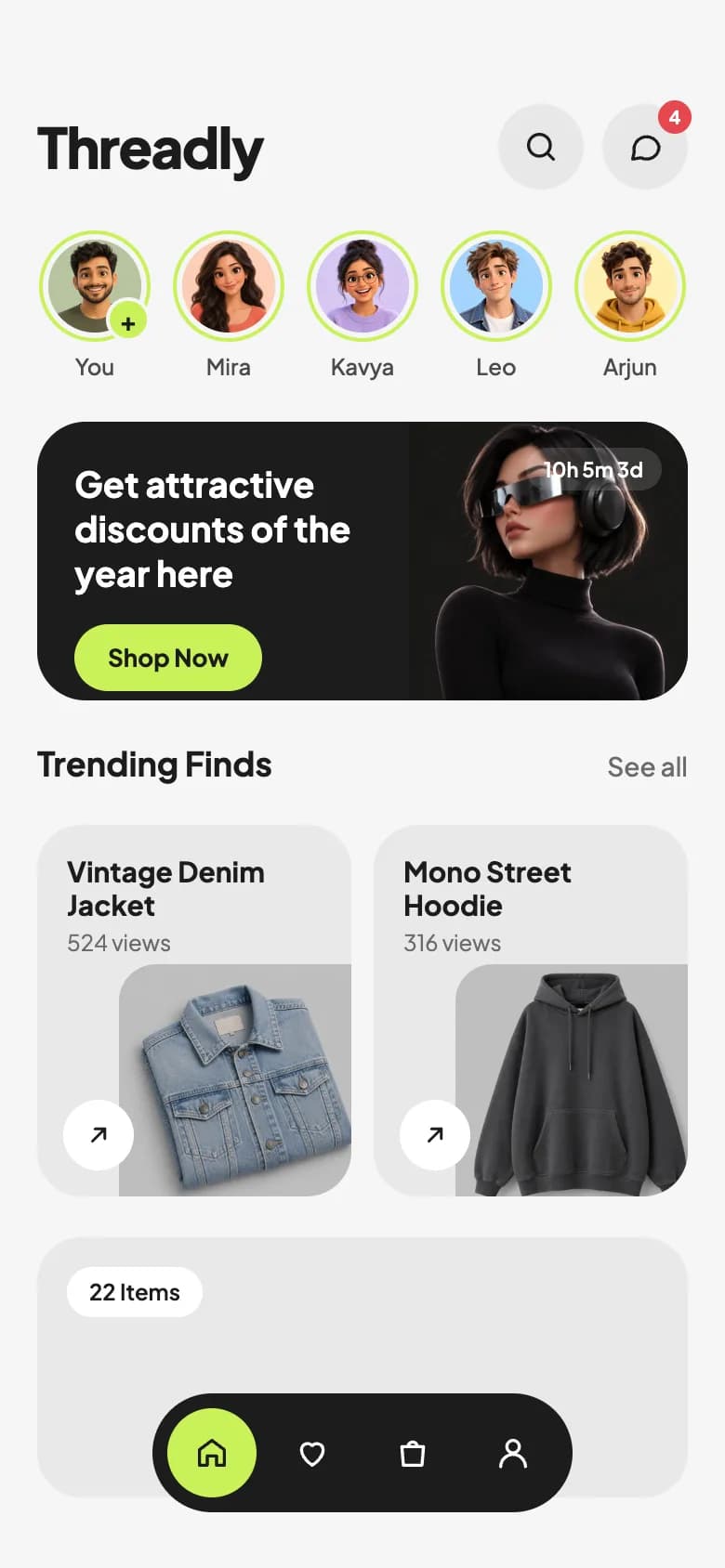
Shop home
Stories row, a dark sale banner with countdown, and Trending Finds cards with product photos and view counts.
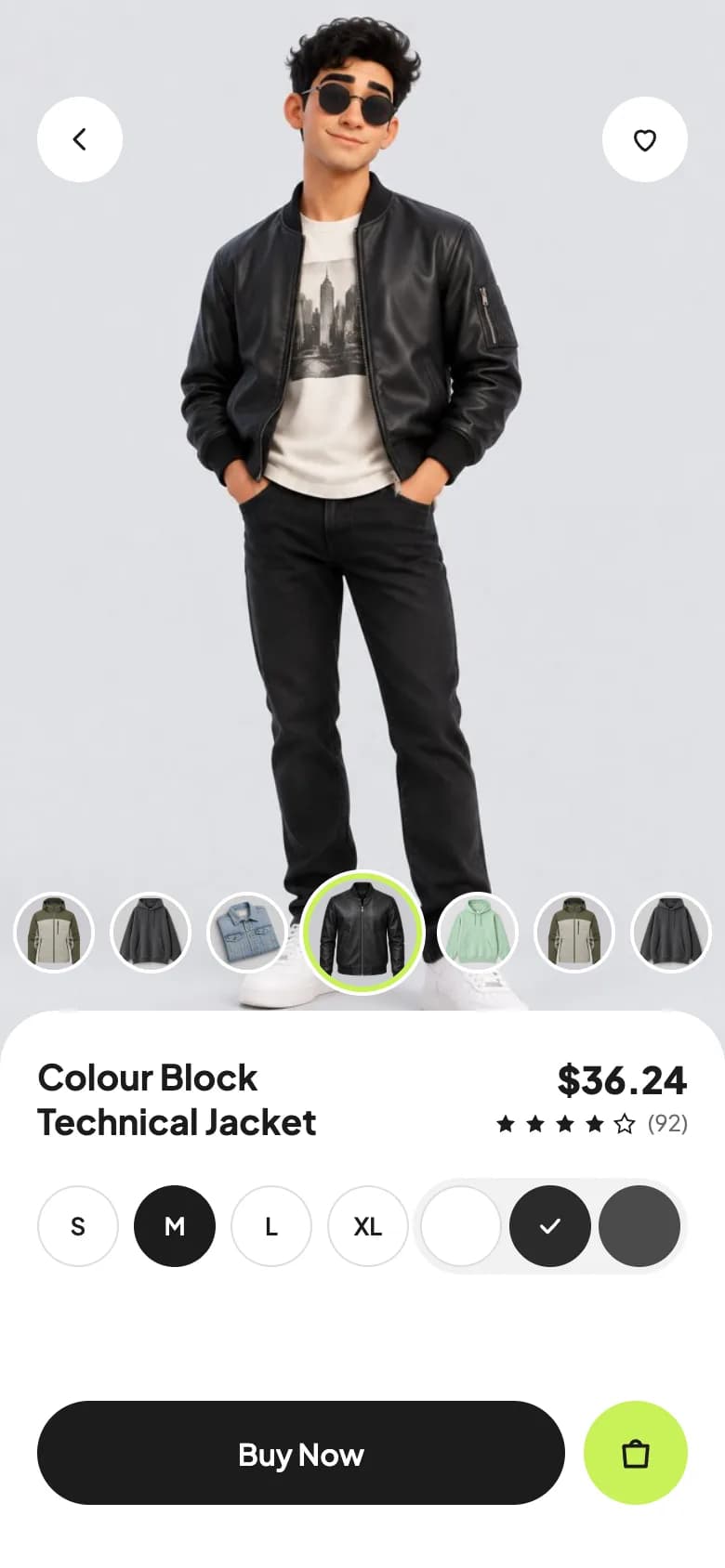
Product detail
A full-height model photo, a colourway thumbnail rail, price and rating, size and colour selectors, and buy actions.
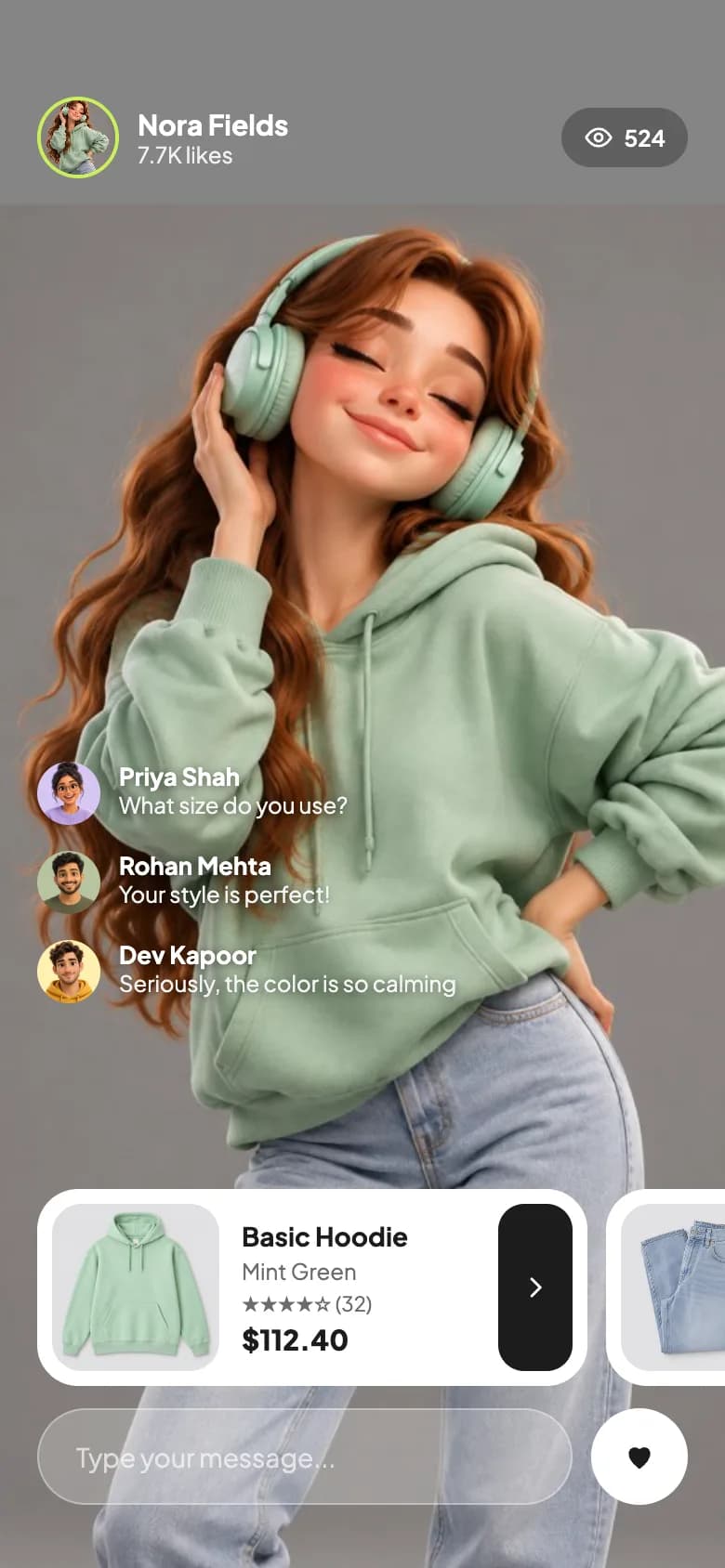
Live styling
A full-screen host with viewer count, stacked chat, a shoppable product rail and a message field.
Copy the Threadly Fashion kit
Use the artifact as a design brief, the skill to generate the UI with an AI agent, or the code to run it right away.
Design artifact
The full design: tokens, screens and source
# Threadly Fashion: design artifact
This fashion shopping app UI blends social and commerce: stories at the top of the home screen, a sale banner, trending products and a live shopping stream.
- Type: Shopping mobile app UI
- Screens: 3
- Artboard: 390 × 844
- Target: Expo SDK 58, Expo Router, TypeScript, expo-image, react-native-svg
- Live page: https://developermill.com/app-designs/fashion-shopping-app-ui-design
## Design direction
Neutral greys and near-black with one electric lime accent, large cut-out product photography and pill-shaped controls.
- Working size, colour and thumbnail selectors
- Live shopping screen with chat and product cards
- Stories row with a lime ring
- Floating pill tab bar
## Foundations
### Colour
| Token | Hex |
| --- | --- |
| Electric lime | `#C9F158` |
| Onyx | `#1C1C1C` |
| Silver | `#E9E9E9` |
| Porcelain | `#F5F5F5` |
| Ash | `#6B6B6B` |
| Sale red | `#E5484D` |
### Typography
- Typefaces: Plus Jakarta Sans
- Common sizes (px): 10, 11, 12, 13, 14, 15, 19, 30
### Shape and depth
- Common corner radii (px): 16, 20, 22, 24, 26, 999
- Shadows: `0 0 0 2px #FFFFFF' : '2px solid #FFFFFF')
}`
## Screens
### 1. Shop home
Stories row, a dark sale banner with countdown, and Trending Finds cards with product photos and view counts.
Preview: https://developermill.com/app-designs/fashion-shopping-app-ui-design/home.webp
Copy on this screen:
- Threadly
- 4
- +
- Get attractive discounts of the year here
- Shop Now
- 10h 5m 3d
- Trending Finds
- See all
- 22 Items
### 2. Product detail
A full-height model photo, a colourway thumbnail rail, price and rating, size and colour selectors, and buy actions.
Preview: https://developermill.com/app-designs/fashion-shopping-app-ui-design/product.webp
Copy on this screen:
- Colour Block Technical Jacket
- $36.24
- (92)
- Buy Now
### 3. Live styling
A full-screen host with viewer count, stacked chat, a shoppable product rail and a message field.
Preview: https://developermill.com/app-designs/fashion-shopping-app-ui-design/live.webp
Copy on this screen:
- Nora Fields
- 7.7K likes
- 524
- Basic Hoodie
- Mint Green
- ★★★★☆ (32)
- $112.40
## Full source
The complete design source for each screen. Images point at hosted demo files.
### Main
```html
<!doctype html>
<html lang="en">
<head>
<meta charset="utf-8">
<title>Threadly home</title>
<script src="./support.js"></script>
</head>
<body>
<x-dc>
<helmet>
<link rel="preconnect" href="https://fonts.googleapis.com">
<link href="https://fonts.googleapis.com/css2?family=Plus+Jakarta+Sans:wght@400;500;600;700;800&display=swap" rel="stylesheet">
<style>
body{margin:0}
a{color:#1C1C1C}a:hover{color:#000}
</style>
</helmet>
<div style="width: 390px; height: 844px; box-sizing: border-box; background: #F5F5F5; font-family: 'Plus Jakarta Sans', system-ui, sans-serif; color: #1C1C1C; position: relative; overflow: hidden; padding: 56px 20px 0 20px; display: flex; flex-direction: column; gap: 22px">
<div style="display: flex; align-items: center; justify-content: space-between">
<h1 style="margin: 0; font-size: 30px; font-weight: 800; letter-spacing: -0.8px">Threadly</h1>
<div style="display: flex; gap: 10px">
<button aria-label="Search" style="width: 46px; height: 46px; border-radius: 50%; border: none; background: #E8E8E8; display: flex; align-items: center; justify-content: center; cursor: pointer"><svg width="20" height="20" viewBox="0 0 24 24" fill="none" stroke="#1C1C1C" stroke-width="2" stroke-linecap="round" aria-hidden="true"><circle cx="11" cy="11" r="7"></circle><path d="M20 20l-3.5-3.5"></path></svg></button>
<button aria-label="Messages, 4 unread" style="width: 46px; height: 46px; border-radius: 50%; border: none; background: #E8E8E8; display: flex; align-items: center; justify-content: center; position: relative; cursor: pointer"><svg width="20" height="20" viewBox="0 0 24 24" fill="none" stroke="#1C1C1C" stroke-width="2" stroke-linecap="round" stroke-linejoin="round" aria-hidden="true"><path d="M21 12a8 8 0 0 1-11.6 7.1L4 20l1-4.6A8 8 0 1 1 21 12z"></path></svg><span style="position: absolute; top: -2px; right: -2px; width: 18px; height: 18px; border-radius: 50%; background: #E5484D; color: #FFFFFF; font-size: 10px; font-weight: 700; display: flex; align-items: center; justify-content: center">4</span></button>
</div>
</div>
<div style="display: flex; justify-content: space-between">
<sc-for list="{{stories}}" as="s" hint-placeholder-count="5">
<div style="display: flex; flex-direction: column; align-items: center; gap: 6px; width: 62px">
<div style="width: 60px; height: 60px; border-radius: 50%; box-sizing: border-box; padding: 3px; border: 2px solid #C9F158; position: relative">
<img src="{{s.img}}" alt="{{s.name}}" style="width: 100%; height: 100%; border-radius: 50%; object-fit: cover; display: block; background: #DADADA">
<sc-if value="{{s.isYou}}" hint-placeholder-val="{{false}}"><span style="position: absolute; right: -2px; bottom: -2px; width: 20px; height: 20px; border-radius: 50%; background: #C9F158; border: 2px solid #F5F5F5; display: flex; align-items: center; justify-content: center; font-size: 14px; font-weight: 700; line-height: 1">+</span></sc-if>
</div>
<span style="font-size: 12px; font-weight: 500; color: #4A4A4A">{{s.name}}</span>
</div>
</sc-for>
</div>
<div style="height: 150px; border-radius: 26px; background: #1C1C1C; position: relative; overflow: hidden; display: flex">
<div style="flex: 1; padding: 22px 0 0 20px; display: flex; flex-direction: column; gap: 16px; z-index: 1">
<p style="margin: 0; color: #FFFFFF; font-size: 19px; font-weight: 700; line-height: 1.25; max-width: 190px">Get attractive discounts of the year here</p>
<a href="Product.dc.html" style="align-self: flex-start; background: #C9F158; color: #1C1C1C; text-decoration: none; font-size: 13px; font-weight: 700; padding: 10px 18px; border-radius: 999px">Shop Now</a>
</div>
<img src="https://developermill.com/app-designs/fashion-shopping-app-ui-design/assets/5590d52ebf.jpg" alt="" style="width: 150px; height: 150px; object-fit: cover; object-position: 40% 20%; display: block">
<span style="position: absolute; top: 14px; right: 14px; z-index: 2; background: rgba(255,255,255,0.14); color: #FFFFFF; font-size: 11px; font-weight: 600; padding: 5px 10px; border-radius: 999px">10h 5m 3d</span>
</div>
<div style="display: flex; justify-content: space-between; align-items: baseline">
<h2 style="margin: 0; font-size: 18px; font-weight: 700">Trending Finds</h2>
<a href="#" style="font-size: 14px; font-weight: 500; color: #6B6B6B; text-decoration: none">See all</a>
</div>
<div style="display: grid; grid-template-columns: repeat(2, minmax(0, 1fr)); gap: 12px">
<sc-for list="{{products}}" as="p" hint-placeholder-count="2">
<a href="Product.dc.html" style="height: 200px; border-radius: 24px; background: #E9E9E9; padding: 16px; box-sizing: border-box; position: relative; overflow: hidden; text-decoration: none; color: #1C1C1C; display: block">
<div style="font-size: 15px; font-weight: 700; line-height: 1.2">{{p.title}}</div>
<div style="font-size: 12px; color: #6B6B6B; margin-top: 4px">{{p.views}}</div>
<img src="{{p.img}}" alt="{{p.title}}" style="position: absolute; right: -10px; bottom: -10px; width: 135px; height: 135px; border-radius: 20px 0 0 0; object-fit: cover; display: block; mix-blend-mode: multiply">
<span style="position: absolute; left: 14px; bottom: 14px; width: 38px; height: 38px; border-radius: 50%; background: #FFFFFF; display: flex; align-items: center; justify-content: center"><svg width="16" height="16" viewBox="0 0 24 24" fill="none" stroke="#1C1C1C" stroke-width="2.2" stroke-linecap="round" aria-hidden="true"><path d="M7 17L17 7M9 7h8v8"></path></svg></span>
</a>
</sc-for>
</div>
<div style="height: 140px; border-radius: 24px; background: #E9E9E9; padding: 16px; box-sizing: border-box">
<span style="background: #FFFFFF; font-size: 12px; font-weight: 600; padding: 6px 12px; border-radius: 999px">22 Items</span>
</div>
<nav aria-label="Main" style="position: absolute; left: 50%; bottom: 30px; transform: translateX(-50%); background: #1C1C1C; border-radius: 999px; padding: 8px; display: flex; gap: 6px">
<button aria-label="Home" style="width: 48px; height: 48px; border-radius: 50%; border: none; background: #C9F158; display: flex; align-items: center; justify-content: center; cursor: pointer"><svg width="20" height="20" viewBox="0 0 24 24" fill="none" stroke="#1C1C1C" stroke-width="2" stroke-linejoin="round" aria-hidden="true"><path d="M4 10l8-6 8 6v10h-5v-6H9v6H4z"></path></svg></button>
<button aria-label="Wishlist" style="width: 48px; height: 48px; border-radius: 50%; border: none; background: transparent; display: flex; align-items: center; justify-content: center; cursor: pointer"><svg width="20" height="20" viewBox="0 0 24 24" fill="none" stroke="#FFFFFF" stroke-width="2" stroke-linejoin="round" aria-hidden="true"><path d="M12 20s-7-4.4-7-10a4 4 0 0 1 7-2.6A4 4 0 0 1 19 10c0 5.6-7 10-7 10z"></path></svg></button>
<button aria-label="Bag" style="width: 48px; height: 48px; border-radius: 50%; border: none; background: transparent; display: flex; align-items: center; justify-content: center; cursor: pointer"><svg width="20" height="20" viewBox="0 0 24 24" fill="none" stroke="#FFFFFF" stroke-width="2" stroke-linejoin="round" aria-hidden="true"><path d="M5 8h14l-1 12H6z"></path><path d="M9 8a3 3 0 0 1 6 0"></path></svg></button>
<button aria-label="Profile" style="width: 48px; height: 48px; border-radius: 50%; border: none; background: transparent; display: flex; align-items: center; justify-content: center; cursor: pointer"><svg width="20" height="20" viewBox="0 0 24 24" fill="none" stroke="#FFFFFF" stroke-width="2" stroke-linecap="round" aria-hidden="true"><circle cx="12" cy="8" r="4"></circle><path d="M4 21a8 8 0 0 1 16 0"></path></svg></button>
</nav>
</div>
</x-dc>
<script type="text/x-dc" data-dc-script data-props='{"$preview":{"width":390,"height":844}}'>
class Component extends DCLogic {
renderVals() {
return {
stories: [
{ name: 'You', img: 'https://developermill.com/app-designs/fashion-shopping-app-ui-design/assets/8e5adbc794.jpg', isYou: true },
{ name: 'Mira', img: 'https://developermill.com/app-designs/fashion-shopping-app-ui-design/assets/43736c50f7.jpg', isYou: false },
{ name: 'Kavya', img: 'https://developermill.com/app-designs/fashion-shopping-app-ui-design/assets/e0743b20f7.jpg', isYou: false },
{ name: 'Leo', img: 'https://developermill.com/app-designs/fashion-shopping-app-ui-design/assets/3a68241de6.jpg', isYou: false },
{ name: 'Arjun', img: 'https://developermill.com/app-designs/fashion-shopping-app-ui-design/assets/5612656dd3.jpg', isYou: false }
],
products: [
{ title: 'Vintage Denim Jacket', views: '524 views', img: 'https://developermill.com/app-designs/fashion-shopping-app-ui-design/assets/2155aba139.jpg' },
{ title: 'Mono Street Hoodie', views: '316 views', img: 'https://developermill.com/app-designs/fashion-shopping-app-ui-design/assets/b209175939.jpg' }
]
};
}
}
</script>
</body>
</html>
```
### Product
```html
<!doctype html>
<html lang="en">
<head>
<meta charset="utf-8">
<title>Product detail</title>
<script src="./support.js"></script>
</head>
<body>
<x-dc>
<helmet>
<link rel="preconnect" href="https://fonts.googleapis.com">
<link href="https://fonts.googleapis.com/css2?family=Plus+Jakarta+Sans:wght@400;500;600;700;800&display=swap" rel="stylesheet">
<style>
body{margin:0}
a{color:#1C1C1C}a:hover{color:#000}
</style>
</helmet>
<div style="width: 390px; height: 844px; box-sizing: border-box; background: #E7E7EA; font-family: 'Plus Jakarta Sans', system-ui, sans-serif; color: #1C1C1C; position: relative; overflow: hidden">
<img src="https://developermill.com/app-designs/fashion-shopping-app-ui-design/assets/9c3ba76a7f.jpg" alt="Model wearing the jacket" style="position: absolute; left: 0; top: 0; width: 390px; height: 585px; object-fit: cover; object-position: center top; display: block">
<div style="position: absolute; top: 52px; left: 20px; right: 20px; display: flex; justify-content: space-between">
<a href="Main.dc.html" aria-label="Back" style="width: 46px; height: 46px; border-radius: 50%; background: #FFFFFF; display: flex; align-items: center; justify-content: center"><svg width="18" height="18" viewBox="0 0 24 24" fill="none" stroke="#1C1C1C" stroke-width="2.2" stroke-linecap="round" stroke-linejoin="round" aria-hidden="true"><path d="M15 5l-7 7 7 7"></path></svg></a>
<button aria-label="Save to wishlist" style="width: 46px; height: 46px; border-radius: 50%; border: none; background: #FFFFFF; display: flex; align-items: center; justify-content: center; cursor: pointer"><svg width="18" height="18" viewBox="0 0 24 24" fill="none" stroke="#1C1C1C" stroke-width="2" stroke-linejoin="round" aria-hidden="true"><path d="M12 20s-7-4.4-7-10a4 4 0 0 1 7-2.6A4 4 0 0 1 19 10c0 5.6-7 10-7 10z"></path></svg></button>
</div>
<div style="position: absolute; top: 470px; left: 0; right: 0; display: flex; justify-content: center; align-items: center; gap: 8px">
<sc-for list="{{thumbs}}" as="t" hint-placeholder-count="7">
<button aria-label="{{t.label}}" onClick="{{t.pick}}" style="{{t.style}}"><img src="{{t.img}}" alt="" style="width: 100%; height: 100%; border-radius: 50%; object-fit: cover; display: block"></button>
</sc-for>
</div>
<div style="position: absolute; left: 0; right: 0; bottom: 0; height: 300px; background: #FFFFFF; border-radius: 30px 30px 0 0; padding: 24px 20px 34px 20px; box-sizing: border-box; display: flex; flex-direction: column; gap: 18px">
<div style="display: flex; justify-content: space-between; align-items: flex-start; gap: 12px">
<h1 style="margin: 0; font-size: 19px; font-weight: 700; line-height: 1.25; max-width: 200px">Colour Block Technical Jacket</h1>
<div style="text-align: right">
<div style="font-size: 20px; font-weight: 800">$36.24</div>
<div style="display: flex; align-items: center; gap: 2px; justify-content: flex-end; margin-top: 4px" role="img" aria-label="Rated 4 out of 5, 92 reviews">
<svg width="14" height="14" viewBox="0 0 24 24" fill="#1C1C1C" aria-hidden="true"><path d="M12 3l2.7 5.6 6.1.9-4.4 4.3 1 6.1L12 17l-5.4 2.9 1-6.1-4.4-4.3 6.1-.9z"></path></svg>
<svg width="14" height="14" viewBox="0 0 24 24" fill="#1C1C1C" aria-hidden="true"><path d="M12 3l2.7 5.6 6.1.9-4.4 4.3 1 6.1L12 17l-5.4 2.9 1-6.1-4.4-4.3 6.1-.9z"></path></svg>
<svg width="14" height="14" viewBox="0 0 24 24" fill="#1C1C1C" aria-hidden="true"><path d="M12 3l2.7 5.6 6.1.9-4.4 4.3 1 6.1L12 17l-5.4 2.9 1-6.1-4.4-4.3 6.1-.9z"></path></svg>
<svg width="14" height="14" viewBox="0 0 24 24" fill="#1C1C1C" aria-hidden="true"><path d="M12 3l2.7 5.6 6.1.9-4.4 4.3 1 6.1L12 17l-5.4 2.9 1-6.1-4.4-4.3 6.1-.9z"></path></svg>
<svg width="14" height="14" viewBox="0 0 24 24" fill="none" stroke="#1C1C1C" stroke-width="1.6" aria-hidden="true"><path d="M12 3l2.7 5.6 6.1.9-4.4 4.3 1 6.1L12 17l-5.4 2.9 1-6.1-4.4-4.3 6.1-.9z"></path></svg>
<span style="font-size: 12px; color: #6B6B6B; margin-left: 4px">(92)</span>
</div>
</div>
</div>
<div style="display: flex; justify-content: space-between; align-items: center">
<div style="display: flex; gap: 8px" role="group" aria-label="Size">
<sc-for list="{{sizes}}" as="s" hint-placeholder-count="4">
<button onClick="{{s.pick}}" style="{{s.style}}">{{s.label}}</button>
</sc-for>
</div>
<div style="display: flex; gap: 4px; background: #F2F2F2; border-radius: 999px; padding: 4px" role="group" aria-label="Colour">
<sc-for list="{{colors}}" as="c" hint-placeholder-count="3">
<button aria-label="{{c.label}}" onClick="{{c.pick}}" style="{{c.style}}"><sc-if value="{{c.selected}}" hint-placeholder-val="{{false}}"><svg width="16" height="16" viewBox="0 0 24 24" fill="none" stroke="{{c.check}}" stroke-width="2.6" stroke-linecap="round" stroke-linejoin="round" aria-hidden="true"><path d="M5 12l5 5 9-10"></path></svg></sc-if></button>
</sc-for>
</div>
</div>
<div style="display: flex; gap: 10px; margin-top: auto">
<button style="flex: 1; height: 56px; border-radius: 999px; border: none; background: #1C1C1C; color: #FFFFFF; font-family: inherit; font-size: 16px; font-weight: 600; cursor: pointer">Buy Now</button>
<button aria-label="Add to bag" style="width: 56px; height: 56px; border-radius: 50%; border: none; background: #C9F158; display: flex; align-items: center; justify-content: center; cursor: pointer"><svg width="22" height="22" viewBox="0 0 24 24" fill="none" stroke="#1C1C1C" stroke-width="2" stroke-linejoin="round" aria-hidden="true"><path d="M5 8h14l-1 12H6z"></path><path d="M9 8a3 3 0 0 1 6 0"></path></svg></button>
</div>
</div>
</div>
</x-dc>
<script type="text/x-dc" data-dc-script data-props='{"$preview":{"width":390,"height":844}}'>
class Component extends DCLogic {
constructor(p) { super(p); this.state = { size: 'M', color: 'mid', thumb: 3 }; }
renderVals() {
var self = this;
var thumbs = [0,1,2,3,4,5,6].map(function (i) {
var on = i === self.state.thumb;
var d = on ? 64 : 44;
return {
img: ['https://developermill.com/app-designs/fashion-shopping-app-ui-design/assets/f9474ca3ea.jpg','https://developermill.com/app-designs/fashion-shopping-app-ui-design/assets/b209175939.jpg','https://developermill.com/app-designs/fashion-shopping-app-ui-design/assets/2155aba139.jpg','https://developermill.com/app-designs/fashion-shopping-app-ui-design/assets/53e8cb3564.jpg','https://developermill.com/app-designs/fashion-shopping-app-ui-design/assets/36cb1f74ad.jpg','https://developermill.com/app-designs/fashion-shopping-app-ui-design/assets/f9474ca3ea.jpg','https://developermill.com/app-designs/fashion-shopping-app-ui-design/assets/b209175939.jpg'][i],
label: 'Jacket colourway ' + (i + 1),
pick: function () { self.setState({ thumb: i }); },
style: 'width: ' + d + 'px; height: ' + d + 'px; flex: none; border-radius: 50%; padding: 0; overflow: hidden; cursor: pointer; background: #D2D2D6; box-sizing: border-box; border: ' + (on ? '3px solid #C9F158; box-shadow: 0 0 0 2px #FFFFFF' : '2px solid #FFFFFF')
};
});
var sizes = ['S','M','L','XL'].map(function (l) {
var on = l === self.state.size;
return {
label: l,
pick: function () { self.setState({ size: l }); },
style: 'width: 44px; height: 44px; border-radius: 50%; cursor: pointer; font-family: inherit; font-size: 13px; font-weight: 600; border: 1px solid ' + (on ? '#1C1C1C' : '#DDDDDD') + '; background: ' + (on ? '#1C1C1C' : '#FFFFFF') + '; color: ' + (on ? '#FFFFFF' : '#1C1C1C')
};
});
var colors = [
{ id: 'light', label: 'White', fill: '#FFFFFF', check: '#1C1C1C' },
{ id: 'mid', label: 'Charcoal', fill: '#2B2B2B', check: '#FFFFFF' },
{ id: 'dark', label: 'Graphite', fill: '#4A4A4A', check: '#FFFFFF' }
].map(function (c) {
var on = c.id === self.state.color;
return {
label: c.label, selected: on, check: c.check,
pick: function () { self.setState({ color: c.id }); },
style: 'width: 44px; height: 44px; border-radius: 50%; cursor: pointer; padding: 0; display: flex; align-items: center; justify-content: center; background: ' + c.fill + '; border: ' + (c.id === 'light' ? '1px solid #DDDDDD' : 'none')
};
});
return { thumbs: thumbs, sizes: sizes, colors: colors };
}
}
</script>
</body>
</html>
```
### Live
```html
<!doctype html>
<html lang="en">
<head>
<meta charset="utf-8">
<title>Live styling</title>
<script src="./support.js"></script>
</head>
<body>
<x-dc>
<helmet>
<link rel="preconnect" href="https://fonts.googleapis.com">
<link href="https://fonts.googleapis.com/css2?family=Plus+Jakarta+Sans:wght@400;500;600;700;800&display=swap" rel="stylesheet">
<style>
body{margin:0}
a{color:#FFFFFF}a:hover{color:#E8E8E8}
</style>
</helmet>
<div style="width: 390px; height: 844px; box-sizing: border-box; background: #858585; font-family: 'Plus Jakarta Sans', system-ui, sans-serif; color: #FFFFFF; position: relative; overflow: hidden">
<img src="https://developermill.com/app-designs/fashion-shopping-app-ui-design/assets/e812d49a73.jpg" alt="Host wearing the mint hoodie" style="position: absolute; left: -20px; top: 110px; width: 490px; height: 735px; object-fit: cover; display: block">
<div style="position: absolute; top: 52px; left: 20px; right: 20px; display: flex; justify-content: space-between; align-items: center">
<div style="display: flex; align-items: center; gap: 10px">
<img src="https://developermill.com/app-designs/fashion-shopping-app-ui-design/assets/e812d49a73.jpg" alt="Nora Fields" style="width: 44px; height: 44px; border-radius: 50%; border: 2px solid #C9F158; box-sizing: border-box; object-fit: cover; object-position: 55% 8%; display: block">
<div>
<div style="font-size: 15px; font-weight: 700">Nora Fields</div>
<div style="font-size: 12px; color: #F1F1F1">7.7K likes</div>
</div>
</div>
<div style="display: flex; align-items: center; gap: 6px; background: rgba(28,28,28,0.35); padding: 8px 12px; border-radius: 999px; font-size: 12px; font-weight: 600" aria-label="524 watching">
<svg width="16" height="16" viewBox="0 0 24 24" fill="none" stroke="#FFFFFF" stroke-width="2" aria-hidden="true"><path d="M2 12s3.6-7 10-7 10 7 10 7-3.6 7-10 7S2 12 2 12z"></path><circle cx="12" cy="12" r="3"></circle></svg>524
</div>
</div>
<div style="position: absolute; left: 20px; top: 410px; width: 230px; display: flex; flex-direction: column; gap: 14px; text-shadow: 0 1px 6px rgba(0,0,0,0.55)">
<sc-for list="{{comments}}" as="c" hint-placeholder-count="3">
<div style="display: flex; gap: 10px; align-items: flex-start">
<img src="{{c.img}}" alt="" style="width: 34px; height: 34px; flex: none; border-radius: 50%; object-fit: cover; display: block">
<div>
<div style="font-size: 13px; font-weight: 700">{{c.name}}</div>
<div style="font-size: 12px; color: #F4F4F4; line-height: 1.35">{{c.text}}</div>
</div>
</div>
</sc-for>
</div>
<div style="position: absolute; left: 20px; right: 0; top: 640px; display: flex; gap: 10px">
<a href="Product.dc.html" style="width: 296px; flex: none; height: 106px; background: #FFFFFF; border-radius: 22px; padding: 8px; box-sizing: border-box; display: flex; gap: 12px; text-decoration: none; color: #1C1C1C; position: relative">
<img src="https://developermill.com/app-designs/fashion-shopping-app-ui-design/assets/36cb1f74ad.jpg" alt="Mint green hoodie" style="width: 90px; height: 90px; border-radius: 16px; object-fit: cover; display: block">
<div style="display: flex; flex-direction: column; justify-content: center; gap: 3px">
<div style="font-size: 14px; font-weight: 700">Basic Hoodie</div>
<div style="font-size: 12px; color: #6B6B6B">Mint Green</div>
<div style="font-size: 11px; color: #6B6B6B" aria-label="Rated 4 out of 5, 32 reviews">★★★★☆ (32)</div>
<div style="font-size: 15px; font-weight: 800">$112.40</div>
</div>
<span style="position: absolute; right: 8px; top: 8px; bottom: 8px; width: 40px; border-radius: 14px; background: #1C1C1C; display: flex; align-items: center; justify-content: center"><svg width="16" height="16" viewBox="0 0 24 24" fill="none" stroke="#FFFFFF" stroke-width="2.2" stroke-linecap="round" stroke-linejoin="round" aria-hidden="true"><path d="M9 5l7 7-7 7"></path></svg></span>
</a>
<div style="width: 90px; flex: none; height: 106px; background: #FFFFFF; border-radius: 22px 0 0 22px; padding: 8px; box-sizing: border-box">
<img src="https://developermill.com/app-designs/fashion-shopping-app-ui-design/assets/0825651105.jpg" alt="Light-wash jeans" style="width: 82px; height: 90px; border-radius: 16px; object-fit: cover; display: block">
</div>
</div>
<div style="position: absolute; left: 20px; right: 20px; bottom: 34px; display: flex; gap: 10px">
<div style="flex: 1; height: 52px; border-radius: 999px; background: rgba(255,255,255,0.22); border: 1px solid rgba(255,255,255,0.35); box-sizing: border-box; display: flex; align-items: center; padding: 0 20px">
<input type="text" aria-label="Message" placeholder="Type your message..." style="flex: 1; min-width: 0; border: none; background: transparent; outline: none; color: #FFFFFF; font-family: inherit; font-size: 14px">
</div>
<button aria-label="Like" style="width: 52px; height: 52px; border-radius: 50%; border: none; background: #FFFFFF; display: flex; align-items: center; justify-content: center; cursor: pointer"><svg width="20" height="20" viewBox="0 0 24 24" fill="#1C1C1C" aria-hidden="true"><path d="M12 20s-7-4.4-7-10a4 4 0 0 1 7-2.6A4 4 0 0 1 19 10c0 5.6-7 10-7 10z"></path></svg></button>
</div>
</div>
</x-dc>
<script type="text/x-dc" data-dc-script data-props='{"$preview":{"width":390,"height":844}}'>
class Component extends DCLogic {
renderVals() {
return {
comments: [
{ name: 'Priya Shah', img: 'https://developermill.com/app-designs/fashion-shopping-app-ui-design/assets/e0743b20f7.jpg', text: 'What size do you use?' },
{ name: 'Rohan Mehta', img: 'https://developermill.com/app-designs/fashion-shopping-app-ui-design/assets/8e5adbc794.jpg', text: 'Your style is perfect!' },
{ name: 'Dev Kapoor', img: 'https://developermill.com/app-designs/fashion-shopping-app-ui-design/assets/5612656dd3.jpg', text: 'Seriously, the color is so calming' }
]
};
}
}
</script>
</body>
</html>
```SKILL.md
Save as .claude/skills/fashion-shopping-app-ui/SKILL.md
---
name: fashion-shopping-app-ui
description: Build the Threadly Fashion mobile app UI in Expo React Native. Use when asked to create a fashion app UI or a new screen in this visual style.
---

# Threadly Fashion app UI

Build this UI in an Expo SDK 58 app with Expo Router and strict TypeScript. Match the spec below rather than inventing a new look. The finished reference lives at https://developermill.com/app-designs/fashion-shopping-app-ui-design

## Visual direction

Neutral greys and near-black with one electric lime accent, large cut-out product photography and pill-shaped controls.

Keep these signature details:

- Working size, colour and thumbnail selectors
- Live shopping screen with chat and product cards
- Stories row with a lime ring
- Floating pill tab bar

## Set up

```bash
npx expo install expo-image react-native-svg @expo-google-fonts/plus-jakarta-sans expo-font
```

## Tokens

| Token | Hex |
| --- | --- |
| Electric lime | `#C9F158` |
| Onyx | `#1C1C1C` |
| Silver | `#E9E9E9` |
| Porcelain | `#F5F5F5` |
| Ash | `#6B6B6B` |
| Sale red | `#E5484D` |

- Typefaces: Plus Jakarta Sans
- Common sizes (px): 10, 11, 12, 13, 14, 15, 19, 30
- Common corner radii (px): 16, 20, 22, 24, 26, 999

Define these once and reuse them. Do not add new colours.

## Screens

Build one Expo Router route per screen, in this order:

1. **Shop home**: Stories row, a dark sale banner with countdown, and Trending Finds cards with product photos and view counts.
2. **Product detail**: A full-height model photo, a colourway thumbnail rail, price and rating, size and colour selectors, and buy actions.
3. **Live styling**: A full-screen host with viewer count, stacked chat, a shoppable product rail and a message field.

## Build rules

- Design on a 390 × 844 artboard, then scale to the device width so layouts match on every phone.
- Load each custom font weight by its own family name with expo-font. Do not rely on `fontWeight` with custom fonts.
- Draw icons, charts and illustrations with react-native-svg rather than image files or chart libraries.
- Use `Pressable` with an `accessibilityLabel` for every icon-only control, and keep touch targets at 44 px or larger.
- Wire navigation with `router.navigate`, and keep sample data in constants at the top of each file so it is easy to replace.
- Use expo-image for photos, with `contentFit` set explicitly.

## Done when

- Every screen above exists as a route and they link together.
- Colours, type and radii match the tokens exactly.
- `npx tsc --noEmit` and `npx expo lint` both pass.
- Layouts hold up on small and large phones.
Set up the project
npx create-expo-app@latest fashion-shopping-app --template default
cd fashion-shopping-app
rm -rf src
npx expo install expo-image react-native-svg @expo-google-fonts/plus-jakarta-sans expo-font
src/app/_layout.tsx
import {
  PlusJakartaSans_400Regular,
  PlusJakartaSans_500Medium,
  PlusJakartaSans_600SemiBold,
  PlusJakartaSans_700Bold,
  PlusJakartaSans_800ExtraBold,
} from '@expo-google-fonts/plus-jakarta-sans';
import { useFonts } from 'expo-font';
import { Stack } from 'expo-router';

export default function RootLayout() {
  const [fontsLoaded] = useFonts({
    PlusJakartaSans_400Regular,
    PlusJakartaSans_500Medium,
    PlusJakartaSans_600SemiBold,
    PlusJakartaSans_700Bold,
    PlusJakartaSans_800ExtraBold,
  });

  if (!fontsLoaded) return null;

  return <Stack screenOptions={{ headerShown: false }} />;
}
src/app/index.tsx
import { Image } from 'expo-image';
import { router } from 'expo-router';
import { Pressable, Text, View } from 'react-native';
import Svg, { Circle, Path } from 'react-native-svg';
import { Screen } from '@/components/screen';
import { asset } from '@/lib/assets';
const stories = [
{ name: 'You', img: '8e5adbc794.jpg', isYou: true },
{ name: 'Mira', img: '43736c50f7.jpg', isYou: false },
{ name: 'Kavya', img: 'e0743b20f7.jpg', isYou: false },
{ name: 'Leo', img: '3a68241de6.jpg', isYou: false },
{ name: 'Arjun', img: '5612656dd3.jpg', isYou: false },
];
const products = [
{ title: 'Vintage Denim Jacket', views: '524 views', img: '2155aba139.jpg' },
{ title: 'Mono Street Hoodie', views: '316 views', img: 'b209175939.jpg' },
];
export default function MainScreen() {
return (
<Screen background="#F5F5F5" statusBar="dark">
<View style={{ paddingTop: 56, paddingBottom: 0, paddingHorizontal: 20, gap: 22, flex: 1 }}>
<View
style={{ alignItems: 'center', justifyContent: 'space-between', flexDirection: 'row' }}>
<Text
style={{
margin: 0,
flexShrink: 1,
fontFamily: 'PlusJakartaSans_800ExtraBold',
fontSize: 30,
color: '#1C1C1C',
letterSpacing: -0.8,
}}>
Threadly
</Text>
<View style={{ gap: 10, flexShrink: 1, flexDirection: 'row' }}>
<Pressable
accessibilityRole="button"
accessibilityLabel="Search"
style={{
width: 46,
height: 46,
borderRadius: '50%',
borderWidth: 0,
backgroundColor: '#E8E8E8',
alignItems: 'center',
justifyContent: 'center',
flexDirection: 'row',
}}>
<Svg
width="20"
height="20"
viewBox="0 0 24 24"
fill="none"
stroke="#1C1C1C"
strokeWidth="2"
strokeLinecap="round">
<Circle cx="11" cy="11" r="7" />
<Path d="M20 20l-3.5-3.5" />
</Svg>
</Pressable>
<Pressable
accessibilityRole="button"
accessibilityLabel="Messages, 4 unread"
style={{
width: 46,
height: 46,
borderRadius: '50%',
borderWidth: 0,
backgroundColor: '#E8E8E8',
alignItems: 'center',
justifyContent: 'center',
flexDirection: 'row',
}}>
<Svg
width="20"
height="20"
viewBox="0 0 24 24"
fill="none"
stroke="#1C1C1C"
strokeWidth="2"
strokeLinecap="round"
strokeLinejoin="round">
<Path d="M21 12a8 8 0 0 1-11.6 7.1L4 20l1-4.6A8 8 0 1 1 21 12z" />
</Svg>
<View
style={{
position: 'absolute',
top: -2,
right: -2,
width: 18,
height: 18,
borderRadius: '50%',
backgroundColor: '#E5484D',
alignItems: 'center',
justifyContent: 'center',
flexDirection: 'row',
}}>
<Text
style={{
fontFamily: 'PlusJakartaSans_700Bold',
fontSize: 10,
color: '#FFFFFF',
flexShrink: 1,
}}>
4
</Text>
</View>
</Pressable>
</View>
</View>
<View style={{ justifyContent: 'space-between', flexDirection: 'row' }}>
{stories.map((s, index) => (
<View key={index} style={{ alignItems: 'center', gap: 6, width: 62 }}>
<View
style={{
width: 60,
height: 60,
borderRadius: '50%',
padding: 3,
borderWidth: 2,
borderColor: '#C9F158',
}}>
<Image
source={{ uri: asset(s.img) }}
contentFit="cover"
style={{
width: '100%',
height: '100%',
borderRadius: '50%',
backgroundColor: '#DADADA',
}}
/>
{s.isYou && (
<View
style={{
position: 'absolute',
right: -2,
bottom: -2,
width: 24,
height: 24,
borderRadius: '50%',
backgroundColor: '#C9F158',
borderWidth: 2,
borderColor: '#F5F5F5',
alignItems: 'center',
justifyContent: 'center',
flexDirection: 'row',
}}>
<Text
style={{
fontFamily: 'PlusJakartaSans_700Bold',
fontSize: 14,
color: '#1C1C1C',
lineHeight: 14,
flexShrink: 1,
}}>
+
</Text>
</View>
)}
</View>
<Text
style={{ fontFamily: 'PlusJakartaSans_500Medium', fontSize: 12, color: '#4A4A4A' }}>
{s.name}
</Text>
</View>
))}
</View>
<View
style={{
height: 150,
borderRadius: 26,
backgroundColor: '#1C1C1C',
overflow: 'hidden',
flexDirection: 'row',
}}>
<View
style={{
flex: 1,
paddingTop: 22,
paddingBottom: 0,
paddingLeft: 20,
paddingRight: 0,
gap: 16,
zIndex: 1,
}}>
<Text
style={{
margin: 0,
maxWidth: 190,
fontFamily: 'PlusJakartaSans_700Bold',
fontSize: 19,
color: '#FFFFFF',
lineHeight: 23.75,
}}>
Get attractive discounts of the year here
</Text>
<Pressable
accessibilityRole="link"
onPress={() => router.navigate('/product')}
style={{
alignSelf: 'flex-start',
backgroundColor: '#C9F158',
paddingVertical: 10,
paddingHorizontal: 18,
borderRadius: 999,
}}>
<Text
style={{ fontFamily: 'PlusJakartaSans_700Bold', fontSize: 13, color: '#1C1C1C' }}>
Shop Now
</Text>
</Pressable>
</View>
<Image
source={{ uri: asset('5590d52ebf.jpg') }}
contentFit="cover"
contentPosition={{ left: '40%', top: '20%' }}
style={{ width: 150, height: 150 }}
/>
<Text
style={{
position: 'absolute',
top: 14,
right: 14,
zIndex: 2,
backgroundColor: 'rgba(255,255,255,0.14)',
paddingVertical: 5,
paddingHorizontal: 10,
borderRadius: 999,
fontFamily: 'PlusJakartaSans_600SemiBold',
fontSize: 11,
color: '#FFFFFF',
flexShrink: 1,
}}>
10h 5m 3d
</Text>
</View>
<View
style={{ justifyContent: 'space-between', alignItems: 'baseline', flexDirection: 'row' }}>
<Text
style={{
margin: 0,
flexShrink: 1,
fontFamily: 'PlusJakartaSans_700Bold',
fontSize: 18,
color: '#1C1C1C',
}}>
Trending Finds
</Text>
<Pressable accessibilityRole="link" style={{ flexShrink: 1 }}>
<Text
style={{ fontFamily: 'PlusJakartaSans_500Medium', fontSize: 14, color: '#6B6B6B' }}>
See all
</Text>
</Pressable>
</View>
<View style={{ flexDirection: 'row', gap: 12 }}>
{products.map((p, index) => (
<Pressable
key={index}
accessibilityRole="link"
onPress={() => router.navigate('/product')}
style={{
height: 200,
borderRadius: 24,
backgroundColor: '#E9E9E9',
padding: 16,
overflow: 'hidden',
flex: 1,
}}>
<Text
style={{
fontFamily: 'PlusJakartaSans_700Bold',
fontSize: 15,
color: '#1C1C1C',
lineHeight: 18,
}}>
{p.title}
</Text>
<Text
style={{
marginTop: 4,
fontFamily: 'PlusJakartaSans_400Regular',
fontSize: 12,
color: '#6B6B6B',
}}>
{p.views}
</Text>
<Image
source={{ uri: asset(p.img) }}
contentFit="cover"
style={{
position: 'absolute',
right: -10,
bottom: -10,
width: 135,
height: 135,
borderTopLeftRadius: 20,
borderTopRightRadius: 0,
borderBottomRightRadius: 0,
borderBottomLeftRadius: 0,
mixBlendMode: 'multiply',
}}
/>
<View
style={{
position: 'absolute',
left: 14,
bottom: 14,
width: 38,
height: 38,
borderRadius: '50%',
backgroundColor: '#FFFFFF',
alignItems: 'center',
justifyContent: 'center',
flexDirection: 'row',
}}>
<Svg
width="16"
height="16"
viewBox="0 0 24 24"
fill="none"
stroke="#1C1C1C"
strokeWidth="2.2"
strokeLinecap="round">
<Path d="M7 17L17 7M9 7h8v8" />
</Svg>
</View>
</Pressable>
))}
</View>
<View style={{ height: 140, borderRadius: 24, backgroundColor: '#E9E9E9', padding: 16 }}>
<Text
style={{
backgroundColor: '#FFFFFF',
paddingVertical: 6,
paddingHorizontal: 12,
borderRadius: 999,
alignSelf: 'flex-start',
fontFamily: 'PlusJakartaSans_600SemiBold',
fontSize: 12,
color: '#1C1C1C',
}}>
22 Items
</Text>
</View>
<View
style={{
position: 'absolute',
left: '50%',
bottom: 30,
transform: [{ translateX: '-50%' }],
backgroundColor: '#1C1C1C',
borderRadius: 999,
padding: 8,
gap: 6,
flexDirection: 'row',
}}>
<Pressable
accessibilityRole="button"
accessibilityLabel="Home"
style={{
width: 48,
height: 48,
borderRadius: '50%',
borderWidth: 0,
backgroundColor: '#C9F158',
alignItems: 'center',
justifyContent: 'center',
flexDirection: 'row',
}}>
<Svg
width="20"
height="20"
viewBox="0 0 24 24"
fill="none"
stroke="#1C1C1C"
strokeWidth="2"
strokeLinejoin="round">
<Path d="M4 10l8-6 8 6v10h-5v-6H9v6H4z" />
</Svg>
</Pressable>
<Pressable
accessibilityRole="button"
accessibilityLabel="Wishlist"
style={{
width: 48,
height: 48,
borderRadius: '50%',
borderWidth: 0,
alignItems: 'center',
justifyContent: 'center',
flexDirection: 'row',
}}>
<Svg
width="20"
height="20"
viewBox="0 0 24 24"
fill="none"
stroke="#FFFFFF"
strokeWidth="2"
strokeLinejoin="round">
<Path d="M12 20s-7-4.4-7-10a4 4 0 0 1 7-2.6A4 4 0 0 1 19 10c0 5.6-7 10-7 10z" />
</Svg>
</Pressable>
<Pressable
accessibilityRole="button"
accessibilityLabel="Bag"
style={{
width: 48,
height: 48,
borderRadius: '50%',
borderWidth: 0,
alignItems: 'center',
justifyContent: 'center',
flexDirection: 'row',
}}>
<Svg
width="20"
height="20"
viewBox="0 0 24 24"
fill="none"
stroke="#FFFFFF"
strokeWidth="2"
strokeLinejoin="round">
<Path d="M5 8h14l-1 12H6z" />
<Path d="M9 8a3 3 0 0 1 6 0" />
</Svg>
</Pressable>
<Pressable
accessibilityRole="button"
accessibilityLabel="Profile"
style={{
width: 48,
height: 48,
borderRadius: '50%',
borderWidth: 0,
alignItems: 'center',
justifyContent: 'center',
flexDirection: 'row',
}}>
<Svg
width="20"
height="20"
viewBox="0 0 24 24"
fill="none"
stroke="#FFFFFF"
strokeWidth="2"
strokeLinecap="round">
<Circle cx="12" cy="8" r="4" />
<Path d="M4 21a8 8 0 0 1 16 0" />
</Svg>
</Pressable>
</View>
</View>
</Screen>
);
}src/app/live.tsx
import { Image } from 'expo-image';
import { router } from 'expo-router';
import { Pressable, Text, TextInput, View } from 'react-native';
import Svg, { Circle, Path } from 'react-native-svg';

import { Screen } from '@/components/screen';
import { asset } from '@/lib/assets';

const comments = [
  { name: 'Priya Shah', img: 'e0743b20f7.jpg', text: 'What size do you use?' },
  { name: 'Rohan Mehta', img: '8e5adbc794.jpg', text: 'Your style is perfect!' },
  { name: 'Dev Kapoor', img: '5612656dd3.jpg', text: 'Seriously, the color is so calming' },
];

export default function LiveScreen() {
  return (
    <Screen background="#858585" statusBar="dark">
      <View style={{ flex: 1 }}>
        <Image
          source={{ uri: asset('e812d49a73.jpg') }}
          contentFit="cover"
          accessibilityLabel="Host wearing the mint hoodie"
          style={{ position: 'absolute', left: -20, top: 110, width: 490, height: 735 }}
        />
        <View
          style={{
            position: 'absolute',
            top: 52,
            left: 20,
            right: 20,
            justifyContent: 'space-between',
            alignItems: 'center',
            flexDirection: 'row',
          }}>
          <View style={{ alignItems: 'center', gap: 10, flexShrink: 1, flexDirection: 'row' }}>
            <Image
              source={{ uri: asset('e812d49a73.jpg') }}
              contentFit="cover"
              contentPosition={{ left: '55%', top: '8%' }}
              accessibilityLabel="Nora Fields"
              style={{
                width: 44,
                height: 44,
                borderRadius: '50%',
                borderWidth: 2,
                borderColor: '#C9F158',
              }}
            />
            <View style={{ flexShrink: 1 }}>
              <Text
                style={{ fontFamily: 'PlusJakartaSans_700Bold', fontSize: 15, color: '#FFFFFF' }}>
                Nora Fields
              </Text>
              <Text
                style={{
                  fontFamily: 'PlusJakartaSans_400Regular',
                  fontSize: 12,
                  color: '#F1F1F1',
                }}>
                7.7K likes
              </Text>
            </View>
          </View>
          <View
            style={{
              alignItems: 'center',
              gap: 6,
              backgroundColor: 'rgba(28,28,28,0.35)',
              paddingVertical: 8,
              paddingHorizontal: 12,
              borderRadius: 999,
              flexShrink: 1,
              flexDirection: 'row',
            }}>
            <Svg
              width="16"
              height="16"
              viewBox="0 0 24 24"
              fill="none"
              stroke="#FFFFFF"
              strokeWidth="2">
              <Path d="M2 12s3.6-7 10-7 10 7 10 7-3.6 7-10 7S2 12 2 12z" />
              <Circle cx="12" cy="12" r="3" />
            </Svg>
            <Text
              style={{
                fontFamily: 'PlusJakartaSans_600SemiBold',
                fontSize: 12,
                color: '#FFFFFF',
                flexShrink: 1,
              }}>
              524
            </Text>
          </View>
        </View>
        <View style={{ position: 'absolute', left: 20, top: 410, width: 230, gap: 14 }}>
          {comments.map((c, index) => (
            <View key={index} style={{ gap: 10, alignItems: 'flex-start', flexDirection: 'row' }}>
              <Image
                source={{ uri: asset(c.img) }}
                contentFit="cover"
                style={{ width: 34, height: 34, flexGrow: 0, flexShrink: 0, borderRadius: '50%' }}
              />
              <View style={{ flexShrink: 1 }}>
                <Text
                  style={{
                    fontFamily: 'PlusJakartaSans_700Bold',
                    fontSize: 13,
                    color: '#FFFFFF',
                    textShadowOffset: { width: 0, height: 1 },
                    textShadowRadius: 6,
                    textShadowColor: 'rgba(0,0,0,0.55)',
                  }}>
                  {c.name}
                </Text>
                <Text
                  style={{
                    fontFamily: 'PlusJakartaSans_400Regular',
                    fontSize: 12,
                    color: '#F4F4F4',
                    lineHeight: 16.2,
                    textShadowOffset: { width: 0, height: 1 },
                    textShadowRadius: 6,
                    textShadowColor: 'rgba(0,0,0,0.55)',
                  }}>
                  {c.text}
                </Text>
              </View>
            </View>
          ))}
        </View>
        <View
          style={{
            position: 'absolute',
            left: 20,
            right: 0,
            top: 640,
            gap: 10,
            flexDirection: 'row',
          }}>
          <Pressable
            accessibilityRole="link"
            onPress={() => router.navigate('/product')}
            style={{
              width: 296,
              flexGrow: 0,
              flexShrink: 0,
              height: 106,
              backgroundColor: '#FFFFFF',
              borderRadius: 22,
              padding: 8,
              gap: 12,
              flexDirection: 'row',
            }}>
            <Image
              source={{ uri: asset('36cb1f74ad.jpg') }}
              contentFit="cover"
              accessibilityLabel="Mint green hoodie"
              style={{ width: 90, height: 90, borderRadius: 16 }}
            />
            <View style={{ justifyContent: 'center', gap: 3, flexShrink: 1 }}>
              <Text
                style={{ fontFamily: 'PlusJakartaSans_700Bold', fontSize: 14, color: '#1C1C1C' }}>
                Basic Hoodie
              </Text>
              <Text
                style={{
                  fontFamily: 'PlusJakartaSans_400Regular',
                  fontSize: 12,
                  color: '#6B6B6B',
                }}>
                Mint Green
              </Text>
              <Text
                style={{
                  fontFamily: 'PlusJakartaSans_400Regular',
                  fontSize: 11,
                  color: '#6B6B6B',
                }}>
                ★★★★☆ (32)
              </Text>
              <Text
                style={{
                  fontFamily: 'PlusJakartaSans_800ExtraBold',
                  fontSize: 15,
                  color: '#1C1C1C',
                }}>
                $112.40
              </Text>
            </View>
            <View
              style={{
                position: 'absolute',
                right: 8,
                top: 8,
                bottom: 8,
                width: 40,
                borderRadius: 14,
                backgroundColor: '#1C1C1C',
                alignItems: 'center',
                justifyContent: 'center',
                flexDirection: 'row',
              }}>
              <Svg
                width="16"
                height="16"
                viewBox="0 0 24 24"
                fill="none"
                stroke="#FFFFFF"
                strokeWidth="2.2"
                strokeLinecap="round"
                strokeLinejoin="round">
                <Path d="M9 5l7 7-7 7" />
              </Svg>
            </View>
          </Pressable>
          <View
            style={{
              width: 90,
              flexGrow: 0,
              flexShrink: 0,
              height: 106,
              backgroundColor: '#FFFFFF',
              borderTopLeftRadius: 22,
              borderTopRightRadius: 0,
              borderBottomRightRadius: 0,
              borderBottomLeftRadius: 22,
              padding: 8,
            }}>
            <Image
              source={{ uri: asset('0825651105.jpg') }}
              contentFit="cover"
              accessibilityLabel="Light-wash jeans"
              style={{ width: 82, height: 90, borderRadius: 16 }}
            />
          </View>
        </View>
        <View
          style={{
            position: 'absolute',
            left: 20,
            right: 20,
            bottom: 34,
            gap: 10,
            flexDirection: 'row',
          }}>
          <View
            style={{
              flex: 1,
              height: 52,
              borderRadius: 999,
              backgroundColor: 'rgba(255,255,255,0.22)',
              borderWidth: 1,
              borderColor: 'rgba(255,255,255,0.35)',
              alignItems: 'center',
              paddingVertical: 0,
              paddingHorizontal: 20,
              flexDirection: 'row',
            }}>
            <TextInput
              placeholder="Type your message..."
              placeholderTextColor="rgba(255,255,255,0.65)"
              accessibilityLabel="Message"
              style={{
                flex: 1,
                minWidth: 0,
                borderWidth: 0,
                fontFamily: 'PlusJakartaSans_400Regular',
                fontSize: 14,
                color: '#FFFFFF',
              }}
            />
          </View>
          <Pressable
            accessibilityRole="button"
            accessibilityLabel="Like"
            style={{
              width: 52,
              height: 52,
              borderRadius: '50%',
              borderWidth: 0,
              backgroundColor: '#FFFFFF',
              alignItems: 'center',
              justifyContent: 'center',
              flexDirection: 'row',
            }}>
            <Svg width="20" height="20" viewBox="0 0 24 24" fill="#1C1C1C">
              <Path d="M12 20s-7-4.4-7-10a4 4 0 0 1 7-2.6A4 4 0 0 1 19 10c0 5.6-7 10-7 10z" />
            </Svg>
          </Pressable>
        </View>
      </View>
    </Screen>
  );
}
src/app/product.tsx
import { Image } from 'expo-image';
import { router } from 'expo-router';
import { useState } from 'react';
import { Pressable, Text, View } from 'react-native';
import Svg, { Path } from 'react-native-svg';

import { Screen } from '@/components/screen';
import { asset } from '@/lib/assets';

const THUMBS = [
  'f9474ca3ea.jpg',
  'b209175939.jpg',
  '2155aba139.jpg',
  '53e8cb3564.jpg',
  '36cb1f74ad.jpg',
  'f9474ca3ea.jpg',
  'b209175939.jpg',
];
const COLORS = [
  { id: 'light', label: 'White', fill: '#FFFFFF', check: '#1C1C1C' },
  { id: 'mid', label: 'Charcoal', fill: '#2B2B2B', check: '#FFFFFF' },
  { id: 'dark', label: 'Graphite', fill: '#4A4A4A', check: '#FFFFFF' },
];

export default function ProductScreen() {
  const [thumb, setThumb] = useState(3);
  const [size, setSize] = useState('M');
  const [color, setColor] = useState('mid');
  const thumbs = THUMBS.map((img, i) => {
    const on = i === thumb;
    const d = on ? 64 : 44;
    return {
      img,
      label: `Jacket colourway ${i + 1}`,
      pick: () => setThumb(i),
      style: {
        width: d,
        height: d,
        flexGrow: 0,
        flexShrink: 0,
        borderRadius: d / 2,
        overflow: 'hidden' as const,
        backgroundColor: '#D2D2D6',
        borderWidth: on ? 3 : 2,
        borderColor: on ? '#C9F158' : '#FFFFFF',
        boxShadow: on ? '0 0 0 2px #FFFFFF' : undefined,
      },
    };
  });
  const sizes = ['S', 'M', 'L', 'XL'].map((label) => {
    const on = label === size;
    return {
      label,
      pick: () => setSize(label),
      text: on ? '#FFFFFF' : '#1C1C1C',
      style: {
        width: 44,
        height: 44,
        borderRadius: 22,
        borderWidth: 1,
        borderColor: on ? '#1C1C1C' : '#DDDDDD',
        backgroundColor: on ? '#1C1C1C' : '#FFFFFF',
      },
    };
  });
  const colors = COLORS.map((c) => ({
    label: c.label,
    selected: c.id === color,
    check: c.check,
    pick: () => setColor(c.id),
    style: {
      width: 44,
      height: 44,
      borderRadius: 22,
      alignItems: 'center' as const,
      justifyContent: 'center' as const,
      backgroundColor: c.fill,
      borderWidth: c.id === 'light' ? 1 : 0,
      borderColor: '#DDDDDD',
    },
  }));
  return (
    <Screen background="#E7E7EA" statusBar="dark">
      <View style={{ flex: 1 }}>
        <Image
          source={{ uri: asset('9c3ba76a7f.jpg') }}
          contentFit="cover"
          contentPosition="top center"
          accessibilityLabel="Model wearing the jacket"
          style={{ position: 'absolute', left: 0, top: 0, width: 390, height: 585 }}
        />
        <View
          style={{
            position: 'absolute',
            top: 52,
            left: 20,
            right: 20,
            justifyContent: 'space-between',
            flexDirection: 'row',
          }}>
          <Pressable
            accessibilityRole="link"
            accessibilityLabel="Back"
            onPress={() => router.navigate('/')}
            style={{
              width: 46,
              height: 46,
              borderRadius: '50%',
              backgroundColor: '#FFFFFF',
              alignItems: 'center',
              justifyContent: 'center',
              flexDirection: 'row',
            }}>
            <Svg
              width="18"
              height="18"
              viewBox="0 0 24 24"
              fill="none"
              stroke="#1C1C1C"
              strokeWidth="2.2"
              strokeLinecap="round"
              strokeLinejoin="round">
              <Path d="M15 5l-7 7 7 7" />
            </Svg>
          </Pressable>
          <Pressable
            accessibilityRole="button"
            accessibilityLabel="Save to wishlist"
            style={{
              width: 46,
              height: 46,
              borderRadius: '50%',
              borderWidth: 0,
              backgroundColor: '#FFFFFF',
              alignItems: 'center',
              justifyContent: 'center',
              flexDirection: 'row',
            }}>
            <Svg
              width="18"
              height="18"
              viewBox="0 0 24 24"
              fill="none"
              stroke="#1C1C1C"
              strokeWidth="2"
              strokeLinejoin="round">
              <Path d="M12 20s-7-4.4-7-10a4 4 0 0 1 7-2.6A4 4 0 0 1 19 10c0 5.6-7 10-7 10z" />
            </Svg>
          </Pressable>
        </View>
        <View
          style={{
            position: 'absolute',
            top: 470,
            left: 0,
            right: 0,
            justifyContent: 'center',
            alignItems: 'center',
            gap: 8,
            flexDirection: 'row',
          }}>
          {thumbs.map((t, index) => (
            <Pressable
              key={index}
              accessibilityRole="button"
              accessibilityLabel={t.label}
              onPress={t.pick}
              style={{ ...t.style, flexShrink: 1, alignItems: 'center', justifyContent: 'center' }}>
              <Image
                source={{ uri: asset(t.img) }}
                contentFit="cover"
                style={{ width: '100%', height: '100%', borderRadius: '50%' }}
              />
            </Pressable>
          ))}
        </View>
        <View
          style={{
            position: 'absolute',
            left: 0,
            right: 0,
            bottom: 0,
            height: 300,
            backgroundColor: '#FFFFFF',
            borderTopLeftRadius: 30,
            borderTopRightRadius: 30,
            borderBottomRightRadius: 0,
            borderBottomLeftRadius: 0,
            paddingTop: 24,
            paddingBottom: 34,
            paddingHorizontal: 20,
            gap: 18,
          }}>
          <View
            style={{
              justifyContent: 'space-between',
              alignItems: 'flex-start',
              gap: 12,
              flexDirection: 'row',
            }}>
            <Text
              style={{
                margin: 0,
                maxWidth: 200,
                flexShrink: 1,
                fontFamily: 'PlusJakartaSans_700Bold',
                fontSize: 19,
                color: '#1C1C1C',
                lineHeight: 23.75,
              }}>
              Colour Block Technical Jacket
            </Text>
            <View style={{ flexShrink: 1 }}>
              <Text
                style={{
                  fontFamily: 'PlusJakartaSans_800ExtraBold',
                  fontSize: 20,
                  color: '#1C1C1C',
                  textAlign: 'right',
                }}>
                $36.24
              </Text>
              <View
                accessibilityRole="image"
                accessibilityLabel="Rated 4 out of 5, 92 reviews"
                style={{
                  alignItems: 'center',
                  gap: 2,
                  justifyContent: 'flex-end',
                  marginTop: 4,
                  flexDirection: 'row',
                }}>
                <Svg width="14" height="14" viewBox="0 0 24 24" fill="#1C1C1C">
                  <Path d="M12 3l2.7 5.6 6.1.9-4.4 4.3 1 6.1L12 17l-5.4 2.9 1-6.1-4.4-4.3 6.1-.9z" />
                </Svg>
                <Svg width="14" height="14" viewBox="0 0 24 24" fill="#1C1C1C">
                  <Path d="M12 3l2.7 5.6 6.1.9-4.4 4.3 1 6.1L12 17l-5.4 2.9 1-6.1-4.4-4.3 6.1-.9z" />
                </Svg>
                <Svg width="14" height="14" viewBox="0 0 24 24" fill="#1C1C1C">
                  <Path d="M12 3l2.7 5.6 6.1.9-4.4 4.3 1 6.1L12 17l-5.4 2.9 1-6.1-4.4-4.3 6.1-.9z" />
                </Svg>
                <Svg width="14" height="14" viewBox="0 0 24 24" fill="#1C1C1C">
                  <Path d="M12 3l2.7 5.6 6.1.9-4.4 4.3 1 6.1L12 17l-5.4 2.9 1-6.1-4.4-4.3 6.1-.9z" />
                </Svg>
                <Svg
                  width="14"
                  height="14"
                  viewBox="0 0 24 24"
                  fill="none"
                  stroke="#1C1C1C"
                  strokeWidth="1.6">
                  <Path d="M12 3l2.7 5.6 6.1.9-4.4 4.3 1 6.1L12 17l-5.4 2.9 1-6.1-4.4-4.3 6.1-.9z" />
                </Svg>
                <Text
                  style={{
                    marginLeft: 4,
                    flexShrink: 1,
                    fontFamily: 'PlusJakartaSans_400Regular',
                    fontSize: 12,
                    color: '#6B6B6B',
                    textAlign: 'right',
                  }}>
                  (92)
                </Text>
              </View>
            </View>
          </View>
          <View
            style={{ justifyContent: 'space-between', alignItems: 'center', flexDirection: 'row' }}>
            <View style={{ gap: 8, flexShrink: 1, flexDirection: 'row' }}>
              {sizes.map((s, index) => (
                <Pressable
                  key={index}
                  accessibilityRole="button"
                  onPress={s.pick}
                  style={{
                    ...s.style,
                    flexShrink: 1,
                    alignItems: 'center',
                    justifyContent: 'center',
                  }}>
                  <Text
                    style={{
                      fontFamily: 'PlusJakartaSans_600SemiBold',
                      fontSize: 13,
                      color: s.text,
                      textAlign: 'center',
                    }}>
                    {s.label}
                  </Text>
                </Pressable>
              ))}
            </View>
            <View
              style={{
                gap: 4,
                backgroundColor: '#F2F2F2',
                borderRadius: 999,
                padding: 4,
                flexShrink: 1,
                flexDirection: 'row',
              }}>
              {colors.map((c, index) => (
                <Pressable
                  key={index}
                  accessibilityRole="button"
                  accessibilityLabel={c.label}
                  onPress={c.pick}
                  style={{
                    ...c.style,
                    flexShrink: 1,
                    alignItems: 'center',
                    justifyContent: 'center',
                  }}>
                  {c.selected && (
                    <Svg
                      width="16"
                      height="16"
                      viewBox="0 0 24 24"
                      fill="none"
                      stroke={c.check}
                      strokeWidth="2.6"
                      strokeLinecap="round"
                      strokeLinejoin="round">
                      <Path d="M5 12l5 5 9-10" />
                    </Svg>
                  )}
                </Pressable>
              ))}
            </View>
          </View>
          <View style={{ gap: 10, marginTop: 'auto', flexDirection: 'row' }}>
            <Pressable
              accessibilityRole="button"
              style={{
                flex: 1,
                height: 56,
                borderRadius: 999,
                borderWidth: 0,
                backgroundColor: '#1C1C1C',
                alignItems: 'center',
                justifyContent: 'center',
              }}>
              <Text
                style={{
                  fontFamily: 'PlusJakartaSans_600SemiBold',
                  fontSize: 16,
                  color: '#FFFFFF',
                  textAlign: 'center',
                }}>
                Buy Now
              </Text>
            </Pressable>
            <Pressable
              accessibilityRole="button"
              accessibilityLabel="Add to bag"
              style={{
                width: 56,
                height: 56,
                borderRadius: '50%',
                borderWidth: 0,
                backgroundColor: '#C9F158',
                alignItems: 'center',
                justifyContent: 'center',
                flexDirection: 'row',
              }}>
              <Svg
                width="22"
                height="22"
                viewBox="0 0 24 24"
                fill="none"
                stroke="#1C1C1C"
                strokeWidth="2"
                strokeLinejoin="round">
                <Path d="M5 8h14l-1 12H6z" />
                <Path d="M9 8a3 3 0 0 1 6 0" />
              </Svg>
            </Pressable>
          </View>
        </View>
      </View>
    </Screen>
  );
}
src/components/screen.tsx
import { StatusBar } from 'expo-status-bar';
import type { ReactNode } from 'react';
import { ScrollView, useWindowDimensions, View } from 'react-native';

// Every screen is drawn on a 390 x 844 artboard, then scaled to the device width.
const ARTBOARD_WIDTH = 390;
const ARTBOARD_HEIGHT = 844;

type Props = {
  background: string;
  statusBar: 'light' | 'dark';
  children: ReactNode;
};

export function Screen({ background, statusBar, children }: Props) {
  const { width, height } = useWindowDimensions();
  const scale = width / ARTBOARD_WIDTH;

  return (
    <ScrollView
      bounces={false}
      showsVerticalScrollIndicator={false}
      style={{ flex: 1, backgroundColor: background }}
      contentContainerStyle={{ height: Math.max(ARTBOARD_HEIGHT * scale, height) }}>
      <StatusBar style={statusBar} />
      <View
        style={{
          width: ARTBOARD_WIDTH,
          height: ARTBOARD_HEIGHT,
          overflow: 'hidden',
          transformOrigin: 'left top',
          transform: [{ scale }],
        }}>
        {children}
      </View>
    </ScrollView>
  );
}
src/lib/assets.ts
// Demo images are hosted by DeveloperMill. Point this at your own CDN, or swap to require().
const ASSET_BASE = 'https://developermill.com/app-designs/fashion-shopping-app-ui-design/assets';

export const asset = (name: string) => `${ASSET_BASE}/${name}`;
About this design
The product page is interactive, with working thumbnails, size selection and colour selection, so you can wire your catalogue straight into the existing state.
Neutral greys and near-black with one electric lime accent, large cut-out product photography and pill-shaped controls.
- Working size, colour and thumbnail selectors
- Live shopping screen with chat and product cards
- Stories row with a lime ring
- Floating pill tab bar
Colour palette
Electric lime
#C9F158
Onyx
#1C1C1C
Silver
#E9E9E9
Porcelain
#F5F5F5
Ash
#6B6B6B
Sale red
#E5484D
How to use this design
- 01
Pick what to copy
Copy the Threadly Fashion artifact, skill or code from this page.
- 02
Run it or generate it
Paste the code into a new Expo app and start it, or give the skill to your AI coding agent.
- 03
Make it yours
Replace the demo images and sample content, then connect your own data.
Frequently asked questions
Can I use it for a store that is not fashion?
Yes. The stories, product grid and product detail pattern suit most consumer stores. Swap the images, sizes and options for your catalogue.
Is the Threadly Fashion design free to use?
Yes. The design, skill and Expo code are free and MIT licensed, including for commercial apps. Replace the demo images and sample content with your own before you ship.
What is the difference between the artifact, skill and code?
The artifact is the full design: tokens, screens and source. The skill is a SKILL.md that teaches an AI coding agent to build the UI. The code is the finished Expo app you can paste in and run.
Which Expo version does the code use?
It targets Expo SDK 58 with Expo Router and TypeScript. It uses packages installed through npx expo install, with no custom native code.