// Pets app UI
Pet GPS Tracker App UI Design in Expo
This pet GPS tracker app UI gives anxious owners quick reassurance. The home screen shows the pet, its battery and last location, and the map screen adds speed, distance and a clear Lost Mode action.
- Screens
- 3
- Built with
- Expo SDK 58
- Fonts
- Outfit
- License
- Free (MIT)
Pet GPS Tracker app screens
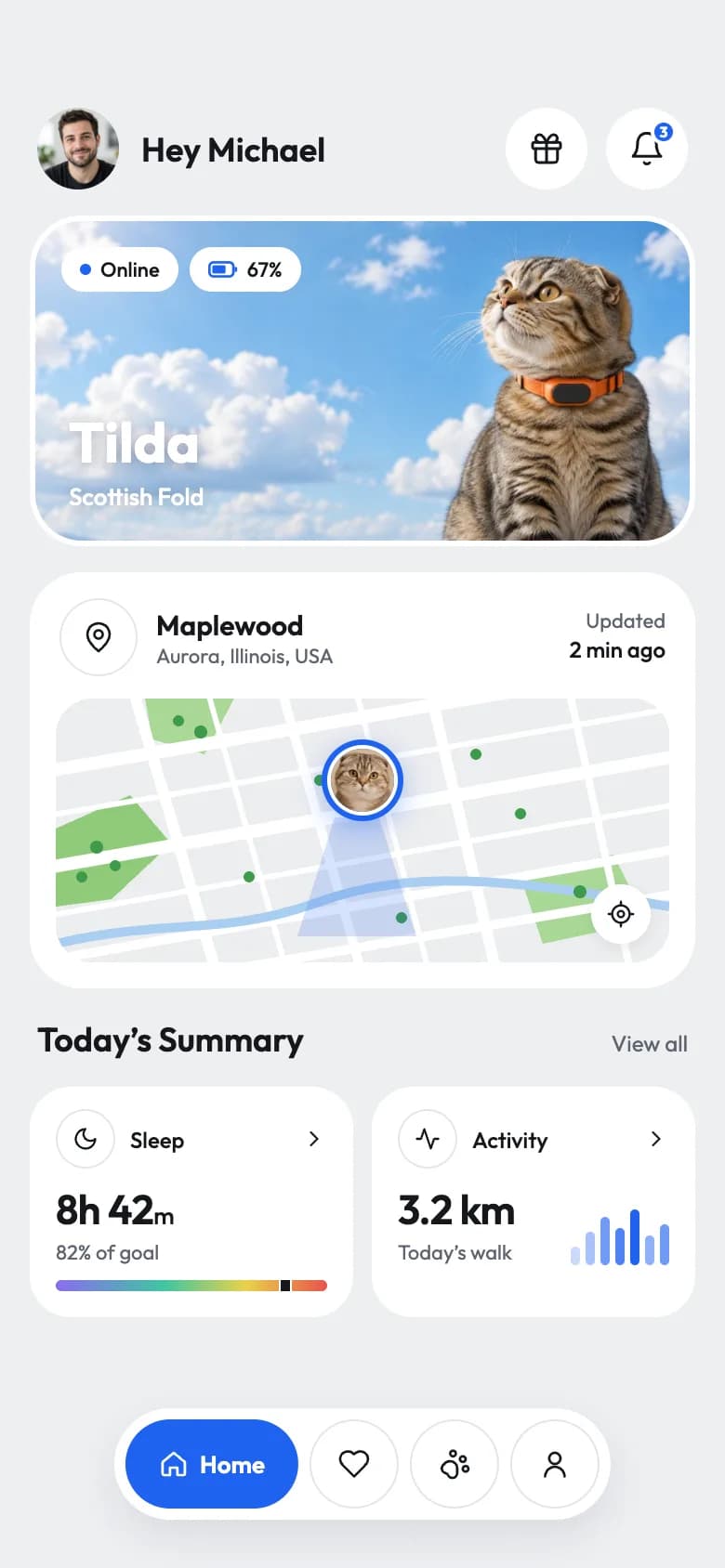
Pet home
A greeting, a pet hero with status chips, a location card with a map, and sleep and activity summaries.
Tracker ready
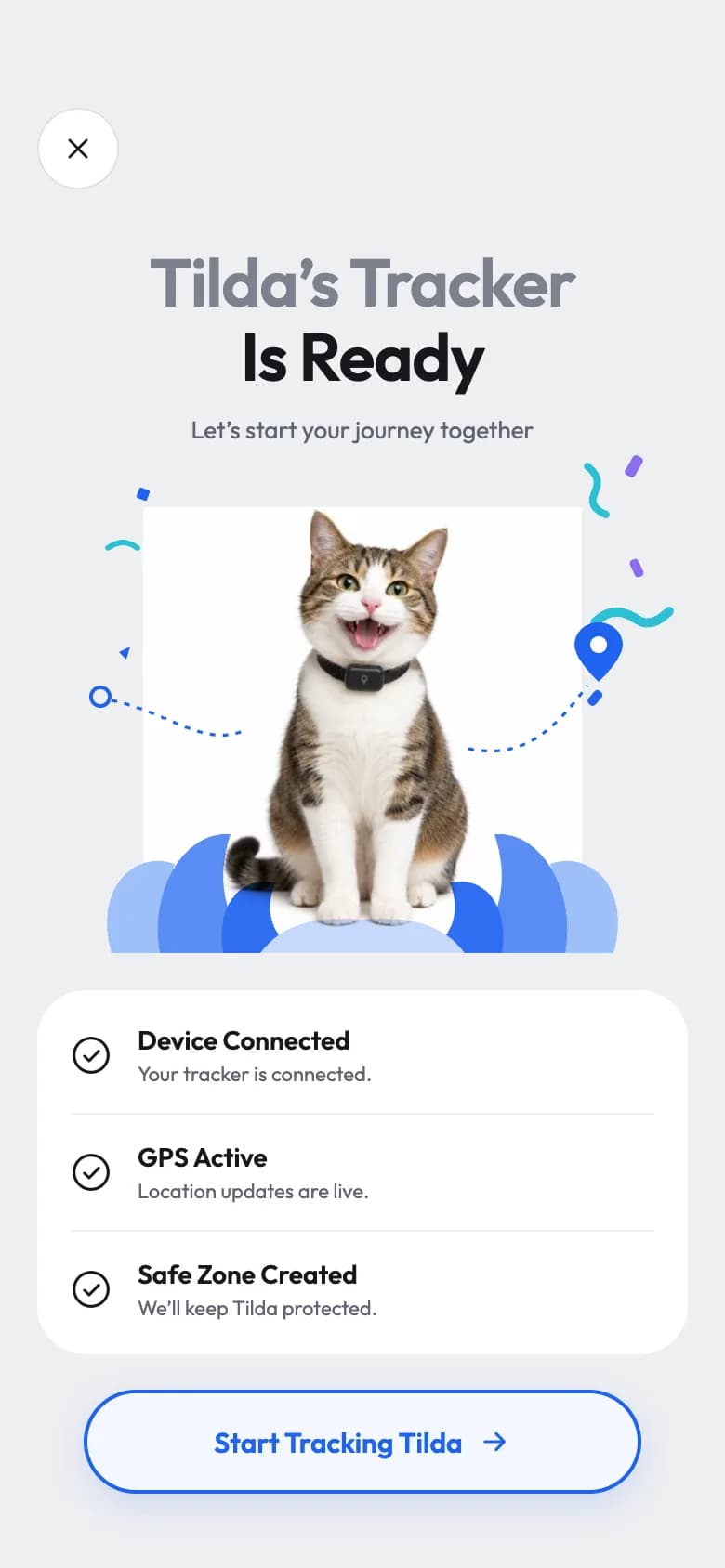
A celebratory illustration of a cat with blue foliage, a setup checklist and a Start Tracking button.
Live map
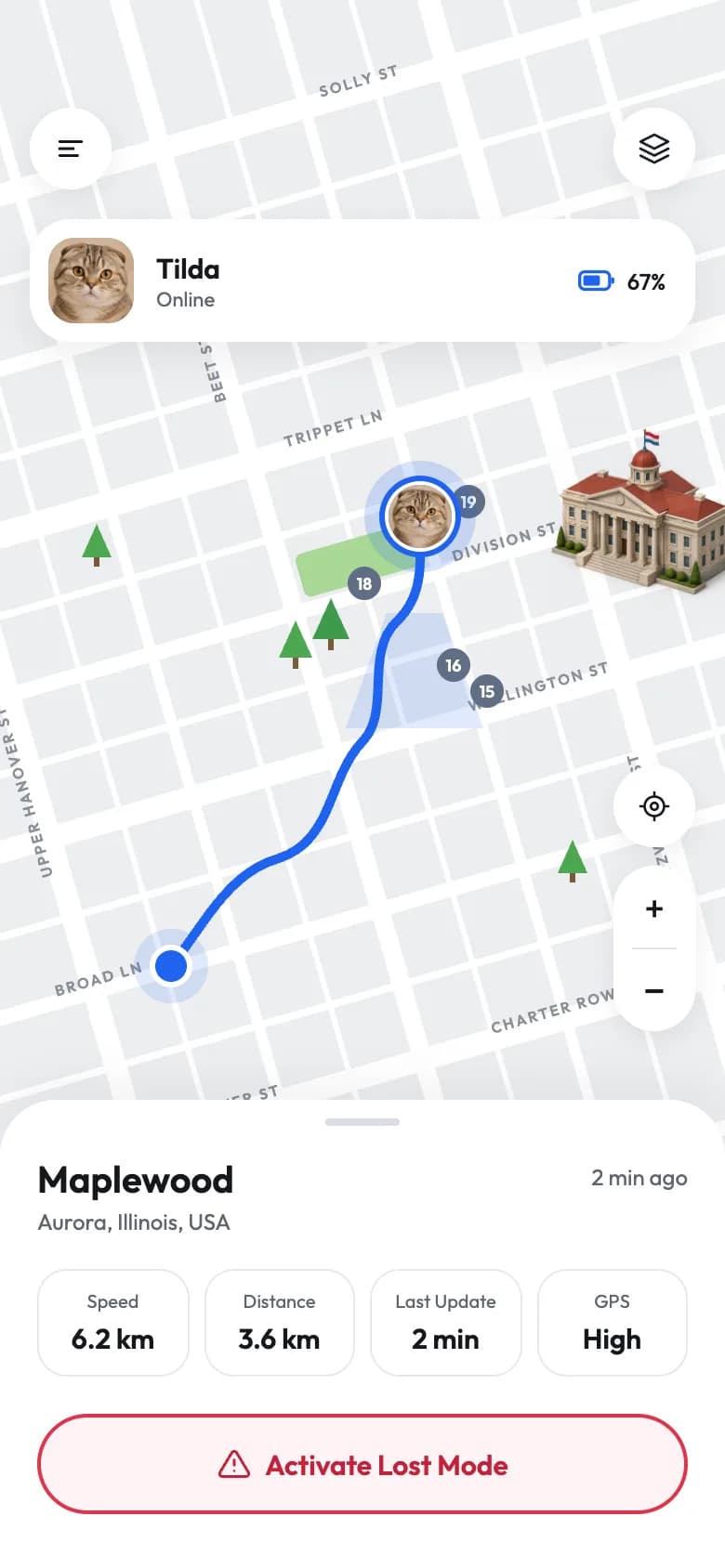
A street map with a route and pet marker, a pet card, map controls and a sheet of live stats.
Copy the Pet GPS Tracker kit
Use the artifact as a design brief, the skill to generate the UI with an AI agent, or the code to run it right away.
Design artifact
The full design: tokens, screens and source
# Pet GPS Tracker: design artifact
This pet GPS tracker app UI gives anxious owners quick reassurance. The home screen shows the pet, its battery and last location, and the map screen adds speed, distance and a clear Lost Mode action.
- Type: Pets mobile app UI
- Screens: 3
- Artboard: 390 × 844
- Target: Expo SDK 58, Expo Router, TypeScript, expo-image, expo-linear-gradient, react-native-svg
- Live page: https://developermill.com/app-designs/pet-gps-tracker-app-ui-design
## Design direction
Clean cool grey with a confident blue, a fluffy cat as the hero and playful blue foliage around the setup moment.
- Pet hero with online and battery chips
- Location card with SVG map preview
- Sleep and activity summary cards
- Live map with stats and Lost Mode action
## Foundations
### Colour
| Token | Hex |
| --- | --- |
| Tracker blue | `#1E63F0` |
| Sky | `#A8C3FA` |
| Fog | `#EEEFF2` |
| Ink | `#15171C` |
| Slate | `#5F6470` |
| Alert red | `#E0334A` |
### Typography
- Typefaces: Outfit
- Common sizes (px): 10, 11, 12, 13, 14, 15, 18, 22
### Shape and depth
- Common corner radii (px): 2, 3, 14, 16, 22, 28
- Shadows: `0 4px 12px rgba(20,24,40,.08)`, `0 4px 14px rgba(30,99,240,.35)`, `0 2px 8px rgba(0,0,0,.08)`, `0 8px 24px rgba(20,24,40,.10)`
## Screens
### 1. Pet home
A greeting, a pet hero with status chips, a location card with a map, and sleep and activity summaries.
Preview: https://developermill.com/app-designs/pet-gps-tracker-app-ui-design/home.webp
Copy on this screen:
- Hey Michael
- 3
- Online
- 67%
- Tilda
- Scottish Fold
- Maplewood
- Aurora, Illinois, USA
- Updated
- 2 min ago
- Today’s Summary
- View all
- Sleep
- 8h 42
- m
- 82% of goal
- Activity
- 3.2 km
- Today’s walk
- Home
### 2. Tracker ready
A celebratory illustration of a cat with blue foliage, a setup checklist and a Start Tracking button.
Preview: https://developermill.com/app-designs/pet-gps-tracker-app-ui-design/ready.webp
Copy on this screen:
- Tilda’s Tracker
- Is Ready
- Let’s start your journey together
- Device Connected
- Your tracker is connected.
- GPS Active
- Location updates are live.
- Safe Zone Created
- We’ll keep Tilda protected.
- Start Tracking Tilda
### 3. Live map
A street map with a route and pet marker, a pet card, map controls and a sheet of live stats.
Preview: https://developermill.com/app-designs/pet-gps-tracker-app-ui-design/map.webp
Copy on this screen:
- Tilda
- Online
- 67%
- +
- −
- Maplewood
- Aurora, Illinois, USA
- 2 min ago
- Speed
- 6.2 km
- Distance
- 3.6 km
- Last Update
- 2 min
- GPS
- High
- Activate Lost Mode
## Full source
The original artboards as HTML. Image URLs point at the hosted demo assets.
### Pet home (Main)
```html
<!doctype html>
<html lang="en">
<head>
<meta charset="utf-8">
<title>Home – Pet Tracker</title>
<script src="./support.js"></script>
</head>
<body>
<x-dc>
<helmet>
<link rel="preconnect" href="https://fonts.googleapis.com">
<link href="https://fonts.googleapis.com/css2?family=Outfit:wght@400;500;600;700&display=swap" rel="stylesheet">
<style>
body{margin:0}
a{color:#1E63F0}a:hover{color:#174FC4}
.hero{background-image:url(https://developermill.com/app-designs/pet-gps-tracker-app-ui-design/assets/4dc270de80.jpg);background-size:cover;background-position:72% 30%}
</style>
</helmet>
<div style="width: 390px; height: 844px; box-sizing: border-box; background: #EEEFF2; font-family: 'Outfit', system-ui, sans-serif; color: #15171C; position: relative; overflow: hidden; padding: 58px 16px 0; display: flex; flex-direction: column; gap: 14px">
<!-- Header -->
<header style="display: flex; align-items: center; justify-content: space-between; padding: 0 4px">
<div style="display: flex; align-items: center; gap: 12px">
<img src="https://developermill.com/app-designs/pet-gps-tracker-app-ui-design/assets/f2b3bce820.jpg" alt="Michael" style="width: 44px; height: 44px; border-radius: 50%; object-fit: cover">
<span style="font-size: 18px; font-weight: 600">Hey Michael</span>
</div>
<div style="display: flex; gap: 10px">
<button aria-label="Rewards" style="width: 44px; height: 44px; border-radius: 50%; border: 0; background: #FFFFFF; display: flex; align-items: center; justify-content: center; cursor: pointer">
<svg width="20" height="20" viewBox="0 0 24 24" fill="none" stroke="#15171C" stroke-width="1.8" stroke-linecap="round" stroke-linejoin="round" aria-hidden="true"><rect x="3" y="8" width="18" height="4" rx="1"></rect><path d="M12 8v13M19 12v7a2 2 0 0 1-2 2H7a2 2 0 0 1-2-2v-7M7.5 8a2.5 2.5 0 0 1 0-5C10 3 12 8 12 8s2-5 4.5-5a2.5 2.5 0 0 1 0 5"></path></svg>
</button>
<button aria-label="Notifications" style="width: 44px; height: 44px; border-radius: 50%; border: 0; background: #FFFFFF; display: flex; align-items: center; justify-content: center; cursor: pointer; position: relative">
<svg width="20" height="20" viewBox="0 0 24 24" fill="none" stroke="#15171C" stroke-width="1.8" stroke-linecap="round" stroke-linejoin="round" aria-hidden="true"><path d="M6 8a6 6 0 0 1 12 0c0 7 3 9 3 9H3s3-2 3-9"></path><path d="M10.3 21a1.94 1.94 0 0 0 3.4 0"></path></svg>
<span style="position: absolute; top: 6px; right: 6px; width: 14px; height: 14px; border-radius: 50%; background: #1E63F0; border: 2px solid #FFFFFF; color: #FFFFFF; font-size: 8px; font-weight: 700; display: flex; align-items: center; justify-content: center; box-sizing: border-box">3</span>
</button>
</div>
</header>
<!-- Pet hero card -->
<section class="hero" style="height: 178px; border-radius: 28px; position: relative; overflow: hidden; border: 3px solid #FFFFFF; box-sizing: border-box">
<div style="position: absolute; top: 14px; left: 14px; display: flex; gap: 6px">
<span style="display: flex; align-items: center; gap: 5px; background: #FFFFFF; border-radius: 999px; padding: 5px 10px; font-size: 11px; font-weight: 500"><span style="width: 6px; height: 6px; border-radius: 50%; background: #1E63F0"></span>Online</span>
<span style="display: flex; align-items: center; gap: 5px; background: #FFFFFF; border-radius: 999px; padding: 5px 10px; font-size: 11px; font-weight: 500">
<svg width="16" height="10" viewBox="0 0 18 10" aria-hidden="true"><rect x="0.75" y="0.75" width="14.5" height="8.5" rx="2.5" fill="none" stroke="#1E63F0" stroke-width="1.5"></rect><rect x="2.5" y="2.5" width="8" height="5" rx="1" fill="#1E63F0"></rect><rect x="16" y="3.5" width="1.5" height="3" rx=".75" fill="#1E63F0"></rect></svg>67%</span>
</div>
<div style="position: absolute; left: 18px; bottom: 16px; color: #FFFFFF; text-shadow: 0 1px 8px rgba(20,40,80,.35)">
<h1 style="margin: 0; font-size: 30px; font-weight: 700; line-height: 1">Tilda</h1>
<p style="margin: 6px 0 0; font-size: 13px; font-weight: 500">Scottish Fold</p>
</div>
</section>
<!-- Location card -->
<section style="background: #FFFFFF; border-radius: 28px; padding: 14px; display: flex; flex-direction: column; gap: 12px">
<div style="display: flex; align-items: center; justify-content: space-between; padding: 0 2px">
<div style="display: flex; align-items: center; gap: 10px">
<span style="width: 40px; height: 40px; border-radius: 50%; border: 1px solid #E3E5EA; display: flex; align-items: center; justify-content: center">
<svg width="18" height="18" viewBox="0 0 24 24" fill="none" stroke="#15171C" stroke-width="1.8" stroke-linecap="round" stroke-linejoin="round" aria-hidden="true"><path d="M20 10c0 6-8 12-8 12s-8-6-8-12a8 8 0 0 1 16 0Z"></path><circle cx="12" cy="10" r="3"></circle></svg>
</span>
<div>
<div style="font-size: 15px; font-weight: 600">Maplewood</div>
<div style="font-size: 11px; color: #5F6470">Aurora, Illinois, USA</div>
</div>
</div>
<div style="text-align: right; font-size: 11px; color: #5F6470; line-height: 1.4">Updated<br><span style="color: #15171C; font-weight: 500; font-size: 12px">2 min ago</span></div>
</div>
<a href="Map.dc.html" aria-label="Open live map" style="display: block; height: 142px; border-radius: 20px; overflow: hidden; position: relative; background: #ECEDEF">
<svg viewBox="0 0 330 142" width="100%" height="100%" preserveAspectRatio="xMidYMid slice" aria-hidden="true">
<rect width="330" height="142" fill="#ECEDEF"></rect>
<path d="M0 70 L40 52 L62 78 L30 108 L0 112 Z" fill="#8FCB7A"></path>
<path d="M48 0 L96 0 L80 30 L52 22 Z" fill="#A9D896"></path>
<path d="M250 96 L300 84 L318 120 L262 132 Z" fill="#A9D896"></path>
<g stroke="#FFFFFF" stroke-linecap="round" fill="none">
<path d="M-10 40 L340 -20" stroke-width="7"></path>
<path d="M-10 92 L340 30" stroke-width="7"></path>
<path d="M-10 142 L340 80" stroke-width="5"></path>
<path d="M10 160 L340 104" stroke-width="5"></path>
<path d="M40 -10 L90 160" stroke-width="6"></path>
<path d="M120 -10 L168 160" stroke-width="5"></path>
<path d="M200 -10 L240 160" stroke-width="6"></path>
<path d="M275 -10 L312 160" stroke-width="4"></path>
<path d="M-10 64 L340 4" stroke-width="3"></path>
<path d="M-10 118 L340 56" stroke-width="3"></path>
<path d="M160 -10 L204 160" stroke-width="3"></path>
<path d="M80 -10 L128 160" stroke-width="3"></path>
</g>
<path d="M0 132 C60 118 90 128 140 110 S240 96 330 112" stroke="#A9CEF2" stroke-width="5" fill="none"></path>
<g fill="#3E9A4B">
<circle cx="22" cy="80" r="3.5"></circle><circle cx="32" cy="90" r="3"></circle><circle cx="14" cy="96" r="3"></circle>
<circle cx="66" cy="12" r="3"></circle><circle cx="78" cy="18" r="3.5"></circle>
<circle cx="282" cy="104" r="3.5"></circle><circle cx="294" cy="114" r="3"></circle>
<circle cx="142" cy="44" r="3"></circle><circle cx="226" cy="30" r="3"></circle><circle cx="186" cy="118" r="3"></circle><circle cx="104" cy="96" r="3"></circle><circle cx="250" cy="62" r="3"></circle>
</g>
<path d="M150 64 L174 64 L194 128 L130 128 Z" fill="#1E63F0" opacity=".18"></path>
</svg>
<span style="position: absolute; left: 50%; top: 22px; transform: translateX(-50%); width: 44px; height: 44px; border-radius: 50%; background: #1E63F0; padding: 3px; box-sizing: border-box; box-shadow: 0 4px 14px rgba(30,99,240,.35)">
<img src="https://developermill.com/app-designs/pet-gps-tracker-app-ui-design/assets/63ae0dfa26.jpg" alt="" style="width: 100%; height: 100%; border-radius: 50%; object-fit: cover; border: 2px solid #FFFFFF; box-sizing: border-box; display: block">
</span>
<span style="position: absolute; right: 10px; bottom: 10px; width: 32px; height: 32px; border-radius: 50%; background: #FFFFFF; display: flex; align-items: center; justify-content: center; box-shadow: 0 2px 8px rgba(0,0,0,.08)">
<svg width="16" height="16" viewBox="0 0 24 24" fill="none" stroke="#15171C" stroke-width="1.8" stroke-linecap="round" aria-hidden="true"><circle cx="12" cy="12" r="7"></circle><circle cx="12" cy="12" r="2.5"></circle><path d="M12 2v3M12 19v3M2 12h3M19 12h3"></path></svg>
</span>
</a>
</section>
<!-- Summary -->
<div style="display: flex; align-items: baseline; justify-content: space-between; padding: 2px 4px 0">
<h2 style="margin: 0; font-size: 18px; font-weight: 600">Today’s Summary</h2>
<a href="#" style="font-size: 12px; color: #5F6470; text-decoration: none">View all</a>
</div>
<div style="display: grid; grid-template-columns: repeat(2, minmax(0, 1fr)); gap: 10px">
<article style="background: #FFFFFF; border-radius: 22px; padding: 12px 14px 14px; display: flex; flex-direction: column; gap: 8px">
<div style="display: flex; align-items: center; justify-content: space-between">
<span style="display: flex; align-items: center; gap: 8px; font-size: 12px; font-weight: 500">
<span style="width: 30px; height: 30px; border-radius: 50%; border: 1px solid #E3E5EA; display: flex; align-items: center; justify-content: center"><svg width="14" height="14" viewBox="0 0 24 24" fill="none" stroke="#15171C" stroke-width="2" stroke-linecap="round" stroke-linejoin="round" aria-hidden="true"><path d="M12 3a6 6 0 0 0 9 9 9 9 0 1 1-9-9Z"></path></svg></span>Sleep</span>
<svg width="14" height="14" viewBox="0 0 24 24" fill="none" stroke="#15171C" stroke-width="2" stroke-linecap="round" aria-hidden="true"><path d="m9 18 6-6-6-6"></path></svg>
</div>
<div style="font-size: 22px; font-weight: 600; letter-spacing: -.3px">8h 42<span style="font-size: 13px; font-weight: 500">m</span></div>
<div style="font-size: 11px; color: #5F6470; margin-top: -6px">82% of goal</div>
<div style="position: relative; height: 6px; border-radius: 999px; background: linear-gradient(90deg, #8B6CF0, #3FC6A0 40%, #E9D24A 70%, #E8524A)">
<span style="position: absolute; left: 82%; top: -4px; width: 4px; height: 14px; border-radius: 2px; background: #15171C; border: 1.5px solid #FFFFFF"></span>
</div>
</article>
<article style="background: #FFFFFF; border-radius: 22px; padding: 12px 14px 14px; display: flex; flex-direction: column; gap: 8px">
<div style="display: flex; align-items: center; justify-content: space-between">
<span style="display: flex; align-items: center; gap: 8px; font-size: 12px; font-weight: 500">
<span style="width: 30px; height: 30px; border-radius: 50%; border: 1px solid #E3E5EA; display: flex; align-items: center; justify-content: center"><svg width="14" height="14" viewBox="0 0 24 24" fill="none" stroke="#15171C" stroke-width="2" stroke-linecap="round" stroke-linejoin="round" aria-hidden="true"><path d="M22 12h-4l-3 9L9 3l-3 9H2"></path></svg></span>Activity</span>
<svg width="14" height="14" viewBox="0 0 24 24" fill="none" stroke="#15171C" stroke-width="2" stroke-linecap="round" aria-hidden="true"><path d="m9 18 6-6-6-6"></path></svg>
</div>
<div style="display: flex; align-items: flex-end; justify-content: space-between">
<div>
<div style="font-size: 22px; font-weight: 600; letter-spacing: -.3px">3.2 km</div>
<div style="font-size: 11px; color: #5F6470; margin-top: 2px">Today’s walk</div>
</div>
<div style="display: flex; align-items: flex-end; gap: 3px; height: 30px" aria-hidden="true">
<span style="width: 5px; height: 10px; border-radius: 3px; background: #C9D9FB"></span>
<span style="width: 5px; height: 18px; border-radius: 3px; background: #A8C3FA"></span>
<span style="width: 5px; height: 26px; border-radius: 3px; background: #6F9BF6"></span>
<span style="width: 5px; height: 20px; border-radius: 3px; background: #4D84F4"></span>
<span style="width: 5px; height: 30px; border-radius: 3px; background: #1E63F0"></span>
<span style="width: 5px; height: 16px; border-radius: 3px; background: #8EB1F8"></span>
<span style="width: 5px; height: 22px; border-radius: 3px; background: #6F9BF6"></span>
</div>
</div>
</article>
</div>
<!-- Bottom nav -->
<nav aria-label="Main" style="position: absolute; left: 50%; bottom: 26px; transform: translateX(-50%); background: #FFFFFF; border-radius: 999px; padding: 6px; display: flex; align-items: center; gap: 6px; box-shadow: 0 8px 24px rgba(20,24,40,.10)">
<a href="Main.dc.html" style="height: 48px; padding: 0 18px; border-radius: 999px; background: #1E63F0; color: #FFFFFF; display: flex; align-items: center; gap: 6px; font-size: 13px; font-weight: 600; text-decoration: none">
<svg width="16" height="16" viewBox="0 0 24 24" fill="none" stroke="#FFFFFF" stroke-width="2" stroke-linecap="round" stroke-linejoin="round" aria-hidden="true"><path d="M3 10.5 12 3l9 7.5V20a1 1 0 0 1-1 1h-5v-6H9v6H4a1 1 0 0 1-1-1Z"></path></svg>Home</a>
<button aria-label="Health" style="width: 48px; height: 48px; border-radius: 50%; border: 1px solid #E3E5EA; background: #FFFFFF; display: flex; align-items: center; justify-content: center; cursor: pointer"><svg width="18" height="18" viewBox="0 0 24 24" fill="none" stroke="#15171C" stroke-width="1.8" stroke-linecap="round" stroke-linejoin="round" aria-hidden="true"><path d="M19 14c1.5-1.5 3-3.2 3-5.5A5.5 5.5 0 0 0 16.5 3c-1.8 0-3 .5-4.5 2-1.5-1.5-2.7-2-4.5-2A5.5 5.5 0 0 0 2 8.5c0 2.3 1.5 4 3 5.5l7 7Z"></path></svg></button>
<button aria-label="Pets" style="width: 48px; height: 48px; border-radius: 50%; border: 1px solid #E3E5EA; background: #FFFFFF; display: flex; align-items: center; justify-content: center; cursor: pointer"><svg width="18" height="18" viewBox="0 0 24 24" fill="none" stroke="#15171C" stroke-width="1.8" stroke-linecap="round" stroke-linejoin="round" aria-hidden="true"><circle cx="11" cy="4.5" r="2"></circle><circle cx="18" cy="8.5" r="2"></circle><circle cx="20" cy="15.5" r="2"></circle><path d="M9 10a5 5 0 0 1 5 5v3.5a3.5 3.5 0 0 1-6.8 1.2 1.4 1.4 0 0 0-1.3-1A3.5 3.5 0 0 1 4.5 12.3 5 5 0 0 1 9 10Z"></path></svg></button>
<button aria-label="Profile" style="width: 48px; height: 48px; border-radius: 50%; border: 1px solid #E3E5EA; background: #FFFFFF; display: flex; align-items: center; justify-content: center; cursor: pointer"><svg width="18" height="18" viewBox="0 0 24 24" fill="none" stroke="#15171C" stroke-width="1.8" stroke-linecap="round" stroke-linejoin="round" aria-hidden="true"><circle cx="12" cy="8" r="4"></circle><path d="M5 21a7 7 0 0 1 14 0"></path></svg></button>
</nav>
</div>
</x-dc>
<script type="text/x-dc" data-dc-script data-props='{"$preview":{"width":390,"height":844}}'>
class Component extends DCLogic {
renderVals() {
return {};
}
}
</script>
</body>
</html>
```
### Tracker ready (Ready)
```html
<!doctype html>
<html lang="en">
<head>
<meta charset="utf-8">
<title>Tracker Ready – Pet Tracker</title>
<script src="./support.js"></script>
</head>
<body>
<x-dc>
<helmet>
<link rel="preconnect" href="https://fonts.googleapis.com">
<link href="https://fonts.googleapis.com/css2?family=Outfit:wght@400;500;600;700&display=swap" rel="stylesheet">
<style>
body{margin:0}
a{color:#1E63F0}a:hover{color:#174FC4}
</style>
</helmet>
<div style="width: 390px; height: 844px; box-sizing: border-box; background: #EDEEF1; font-family: 'Outfit', system-ui, sans-serif; color: #15171C; position: relative; overflow: hidden; padding: 58px 20px 0; display: flex; flex-direction: column; align-items: center">
<a href="Main.dc.html" aria-label="Close" style="align-self: flex-start; width: 44px; height: 44px; border-radius: 50%; background: #FFFFFF; border: 1px solid #DFE1E6; box-sizing: border-box; display: flex; align-items: center; justify-content: center">
<svg width="18" height="18" viewBox="0 0 24 24" fill="none" stroke="#15171C" stroke-width="2" stroke-linecap="round" aria-hidden="true"><path d="M18 6 6 18M6 6l12 12"></path></svg>
</a>
<h1 style="margin: 30px 0 0; text-align: center; font-size: 36px; line-height: 1.12; font-weight: 600; letter-spacing: -.6px"><span style="color: #7C818C">Tilda’s Tracker</span><br>Is Ready</h1>
<p style="margin: 10px 0 0; font-size: 13px; color: #5F6470">Let’s start your journey together</p>
<!-- Illustration -->
<div style="position: relative; width: 350px; height: 272px; margin-top: 4px">
<svg viewBox="0 0 350 272" width="350" height="272" style="position: absolute; inset: 0" aria-hidden="true">
<!-- confetti -->
<path d="M296 8 q8 6 4 14 q-4 8 6 12" stroke="#2BC0D4" stroke-width="4" fill="none" stroke-linecap="round"></path>
<rect x="318" y="2" width="6" height="12" rx="2" fill="#8C6CF0" transform="rotate(30 321 8)"></rect>
<path d="M300 92 q10 -10 22 -2 q8 6 18 -4" stroke="#2BC0D4" stroke-width="5" fill="none" stroke-linecap="round"></path>
<rect x="320" y="58" width="5" height="10" rx="2" fill="#8C6CF0" transform="rotate(-25 322 63)"></rect>
<path d="M38 52 q8 -6 16 0" stroke="#2BC0D4" stroke-width="3" fill="none" stroke-linecap="round"></path>
<rect x="54" y="20" width="6" height="6" rx="1" fill="#1E63F0" transform="rotate(20 57 23)"></rect>
<path d="M44 108 l6 -3 l-2 7 z" fill="#1E63F0"></path>
<rect x="298" y="128" width="5" height="9" rx="2" fill="#1E63F0" transform="rotate(40 300 132)"></rect>
<!-- dotted paths -->
<circle cx="34" cy="132" r="5" fill="none" stroke="#1E63F0" stroke-width="2"></circle>
<path d="M40 134 C70 140 90 160 112 150" stroke="#1E63F0" stroke-width="1.6" stroke-dasharray="3 4" fill="none"></path>
<path d="M232 160 C262 166 278 150 296 126" stroke="#1E63F0" stroke-width="1.6" stroke-dasharray="3 4" fill="none"></path>
<path d="M302 92 c-8 0 -13 6 -13 12 c0 8 13 20 13 20 s13 -12 13 -20 c0 -6 -5 -12 -13 -12 z" fill="#1E63F0"></path>
<circle cx="302" cy="104" r="4.5" fill="#FFFFFF"></circle>
<!-- blue foliage -->
<path d="M40 270 C30 236 52 214 74 222 C70 240 72 256 86 270 Z" fill="#9EC0FA"></path>
<path d="M66 270 C60 238 78 204 104 206 C96 230 100 252 118 270 Z" fill="#5A8EF5"></path>
<path d="M100 270 C96 246 108 228 128 232 C122 248 126 260 140 270 Z" fill="#2F6EF2"></path>
<path d="M310 270 C320 236 298 214 276 222 C280 240 278 256 264 270 Z" fill="#9EC0FA"></path>
<path d="M284 270 C290 238 272 204 246 206 C254 230 250 252 232 270 Z" fill="#5A8EF5"></path>
<path d="M250 270 C254 246 242 228 222 232 C228 248 224 260 210 270 Z" fill="#2F6EF2"></path>
<path d="M120 270 C132 254 150 250 175 252 C200 250 218 254 230 270 Z" fill="#C7DAFD"></path>
</svg>
<img src="https://developermill.com/app-designs/pet-gps-tracker-app-ui-design/assets/78dff0e5db.jpg" alt="Tilda wearing her new tracker" style="position: absolute; left: 50%; bottom: 6px; transform: translateX(-50%); width: 236px; height: 236px; object-fit: contain; mix-blend-mode: multiply">
</div>
<!-- Checklist -->
<ul style="list-style: none; margin: 18px 0 0; padding: 4px 18px; width: 100%; box-sizing: border-box; background: #FFFFFF; border-radius: 26px">
<li style="display: flex; align-items: center; gap: 14px; padding: 14px 0; border-bottom: 1px solid #ECEEF2">
<svg width="22" height="22" viewBox="0 0 24 24" fill="none" stroke="#15171C" stroke-width="1.7" stroke-linecap="round" stroke-linejoin="round" aria-hidden="true"><circle cx="12" cy="12" r="10"></circle><path d="m8 12.5 2.8 2.8L16.5 9.5"></path></svg>
<div><div style="font-size: 14px; font-weight: 600">Device Connected</div><div style="font-size: 11px; color: #5F6470; margin-top: 2px">Your tracker is connected.</div></div>
</li>
<li style="display: flex; align-items: center; gap: 14px; padding: 14px 0; border-bottom: 1px solid #ECEEF2">
<svg width="22" height="22" viewBox="0 0 24 24" fill="none" stroke="#15171C" stroke-width="1.7" stroke-linecap="round" stroke-linejoin="round" aria-hidden="true"><circle cx="12" cy="12" r="10"></circle><path d="m8 12.5 2.8 2.8L16.5 9.5"></path></svg>
<div><div style="font-size: 14px; font-weight: 600">GPS Active</div><div style="font-size: 11px; color: #5F6470; margin-top: 2px">Location updates are live.</div></div>
</li>
<li style="display: flex; align-items: center; gap: 14px; padding: 14px 0">
<svg width="22" height="22" viewBox="0 0 24 24" fill="none" stroke="#15171C" stroke-width="1.7" stroke-linecap="round" stroke-linejoin="round" aria-hidden="true"><circle cx="12" cy="12" r="10"></circle><path d="m8 12.5 2.8 2.8L16.5 9.5"></path></svg>
<div><div style="font-size: 14px; font-weight: 600">Safe Zone Created</div><div style="font-size: 11px; color: #5F6470; margin-top: 2px">We’ll keep Tilda protected.</div></div>
</li>
</ul>
<a href="Main.dc.html" style="position: absolute; left: 50%; bottom: 40px; transform: translateX(-50%); width: 300px; height: 56px; box-sizing: border-box; border-radius: 999px; border: 2px solid #1E63F0; background: #F4F7FF; color: #1E63F0; display: flex; align-items: center; justify-content: center; gap: 8px; font-size: 15px; font-weight: 600; text-decoration: none; box-shadow: 0 6px 18px rgba(30,99,240,.15)">
Start Tracking Tilda
<svg width="18" height="18" viewBox="0 0 24 24" fill="none" stroke="#1E63F0" stroke-width="2" stroke-linecap="round" stroke-linejoin="round" aria-hidden="true"><path d="M5 12h14M13 6l6 6-6 6"></path></svg>
</a>
</div>
</x-dc>
<script type="text/x-dc" data-dc-script data-props='{"$preview":{"width":390,"height":844}}'>
class Component extends DCLogic {
renderVals() {
return {};
}
}
</script>
</body>
</html>
```
### Live map (Map)
```html
<!doctype html>
<html lang="en">
<head>
<meta charset="utf-8">
<title>Live Map – Pet Tracker</title>
<script src="./support.js"></script>
</head>
<body>
<x-dc>
<helmet>
<link rel="preconnect" href="https://fonts.googleapis.com">
<link href="https://fonts.googleapis.com/css2?family=Outfit:wght@400;500;600;700&display=swap" rel="stylesheet">
<style>
body{margin:0}
a{color:#1E63F0}a:hover{color:#174FC4}
</style>
</helmet>
<div style="width: 390px; height: 844px; box-sizing: border-box; background: #ECEDEF; font-family: 'Outfit', system-ui, sans-serif; color: #15171C; position: relative; overflow: hidden">
<!-- Map -->
<svg viewBox="0 0 390 844" width="390" height="844" style="position: absolute; inset: 0" aria-hidden="true">
<rect width="390" height="844" fill="#ECEDEF"></rect>
<g transform="rotate(-16 195 330)">
<g stroke="#FFFFFF" stroke-linecap="round" fill="none">
<path d="M-120 60 H520" stroke-width="12"></path>
<path d="M-120 150 H520" stroke-width="8"></path>
<path d="M-120 236 H520" stroke-width="14"></path>
<path d="M-120 320 H520" stroke-width="8"></path>
<path d="M-120 400 H520" stroke-width="12"></path>
<path d="M-120 486 H520" stroke-width="8"></path>
<path d="M-120 570 H520" stroke-width="12"></path>
<path d="M-120 650 H520" stroke-width="8"></path>
<path d="M-120 105 H520" stroke-width="4"></path>
<path d="M-120 196 H520" stroke-width="4"></path>
<path d="M-120 278 H520" stroke-width="4"></path>
<path d="M-120 360 H520" stroke-width="4"></path>
<path d="M-120 444 H520" stroke-width="4"></path>
<path d="M-120 528 H520" stroke-width="4"></path>
<path d="M0 -100 V760" stroke-width="12"></path>
<path d="M80 -100 V760" stroke-width="6"></path>
<path d="M160 -100 V760" stroke-width="10"></path>
<path d="M240 -100 V760" stroke-width="6"></path>
<path d="M320 -100 V760" stroke-width="12"></path>
<path d="M400 -100 V760" stroke-width="6"></path>
<path d="M40 -100 V760" stroke-width="3"></path>
<path d="M120 -100 V760" stroke-width="3"></path>
<path d="M200 -100 V760" stroke-width="3"></path>
<path d="M280 -100 V760" stroke-width="3"></path>
<path d="M360 -100 V760" stroke-width="3"></path>
</g>
<g fill="#8A8F99" font-family="Outfit, system-ui, sans-serif" font-size="8" font-weight="600" letter-spacing="1.2">
<text x="250" y="57">SOLLY ST</text>
<text x="180" y="233">TRIPPET LN</text>
<text x="250" y="317">DIVISION ST</text>
<text x="236" y="397">WELLINGTON ST</text>
<text x="20" y="567">HANOVER ST</text>
<text x="200" y="567">CHARTER ROW</text>
<text x="-20" y="483">BROAD LN</text>
<text transform="translate(-4 420) rotate(-90)">UPPER HANOVER ST</text>
<text transform="translate(156 200) rotate(-90)">BEET ST</text>
<text transform="translate(316 520) rotate(-90)">FITZWILLIAM ST</text>
</g>
<rect x="168" y="290" width="64" height="24" rx="4" fill="#A9D896"></rect>
</g>
<!-- route -->
<path d="M92 520 C110 498 122 470 150 462 C180 452 176 418 196 398 C210 382 196 350 214 334 C224 324 226 312 226 300" stroke="#1E63F0" stroke-width="5" fill="none" stroke-linecap="round" stroke-linejoin="round"></path>
<path d="M208 330 L238 330 L260 392 L186 392 Z" fill="#1E63F0" opacity=".14"></path>
<circle cx="92" cy="520" r="20" fill="#1E63F0" opacity=".14"></circle>
<circle cx="92" cy="520" r="10" fill="#1E63F0" stroke="#FFFFFF" stroke-width="3"></circle>
<!-- trees -->
<g>
<path d="M150 354 l9 -20 l9 20 z" fill="#4CA84F"></path><rect x="157.5" y="354" width="3" height="6" fill="#7A5A3A"></rect>
<path d="M168 344 l10 -22 l10 22 z" fill="#3E9A4B"></path><rect x="176.5" y="344" width="3" height="6" fill="#7A5A3A"></rect>
<path d="M44 300 l8 -18 l8 18 z" fill="#4CA84F"></path><rect x="50.5" y="300" width="3" height="5" fill="#7A5A3A"></rect>
<path d="M300 470 l8 -18 l8 18 z" fill="#4CA84F"></path><rect x="306.5" y="470" width="3" height="5" fill="#7A5A3A"></rect>
</g>
<!-- numbered pins -->
<g font-family="Outfit, system-ui, sans-serif" font-size="9" font-weight="600" fill="#FFFFFF" text-anchor="middle">
<circle cx="196" cy="314" r="9" fill="#5E6E84"></circle><text x="196" y="317.5">18</text>
<circle cx="244" cy="358" r="9" fill="#5E6E84"></circle><text x="244" y="361.5">16</text>
<circle cx="262" cy="372" r="9" fill="#5E6E84"></circle><text x="262" y="375.5">15</text>
<circle cx="252" cy="270" r="9" fill="#5E6E84"></circle><text x="252" y="273.5">19</text>
</g>
</svg>
<img src="https://developermill.com/app-designs/pet-gps-tracker-app-ui-design/assets/c98a228f1e.jpg" alt="" style="position: absolute; right: -8px; top: 226px; width: 104px; height: 104px; object-fit: contain; mix-blend-mode: multiply">
<!-- Pet marker -->
<span style="position: absolute; left: 204px; top: 256px; width: 44px; height: 44px; border-radius: 50%; background: #1E63F0; padding: 3px; box-sizing: border-box; box-shadow: 0 0 0 8px rgba(30,99,240,.18)">
<img src="https://developermill.com/app-designs/pet-gps-tracker-app-ui-design/assets/63ae0dfa26.jpg" alt="Tilda’s location" style="width: 100%; height: 100%; border-radius: 50%; object-fit: cover; border: 2px solid #FFFFFF; box-sizing: border-box; display: block">
</span>
<!-- Top controls -->
<a href="Main.dc.html" aria-label="Menu" style="position: absolute; left: 16px; top: 58px; width: 44px; height: 44px; border-radius: 50%; background: #FFFFFF; display: flex; align-items: center; justify-content: center; box-shadow: 0 4px 12px rgba(20,24,40,.08)">
<svg width="18" height="18" viewBox="0 0 24 24" fill="none" stroke="#15171C" stroke-width="2" stroke-linecap="round" aria-hidden="true"><path d="M4 7h16M4 12h10M4 17h13"></path></svg>
</a>
<button aria-label="Map layers" style="position: absolute; right: 16px; top: 58px; width: 44px; height: 44px; border-radius: 50%; border: 0; background: #FFFFFF; display: flex; align-items: center; justify-content: center; box-shadow: 0 4px 12px rgba(20,24,40,.08); cursor: pointer">
<svg width="18" height="18" viewBox="0 0 24 24" fill="none" stroke="#15171C" stroke-width="1.8" stroke-linecap="round" stroke-linejoin="round" aria-hidden="true"><path d="m12 2 10 5-10 5L2 7Z"></path><path d="m2 12 10 5 10-5M2 17l10 5 10-5"></path></svg>
</button>
<!-- Pet card -->
<section style="position: absolute; left: 16px; top: 118px; width: 358px; box-sizing: border-box; background: #FFFFFF; border-radius: 22px; padding: 10px 16px 10px 10px; display: flex; align-items: center; justify-content: space-between; box-shadow: 0 6px 18px rgba(20,24,40,.08)">
<div style="display: flex; align-items: center; gap: 12px">
<img src="https://developermill.com/app-designs/pet-gps-tracker-app-ui-design/assets/63ae0dfa26.jpg" alt="Tilda" style="width: 46px; height: 46px; border-radius: 14px; object-fit: cover">
<div>
<div style="font-size: 15px; font-weight: 600">Tilda</div>
<div style="font-size: 11px; color: #5F6470">Online</div>
</div>
</div>
<span style="display: flex; align-items: center; gap: 6px; font-size: 12px; font-weight: 500">
<svg width="20" height="12" viewBox="0 0 18 10" aria-hidden="true"><rect x="0.75" y="0.75" width="14.5" height="8.5" rx="2.5" fill="none" stroke="#1E63F0" stroke-width="1.5"></rect><rect x="2.5" y="2.5" width="8" height="5" rx="1" fill="#1E63F0"></rect><rect x="16" y="3.5" width="1.5" height="3" rx=".75" fill="#1E63F0"></rect></svg>67%</span>
</section>
<!-- Right map controls -->
<button aria-label="Center on Tilda" style="position: absolute; right: 16px; top: 412px; width: 44px; height: 44px; border-radius: 50%; border: 0; background: #FFFFFF; display: flex; align-items: center; justify-content: center; box-shadow: 0 4px 12px rgba(20,24,40,.08); cursor: pointer">
<svg width="18" height="18" viewBox="0 0 24 24" fill="none" stroke="#15171C" stroke-width="1.8" stroke-linecap="round" aria-hidden="true"><circle cx="12" cy="12" r="7"></circle><circle cx="12" cy="12" r="2.5"></circle><path d="M12 2v3M12 19v3M2 12h3M19 12h3"></path></svg>
</button>
<div style="position: absolute; right: 16px; top: 466px; width: 44px; background: #FFFFFF; border-radius: 22px; display: flex; flex-direction: column; box-shadow: 0 4px 12px rgba(20,24,40,.08)">
<button aria-label="Zoom in" style="height: 44px; border: 0; background: transparent; font-size: 20px; color: #15171C; cursor: pointer; font-family: inherit">+</button>
<span style="height: 1px; margin: 0 10px; background: #E3E5EA"></span>
<button aria-label="Zoom out" style="height: 44px; border: 0; background: transparent; font-size: 22px; color: #15171C; cursor: pointer; font-family: inherit">−</button>
</div>
<!-- Bottom sheet -->
<section style="position: absolute; left: 0; right: 0; bottom: 0; height: 252px; background: #FFFFFF; border-radius: 30px 30px 0 0; padding: 10px 20px 0; box-sizing: border-box; box-shadow: 0 -8px 24px rgba(20,24,40,.06); display: flex; flex-direction: column">
<span style="align-self: center; width: 40px; height: 4px; border-radius: 2px; background: #DADDE3"></span>
<div style="display: flex; justify-content: space-between; align-items: flex-start; margin-top: 16px">
<div>
<h1 style="margin: 0; font-size: 20px; font-weight: 600">Maplewood</h1>
<p style="margin: 3px 0 0; font-size: 12px; color: #5F6470">Aurora, Illinois, USA</p>
</div>
<span style="font-size: 12px; color: #5F6470; margin-top: 4px">2 min ago</span>
</div>
<div style="display: grid; grid-template-columns: repeat(4, minmax(0, 1fr)); gap: 8px; margin-top: 18px">
<div style="border: 1px solid #E6E8EC; border-radius: 16px; padding: 10px 6px; text-align: center"><div style="font-size: 10px; color: #5F6470">Speed</div><div style="font-size: 15px; font-weight: 600; margin-top: 4px">6.2 km</div></div>
<div style="border: 1px solid #E6E8EC; border-radius: 16px; padding: 10px 6px; text-align: center"><div style="font-size: 10px; color: #5F6470">Distance</div><div style="font-size: 15px; font-weight: 600; margin-top: 4px">3.6 km</div></div>
<div style="border: 1px solid #E6E8EC; border-radius: 16px; padding: 10px 6px; text-align: center"><div style="font-size: 10px; color: #5F6470">Last Update</div><div style="font-size: 15px; font-weight: 600; margin-top: 4px">2 min</div></div>
<div style="border: 1px solid #E6E8EC; border-radius: 16px; padding: 10px 6px; text-align: center"><div style="font-size: 10px; color: #5F6470">GPS</div><div style="font-size: 15px; font-weight: 600; margin-top: 4px">High</div></div>
</div>
<button style="margin-top: 20px; height: 54px; border-radius: 999px; border: 2px solid #E0334A; background: #FFF3F5; color: #C4213A; font-family: inherit; font-size: 15px; font-weight: 600; display: flex; align-items: center; justify-content: center; gap: 8px; cursor: pointer">
<svg width="18" height="18" viewBox="0 0 24 24" fill="none" stroke="#C4213A" stroke-width="2" stroke-linecap="round" stroke-linejoin="round" aria-hidden="true"><path d="M10.3 3.9 1.8 18a2 2 0 0 0 1.7 3h17a2 2 0 0 0 1.7-3L13.7 3.9a2 2 0 0 0-3.4 0Z"></path><path d="M12 9v4M12 17h.01"></path></svg>
Activate Lost Mode
</button>
</section>
</div>
</x-dc>
<script type="text/x-dc" data-dc-script data-props='{"$preview":{"width":390,"height":844}}'>
class Component extends DCLogic {
renderVals() {
return {};
}
}
</script>
</body>
</html>
```SKILL.md
Save as .claude/skills/pet-gps-tracker-app-ui/SKILL.md
---
name: pet-gps-tracker-app-ui
description: Build the Pet GPS Tracker mobile app UI in Expo React Native. Use when asked to create a pet GPS tracker app UI or a new screen in this visual style.
---

# Pet GPS Tracker app UI

Build this pets app UI in an Expo Router project with TypeScript.

Reference: https://developermill.com/app-designs/pet-gps-tracker-app-ui-design

## Visual direction

Clean cool grey with a confident blue, a fluffy cat as the hero and playful blue foliage around the setup moment.

Keep these signature details:

- Pet hero with online and battery chips
- Location card with SVG map preview
- Sleep and activity summary cards
- Live map with stats and Lost Mode action

## Set up

```bash
npx expo install expo-image expo-linear-gradient react-native-svg @expo-google-fonts/outfit expo-font
```

## Tokens

| Name | Hex |
| --- | --- |
| Tracker blue | `#1E63F0` |
| Sky | `#A8C3FA` |
| Fog | `#EEEFF2` |
| Ink | `#15171C` |
| Slate | `#5F6470` |
| Alert red | `#E0334A` |

- Typefaces: Outfit
- Text sizes (px): 10, 11, 12, 13, 14, 15, 18, 22
- Corner radii (px): 2, 3, 14, 16, 22, 28

Define these once and reuse them. Do not add new colours.

## Screens

1. **Pet home.** A greeting, a pet hero with status chips, a location card with a map, and sleep and activity summaries.
2. **Tracker ready.** A celebratory illustration of a cat with blue foliage, a setup checklist and a Start Tracking button.
3. **Live map.** A street map with a route and pet marker, a pet card, map controls and a sheet of live stats.

## Build rules

- Draw each screen on a 390 × 844 artboard and scale it to the device width.
- Load each custom font weight by family name with expo-font. Do not set fontWeight with custom fonts.
- Draw icons, charts and illustrations with react-native-svg.
- Use Pressable with an accessibilityLabel for controls, with at least a 44px target.
- Navigate with router.navigate and keep sample data as constants at the top of the file.
- Use expo-image with contentFit for photos.

## Done when

- All routes are linked and reachable.
- Colours, type and radii match the tokens above.
- `npx tsc --noEmit` and `npx expo lint` pass.
- The layout holds up on small and large phones.
Set up the project
npx create-expo-app@latest pet-gps-tracker-app --template default
cd pet-gps-tracker-app
rm -rf src
npx expo install expo-image expo-linear-gradient react-native-svg @expo-google-fonts/outfit expo-font
src/app/_layout.tsx
import {
  Outfit_400Regular,
  Outfit_500Medium,
  Outfit_600SemiBold,
  Outfit_700Bold,
} from '@expo-google-fonts/outfit';
import { useFonts } from 'expo-font';
import { Stack } from 'expo-router';

export default function RootLayout() {
  const [fontsLoaded] = useFonts({
    Outfit_400Regular,
    Outfit_500Medium,
    Outfit_600SemiBold,
    Outfit_700Bold,
  });

  if (!fontsLoaded) return null;

  return <Stack screenOptions={{ headerShown: false }} />;
}
src/app/index.tsx
import { Image } from 'expo-image';
import { LinearGradient } from 'expo-linear-gradient';
import { router } from 'expo-router';
import { Pressable, StyleSheet, Text, View } from 'react-native';
import Svg, { Circle, G, Path, Rect } from 'react-native-svg';
import { Screen } from '@/components/screen';
import { asset } from '@/lib/assets';
export default function MainScreen() {
return (
<Screen background="#EEEFF2" statusBar="dark">
<View style={{ paddingTop: 58, paddingBottom: 0, paddingHorizontal: 16, gap: 14, flex: 1 }}>
<View
style={{
alignItems: 'center',
justifyContent: 'space-between',
paddingVertical: 0,
paddingHorizontal: 4,
flexDirection: 'row',
}}>
<View style={{ alignItems: 'center', gap: 12, flexShrink: 1, flexDirection: 'row' }}>
<Image
source={{ uri: asset('f2b3bce820.jpg') }}
contentFit="cover"
accessibilityLabel="Michael"
style={{ width: 44, height: 44, borderRadius: '50%' }}
/>
<Text
style={{
flexShrink: 1,
fontFamily: 'Outfit_600SemiBold',
fontSize: 18,
color: '#15171C',
}}>
Hey Michael
</Text>
</View>
<View style={{ gap: 10, flexShrink: 1, flexDirection: 'row' }}>
<Pressable
accessibilityRole="button"
accessibilityLabel="Rewards"
style={{
width: 44,
height: 44,
borderRadius: '50%',
borderWidth: 0,
backgroundColor: '#FFFFFF',
alignItems: 'center',
justifyContent: 'center',
flexDirection: 'row',
}}>
<Svg
width="20"
height="20"
viewBox="0 0 24 24"
fill="none"
stroke="#15171C"
strokeWidth="1.8"
strokeLinecap="round"
strokeLinejoin="round">
<Rect x="3" y="8" width="18" height="4" rx="1" />
<Path d="M12 8v13M19 12v7a2 2 0 0 1-2 2H7a2 2 0 0 1-2-2v-7M7.5 8a2.5 2.5 0 0 1 0-5C10 3 12 8 12 8s2-5 4.5-5a2.5 2.5 0 0 1 0 5" />
</Svg>
</Pressable>
<Pressable
accessibilityRole="button"
accessibilityLabel="Notifications"
style={{
width: 44,
height: 44,
borderRadius: '50%',
borderWidth: 0,
backgroundColor: '#FFFFFF',
alignItems: 'center',
justifyContent: 'center',
flexDirection: 'row',
}}>
<Svg
width="20"
height="20"
viewBox="0 0 24 24"
fill="none"
stroke="#15171C"
strokeWidth="1.8"
strokeLinecap="round"
strokeLinejoin="round">
<Path d="M6 8a6 6 0 0 1 12 0c0 7 3 9 3 9H3s3-2 3-9" />
<Path d="M10.3 21a1.94 1.94 0 0 0 3.4 0" />
</Svg>
<View
style={{
position: 'absolute',
top: 6,
right: 6,
width: 14,
height: 14,
borderRadius: '50%',
backgroundColor: '#1E63F0',
borderWidth: 2,
borderColor: '#FFFFFF',
alignItems: 'center',
justifyContent: 'center',
flexDirection: 'row',
}}>
<Text
style={{
fontFamily: 'Outfit_700Bold',
fontSize: 8,
color: '#FFFFFF',
flexShrink: 1,
}}>
3
</Text>
</View>
</Pressable>
</View>
</View>
<View
style={{
height: 178,
borderRadius: 28,
overflow: 'hidden',
borderWidth: 3,
borderColor: '#FFFFFF',
}}>
<Image
source={{ uri: asset('4dc270de80.jpg') }}
contentFit="cover"
contentPosition={{ left: '72%', top: '30%' }}
style={StyleSheet.absoluteFill}
/>
<View style={{ position: 'absolute', top: 14, left: 14, gap: 6, flexDirection: 'row' }}>
<View
style={{
alignItems: 'center',
gap: 5,
backgroundColor: '#FFFFFF',
borderRadius: 999,
paddingVertical: 5,
paddingHorizontal: 10,
flexShrink: 1,
flexDirection: 'row',
}}>
<View
style={{ width: 6, height: 6, borderRadius: '50%', backgroundColor: '#1E63F0' }}
/>
<Text
style={{
fontFamily: 'Outfit_500Medium',
fontSize: 11,
color: '#15171C',
flexShrink: 1,
}}>
Online
</Text>
</View>
<View
style={{
alignItems: 'center',
gap: 5,
backgroundColor: '#FFFFFF',
borderRadius: 999,
paddingVertical: 5,
paddingHorizontal: 10,
flexShrink: 1,
flexDirection: 'row',
}}>
<Svg width="16" height="10" viewBox="0 0 18 10">
<Rect
x="0.75"
y="0.75"
width="14.5"
height="8.5"
rx="2.5"
fill="none"
stroke="#1E63F0"
strokeWidth="1.5"
/>
<Rect x="2.5" y="2.5" width="8" height="5" rx="1" fill="#1E63F0" />
<Rect x="16" y="3.5" width="1.5" height="3" rx=".75" fill="#1E63F0" />
</Svg>
<Text
style={{
fontFamily: 'Outfit_500Medium',
fontSize: 11,
color: '#15171C',
flexShrink: 1,
}}>
67%
</Text>
</View>
</View>
<View style={{ position: 'absolute', left: 18, bottom: 16 }}>
<Text
style={{
margin: 0,
fontFamily: 'Outfit_700Bold',
fontSize: 30,
color: '#FFFFFF',
lineHeight: 30,
textShadowOffset: { width: 0, height: 1 },
textShadowRadius: 8,
textShadowColor: 'rgba(20,40,80,.35)',
}}>
Tilda
</Text>
<Text
style={{
marginTop: 6,
marginBottom: 0,
marginHorizontal: 0,
fontFamily: 'Outfit_500Medium',
fontSize: 13,
color: '#FFFFFF',
textShadowOffset: { width: 0, height: 1 },
textShadowRadius: 8,
textShadowColor: 'rgba(20,40,80,.35)',
}}>
Scottish Fold
</Text>
</View>
</View>
<View style={{ backgroundColor: '#FFFFFF', borderRadius: 28, padding: 14, gap: 12 }}>
<View
style={{
alignItems: 'center',
justifyContent: 'space-between',
paddingVertical: 0,
paddingHorizontal: 2,
flexDirection: 'row',
}}>
<View style={{ alignItems: 'center', gap: 10, flexShrink: 1, flexDirection: 'row' }}>
<View
style={{
width: 42,
height: 42,
borderRadius: '50%',
borderWidth: 1,
borderColor: '#E3E5EA',
alignItems: 'center',
justifyContent: 'center',
flexDirection: 'row',
}}>
<Svg
width="18"
height="18"
viewBox="0 0 24 24"
fill="none"
stroke="#15171C"
strokeWidth="1.8"
strokeLinecap="round"
strokeLinejoin="round">
<Path d="M20 10c0 6-8 12-8 12s-8-6-8-12a8 8 0 0 1 16 0Z" />
<Circle cx="12" cy="10" r="3" />
</Svg>
</View>
<View style={{ flexShrink: 1 }}>
<Text style={{ fontFamily: 'Outfit_600SemiBold', fontSize: 15, color: '#15171C' }}>
Maplewood
</Text>
<Text style={{ fontFamily: 'Outfit_400Regular', fontSize: 11, color: '#5F6470' }}>
Aurora, Illinois, USA
</Text>
</View>
</View>
<Text
style={{
flexShrink: 1,
fontFamily: 'Outfit_400Regular',
fontSize: 11,
color: '#5F6470',
lineHeight: 15.4,
textAlign: 'right',
}}>
Updated{'\n'}
<Text
style={{
fontFamily: 'Outfit_500Medium',
fontSize: 12,
color: '#15171C',
lineHeight: 16.8,
}}>
2 min ago
</Text>
</Text>
</View>
<Pressable
accessibilityRole="link"
accessibilityLabel="Open live map"
onPress={() => router.navigate('/map')}
style={{
height: 142,
borderRadius: 20,
overflow: 'hidden',
backgroundColor: '#ECEDEF',
}}>
<Svg
viewBox="0 0 330 142"
width="100%"
height="100%"
preserveAspectRatio="xMidYMid slice">
<Rect width="330" height="142" fill="#ECEDEF" />
<Path d="M0 70 L40 52 L62 78 L30 108 L0 112 Z" fill="#8FCB7A" />
<Path d="M48 0 L96 0 L80 30 L52 22 Z" fill="#A9D896" />
<Path d="M250 96 L300 84 L318 120 L262 132 Z" fill="#A9D896" />
<G stroke="#FFFFFF" strokeLinecap="round" fill="none">
<Path d="M-10 40 L340 -20" strokeWidth="7" />
<Path d="M-10 92 L340 30" strokeWidth="7" />
<Path d="M-10 142 L340 80" strokeWidth="5" />
<Path d="M10 160 L340 104" strokeWidth="5" />
<Path d="M40 -10 L90 160" strokeWidth="6" />
<Path d="M120 -10 L168 160" strokeWidth="5" />
<Path d="M200 -10 L240 160" strokeWidth="6" />
<Path d="M275 -10 L312 160" strokeWidth="4" />
<Path d="M-10 64 L340 4" strokeWidth="3" />
<Path d="M-10 118 L340 56" strokeWidth="3" />
<Path d="M160 -10 L204 160" strokeWidth="3" />
<Path d="M80 -10 L128 160" strokeWidth="3" />
</G>
<Path
d="M0 132 C60 118 90 128 140 110 S240 96 330 112"
stroke="#A9CEF2"
strokeWidth="5"
fill="none"
/>
<G fill="#3E9A4B">
<Circle cx="22" cy="80" r="3.5" />
<Circle cx="32" cy="90" r="3" />
<Circle cx="14" cy="96" r="3" />
<Circle cx="66" cy="12" r="3" />
<Circle cx="78" cy="18" r="3.5" />
<Circle cx="282" cy="104" r="3.5" />
<Circle cx="294" cy="114" r="3" />
<Circle cx="142" cy="44" r="3" />
<Circle cx="226" cy="30" r="3" />
<Circle cx="186" cy="118" r="3" />
<Circle cx="104" cy="96" r="3" />
<Circle cx="250" cy="62" r="3" />
</G>
<Path d="M150 64 L174 64 L194 128 L130 128 Z" fill="#1E63F0" opacity=".18" />
</Svg>
<View
style={{
position: 'absolute',
left: '50%',
top: 22,
transform: [{ translateX: '-50%' }],
width: 44,
height: 44,
borderRadius: '50%',
backgroundColor: '#1E63F0',
padding: 3,
boxShadow: '0 4px 14px rgba(30,99,240,.35)',
}}>
<Image
source={{ uri: asset('63ae0dfa26.jpg') }}
contentFit="cover"
style={{
width: '100%',
height: '100%',
borderRadius: '50%',
borderWidth: 2,
borderColor: '#FFFFFF',
}}
/>
</View>
<View
style={{
position: 'absolute',
right: 10,
bottom: 10,
width: 32,
height: 32,
borderRadius: '50%',
backgroundColor: '#FFFFFF',
alignItems: 'center',
justifyContent: 'center',
boxShadow: '0 2px 8px rgba(0,0,0,.08)',
flexDirection: 'row',
}}>
<Svg
width="16"
height="16"
viewBox="0 0 24 24"
fill="none"
stroke="#15171C"
strokeWidth="1.8"
strokeLinecap="round">
<Circle cx="12" cy="12" r="7" />
<Circle cx="12" cy="12" r="2.5" />
<Path d="M12 2v3M12 19v3M2 12h3M19 12h3" />
</Svg>
</View>
</Pressable>
</View>
<View
style={{
alignItems: 'baseline',
justifyContent: 'space-between',
paddingTop: 2,
paddingBottom: 0,
paddingHorizontal: 4,
flexDirection: 'row',
}}>
<Text
style={{
margin: 0,
flexShrink: 1,
fontFamily: 'Outfit_600SemiBold',
fontSize: 18,
color: '#15171C',
}}>
Today’s Summary
</Text>
<Pressable accessibilityRole="link" style={{ flexShrink: 1 }}>
<Text style={{ fontFamily: 'Outfit_400Regular', fontSize: 12, color: '#5F6470' }}>
View all
</Text>
</Pressable>
</View>
<View style={{ flexDirection: 'row', gap: 10 }}>
<View
style={{
backgroundColor: '#FFFFFF',
borderRadius: 22,
paddingTop: 12,
paddingBottom: 14,
paddingHorizontal: 14,
gap: 8,
flex: 1,
}}>
<View
style={{
alignItems: 'center',
justifyContent: 'space-between',
flexDirection: 'row',
}}>
<View style={{ alignItems: 'center', gap: 8, flexShrink: 1, flexDirection: 'row' }}>
<View
style={{
width: 32,
height: 32,
borderRadius: '50%',
borderWidth: 1,
borderColor: '#E3E5EA',
alignItems: 'center',
justifyContent: 'center',
flexDirection: 'row',
}}>
<Svg
width="14"
height="14"
viewBox="0 0 24 24"
fill="none"
stroke="#15171C"
strokeWidth="2"
strokeLinecap="round"
strokeLinejoin="round">
<Path d="M12 3a6 6 0 0 0 9 9 9 9 0 1 1-9-9Z" />
</Svg>
</View>
<Text
style={{
fontFamily: 'Outfit_500Medium',
fontSize: 12,
color: '#15171C',
flexShrink: 1,
}}>
Sleep
</Text>
</View>
<Svg
width="14"
height="14"
viewBox="0 0 24 24"
fill="none"
stroke="#15171C"
strokeWidth="2"
strokeLinecap="round">
<Path d="m9 18 6-6-6-6" />
</Svg>
</View>
<Text
style={{
fontFamily: 'Outfit_600SemiBold',
fontSize: 22,
color: '#15171C',
letterSpacing: -0.3,
}}>
8h 42<Text style={{ fontFamily: 'Outfit_500Medium', fontSize: 13 }}>m</Text>
</Text>
<Text
style={{
marginTop: -6,
fontFamily: 'Outfit_400Regular',
fontSize: 11,
color: '#5F6470',
}}>
82% of goal
</Text>
<View style={{ height: 6, borderRadius: 999, overflow: 'hidden' }}>
<LinearGradient
colors={['#8B6CF0', '#3FC6A0', '#E9D24A', '#E8524A']}
locations={[0, 0.4, 0.7, 1]}
start={{ x: 0, y: 0.5 }}
end={{ x: 1, y: 0.5 }}
style={StyleSheet.absoluteFill}
/>
<View
style={{
position: 'absolute',
left: '82%',
top: -4,
width: 7,
height: 17,
borderRadius: 2,
backgroundColor: '#15171C',
borderWidth: 1.5,
borderColor: '#FFFFFF',
}}
/>
</View>
</View>
<View
style={{
backgroundColor: '#FFFFFF',
borderRadius: 22,
paddingTop: 12,
paddingBottom: 14,
paddingHorizontal: 14,
gap: 8,
flex: 1,
}}>
<View
style={{
alignItems: 'center',
justifyContent: 'space-between',
flexDirection: 'row',
}}>
<View style={{ alignItems: 'center', gap: 8, flexShrink: 1, flexDirection: 'row' }}>
<View
style={{
width: 32,
height: 32,
borderRadius: '50%',
borderWidth: 1,
borderColor: '#E3E5EA',
alignItems: 'center',
justifyContent: 'center',
flexDirection: 'row',
}}>
<Svg
width="14"
height="14"
viewBox="0 0 24 24"
fill="none"
stroke="#15171C"
strokeWidth="2"
strokeLinecap="round"
strokeLinejoin="round">
<Path d="M22 12h-4l-3 9L9 3l-3 9H2" />
</Svg>
</View>
<Text
style={{
fontFamily: 'Outfit_500Medium',
fontSize: 12,
color: '#15171C',
flexShrink: 1,
}}>
Activity
</Text>
</View>
<Svg
width="14"
height="14"
viewBox="0 0 24 24"
fill="none"
stroke="#15171C"
strokeWidth="2"
strokeLinecap="round">
<Path d="m9 18 6-6-6-6" />
</Svg>
</View>
<View
style={{
alignItems: 'flex-end',
justifyContent: 'space-between',
flexDirection: 'row',
}}>
<View style={{ flexShrink: 1 }}>
<Text
style={{
fontFamily: 'Outfit_600SemiBold',
fontSize: 22,
color: '#15171C',
letterSpacing: -0.3,
}}>
3.2 km
</Text>
<Text
style={{
marginTop: 2,
fontFamily: 'Outfit_400Regular',
fontSize: 11,
color: '#5F6470',
}}>
Today’s walk
</Text>
</View>
<View
style={{
alignItems: 'flex-end',
gap: 3,
height: 30,
flexShrink: 1,
flexDirection: 'row',
}}>
<View
style={{ width: 5, height: 10, borderRadius: 3, backgroundColor: '#C9D9FB' }}
/>
<View
style={{ width: 5, height: 18, borderRadius: 3, backgroundColor: '#A8C3FA' }}
/>
<View
style={{ width: 5, height: 26, borderRadius: 3, backgroundColor: '#6F9BF6' }}
/>
<View
style={{ width: 5, height: 20, borderRadius: 3, backgroundColor: '#4D84F4' }}
/>
<View
style={{ width: 5, height: 30, borderRadius: 3, backgroundColor: '#1E63F0' }}
/>
<View
style={{ width: 5, height: 16, borderRadius: 3, backgroundColor: '#8EB1F8' }}
/>
<View
style={{ width: 5, height: 22, borderRadius: 3, backgroundColor: '#6F9BF6' }}
/>
</View>
</View>
</View>
</View>
<View
style={{
position: 'absolute',
left: '50%',
bottom: 26,
transform: [{ translateX: '-50%' }],
backgroundColor: '#FFFFFF',
borderRadius: 999,
padding: 6,
alignItems: 'center',
gap: 6,
boxShadow: '0 8px 24px rgba(20,24,40,.10)',
flexDirection: 'row',
}}>
<Pressable
accessibilityRole="link"
onPress={() => router.navigate('/')}
style={{
height: 48,
paddingVertical: 0,
paddingHorizontal: 18,
borderRadius: 999,
backgroundColor: '#1E63F0',
alignItems: 'center',
gap: 6,
flexShrink: 1,
flexDirection: 'row',
}}>
<Svg
width="16"
height="16"
viewBox="0 0 24 24"
fill="none"
stroke="#FFFFFF"
strokeWidth="2"
strokeLinecap="round"
strokeLinejoin="round">
<Path d="M3 10.5 12 3l9 7.5V20a1 1 0 0 1-1 1h-5v-6H9v6H4a1 1 0 0 1-1-1Z" />
</Svg>
<Text
style={{
fontFamily: 'Outfit_600SemiBold',
fontSize: 13,
color: '#FFFFFF',
flexShrink: 1,
}}>
Home
</Text>
</Pressable>
<Pressable
accessibilityRole="button"
accessibilityLabel="Health"
style={{
width: 48,
height: 48,
borderRadius: '50%',
borderWidth: 1,
borderColor: '#E3E5EA',
backgroundColor: '#FFFFFF',
alignItems: 'center',
justifyContent: 'center',
flexDirection: 'row',
}}>
<Svg
width="18"
height="18"
viewBox="0 0 24 24"
fill="none"
stroke="#15171C"
strokeWidth="1.8"
strokeLinecap="round"
strokeLinejoin="round">
<Path d="M19 14c1.5-1.5 3-3.2 3-5.5A5.5 5.5 0 0 0 16.5 3c-1.8 0-3 .5-4.5 2-1.5-1.5-2.7-2-4.5-2A5.5 5.5 0 0 0 2 8.5c0 2.3 1.5 4 3 5.5l7 7Z" />
</Svg>
</Pressable>
<Pressable
accessibilityRole="button"
accessibilityLabel="Pets"
style={{
width: 48,
height: 48,
borderRadius: '50%',
borderWidth: 1,
borderColor: '#E3E5EA',
backgroundColor: '#FFFFFF',
alignItems: 'center',
justifyContent: 'center',
flexDirection: 'row',
}}>
<Svg
width="18"
height="18"
viewBox="0 0 24 24"
fill="none"
stroke="#15171C"
strokeWidth="1.8"
strokeLinecap="round"
strokeLinejoin="round">
<Circle cx="11" cy="4.5" r="2" />
<Circle cx="18" cy="8.5" r="2" />
<Circle cx="20" cy="15.5" r="2" />
<Path d="M9 10a5 5 0 0 1 5 5v3.5a3.5 3.5 0 0 1-6.8 1.2 1.4 1.4 0 0 0-1.3-1A3.5 3.5 0 0 1 4.5 12.3 5 5 0 0 1 9 10Z" />
</Svg>
</Pressable>
<Pressable
accessibilityRole="button"
accessibilityLabel="Profile"
style={{
width: 48,
height: 48,
borderRadius: '50%',
borderWidth: 1,
borderColor: '#E3E5EA',
backgroundColor: '#FFFFFF',
alignItems: 'center',
justifyContent: 'center',
flexDirection: 'row',
}}>
<Svg
width="18"
height="18"
viewBox="0 0 24 24"
fill="none"
stroke="#15171C"
strokeWidth="1.8"
strokeLinecap="round"
strokeLinejoin="round">
<Circle cx="12" cy="8" r="4" />
<Path d="M5 21a7 7 0 0 1 14 0" />
</Svg>
</Pressable>
</View>
</View>
</Screen>
);
}src/app/map.tsx
import { Image } from 'expo-image';
import { router } from 'expo-router';
import { Pressable, Text, View } from 'react-native';
import Svg, { Circle, G, Path, Rect, Text as SvgText } from 'react-native-svg';
import { Screen } from '@/components/screen';
import { asset } from '@/lib/assets';
export default function MapScreen() {
return (
<Screen background="#ECEDEF" statusBar="dark">
<View style={{ flex: 1 }}>
<Svg
viewBox="0 0 390 844"
width="390"
height="844"
style={{ position: 'absolute', top: 0, right: 0, bottom: 0, left: 0 }}>
<Rect width="390" height="844" fill="#ECEDEF" />
<G transform="rotate(-16 195 330)">
<G stroke="#FFFFFF" strokeLinecap="round" fill="none">
<Path d="M-120 60 H520" strokeWidth="12" />
<Path d="M-120 150 H520" strokeWidth="8" />
<Path d="M-120 236 H520" strokeWidth="14" />
<Path d="M-120 320 H520" strokeWidth="8" />
<Path d="M-120 400 H520" strokeWidth="12" />
<Path d="M-120 486 H520" strokeWidth="8" />
<Path d="M-120 570 H520" strokeWidth="12" />
<Path d="M-120 650 H520" strokeWidth="8" />
<Path d="M-120 105 H520" strokeWidth="4" />
<Path d="M-120 196 H520" strokeWidth="4" />
<Path d="M-120 278 H520" strokeWidth="4" />
<Path d="M-120 360 H520" strokeWidth="4" />
<Path d="M-120 444 H520" strokeWidth="4" />
<Path d="M-120 528 H520" strokeWidth="4" />
<Path d="M0 -100 V760" strokeWidth="12" />
<Path d="M80 -100 V760" strokeWidth="6" />
<Path d="M160 -100 V760" strokeWidth="10" />
<Path d="M240 -100 V760" strokeWidth="6" />
<Path d="M320 -100 V760" strokeWidth="12" />
<Path d="M400 -100 V760" strokeWidth="6" />
<Path d="M40 -100 V760" strokeWidth="3" />
<Path d="M120 -100 V760" strokeWidth="3" />
<Path d="M200 -100 V760" strokeWidth="3" />
<Path d="M280 -100 V760" strokeWidth="3" />
<Path d="M360 -100 V760" strokeWidth="3" />
</G>
<G fill="#8A8F99" fontFamily="Outfit_600SemiBold" fontSize="8" letterSpacing="1.2">
<SvgText x="250" y="57">
SOLLY ST
</SvgText>
<SvgText x="180" y="233">
TRIPPET LN
</SvgText>
<SvgText x="250" y="317">
DIVISION ST
</SvgText>
<SvgText x="236" y="397">
WELLINGTON ST
</SvgText>
<SvgText x="20" y="567">
HANOVER ST
</SvgText>
<SvgText x="200" y="567">
CHARTER ROW
</SvgText>
<SvgText x="-20" y="483">
BROAD LN
</SvgText>
<SvgText transform="translate(-4 420) rotate(-90)">UPPER HANOVER ST</SvgText>
<SvgText transform="translate(156 200) rotate(-90)">BEET ST</SvgText>
<SvgText transform="translate(316 520) rotate(-90)">FITZWILLIAM ST</SvgText>
</G>
<Rect x="168" y="290" width="64" height="24" rx="4" fill="#A9D896" />
</G>
<Path
d="M92 520 C110 498 122 470 150 462 C180 452 176 418 196 398 C210 382 196 350 214 334 C224 324 226 312 226 300"
stroke="#1E63F0"
strokeWidth="5"
fill="none"
strokeLinecap="round"
strokeLinejoin="round"
/>
<Path d="M208 330 L238 330 L260 392 L186 392 Z" fill="#1E63F0" opacity=".14" />
<Circle cx="92" cy="520" r="20" fill="#1E63F0" opacity=".14" />
<Circle cx="92" cy="520" r="10" fill="#1E63F0" stroke="#FFFFFF" strokeWidth="3" />
<G>
<Path d="M150 354 l9 -20 l9 20 z" fill="#4CA84F" />
<Rect x="157.5" y="354" width="3" height="6" fill="#7A5A3A" />
<Path d="M168 344 l10 -22 l10 22 z" fill="#3E9A4B" />
<Rect x="176.5" y="344" width="3" height="6" fill="#7A5A3A" />
<Path d="M44 300 l8 -18 l8 18 z" fill="#4CA84F" />
<Rect x="50.5" y="300" width="3" height="5" fill="#7A5A3A" />
<Path d="M300 470 l8 -18 l8 18 z" fill="#4CA84F" />
<Rect x="306.5" y="470" width="3" height="5" fill="#7A5A3A" />
</G>
<G fontFamily="Outfit_600SemiBold" fontSize="9" fill="#FFFFFF" textAnchor="middle">
<Circle cx="196" cy="314" r="9" fill="#5E6E84" />
<SvgText x="196" y="317.5">
18
</SvgText>
<Circle cx="244" cy="358" r="9" fill="#5E6E84" />
<SvgText x="244" y="361.5">
16
</SvgText>
<Circle cx="262" cy="372" r="9" fill="#5E6E84" />
<SvgText x="262" y="375.5">
15
</SvgText>
<Circle cx="252" cy="270" r="9" fill="#5E6E84" />
<SvgText x="252" y="273.5">
19
</SvgText>
</G>
</Svg>
<Image
source={{ uri: asset('c98a228f1e.jpg') }}
contentFit="contain"
style={{
position: 'absolute',
right: -8,
top: 226,
width: 104,
height: 104,
mixBlendMode: 'multiply',
}}
/>
<View
style={{
position: 'absolute',
left: 204,
top: 256,
width: 44,
height: 44,
borderRadius: '50%',
backgroundColor: '#1E63F0',
padding: 3,
boxShadow: '0 0 0 8px rgba(30,99,240,.18)',
}}>
<Image
source={{ uri: asset('63ae0dfa26.jpg') }}
contentFit="cover"
accessibilityLabel="Tilda’s location"
style={{
width: '100%',
height: '100%',
borderRadius: '50%',
borderWidth: 2,
borderColor: '#FFFFFF',
}}
/>
</View>
<Pressable
accessibilityRole="link"
accessibilityLabel="Menu"
onPress={() => router.navigate('/')}
style={{
position: 'absolute',
left: 16,
top: 58,
width: 44,
height: 44,
borderRadius: '50%',
backgroundColor: '#FFFFFF',
alignItems: 'center',
justifyContent: 'center',
boxShadow: '0 4px 12px rgba(20,24,40,.08)',
flexDirection: 'row',
}}>
<Svg
width="18"
height="18"
viewBox="0 0 24 24"
fill="none"
stroke="#15171C"
strokeWidth="2"
strokeLinecap="round">
<Path d="M4 7h16M4 12h10M4 17h13" />
</Svg>
</Pressable>
<Pressable
accessibilityRole="button"
accessibilityLabel="Map layers"
style={{
position: 'absolute',
right: 16,
top: 58,
width: 44,
height: 44,
borderRadius: '50%',
borderWidth: 0,
backgroundColor: '#FFFFFF',
alignItems: 'center',
justifyContent: 'center',
boxShadow: '0 4px 12px rgba(20,24,40,.08)',
flexDirection: 'row',
}}>
<Svg
width="18"
height="18"
viewBox="0 0 24 24"
fill="none"
stroke="#15171C"
strokeWidth="1.8"
strokeLinecap="round"
strokeLinejoin="round">
<Path d="m12 2 10 5-10 5L2 7Z" />
<Path d="m2 12 10 5 10-5M2 17l10 5 10-5" />
</Svg>
</Pressable>
<View
style={{
position: 'absolute',
left: 16,
top: 118,
width: 358,
backgroundColor: '#FFFFFF',
borderRadius: 22,
paddingVertical: 10,
paddingLeft: 10,
paddingRight: 16,
alignItems: 'center',
justifyContent: 'space-between',
boxShadow: '0 6px 18px rgba(20,24,40,.08)',
flexDirection: 'row',
}}>
<View style={{ alignItems: 'center', gap: 12, flexShrink: 1, flexDirection: 'row' }}>
<Image
source={{ uri: asset('63ae0dfa26.jpg') }}
contentFit="cover"
accessibilityLabel="Tilda"
style={{ width: 46, height: 46, borderRadius: 14 }}
/>
<View style={{ flexShrink: 1 }}>
<Text style={{ fontFamily: 'Outfit_600SemiBold', fontSize: 15, color: '#15171C' }}>
Tilda
</Text>
<Text style={{ fontFamily: 'Outfit_400Regular', fontSize: 11, color: '#5F6470' }}>
Online
</Text>
</View>
</View>
<View style={{ alignItems: 'center', gap: 6, flexShrink: 1, flexDirection: 'row' }}>
<Svg width="20" height="12" viewBox="0 0 18 10">
<Rect
x="0.75"
y="0.75"
width="14.5"
height="8.5"
rx="2.5"
fill="none"
stroke="#1E63F0"
strokeWidth="1.5"
/>
<Rect x="2.5" y="2.5" width="8" height="5" rx="1" fill="#1E63F0" />
<Rect x="16" y="3.5" width="1.5" height="3" rx=".75" fill="#1E63F0" />
</Svg>
<Text
style={{
fontFamily: 'Outfit_500Medium',
fontSize: 12,
color: '#15171C',
flexShrink: 1,
}}>
67%
</Text>
</View>
</View>
<Pressable
accessibilityRole="button"
accessibilityLabel="Center on Tilda"
style={{
position: 'absolute',
right: 16,
top: 412,
width: 44,
height: 44,
borderRadius: '50%',
borderWidth: 0,
backgroundColor: '#FFFFFF',
alignItems: 'center',
justifyContent: 'center',
boxShadow: '0 4px 12px rgba(20,24,40,.08)',
flexDirection: 'row',
}}>
<Svg
width="18"
height="18"
viewBox="0 0 24 24"
fill="none"
stroke="#15171C"
strokeWidth="1.8"
strokeLinecap="round">
<Circle cx="12" cy="12" r="7" />
<Circle cx="12" cy="12" r="2.5" />
<Path d="M12 2v3M12 19v3M2 12h3M19 12h3" />
</Svg>
</Pressable>
<View
style={{
position: 'absolute',
right: 16,
top: 466,
width: 44,
backgroundColor: '#FFFFFF',
borderRadius: 22,
boxShadow: '0 4px 12px rgba(20,24,40,.08)',
}}>
<Pressable
accessibilityRole="button"
accessibilityLabel="Zoom in"
style={{ height: 44, borderWidth: 0, alignItems: 'center', justifyContent: 'center' }}>
<Text
style={{
fontFamily: 'Outfit_400Regular',
fontSize: 20,
color: '#15171C',
textAlign: 'center',
}}>
+
</Text>
</Pressable>
<View
style={{
height: 1,
marginVertical: 0,
marginHorizontal: 10,
backgroundColor: '#E3E5EA',
}}
/>
<Pressable
accessibilityRole="button"
accessibilityLabel="Zoom out"
style={{ height: 44, borderWidth: 0, alignItems: 'center', justifyContent: 'center' }}>
<Text
style={{
fontFamily: 'Outfit_400Regular',
fontSize: 22,
color: '#15171C',
textAlign: 'center',
}}>
−
</Text>
</Pressable>
</View>
<View
style={{
position: 'absolute',
left: 0,
right: 0,
bottom: 0,
height: 252,
backgroundColor: '#FFFFFF',
borderTopLeftRadius: 30,
borderTopRightRadius: 30,
borderBottomRightRadius: 0,
borderBottomLeftRadius: 0,
paddingTop: 10,
paddingBottom: 0,
paddingHorizontal: 20,
boxShadow: '0 -8px 24px rgba(20,24,40,.06)',
}}>
<View
style={{
alignSelf: 'center',
width: 40,
height: 4,
borderRadius: 2,
backgroundColor: '#DADDE3',
}}
/>
<View
style={{
justifyContent: 'space-between',
alignItems: 'flex-start',
marginTop: 16,
flexDirection: 'row',
}}>
<View style={{ flexShrink: 1 }}>
<Text
style={{
margin: 0,
fontFamily: 'Outfit_600SemiBold',
fontSize: 20,
color: '#15171C',
}}>
Maplewood
</Text>
<Text
style={{
marginTop: 3,
marginBottom: 0,
marginHorizontal: 0,
fontFamily: 'Outfit_400Regular',
fontSize: 12,
color: '#5F6470',
}}>
Aurora, Illinois, USA
</Text>
</View>
<Text
style={{
marginTop: 4,
flexShrink: 1,
fontFamily: 'Outfit_400Regular',
fontSize: 12,
color: '#5F6470',
}}>
2 min ago
</Text>
</View>
<View style={{ marginTop: 18, flexDirection: 'row', gap: 8 }}>
<View
style={{
borderWidth: 1,
borderColor: '#E6E8EC',
borderRadius: 16,
paddingVertical: 10,
paddingHorizontal: 6,
flex: 1,
}}>
<Text
style={{
fontFamily: 'Outfit_400Regular',
fontSize: 10,
color: '#5F6470',
textAlign: 'center',
}}>
Speed
</Text>
<Text
style={{
marginTop: 4,
fontFamily: 'Outfit_600SemiBold',
fontSize: 15,
color: '#15171C',
textAlign: 'center',
}}>
6.2 km
</Text>
</View>
<View
style={{
borderWidth: 1,
borderColor: '#E6E8EC',
borderRadius: 16,
paddingVertical: 10,
paddingHorizontal: 6,
flex: 1,
}}>
<Text
style={{
fontFamily: 'Outfit_400Regular',
fontSize: 10,
color: '#5F6470',
textAlign: 'center',
}}>
Distance
</Text>
<Text
style={{
marginTop: 4,
fontFamily: 'Outfit_600SemiBold',
fontSize: 15,
color: '#15171C',
textAlign: 'center',
}}>
3.6 km
</Text>
</View>
<View
style={{
borderWidth: 1,
borderColor: '#E6E8EC',
borderRadius: 16,
paddingVertical: 10,
paddingHorizontal: 6,
flex: 1,
}}>
<Text
style={{
fontFamily: 'Outfit_400Regular',
fontSize: 10,
color: '#5F6470',
textAlign: 'center',
}}>
Last Update
</Text>
<Text
style={{
marginTop: 4,
fontFamily: 'Outfit_600SemiBold',
fontSize: 15,
color: '#15171C',
textAlign: 'center',
}}>
2 min
</Text>
</View>
<View
style={{
borderWidth: 1,
borderColor: '#E6E8EC',
borderRadius: 16,
paddingVertical: 10,
paddingHorizontal: 6,
flex: 1,
}}>
<Text
style={{
fontFamily: 'Outfit_400Regular',
fontSize: 10,
color: '#5F6470',
textAlign: 'center',
}}>
GPS
</Text>
<Text
style={{
marginTop: 4,
fontFamily: 'Outfit_600SemiBold',
fontSize: 15,
color: '#15171C',
textAlign: 'center',
}}>
High
</Text>
</View>
</View>
<Pressable
accessibilityRole="button"
style={{
marginTop: 20,
height: 54,
borderRadius: 999,
borderWidth: 2,
borderColor: '#E0334A',
backgroundColor: '#FFF3F5',
alignItems: 'center',
justifyContent: 'center',
gap: 8,
flexDirection: 'row',
}}>
<Svg
width="18"
height="18"
viewBox="0 0 24 24"
fill="none"
stroke="#C4213A"
strokeWidth="2"
strokeLinecap="round"
strokeLinejoin="round">
<Path d="M10.3 3.9 1.8 18a2 2 0 0 0 1.7 3h17a2 2 0 0 0 1.7-3L13.7 3.9a2 2 0 0 0-3.4 0Z" />
<Path d="M12 9v4M12 17h.01" />
</Svg>
<Text
style={{
fontFamily: 'Outfit_600SemiBold',
fontSize: 15,
color: '#C4213A',
flexShrink: 1,
}}>
Activate Lost Mode
</Text>
</Pressable>
</View>
</View>
</Screen>
);
}src/app/ready.tsx
import { Image } from 'expo-image';
import { router } from 'expo-router';
import { Pressable, Text, View } from 'react-native';
import Svg, { Circle, Path, Rect } from 'react-native-svg';

import { Screen } from '@/components/screen';
import { asset } from '@/lib/assets';

export default function ReadyScreen() {
  return (
    <Screen background="#EDEEF1" statusBar="dark">
      <View
        style={{
          paddingTop: 58,
          paddingBottom: 0,
          paddingHorizontal: 20,
          alignItems: 'center',
          flex: 1,
        }}>
        <Pressable
          accessibilityRole="link"
          accessibilityLabel="Close"
          onPress={() => router.navigate('/')}
          style={{
            alignSelf: 'flex-start',
            width: 44,
            height: 44,
            borderRadius: '50%',
            backgroundColor: '#FFFFFF',
            borderWidth: 1,
            borderColor: '#DFE1E6',
            alignItems: 'center',
            justifyContent: 'center',
            flexDirection: 'row',
          }}>
          <Svg
            width="18"
            height="18"
            viewBox="0 0 24 24"
            fill="none"
            stroke="#15171C"
            strokeWidth="2"
            strokeLinecap="round">
            <Path d="M18 6 6 18M6 6l12 12" />
          </Svg>
        </Pressable>
        <Text
          style={{
            marginTop: 30,
            marginBottom: 0,
            marginHorizontal: 0,
            fontFamily: 'Outfit_600SemiBold',
            fontSize: 36,
            color: '#15171C',
            letterSpacing: -0.6,
            lineHeight: 40.32,
            textAlign: 'center',
          }}>
          <Text style={{ color: '#7C818C' }}>Tilda’s Tracker</Text>
          {'\n'}Is Ready
        </Text>
        <Text
          style={{
            marginTop: 10,
            marginBottom: 0,
            marginHorizontal: 0,
            fontFamily: 'Outfit_400Regular',
            fontSize: 13,
            color: '#5F6470',
          }}>
          Let’s start your journey together
        </Text>
        <View style={{ width: 350, height: 272, marginTop: 4 }}>
          <Svg
            viewBox="0 0 350 272"
            width="350"
            height="272"
            style={{ position: 'absolute', top: 0, right: 0, bottom: 0, left: 0 }}>
            <Path
              d="M296 8 q8 6 4 14 q-4 8 6 12"
              stroke="#2BC0D4"
              strokeWidth="4"
              fill="none"
              strokeLinecap="round"
            />
            <Rect
              x="318"
              y="2"
              width="6"
              height="12"
              rx="2"
              fill="#8C6CF0"
              transform="rotate(30 321 8)"
            />
            <Path
              d="M300 92 q10 -10 22 -2 q8 6 18 -4"
              stroke="#2BC0D4"
              strokeWidth="5"
              fill="none"
              strokeLinecap="round"
            />
            <Rect
              x="320"
              y="58"
              width="5"
              height="10"
              rx="2"
              fill="#8C6CF0"
              transform="rotate(-25 322 63)"
            />
            <Path
              d="M38 52 q8 -6 16 0"
              stroke="#2BC0D4"
              strokeWidth="3"
              fill="none"
              strokeLinecap="round"
            />
            <Rect
              x="54"
              y="20"
              width="6"
              height="6"
              rx="1"
              fill="#1E63F0"
              transform="rotate(20 57 23)"
            />
            <Path d="M44 108 l6 -3 l-2 7 z" fill="#1E63F0" />
            <Rect
              x="298"
              y="128"
              width="5"
              height="9"
              rx="2"
              fill="#1E63F0"
              transform="rotate(40 300 132)"
            />
            <Circle cx="34" cy="132" r="5" fill="none" stroke="#1E63F0" strokeWidth="2" />
            <Path
              d="M40 134 C70 140 90 160 112 150"
              stroke="#1E63F0"
              strokeWidth="1.6"
              strokeDasharray="3 4"
              fill="none"
            />
            <Path
              d="M232 160 C262 166 278 150 296 126"
              stroke="#1E63F0"
              strokeWidth="1.6"
              strokeDasharray="3 4"
              fill="none"
            />
            <Path
              d="M302 92 c-8 0 -13 6 -13 12 c0 8 13 20 13 20 s13 -12 13 -20 c0 -6 -5 -12 -13 -12 z"
              fill="#1E63F0"
            />
            <Circle cx="302" cy="104" r="4.5" fill="#FFFFFF" />
            <Path d="M40 270 C30 236 52 214 74 222 C70 240 72 256 86 270 Z" fill="#9EC0FA" />
            <Path d="M66 270 C60 238 78 204 104 206 C96 230 100 252 118 270 Z" fill="#5A8EF5" />
            <Path d="M100 270 C96 246 108 228 128 232 C122 248 126 260 140 270 Z" fill="#2F6EF2" />
            <Path d="M310 270 C320 236 298 214 276 222 C280 240 278 256 264 270 Z" fill="#9EC0FA" />
            <Path d="M284 270 C290 238 272 204 246 206 C254 230 250 252 232 270 Z" fill="#5A8EF5" />
            <Path d="M250 270 C254 246 242 228 222 232 C228 248 224 260 210 270 Z" fill="#2F6EF2" />
            <Path d="M120 270 C132 254 150 250 175 252 C200 250 218 254 230 270 Z" fill="#C7DAFD" />
          </Svg>
          <Image
            source={{ uri: asset('78dff0e5db.jpg') }}
            contentFit="contain"
            accessibilityLabel="Tilda wearing her new tracker"
            style={{
              position: 'absolute',
              left: '50%',
              bottom: 6,
              transform: [{ translateX: '-50%' }],
              width: 236,
              height: 236,
              mixBlendMode: 'multiply',
            }}
          />
        </View>
        <View
          style={{
            marginTop: 18,
            marginBottom: 0,
            marginHorizontal: 0,
            paddingVertical: 4,
            paddingHorizontal: 18,
            width: '100%',
            backgroundColor: '#FFFFFF',
            borderRadius: 26,
          }}>
          <View
            style={{
              alignItems: 'center',
              gap: 14,
              paddingVertical: 14,
              paddingHorizontal: 0,
              borderBottomWidth: 1,
              borderBottomColor: '#ECEEF2',
              flexDirection: 'row',
            }}>
            <Svg
              width="22"
              height="22"
              viewBox="0 0 24 24"
              fill="none"
              stroke="#15171C"
              strokeWidth="1.7"
              strokeLinecap="round"
              strokeLinejoin="round">
              <Circle cx="12" cy="12" r="10" />
              <Path d="m8 12.5 2.8 2.8L16.5 9.5" />
            </Svg>
            <View style={{ flexShrink: 1 }}>
              <Text style={{ fontFamily: 'Outfit_600SemiBold', fontSize: 14, color: '#15171C' }}>
                Device Connected
              </Text>
              <Text
                style={{
                  marginTop: 2,
                  fontFamily: 'Outfit_400Regular',
                  fontSize: 11,
                  color: '#5F6470',
                }}>
                Your tracker is connected.
              </Text>
            </View>
          </View>
          <View
            style={{
              alignItems: 'center',
              gap: 14,
              paddingVertical: 14,
              paddingHorizontal: 0,
              borderBottomWidth: 1,
              borderBottomColor: '#ECEEF2',
              flexDirection: 'row',
            }}>
            <Svg
              width="22"
              height="22"
              viewBox="0 0 24 24"
              fill="none"
              stroke="#15171C"
              strokeWidth="1.7"
              strokeLinecap="round"
              strokeLinejoin="round">
              <Circle cx="12" cy="12" r="10" />
              <Path d="m8 12.5 2.8 2.8L16.5 9.5" />
            </Svg>
            <View style={{ flexShrink: 1 }}>
              <Text style={{ fontFamily: 'Outfit_600SemiBold', fontSize: 14, color: '#15171C' }}>
                GPS Active
              </Text>
              <Text
                style={{
                  marginTop: 2,
                  fontFamily: 'Outfit_400Regular',
                  fontSize: 11,
                  color: '#5F6470',
                }}>
                Location updates are live.
              </Text>
            </View>
          </View>
          <View
            style={{
              alignItems: 'center',
              gap: 14,
              paddingVertical: 14,
              paddingHorizontal: 0,
              flexDirection: 'row',
            }}>
            <Svg
              width="22"
              height="22"
              viewBox="0 0 24 24"
              fill="none"
              stroke="#15171C"
              strokeWidth="1.7"
              strokeLinecap="round"
              strokeLinejoin="round">
              <Circle cx="12" cy="12" r="10" />
              <Path d="m8 12.5 2.8 2.8L16.5 9.5" />
            </Svg>
            <View style={{ flexShrink: 1 }}>
              <Text style={{ fontFamily: 'Outfit_600SemiBold', fontSize: 14, color: '#15171C' }}>
                Safe Zone Created
              </Text>
              <Text
                style={{
                  marginTop: 2,
                  fontFamily: 'Outfit_400Regular',
                  fontSize: 11,
                  color: '#5F6470',
                }}>
                We’ll keep Tilda protected.
              </Text>
            </View>
          </View>
        </View>
        <Pressable
          accessibilityRole="link"
          onPress={() => router.navigate('/')}
          style={{
            position: 'absolute',
            left: '50%',
            bottom: 40,
            transform: [{ translateX: '-50%' }],
            width: 300,
            height: 56,
            borderRadius: 999,
            borderWidth: 2,
            borderColor: '#1E63F0',
            backgroundColor: '#F4F7FF',
            alignItems: 'center',
            justifyContent: 'center',
            gap: 8,
            boxShadow: '0 6px 18px rgba(30,99,240,.15)',
            flexDirection: 'row',
          }}>
          <Text
            style={{
              fontFamily: 'Outfit_600SemiBold',
              fontSize: 15,
              color: '#1E63F0',
              flexShrink: 1,
            }}>
            Start Tracking Tilda
          </Text>
          <Svg
            width="18"
            height="18"
            viewBox="0 0 24 24"
            fill="none"
            stroke="#1E63F0"
            strokeWidth="2"
            strokeLinecap="round"
            strokeLinejoin="round">
            <Path d="M5 12h14M13 6l6 6-6 6" />
          </Svg>
        </Pressable>
      </View>
    </Screen>
  );
}
src/components/screen.tsx
import { StatusBar } from 'expo-status-bar';
import type { ReactNode } from 'react';
import { ScrollView, useWindowDimensions, View } from 'react-native';

// Every screen is drawn on a 390 wide artboard, then scaled to the device width.
const ARTBOARD_WIDTH = 390;

type Props = {
  background: string;
  statusBar: 'light' | 'dark';
  height?: number;
  children: ReactNode;
};

export function Screen({ background, statusBar, height: artboardHeight = 844, children }: Props) {
  const { width, height } = useWindowDimensions();
  const scale = width / ARTBOARD_WIDTH;

  return (
    <ScrollView
      bounces={false}
      showsVerticalScrollIndicator={false}
      style={{ flex: 1, backgroundColor: background }}
      contentContainerStyle={{ height: Math.max(artboardHeight * scale, height) }}>
      <StatusBar style={statusBar} />
      <View
        style={{
          width: ARTBOARD_WIDTH,
          height: artboardHeight,
          overflow: 'hidden',
          transformOrigin: 'left top',
          transform: [{ scale }],
        }}>
        {children}
      </View>
    </ScrollView>
  );
}
src/lib/assets.ts
// Demo images are hosted by DeveloperMill. Point this at your own CDN, or swap to require().
const ASSET_BASE = 'https://developermill.com/app-designs/pet-gps-tracker-app-ui-design/assets';

export const asset = (name: string) => `${ASSET_BASE}/${name}`;
About this design
A cheerful setup success screen closes device pairing with a checklist. The maps are drawn in SVG so the design runs with no API key, and the structure suits any connected tracker or IoT companion app.
Clean cool grey with a confident blue, a fluffy cat as the hero and playful blue foliage around the setup moment.
- Pet hero with online and battery chips
- Location card with SVG map preview
- Sleep and activity summary cards
- Live map with stats and Lost Mode action
Colour palette
Tracker blue
#1E63F0
Sky
#A8C3FA
Fog
#EEEFF2
Ink
#15171C
Slate
#5F6470
Alert red
#E0334A
How to use this design
- 01
Pick what to copy
Copy the Pet GPS Tracker artifact, skill or code from this page.
- 02
Run it or generate it
Paste the code into a new Expo app and start it, or give the skill to your AI coding agent.
- 03
Make it yours
Replace the demo images and sample content, then connect your own data.
Frequently asked questions
Is the map real?
It is drawn with SVG roads so the design runs anywhere. Swap it for react-native-maps and keep the pet marker and bottom sheet.
Does it connect to a GPS device?
No device code is included. Feed your tracker data into the status chips, the map and the stats.
What does Lost Mode do?
It is a styled action in the design. Connect it to push notifications or your tracker alert API.
Is the Pet GPS Tracker design free to use?
Yes. The design, skill and Expo code are free and MIT licensed, including for commercial apps. Replace the demo images and sample content with your own before you ship.
What is the difference between the artifact, skill and code?
The artifact is the full design: tokens, screens and source. The skill is a SKILL.md that teaches an AI coding agent to build the UI. The code is the finished Expo app you can paste in and run.
Which Expo version does the code use?
It targets Expo SDK 58 with Expo Router and TypeScript. It uses packages installed through npx expo install, with no custom native code.