// Lifestyle app UI
Plant Care App UI Design in Expo
This plant care app UI has more personality than most utility apps. Tilted sticker labels and cheerful blob characters greet new users before they reach a tidy care home.
- Screens
- 3
- Built with
- Expo SDK 58
- Fonts
- Bricolage Grotesque, DM Sans, Fraunces
- License
- Free (MIT)
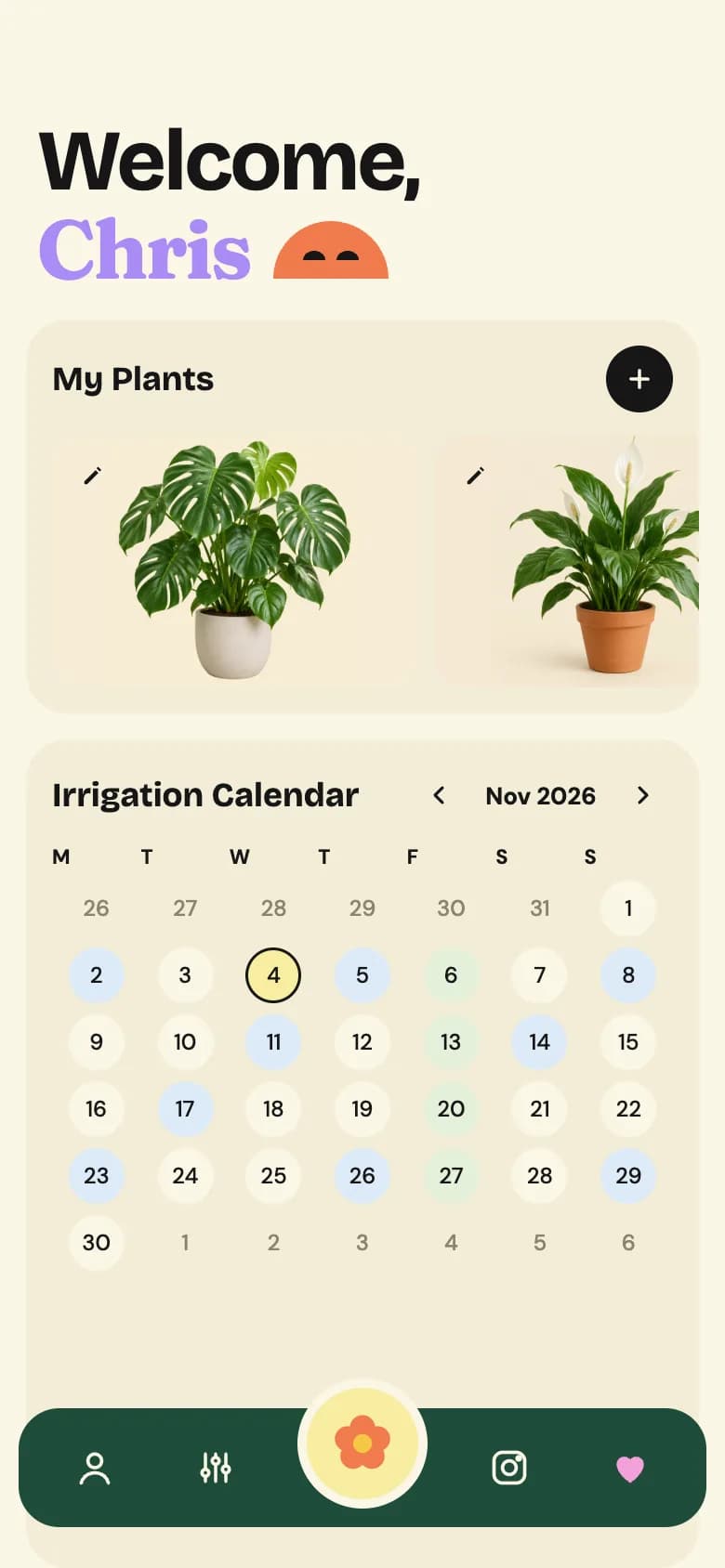
Plant Care Companion app screens
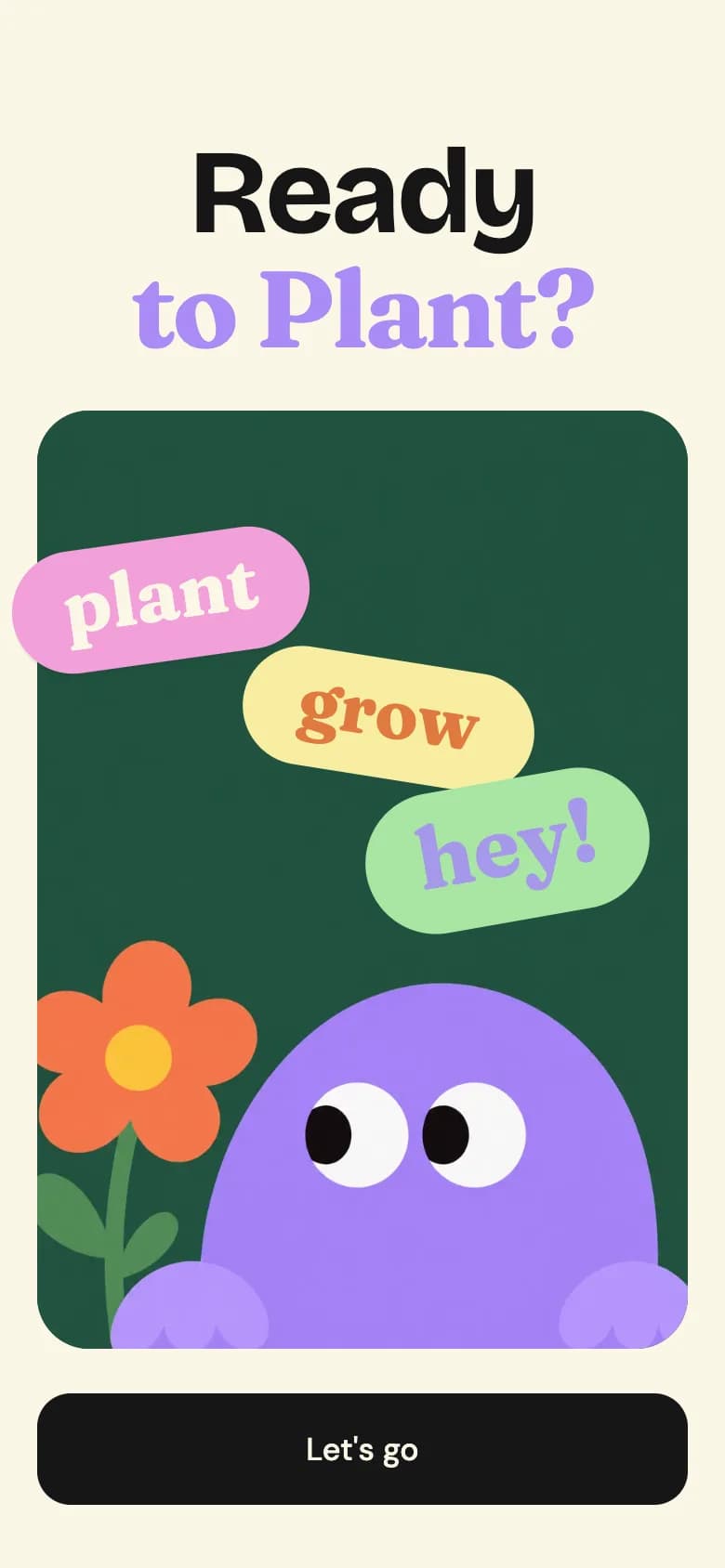
Onboarding
A bold headline over a green card with tilted word stickers, a flower and a smiling character, with one clear start button.
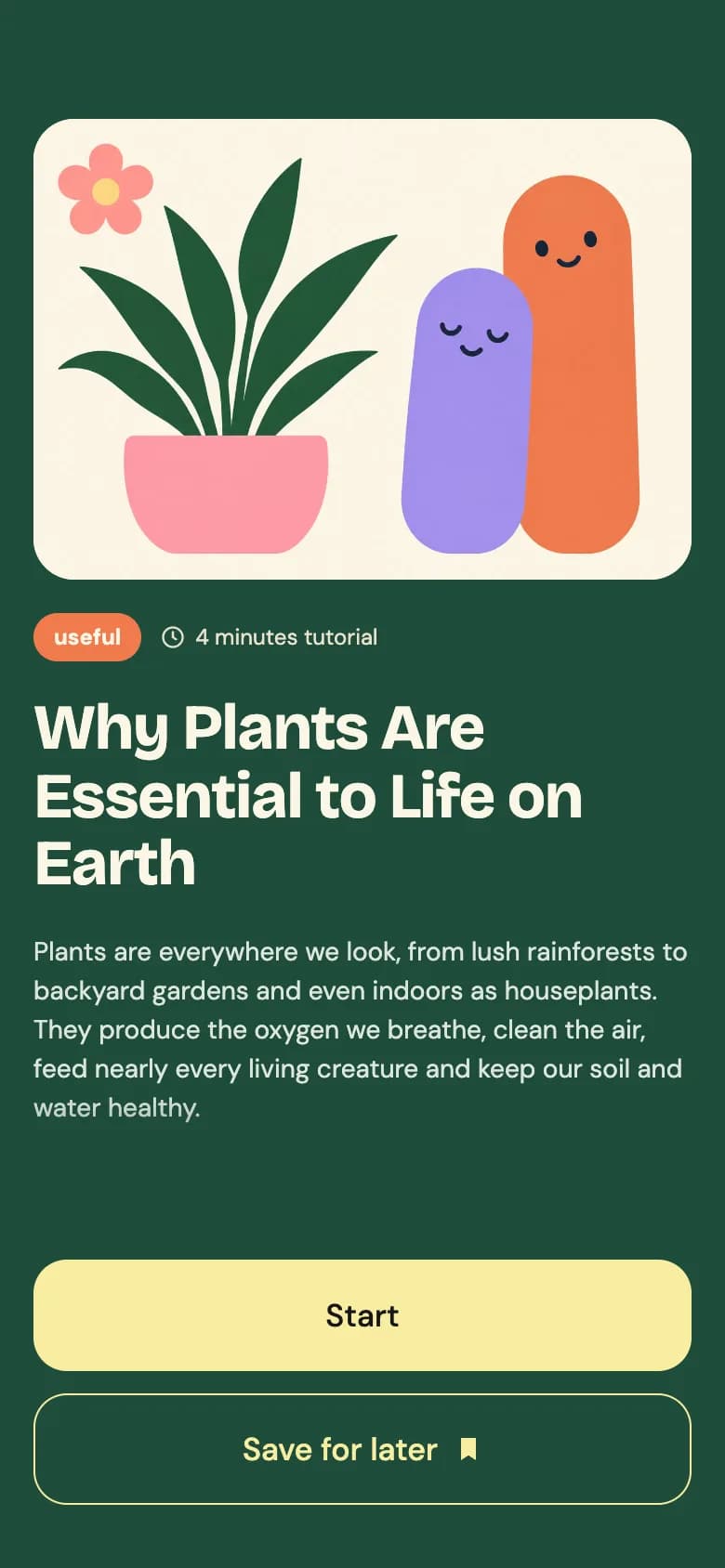
Care article
An illustrated hero, a tutorial tag and read time, a large title, and start or save actions below the fading body text.
Plants and calendar
A personal greeting, plant cards and an irrigation calendar with month controls above a dark tab bar.
Copy the Plant Care Companion kit
Use the artifact as a design brief, the skill to generate the UI with an AI agent, or the code to run it right away.
Design artifact
The full design: tokens, screens and source
# Plant Care Companion: design artifact
This plant care app UI has more personality than most utility apps. Tilted sticker labels and cheerful blob characters greet new users before they reach a tidy care home.
- Type: Lifestyle mobile app UI
- Screens: 3
- Artboard: 390 × 844
- Target: Expo SDK 58, Expo Router, TypeScript, expo-image, expo-linear-gradient, react-native-svg
- Live page: https://developermill.com/app-designs/plant-care-app-ui-design
## Design direction
Cream and forest green with candy pastel stickers, chunky grotesque headlines and friendly illustrated characters.
- Sticker-style onboarding with illustrated characters
- Article screen with a soft text fade
- Month-by-month irrigation calendar
- Watering and feeding days in their own colours
## Foundations
### Colour
| Token | Hex |
| --- | --- |
| Forest | `#1F4D3A` |
| Cream | `#FBF6E6` |
| Butter | `#F7EDA1` |
| Lilac | `#A98BF5` |
| Coral | `#F07A4B` |
| Ink | `#161616` |
### Typography
- Typefaces: Bricolage Grotesque, DM Sans, Fraunces
- Common sizes (px): 11, 12, 13, 14, 17, 18, 34, 46
### Shape and depth
- Common corner radii (px): 16, 18, 22, 28
- Shadows: `0 2px 0 rgba(0,0,0,.06)`, `inset 0 0 0 1.5px #161616`
## Screens
### 1. Onboarding
A bold headline over a green card with tilted word stickers, a flower and a smiling character, with one clear start button.
Preview: https://developermill.com/app-designs/plant-care-app-ui-design/welcome.webp
Copy on this screen:
- Ready
- to Plant?
- plant
- grow
- hey!
- Let's go
### 2. Care article
An illustrated hero, a tutorial tag and read time, a large title, and start or save actions below the fading body text.
Preview: https://developermill.com/app-designs/plant-care-app-ui-design/article.webp
Copy on this screen:
- useful
- 4 minutes tutorial
- Why Plants Are Essential to Life on Earth
- Plants are everywhere we look, from lush rainforests to backyard gardens and even indoors as houseplants. They produce the oxygen we breathe, clean the air, feed nearly every living creature and keep our soil and water healthy.
- Start
- Save for later
### 3. Plants and calendar
A personal greeting, plant cards and an irrigation calendar with month controls above a dark tab bar.
Preview: https://developermill.com/app-designs/plant-care-app-ui-design/home.webp
Copy on this screen:
- Welcome,
- Chris
- My Plants
- Irrigation Calendar
## Full source
The original artboards as HTML. Image URLs point at the hosted demo assets.
### Onboarding (Main)
```html
<!doctype html>
<html lang="en">
<head>
<meta charset="utf-8">
<title>Onboarding – Ready to Plant</title>
<script src="./support.js"></script>
</head>
<body>
<x-dc>
<helmet>
<link rel="preconnect" href="https://fonts.googleapis.com">
<link href="https://fonts.googleapis.com/css2?family=Bricolage+Grotesque:opsz,wght@12..96,500;12..96,700;12..96,800&family=Fraunces:opsz,wght,SOFT@9..144,600..800,100&family=DM+Sans:wght@400;500;700&display=swap" rel="stylesheet">
<style>
body{margin:0}
a{color:#1F4D3A}a:hover{color:#163A2B}
</style>
</helmet>
<div style="width: 390px; height: 844px; box-sizing: border-box; background: #FBF6E6; padding: 72px 20px 34px; display: flex; flex-direction: column; gap: 24px; font-family: 'DM Sans', system-ui, sans-serif; color: #161616; overflow: hidden; position: relative">
<h1 style="margin: 0; text-align: center; display: flex; flex-direction: column; gap: 0">
<span style="font-family: 'Bricolage Grotesque', sans-serif; font-weight: 700; font-size: 64px; line-height: 1; letter-spacing: -2px; color: #161616">Ready</span>
<span style="font-family: 'Fraunces', serif; font-variation-settings: 'SOFT' 100; font-weight: 700; font-size: 58px; line-height: 1.05; letter-spacing: -1.5px; color: {{accent}}">to Plant?</span>
</h1>
<div style="position: relative; flex-grow: 1; border-radius: 28px; background: #1F4D3A; overflow: hidden">
<img src="https://developermill.com/app-designs/plant-care-app-ui-design/assets/d205a3c700.webp" alt="A purple blob character peeking up beside an orange flower" style="position: absolute; inset: 0; width: 100%; height: 100%; object-fit: cover; object-position: center bottom">
</div>
<div aria-hidden="true" style="position: absolute; left: 6px; top: 290px; transform: rotate(-8deg); background: #F2A0DA; border-radius: 999px; padding: 10px 28px 16px; font-family: 'Fraunces', serif; font-variation-settings: 'SOFT' 100; font-weight: 700; font-size: 40px; line-height: 1; color: #FBF6E6; box-shadow: 0 2px 0 rgba(0,0,0,.06)">plant</div>
<div aria-hidden="true" style="position: absolute; left: 130px; top: 355px; transform: rotate(9deg); background: #F7EDA1; border-radius: 999px; padding: 10px 30px 16px; font-family: 'Fraunces', serif; font-variation-settings: 'SOFT' 100; font-weight: 700; font-size: 38px; line-height: 1; color: #E07A3E">grow</div>
<div aria-hidden="true" style="position: absolute; left: 196px; top: 420px; transform: rotate(-10deg); background: #A8E6A3; border-radius: 999px; padding: 12px 28px 18px; font-family: 'Fraunces', serif; font-variation-settings: 'SOFT' 100; font-weight: 700; font-size: 46px; line-height: 1; color: #A598E9">hey!</div>
<a href="Article.dc.html" style="display: flex; align-items: center; justify-content: center; height: 60px; border-radius: 18px; background: #161616; color: #FBF6E6; font-size: 17px; font-weight: 500; text-decoration: none">Let's go</a>
</div>
</x-dc>
<script type="text/x-dc" data-dc-script data-props='{"accent":{"editor":"color","default":"#A98BF5","options":["#A98BF5","#F07A4B","#F2A0DA","#A8E6A3"]},"$preview":{"width":390,"height":844}}'>
class Component extends DCLogic {
renderVals() {
return { accent: this.props.accent ?? '#A98BF5' };
}
}
</script>
</body>
</html>
```
### Care article (Article)
```html
<!doctype html>
<html lang="en">
<head>
<meta charset="utf-8">
<title>Article – Why Plants Are Essential</title>
<script src="./support.js"></script>
</head>
<body>
<x-dc>
<helmet>
<link rel="preconnect" href="https://fonts.googleapis.com">
<link href="https://fonts.googleapis.com/css2?family=Bricolage+Grotesque:opsz,wght@12..96,500;12..96,700;12..96,800&family=Fraunces:opsz,wght,SOFT@9..144,600..800,100&family=DM+Sans:wght@400;500;700&display=swap" rel="stylesheet">
<style>
body{margin:0}
a{color:#F7EDA1}a:hover{color:#FBF6E6}
</style>
</helmet>
<div style="width: 390px; height: 844px; box-sizing: border-box; background: #1F4D3A; padding: 64px 18px 34px; display: flex; flex-direction: column; gap: 18px; font-family: 'DM Sans', system-ui, sans-serif; color: #FBF6E6; overflow: hidden">
<div style="height: 248px; flex-shrink: 0; border-radius: 22px; background: #FBF3E5; overflow: hidden; position: relative">
<img src="https://developermill.com/app-designs/plant-care-app-ui-design/assets/c1d78ffb8b.webp" alt="A potted plant in a pink pot beside two smiling purple and orange characters" style="position: absolute; inset: 0; width: 100%; height: 100%; object-fit: cover; object-position: center bottom">
</div>
<div style="display: flex; align-items: center; gap: 10px">
<span style="background: #F07A4B; color: #FBF6E6; font-size: 12px; font-weight: 700; padding: 5px 11px; border-radius: 999px">useful</span>
<span style="display: flex; align-items: center; gap: 5px; font-size: 12px; color: #E8E3CF">
<svg aria-hidden="true" width="14" height="14" viewBox="0 0 24 24" fill="none" stroke="currentColor" stroke-width="2" stroke-linecap="round"><circle cx="12" cy="12" r="9"></circle><path d="M12 7v5l3 2"></path></svg>
4 minutes tutorial
</span>
</div>
<h1 style="margin: 0; font-family: 'Bricolage Grotesque', sans-serif; font-weight: 700; font-size: 34px; line-height: 1.08; letter-spacing: -0.8px; color: #FBF6E6">Why Plants Are Essential to Life on Earth</h1>
<p style="margin: 0; font-size: 14px; line-height: 1.5; color: #DCE6DF; flex-grow: 1; overflow: hidden; -webkit-mask-image: linear-gradient(#000 55%, transparent); mask-image: linear-gradient(#000 55%, transparent)">Plants are everywhere we look, from lush rainforests to backyard gardens and even indoors as houseplants. They produce the oxygen we breathe, clean the air, feed nearly every living creature and keep our soil and water healthy.</p>
<div style="display: flex; flex-direction: column; gap: 12px">
<button type="button" style="height: 60px; border: none; border-radius: 18px; background: {{accent}}; color: #161616; font-family: inherit; font-size: 17px; font-weight: 500; cursor: pointer">Start</button>
<button type="button" style="height: 60px; border: 1.5px solid #F7EDA1; border-radius: 18px; background: transparent; color: #F7EDA1; font-family: inherit; font-size: 17px; font-weight: 500; display: flex; align-items: center; justify-content: center; gap: 8px; cursor: pointer">
Save for later
<svg aria-hidden="true" width="16" height="16" viewBox="0 0 24 24" fill="currentColor"><path d="M6 3h12v18l-6-4-6 4z"></path></svg>
</button>
</div>
</div>
</x-dc>
<script type="text/x-dc" data-dc-script data-props='{"accent":{"editor":"color","default":"#F7EDA1","options":["#F7EDA1","#A8E6A3","#F2A0DA","#A98BF5"]},"$preview":{"width":390,"height":844}}'>
class Component extends DCLogic {
renderVals() {
return { accent: this.props.accent ?? '#F7EDA1' };
}
}
</script>
</body>
</html>
```
### Plants and calendar (Home)
```html
<!doctype html>
<html lang="en">
<head>
<meta charset="utf-8">
<title>Home – Welcome Chris</title>
<script src="./support.js"></script>
</head>
<body>
<x-dc>
<helmet>
<link rel="preconnect" href="https://fonts.googleapis.com">
<link href="https://fonts.googleapis.com/css2?family=Bricolage+Grotesque:opsz,wght@12..96,500;12..96,700;12..96,800&family=Fraunces:opsz,wght,SOFT@9..144,600..800,100&family=DM+Sans:wght@400;500;700&display=swap" rel="stylesheet">
<style>
body{margin:0}
a{color:#1F4D3A}a:hover{color:#163A2B}
</style>
</helmet>
<div style="width: 390px; height: 844px; box-sizing: border-box; background: #FBF6E6; padding: 64px 14px 0; display: flex; flex-direction: column; gap: 14px; font-family: 'DM Sans', system-ui, sans-serif; color: #161616; overflow: hidden; position: relative">
<h1 style="margin: 0 6px; display: flex; flex-direction: column">
<span style="font-family: 'Bricolage Grotesque', sans-serif; font-weight: 700; font-size: 46px; line-height: 1; letter-spacing: -1.5px">Welcome,</span>
<span style="display: flex; align-items: flex-end; gap: 12px">
<span style="font-family: 'Fraunces', serif; font-variation-settings: 'SOFT' 100; font-weight: 700; font-size: 44px; line-height: 1.1; letter-spacing: -1px; color: #A98BF5">Chris</span>
<svg aria-hidden="true" width="62" height="32" viewBox="0 0 62 32" style="margin-bottom: 8px"><path d="M0 32 A31 31 0 0 1 62 32 Z" fill="#F07A4B"></path><path d="M16 22 a6 5 0 0 1 12 0 Z M34 22 a6 5 0 0 1 12 0 Z" fill="#161616"></path></svg>
</span>
</h1>
<section style="background: #F3EDD8; border-radius: 22px; padding: 14px 0 14px 14px; display: flex; flex-direction: column; gap: 12px">
<div style="display: flex; align-items: center; justify-content: space-between; padding-right: 14px">
<h2 style="margin: 0; font-family: 'Bricolage Grotesque', sans-serif; font-weight: 700; font-size: 18px">My Plants</h2>
<button type="button" aria-label="Add plant" style="width: 36px; height: 36px; border-radius: 50%; border: none; background: #161616; color: #FBF6E6; display: flex; align-items: center; justify-content: center; cursor: pointer">
<svg aria-hidden="true" width="16" height="16" viewBox="0 0 24 24" fill="none" stroke="currentColor" stroke-width="2.6" stroke-linecap="round"><path d="M12 5v14M5 12h14"></path></svg>
</button>
</div>
<div style="display: flex; gap: 10px; overflow: hidden">
<div style="position: relative; flex-shrink: 0; width: 196px; height: 136px; border-radius: 16px; background: #F8EDD7; overflow: hidden">
<button type="button" aria-label="Edit Monstera" style="position: absolute; z-index: 1; top: 8px; left: 8px; width: 28px; height: 28px; border: none; background: transparent; color: #161616; display: flex; align-items: center; justify-content: center; cursor: pointer">
<svg aria-hidden="true" width="14" height="14" viewBox="0 0 24 24" fill="currentColor"><path d="M4 17.5V20h2.5L17 9.5 14.5 7zM19.7 6.8l-2.5-2.5a1 1 0 0 0-1.4 0L15.6 5.6l2.5 2.5 1.6-1.3a1 1 0 0 0 0-1.4z"></path></svg>
</button>
<img src="https://developermill.com/app-designs/plant-care-app-ui-design/assets/263c303358.webp" alt="Monstera in a white pot" style="position: absolute; inset: 0; width: 100%; height: 100%; object-fit: contain">
</div>
<div style="position: relative; flex-shrink: 0; width: 196px; height: 136px; border-radius: 16px; background: #F5E9D4; overflow: hidden">
<button type="button" aria-label="Edit Peace Lily" style="position: absolute; z-index: 1; top: 8px; left: 8px; width: 28px; height: 28px; border: none; background: transparent; color: #161616; display: flex; align-items: center; justify-content: center; cursor: pointer">
<svg aria-hidden="true" width="14" height="14" viewBox="0 0 24 24" fill="currentColor"><path d="M4 17.5V20h2.5L17 9.5 14.5 7zM19.7 6.8l-2.5-2.5a1 1 0 0 0-1.4 0L15.6 5.6l2.5 2.5 1.6-1.3a1 1 0 0 0 0-1.4z"></path></svg>
</button>
<img src="https://developermill.com/app-designs/plant-care-app-ui-design/assets/aa0535fab0.webp" alt="Peace lily in a terracotta pot" style="position: absolute; inset: 0; width: 100%; height: 100%; object-fit: contain">
</div>
</div>
</section>
<section style="background: #F3EDD8; border-radius: 22px; padding: 14px 14px 110px; display: flex; flex-direction: column; gap: 10px; flex-grow: 1">
<div style="display: flex; align-items: center; justify-content: space-between; gap: 8px">
<h2 style="margin: 0; font-family: 'Bricolage Grotesque', sans-serif; font-weight: 700; font-size: 18px">Irrigation Calendar</h2>
<div style="display: flex; align-items: center; gap: 2px">
<button type="button" onClick="{{prev}}" aria-label="Previous month" style="width: 32px; height: 32px; border: none; border-radius: 50%; background: transparent; color: #161616; display: flex; align-items: center; justify-content: center; cursor: pointer">
<svg aria-hidden="true" width="16" height="16" viewBox="0 0 24 24" fill="none" stroke="currentColor" stroke-width="2.4" stroke-linecap="round" stroke-linejoin="round"><path d="M15 6l-6 6 6 6"></path></svg>
</button>
<span style="min-width: 74px; text-align: center; font-size: 13px; font-weight: 700">{{monthLabel}}</span>
<button type="button" onClick="{{next}}" aria-label="Next month" style="width: 32px; height: 32px; border: none; border-radius: 50%; background: transparent; color: #161616; display: flex; align-items: center; justify-content: center; cursor: pointer">
<svg aria-hidden="true" width="16" height="16" viewBox="0 0 24 24" fill="none" stroke="currentColor" stroke-width="2.4" stroke-linecap="round" stroke-linejoin="round"><path d="M9 6l6 6-6 6"></path></svg>
</button>
</div>
</div>
<div style="display: grid; grid-template-columns: repeat(7, minmax(0, 1fr)); row-gap: 6px; justify-items: center">
<sc-for list="{{days}}" as="d" hint-placeholder-count="7">
<span style="font-size: 11px; font-weight: 700; color: #161616">{{d}}</span>
</sc-for>
<sc-for list="{{dates}}" as="c" hint-placeholder-count="42">
<button type="button" onClick="{{c.pick}}" aria-label="{{c.label}}" style="{{c.style}}">{{c.n}}</button>
</sc-for>
</div>
</section>
<nav aria-label="Main" style="position: absolute; left: 10px; right: 10px; bottom: 22px; height: 64px; border-radius: 22px; background: #1F4D3A; display: flex; align-items: center; justify-content: space-around; padding: 0 8px">
<button type="button" aria-label="Profile" style="width: 44px; height: 44px; border: none; background: transparent; color: #FBF6E6; display: flex; align-items: center; justify-content: center; cursor: pointer">
<svg aria-hidden="true" width="22" height="22" viewBox="0 0 24 24" fill="none" stroke="currentColor" stroke-width="2" stroke-linecap="round"><circle cx="12" cy="8" r="4"></circle><path d="M4 21c1-4 4.5-6 8-6s7 2 8 6"></path></svg>
</button>
<button type="button" aria-label="Settings" style="width: 44px; height: 44px; border: none; background: transparent; color: #FBF6E6; display: flex; align-items: center; justify-content: center; cursor: pointer">
<svg aria-hidden="true" width="22" height="22" viewBox="0 0 24 24" fill="none" stroke="currentColor" stroke-width="2" stroke-linecap="round"><path d="M6 4v16M12 4v16M18 4v16"></path><circle cx="6" cy="15" r="2" fill="#1F4D3A"></circle><circle cx="12" cy="8" r="2" fill="#1F4D3A"></circle><circle cx="18" cy="13" r="2" fill="#1F4D3A"></circle></svg>
</button>
<button type="button" aria-label="My garden" style="width: 70px; height: 70px; margin-top: -26px; border-radius: 50%; border: 5px solid #FBF6E6; background: #F7EDA1; display: flex; align-items: center; justify-content: center; cursor: pointer">
<svg aria-hidden="true" width="34" height="34" viewBox="-20 -20 40 40"><g fill="#F07A4B"><circle cx="0" cy="-10" r="8"></circle><circle cx="9.5" cy="-3" r="8"></circle><circle cx="6" cy="8" r="8"></circle><circle cx="-6" cy="8" r="8"></circle><circle cx="-9.5" cy="-3" r="8"></circle></g><circle cx="0" cy="0" r="6" fill="#F7C744"></circle></svg>
</button>
<button type="button" aria-label="Gallery" style="width: 44px; height: 44px; border: none; background: transparent; color: #FBF6E6; display: flex; align-items: center; justify-content: center; cursor: pointer">
<svg aria-hidden="true" width="22" height="22" viewBox="0 0 24 24" fill="none" stroke="currentColor" stroke-width="2"><rect x="3" y="3" width="18" height="18" rx="5"></rect><circle cx="12" cy="12" r="4"></circle><circle cx="17.5" cy="6.5" r="1" fill="currentColor"></circle></svg>
</button>
<button type="button" aria-label="Favourites" style="width: 44px; height: 44px; border: none; background: transparent; color: #F2A0DA; display: flex; align-items: center; justify-content: center; cursor: pointer">
<svg aria-hidden="true" width="22" height="22" viewBox="0 0 24 24" fill="currentColor"><path d="M12 21s-8-5.2-8-11a4.5 4.5 0 0 1 8-2.8A4.5 4.5 0 0 1 20 10c0 5.8-8 11-8 11z"></path></svg>
</button>
</nav>
</div>
</x-dc>
<script type="text/x-dc" data-dc-script data-props='{"$preview":{"width":390,"height":844}}'>
class Component extends DCLogic {
constructor(props) {
super(props);
this.state = { year: 2026, month: 10, picked: '2026-10-4' };
}
renderVals() {
const { year, month, picked } = this.state;
const names = ['January', 'February', 'March', 'April', 'May', 'June', 'July', 'August', 'September', 'October', 'November', 'December'];
const short = ['Jan', 'Feb', 'Mar', 'Apr', 'May', 'Jun', 'Jul', 'Aug', 'Sep', 'Oct', 'Nov', 'Dec'];
const base = 'width: 30px; height: 30px; border-radius: 50%; border: none; font-family: inherit; font-size: 12px; font-weight: 500; display: flex; align-items: center; justify-content: center; cursor: pointer; ';
const first = new Date(year, month, 1);
const lead = (first.getDay() + 6) % 7;
const start = new Date(year, month, 1 - lead);
const dates = [];
for (let i = 0; i < 42; i++) {
const d = new Date(start.getFullYear(), start.getMonth(), start.getDate() + i);
const out = d.getMonth() !== month;
const key = d.getFullYear() + '-' + d.getMonth() + '-' + d.getDate();
const n = d.getDate();
const waterDay = n % 3 === 2;
const feedDay = n % 7 === 6;
let style = base;
if (key === picked) style += 'background: #F7EDA1; color: #161616; box-shadow: inset 0 0 0 1.5px #161616;';
else if (out) style += 'background: transparent; color: #8A846F;';
else if (feedDay) style += 'background: #E4F1D9; color: #161616;';
else if (waterDay) style += 'background: #DCEBF7; color: #161616;';
else style += 'background: #FBF6E6; color: #161616;';
const y = d.getFullYear(), m = d.getMonth();
dates.push({
n,
style,
label: names[m] + ' ' + n + (out ? '' : feedDay ? ', feeding day' : waterDay ? ', watering day' : ''),
pick: () => this.setState({ year: y, month: m, picked: key })
});
}
const shift = (delta) => () => {
const d = new Date(year, month + delta, 1);
this.setState({ year: d.getFullYear(), month: d.getMonth() });
};
return {
days: ['M', 'T', 'W', 'T', 'F', 'S', 'S'],
dates,
monthLabel: short[month] + ' ' + year,
prev: shift(-1),
next: shift(1)
};
}
}
</script>
</body>
</html>
```SKILL.md
Save as .claude/skills/plant-care-app-ui/SKILL.md
---
name: plant-care-app-ui
description: Build the Plant Care Companion mobile app UI in Expo React Native. Use when asked to create a plant care app UI or a new screen in this visual style.
---

# Plant Care Companion app UI

Build this lifestyle app UI in an Expo Router project with TypeScript.

Reference: https://developermill.com/app-designs/plant-care-app-ui-design

## Visual direction

Cream and forest green with candy pastel stickers, chunky grotesque headlines and friendly illustrated characters.

Keep these signature details:

- Sticker-style onboarding with illustrated characters
- Article screen with a soft text fade
- Month-by-month irrigation calendar
- Watering and feeding days in their own colours

## Set up

```bash
npx expo install expo-image expo-linear-gradient react-native-svg @expo-google-fonts/bricolage-grotesque @expo-google-fonts/dm-sans @expo-google-fonts/fraunces expo-font
```

## Tokens

| Name | Hex |
| --- | --- |
| Forest | `#1F4D3A` |
| Cream | `#FBF6E6` |
| Butter | `#F7EDA1` |
| Lilac | `#A98BF5` |
| Coral | `#F07A4B` |
| Ink | `#161616` |

- Typefaces: Bricolage Grotesque, DM Sans, Fraunces
- Text sizes (px): 11, 12, 13, 14, 17, 18, 34, 46
- Corner radii (px): 16, 18, 22, 28

Define these once and reuse them. Do not add new colours.

## Screens

1. **Onboarding.** A bold headline over a green card with tilted word stickers, a flower and a smiling character, with one clear start button.
2. **Care article.** An illustrated hero, a tutorial tag and read time, a large title, and start or save actions below the fading body text.
3. **Plants and calendar.** A personal greeting, plant cards and an irrigation calendar with month controls above a dark tab bar.

## Build rules

- Draw each screen on a 390 × 844 artboard and scale it to the device width.
- Load each custom font weight by family name with expo-font. Do not set fontWeight with custom fonts.
- Draw icons, charts and illustrations with react-native-svg.
- Use Pressable with an accessibilityLabel for controls, with at least a 44px target.
- Navigate with router.navigate and keep sample data as constants at the top of the file.
- Use expo-image with contentFit for photos.

## Done when

- All routes are linked and reachable.
- Colours, type and radii match the tokens above.
- `npx tsc --noEmit` and `npx expo lint` pass.
- The layout holds up on small and large phones.
Set up the project
npx create-expo-app@latest plant-care-app --template default
cd plant-care-app
rm -rf src
npx expo install expo-image expo-linear-gradient react-native-svg @expo-google-fonts/bricolage-grotesque @expo-google-fonts/dm-sans @expo-google-fonts/fraunces expo-font
src/app/_layout.tsx
import { BricolageGrotesque_700Bold } from '@expo-google-fonts/bricolage-grotesque';
import { DMSans_400Regular, DMSans_500Medium, DMSans_700Bold } from '@expo-google-fonts/dm-sans';
import { Fraunces_700Bold } from '@expo-google-fonts/fraunces';
import { useFonts } from 'expo-font';
import { Stack } from 'expo-router';

export default function RootLayout() {
  const [fontsLoaded] = useFonts({
    BricolageGrotesque_700Bold,
    DMSans_400Regular,
    DMSans_500Medium,
    DMSans_700Bold,
    Fraunces_700Bold,
  });

  if (!fontsLoaded) return null;

  return <Stack screenOptions={{ headerShown: false }} />;
}
src/app/index.tsx
import { Image } from 'expo-image';
import { router } from 'expo-router';
import { Pressable, Text, View } from 'react-native';

import { Screen } from '@/components/screen';
import { asset } from '@/lib/assets';

const accent = '#A98BF5';

export default function MainScreen() {
  return (
    <Screen background="#FBF6E6" statusBar="dark">
      <View style={{ paddingTop: 72, paddingBottom: 34, paddingHorizontal: 20, gap: 24, flex: 1 }}>
        <View style={{ margin: 0, gap: 0 }}>
          <Text
            style={{
              fontFamily: 'BricolageGrotesque_700Bold',
              fontSize: 64,
              color: '#161616',
              letterSpacing: -2,
              lineHeight: 64,
              textAlign: 'center',
            }}>
            Ready
          </Text>
          <Text
            style={{
              fontFamily: 'Fraunces_700Bold',
              fontSize: 58,
              color: accent,
              letterSpacing: -1.5,
              lineHeight: 60.9,
              textAlign: 'center',
            }}>
            to Plant?
          </Text>
        </View>
        <View
          style={{ flexGrow: 1, borderRadius: 28, backgroundColor: '#1F4D3A', overflow: 'hidden' }}>
          <Image
            source={{ uri: asset('d205a3c700.webp') }}
            contentFit="cover"
            contentPosition="bottom center"
            accessibilityLabel="A purple blob character peeking up beside an orange flower"
            style={{
              position: 'absolute',
              top: 0,
              right: 0,
              bottom: 0,
              left: 0,
              width: '100%',
              height: '100%',
            }}
          />
        </View>
        <Text
          style={{
            position: 'absolute',
            left: 6,
            top: 290,
            transform: [{ rotate: '-8deg' }],
            backgroundColor: '#F2A0DA',
            borderRadius: 999,
            paddingTop: 10,
            paddingBottom: 16,
            paddingHorizontal: 28,
            boxShadow: '0 2px 0 rgba(0,0,0,.06)',
            zIndex: 1,
            fontFamily: 'Fraunces_700Bold',
            fontSize: 40,
            color: '#FBF6E6',
            lineHeight: 40,
          }}>
          plant
        </Text>
        <Text
          style={{
            position: 'absolute',
            left: 130,
            top: 355,
            transform: [{ rotate: '9deg' }],
            backgroundColor: '#F7EDA1',
            borderRadius: 999,
            paddingTop: 10,
            paddingBottom: 16,
            paddingHorizontal: 30,
            zIndex: 1,
            fontFamily: 'Fraunces_700Bold',
            fontSize: 38,
            color: '#E07A3E',
            lineHeight: 38,
          }}>
          grow
        </Text>
        <Text
          style={{
            position: 'absolute',
            left: 196,
            top: 420,
            transform: [{ rotate: '-10deg' }],
            backgroundColor: '#A8E6A3',
            borderRadius: 999,
            paddingTop: 12,
            paddingBottom: 18,
            paddingHorizontal: 28,
            zIndex: 1,
            fontFamily: 'Fraunces_700Bold',
            fontSize: 46,
            color: '#A598E9',
            lineHeight: 46,
          }}>
          hey!
        </Text>
        <Pressable
          accessibilityRole="link"
          onPress={() => router.navigate('/article')}
          style={{
            alignItems: 'center',
            justifyContent: 'center',
            height: 60,
            borderRadius: 18,
            backgroundColor: '#161616',
            flexDirection: 'row',
          }}>
          <Text
            style={{
              fontFamily: 'DMSans_500Medium',
              fontSize: 17,
              color: '#FBF6E6',
              flexShrink: 1,
            }}>
            {"Let's go"}
          </Text>
        </Pressable>
      </View>
    </Screen>
  );
}
src/app/article.tsx
import { Image } from 'expo-image';
import { LinearGradient } from 'expo-linear-gradient';
import { Pressable, StyleSheet, Text, View } from 'react-native';
import Svg, { Circle, Path } from 'react-native-svg';

import { Screen } from '@/components/screen';
import { asset } from '@/lib/assets';

const accent = '#F7EDA1';

export default function ArticleScreen() {
  return (
    <Screen background="#1F4D3A" statusBar="light">
      <View style={{ paddingTop: 64, paddingBottom: 34, paddingHorizontal: 18, gap: 18, flex: 1 }}>
        <View
          style={{
            height: 248,
            flexShrink: 0,
            borderRadius: 22,
            backgroundColor: '#FBF3E5',
            overflow: 'hidden',
          }}>
          <Image
            source={{ uri: asset('c1d78ffb8b.webp') }}
            contentFit="cover"
            contentPosition="bottom center"
            accessibilityLabel="A potted plant in a pink pot beside two smiling purple and orange characters"
            style={{
              position: 'absolute',
              top: 0,
              right: 0,
              bottom: 0,
              left: 0,
              width: '100%',
              height: '100%',
            }}
          />
        </View>
        <View style={{ alignItems: 'center', gap: 10, flexDirection: 'row' }}>
          <Text
            style={{
              backgroundColor: '#F07A4B',
              paddingVertical: 5,
              paddingHorizontal: 11,
              borderRadius: 999,
              flexShrink: 1,
              fontFamily: 'DMSans_700Bold',
              fontSize: 12,
              color: '#FBF6E6',
            }}>
            useful
          </Text>
          <View style={{ alignItems: 'center', gap: 5, flexShrink: 1, flexDirection: 'row' }}>
            <Svg
              width="14"
              height="14"
              viewBox="0 0 24 24"
              fill="none"
              stroke="#E8E3CF"
              strokeWidth="2"
              strokeLinecap="round">
              <Circle cx="12" cy="12" r="9" />
              <Path d="M12 7v5l3 2" />
            </Svg>
            <Text
              style={{
                fontFamily: 'DMSans_400Regular',
                fontSize: 12,
                color: '#E8E3CF',
                flexShrink: 1,
              }}>
              4 minutes tutorial
            </Text>
          </View>
        </View>
        <Text
          style={{
            margin: 0,
            fontFamily: 'BricolageGrotesque_700Bold',
            fontSize: 34,
            color: '#FBF6E6',
            letterSpacing: -0.8,
            lineHeight: 36.72,
          }}>
          Why Plants Are Essential to Life on Earth
        </Text>
        <View style={{ flexGrow: 1, flexBasis: 0, overflow: 'hidden' }}>
          <Text
            style={{
              margin: 0,
              fontFamily: 'DMSans_400Regular',
              fontSize: 14,
              color: '#DCE6DF',
              lineHeight: 21,
            }}>
            Plants are everywhere we look, from lush rainforests to backyard gardens and even
            indoors as houseplants. They produce the oxygen we breathe, clean the air, feed nearly
            every living creature and keep our soil and water healthy.
          </Text>
          <View style={{ position: 'absolute', left: 0, right: 0, top: '55%', bottom: 0 }}>
            <LinearGradient
              colors={['rgba(31,77,58,0)', 'rgba(31,77,58,1)']}
              locations={[0, 1]}
              start={{ x: 0.5, y: 0 }}
              end={{ x: 0.5, y: 1 }}
              style={StyleSheet.absoluteFill}
            />
          </View>
        </View>
        <View style={{ gap: 12 }}>
          <Pressable
            accessibilityRole="button"
            style={{
              height: 60,
              borderWidth: 0,
              borderRadius: 18,
              backgroundColor: accent,
              alignItems: 'center',
              justifyContent: 'center',
            }}>
            <Text
              style={{
                fontFamily: 'DMSans_500Medium',
                fontSize: 17,
                color: '#161616',
                textAlign: 'center',
              }}>
              Start
            </Text>
          </Pressable>
          <Pressable
            accessibilityRole="button"
            style={{
              height: 60,
              borderWidth: 1.5,
              borderColor: '#F7EDA1',
              borderRadius: 18,
              alignItems: 'center',
              justifyContent: 'center',
              gap: 8,
              flexDirection: 'row',
            }}>
            <Text
              style={{
                fontFamily: 'DMSans_500Medium',
                fontSize: 17,
                color: '#F7EDA1',
                flexShrink: 1,
              }}>
              Save for later
            </Text>
            <Svg width="16" height="16" viewBox="0 0 24 24" fill="#F7EDA1">
              <Path d="M6 3h12v18l-6-4-6 4z" />
            </Svg>
          </Pressable>
        </View>
      </View>
    </Screen>
  );
}
src/app/home.tsx
import { Image } from 'expo-image';
import { useState } from 'react';
import { Pressable, Text, View } from 'react-native';
import Svg, { Circle, G, Path, Rect } from 'react-native-svg';
import { Screen } from '@/components/screen';
import { asset } from '@/lib/assets';
import { css, cssText } from '@/lib/css';
// Screen state, and the values the layout below reads from it.
function useScreen() {
const [state, setScreenState] = useState<Record<string, any>>({
year: 2026,
month: 10,
picked: '2026-10-4',
});
const setState = (patch: Record<string, any>) =>
setScreenState((current) => ({ ...current, ...patch }));
const { year, month, picked } = state;
const names = [
'January',
'February',
'March',
'April',
'May',
'June',
'July',
'August',
'September',
'October',
'November',
'December',
];
const short = [
'Jan',
'Feb',
'Mar',
'Apr',
'May',
'Jun',
'Jul',
'Aug',
'Sep',
'Oct',
'Nov',
'Dec',
];
const base =
'width: 30px; height: 30px; border-radius: 50%; border: none; font-family: inherit; font-size: 12px; font-weight: 500; display: flex; align-items: center; justify-content: center; cursor: pointer; ';
const first = new Date(year, month, 1);
const lead = (first.getDay() + 6) % 7;
const start = new Date(year, month, 1 - lead);
const dates = [];
for (let i = 0; i < 42; i++) {
const d = new Date(start.getFullYear(), start.getMonth(), start.getDate() + i);
const out = d.getMonth() !== month;
const key = d.getFullYear() + '-' + d.getMonth() + '-' + d.getDate();
const n = d.getDate();
const waterDay = n % 3 === 2;
const feedDay = n % 7 === 6;
let style = base;
if (key === picked)
style += 'background: #F7EDA1; color: #161616; box-shadow: inset 0 0 0 1.5px #161616;';
else if (out) style += 'background: transparent; color: #8A846F;';
else if (feedDay) style += 'background: #E4F1D9; color: #161616;';
else if (waterDay) style += 'background: #DCEBF7; color: #161616;';
else style += 'background: #FBF6E6; color: #161616;';
const y = d.getFullYear(),
m = d.getMonth();
dates.push({
n,
style,
label:
names[m] +
' ' +
n +
(out ? '' : feedDay ? ', feeding day' : waterDay ? ', watering day' : ''),
pick: () => setState({ year: y, month: m, picked: key }),
});
}
const shift = (delta: number) => () => {
const d = new Date(year, month + delta, 1);
setState({ year: d.getFullYear(), month: d.getMonth() });
};
return {
days: ['M', 'T', 'W', 'T', 'F', 'S', 'S'],
dates,
monthLabel: short[month] + ' ' + year,
prev: shift(-1),
next: shift(1),
};
}
export default function HomeScreen() {
const { days, dates, monthLabel, prev, next } = useScreen();
return (
<Screen background="#FBF6E6" statusBar="dark">
<View style={{ paddingTop: 64, paddingBottom: 0, paddingHorizontal: 14, gap: 14, flex: 1 }}>
<View style={{ marginVertical: 0, marginHorizontal: 6 }}>
<Text
style={{
fontFamily: 'BricolageGrotesque_700Bold',
fontSize: 46,
color: '#161616',
letterSpacing: -1.5,
lineHeight: 46,
}}>
Welcome,
</Text>
<View style={{ alignItems: 'flex-end', gap: 12, flexDirection: 'row' }}>
<Text
style={{
flexShrink: 1,
fontFamily: 'Fraunces_700Bold',
fontSize: 44,
color: '#A98BF5',
letterSpacing: -1,
lineHeight: 48.4,
}}>
Chris
</Text>
<Svg width="62" height="32" viewBox="0 0 62 32" style={{ marginBottom: 8 }}>
<Path d="M0 32 A31 31 0 0 1 62 32 Z" fill="#F07A4B" />
<Path d="M16 22 a6 5 0 0 1 12 0 Z M34 22 a6 5 0 0 1 12 0 Z" fill="#161616" />
</Svg>
</View>
</View>
<View
style={{
backgroundColor: '#F3EDD8',
borderRadius: 22,
paddingVertical: 14,
paddingLeft: 14,
paddingRight: 0,
gap: 12,
}}>
<View
style={{
alignItems: 'center',
justifyContent: 'space-between',
paddingRight: 14,
flexDirection: 'row',
}}>
<Text
style={{
margin: 0,
flexShrink: 1,
fontFamily: 'BricolageGrotesque_700Bold',
fontSize: 18,
color: '#161616',
}}>
My Plants
</Text>
<Pressable
accessibilityRole="button"
accessibilityLabel="Add plant"
style={{
width: 36,
height: 36,
borderRadius: '50%',
borderWidth: 0,
backgroundColor: '#161616',
alignItems: 'center',
justifyContent: 'center',
flexDirection: 'row',
}}>
<Svg
width="16"
height="16"
viewBox="0 0 24 24"
fill="none"
stroke="#FBF6E6"
strokeWidth="2.6"
strokeLinecap="round">
<Path d="M12 5v14M5 12h14" />
</Svg>
</Pressable>
</View>
<View style={{ gap: 10, overflow: 'hidden', flexDirection: 'row' }}>
<View
style={{
flexShrink: 0,
width: 196,
height: 136,
borderRadius: 16,
backgroundColor: '#F8EDD7',
overflow: 'hidden',
}}>
<Pressable
accessibilityRole="button"
accessibilityLabel="Edit Monstera"
style={{
position: 'absolute',
zIndex: 1,
top: 8,
left: 8,
width: 28,
height: 28,
borderWidth: 0,
alignItems: 'center',
justifyContent: 'center',
flexDirection: 'row',
}}>
<Svg width="14" height="14" viewBox="0 0 24 24" fill="#161616">
<Path d="M4 17.5V20h2.5L17 9.5 14.5 7zM19.7 6.8l-2.5-2.5a1 1 0 0 0-1.4 0L15.6 5.6l2.5 2.5 1.6-1.3a1 1 0 0 0 0-1.4z" />
</Svg>
</Pressable>
<Image
source={{ uri: asset('263c303358.webp') }}
contentFit="contain"
accessibilityLabel="Monstera in a white pot"
style={{
position: 'absolute',
top: 0,
right: 0,
bottom: 0,
left: 0,
width: '100%',
height: '100%',
}}
/>
</View>
<View
style={{
flexShrink: 0,
width: 196,
height: 136,
borderRadius: 16,
backgroundColor: '#F5E9D4',
overflow: 'hidden',
}}>
<Pressable
accessibilityRole="button"
accessibilityLabel="Edit Peace Lily"
style={{
position: 'absolute',
zIndex: 1,
top: 8,
left: 8,
width: 28,
height: 28,
borderWidth: 0,
alignItems: 'center',
justifyContent: 'center',
flexDirection: 'row',
}}>
<Svg width="14" height="14" viewBox="0 0 24 24" fill="#161616">
<Path d="M4 17.5V20h2.5L17 9.5 14.5 7zM19.7 6.8l-2.5-2.5a1 1 0 0 0-1.4 0L15.6 5.6l2.5 2.5 1.6-1.3a1 1 0 0 0 0-1.4z" />
</Svg>
</Pressable>
<Image
source={{ uri: asset('aa0535fab0.webp') }}
contentFit="contain"
accessibilityLabel="Peace lily in a terracotta pot"
style={{
position: 'absolute',
top: 0,
right: 0,
bottom: 0,
left: 0,
width: '100%',
height: '100%',
}}
/>
</View>
</View>
</View>
<View
style={{
backgroundColor: '#F3EDD8',
borderRadius: 22,
paddingTop: 14,
paddingBottom: 110,
paddingHorizontal: 14,
gap: 10,
flexGrow: 1,
}}>
<View
style={{
alignItems: 'center',
justifyContent: 'space-between',
gap: 8,
flexDirection: 'row',
}}>
<Text
style={{
margin: 0,
flexShrink: 1,
fontFamily: 'BricolageGrotesque_700Bold',
fontSize: 18,
color: '#161616',
}}>
Irrigation Calendar
</Text>
<View style={{ alignItems: 'center', gap: 2, flexShrink: 1, flexDirection: 'row' }}>
<Pressable
accessibilityRole="button"
accessibilityLabel="Previous month"
onPress={prev}
style={{
width: 32,
height: 32,
borderWidth: 0,
borderRadius: '50%',
alignItems: 'center',
justifyContent: 'center',
flexDirection: 'row',
}}>
<Svg
width="16"
height="16"
viewBox="0 0 24 24"
fill="none"
stroke="#161616"
strokeWidth="2.4"
strokeLinecap="round"
strokeLinejoin="round">
<Path d="M15 6l-6 6 6 6" />
</Svg>
</Pressable>
<Text
style={{
minWidth: 74,
flexShrink: 1,
fontFamily: 'DMSans_700Bold',
fontSize: 13,
color: '#161616',
textAlign: 'center',
}}>
{monthLabel}
</Text>
<Pressable
accessibilityRole="button"
accessibilityLabel="Next month"
onPress={next}
style={{
width: 32,
height: 32,
borderWidth: 0,
borderRadius: '50%',
alignItems: 'center',
justifyContent: 'center',
flexDirection: 'row',
}}>
<Svg
width="16"
height="16"
viewBox="0 0 24 24"
fill="none"
stroke="#161616"
strokeWidth="2.4"
strokeLinecap="round"
strokeLinejoin="round">
<Path d="M9 6l6 6-6 6" />
</Svg>
</Pressable>
</View>
</View>
<View style={{ flexDirection: 'row', flexWrap: 'wrap', rowGap: 6 }}>
{days.map((d, index) => (
<Text
key={index}
style={{
flexGrow: 1,
flexBasis: '13%',
fontFamily: 'DMSans_700Bold',
fontSize: 11,
color: '#161616',
}}>
{d}
</Text>
))}
{dates.map((c, index) => (
<View
key={index}
style={{
justifyContent: 'center',
flexGrow: 1,
flexBasis: '13%',
flexDirection: 'row',
}}>
<Pressable
accessibilityRole="button"
accessibilityLabel={c.label}
onPress={c.pick}
style={{
flexShrink: 1,
alignItems: 'center',
justifyContent: 'center',
...css(c.style),
}}>
<Text
style={[
{
fontFamily: 'DMSans_400Regular',
fontSize: 13.33,
color: '#000000',
textAlign: 'center',
},
cssText(c.style),
]}>
{c.n}
</Text>
</Pressable>
</View>
))}
</View>
</View>
<View
style={{
position: 'absolute',
left: 10,
right: 10,
bottom: 22,
height: 64,
borderRadius: 22,
backgroundColor: '#1F4D3A',
alignItems: 'center',
justifyContent: 'space-around',
paddingVertical: 0,
paddingHorizontal: 8,
flexDirection: 'row',
}}>
<Pressable
accessibilityRole="button"
accessibilityLabel="Profile"
style={{
width: 44,
height: 44,
borderWidth: 0,
alignItems: 'center',
justifyContent: 'center',
flexDirection: 'row',
}}>
<Svg
width="22"
height="22"
viewBox="0 0 24 24"
fill="none"
stroke="#FBF6E6"
strokeWidth="2"
strokeLinecap="round">
<Circle cx="12" cy="8" r="4" />
<Path d="M4 21c1-4 4.5-6 8-6s7 2 8 6" />
</Svg>
</Pressable>
<Pressable
accessibilityRole="button"
accessibilityLabel="Settings"
style={{
width: 44,
height: 44,
borderWidth: 0,
alignItems: 'center',
justifyContent: 'center',
flexDirection: 'row',
}}>
<Svg
width="22"
height="22"
viewBox="0 0 24 24"
fill="none"
stroke="#FBF6E6"
strokeWidth="2"
strokeLinecap="round">
<Path d="M6 4v16M12 4v16M18 4v16" />
<Circle cx="6" cy="15" r="2" fill="#1F4D3A" />
<Circle cx="12" cy="8" r="2" fill="#1F4D3A" />
<Circle cx="18" cy="13" r="2" fill="#1F4D3A" />
</Svg>
</Pressable>
<Pressable
accessibilityRole="button"
accessibilityLabel="My garden"
style={{
width: 70,
height: 70,
marginTop: -26,
borderRadius: '50%',
borderWidth: 5,
borderColor: '#FBF6E6',
backgroundColor: '#F7EDA1',
alignItems: 'center',
justifyContent: 'center',
flexDirection: 'row',
}}>
<Svg width="34" height="34" viewBox="-20 -20 40 40">
<G fill="#F07A4B">
<Circle cx="0" cy="-10" r="8" />
<Circle cx="9.5" cy="-3" r="8" />
<Circle cx="6" cy="8" r="8" />
<Circle cx="-6" cy="8" r="8" />
<Circle cx="-9.5" cy="-3" r="8" />
</G>
<Circle cx="0" cy="0" r="6" fill="#F7C744" />
</Svg>
</Pressable>
<Pressable
accessibilityRole="button"
accessibilityLabel="Gallery"
style={{
width: 44,
height: 44,
borderWidth: 0,
alignItems: 'center',
justifyContent: 'center',
flexDirection: 'row',
}}>
<Svg
width="22"
height="22"
viewBox="0 0 24 24"
fill="none"
stroke="#FBF6E6"
strokeWidth="2">
<Rect x="3" y="3" width="18" height="18" rx="5" />
<Circle cx="12" cy="12" r="4" />
<Circle cx="17.5" cy="6.5" r="1" fill="#FBF6E6" />
</Svg>
</Pressable>
<Pressable
accessibilityRole="button"
accessibilityLabel="Favourites"
style={{
width: 44,
height: 44,
borderWidth: 0,
alignItems: 'center',
justifyContent: 'center',
flexDirection: 'row',
}}>
<Svg width="22" height="22" viewBox="0 0 24 24" fill="#F2A0DA">
<Path d="M12 21s-8-5.2-8-11a4.5 4.5 0 0 1 8-2.8A4.5 4.5 0 0 1 20 10c0 5.8-8 11-8 11z" />
</Svg>
</Pressable>
</View>
</View>
</Screen>
);
}src/components/screen.tsx
import { StatusBar } from 'expo-status-bar';
import type { ReactNode } from 'react';
import { ScrollView, useWindowDimensions, View } from 'react-native';

// Every screen is drawn on a 390 wide artboard, then scaled to the device width.
const ARTBOARD_WIDTH = 390;

type Props = {
  background: string;
  statusBar: 'light' | 'dark';
  height?: number;
  children: ReactNode;
};

export function Screen({ background, statusBar, height: artboardHeight = 844, children }: Props) {
  const { width, height } = useWindowDimensions();
  const scale = width / ARTBOARD_WIDTH;

  return (
    <ScrollView
      bounces={false}
      showsVerticalScrollIndicator={false}
      style={{ flex: 1, backgroundColor: background }}
      contentContainerStyle={{ height: Math.max(artboardHeight * scale, height) }}>
      <StatusBar style={statusBar} />
      <View
        style={{
          width: ARTBOARD_WIDTH,
          height: artboardHeight,
          overflow: 'hidden',
          transformOrigin: 'left top',
          transform: [{ scale }],
        }}>
        {children}
      </View>
    </ScrollView>
  );
}
src/lib/assets.ts
// Demo images are hosted by DeveloperMill. Point this at your own CDN, or swap to require().
const ASSET_BASE = 'https://developermill.com/app-designs/plant-care-app-ui-design/assets';

export const asset = (name: string) => `${ASSET_BASE}/${name}`;
src/lib/css.ts
import type { TextStyle, ViewStyle } from 'react-native';

// A few styles change with state, so they are kept as short CSS strings from the design.
const FACES: Record<number, string> = {400: 'DMSans_400Regular', 500: 'DMSans_500Medium', 600: 'DMSans_600SemiBold', 700: 'DMSans_700Bold', 800: 'DMSans_800ExtraBold'};

const px = (value: string) => (value.endsWith('%') ? (value as `${number}%`) : parseFloat(value));

function declarations(source: string) {
  return source
    .split(';')
    .map((rule) => rule.split(':').map((part) => part.trim()))
    .filter(([name, value]) => name && value);
}

export function css(source: string): ViewStyle {
  const style: Record<string, unknown> = {};

  for (const [name, ...rest] of declarations(source)) {
    const value = rest.join(':');

    if (name === 'background' || name === 'background-color') {
      style.backgroundColor = value;
    } else if (name === 'border') {
      const [width, , ...color] = value.split(' ');
      if (value === 'none' || value === '0') style.borderWidth = 0;
      else {
        style.borderWidth = parseFloat(width);
        style.borderColor = color.join(' ');
      }
    } else if (name === 'display' && value === 'flex') {
      style.flexDirection = style.flexDirection ?? 'row';
    } else if (name === 'flex-direction') {
      style.flexDirection = value;
    } else if (name === 'align-items') {
      style.alignItems = value;
    } else if (name === 'justify-content') {
      style.justifyContent = value;
    } else if (name === 'box-shadow') {
      style.boxShadow = value;
    } else if (name === 'position') {
      style.position = value === 'absolute' ? 'absolute' : 'relative';
    } else if (name === 'opacity') {
      style.opacity = parseFloat(value);
    } else if (name === 'gap' || name === 'width' || name === 'height' || name === 'left' || name === 'top') {
      style[name] = px(value);
    } else if (name === 'border-radius') {
      style.borderRadius = px(value);
    } else if (name === 'padding') {
      const [vertical, horizontal = vertical] = value.split(' ');
      style.paddingVertical = px(vertical);
      style.paddingHorizontal = px(horizontal);
    } else if (name === 'white-space' && value === 'nowrap') {
      style.flexShrink = 0;
    } else if (name === 'flex-shrink') {
      style.flexShrink = parseFloat(value);
    } else if (name === 'flex') {
      if (value === 'none') style.flexGrow = 0;
      else style.flex = parseFloat(value);
    }
  }

  return style as ViewStyle;
}

export function cssText(source: string): TextStyle {
  const style: Record<string, unknown> = {};

  for (const [name, value] of declarations(source)) {
    if (name === 'color') style.color = value;
    if (name === 'font-size') style.fontSize = parseFloat(value);
    if (name === 'font-weight' && FACES[Number(value)]) style.fontFamily = FACES[Number(value)];
    if (name === 'text-decoration' && value.startsWith('line-through')) {
      style.textDecorationLine = 'line-through';
    }
  }

  return style as TextStyle;
}
About this design
The home screen holds a real irrigation calendar. You can move between months and pick a day, and watering and feeding days are colour-coded, so the screen works as a pattern for any habit, medication or chore tracker.
Cream and forest green with candy pastel stickers, chunky grotesque headlines and friendly illustrated characters.
- Sticker-style onboarding with illustrated characters
- Article screen with a soft text fade
- Month-by-month irrigation calendar
- Watering and feeding days in their own colours
Colour palette
Forest
#1F4D3A
Cream
#FBF6E6
Butter
#F7EDA1
Lilac
#A98BF5
Coral
#F07A4B
Ink
#161616
How to use this design
- 01
Pick what to copy
Copy the Plant Care Companion artifact, skill or code from this page.
- 02
Run it or generate it
Paste the code into a new Expo app and start it, or give the skill to your AI coding agent.
- 03
Make it yours
Replace the demo images and sample content, then connect your own data.
Frequently asked questions
Does the irrigation calendar work?
Yes. The arrows change the month, tapping a date selects it, and watering and feeding days are worked out for every month in the screen logic.
How are the illustrations drawn?
The characters and plants are image assets, and the icons are drawn with react-native-svg. Point the asset helper at your own files to replace them.
Can I connect it to a real watering schedule?
Yes. The day rules are one small condition in the calendar loop. Replace them with dates from your own data and the colours follow.
Is the Plant Care Companion design free to use?
Yes. The design, skill and Expo code are free and MIT licensed, including for commercial apps. Replace the demo images and sample content with your own before you ship.
What is the difference between the artifact, skill and code?
The artifact is the full design: tokens, screens and source. The skill is a SKILL.md that teaches an AI coding agent to build the UI. The code is the finished Expo app you can paste in and run.
Which Expo version does the code use?
It targets Expo SDK 58 with Expo Router and TypeScript. It uses packages installed through npx expo install, with no custom native code.