// Transport app UI
Smart Bike Rental App UI Design in Expo
This smart bike rental app UI shows bikes as hero objects. Layered cards hold thin headings, cut-out photos and quick stats, with a swipe control ready for booking.
- Screens
- 3
- Built with
- Expo SDK 58
- Fonts
- Plus Jakarta Sans
- License
- Free (MIT)
Smart Bike Rental app screens
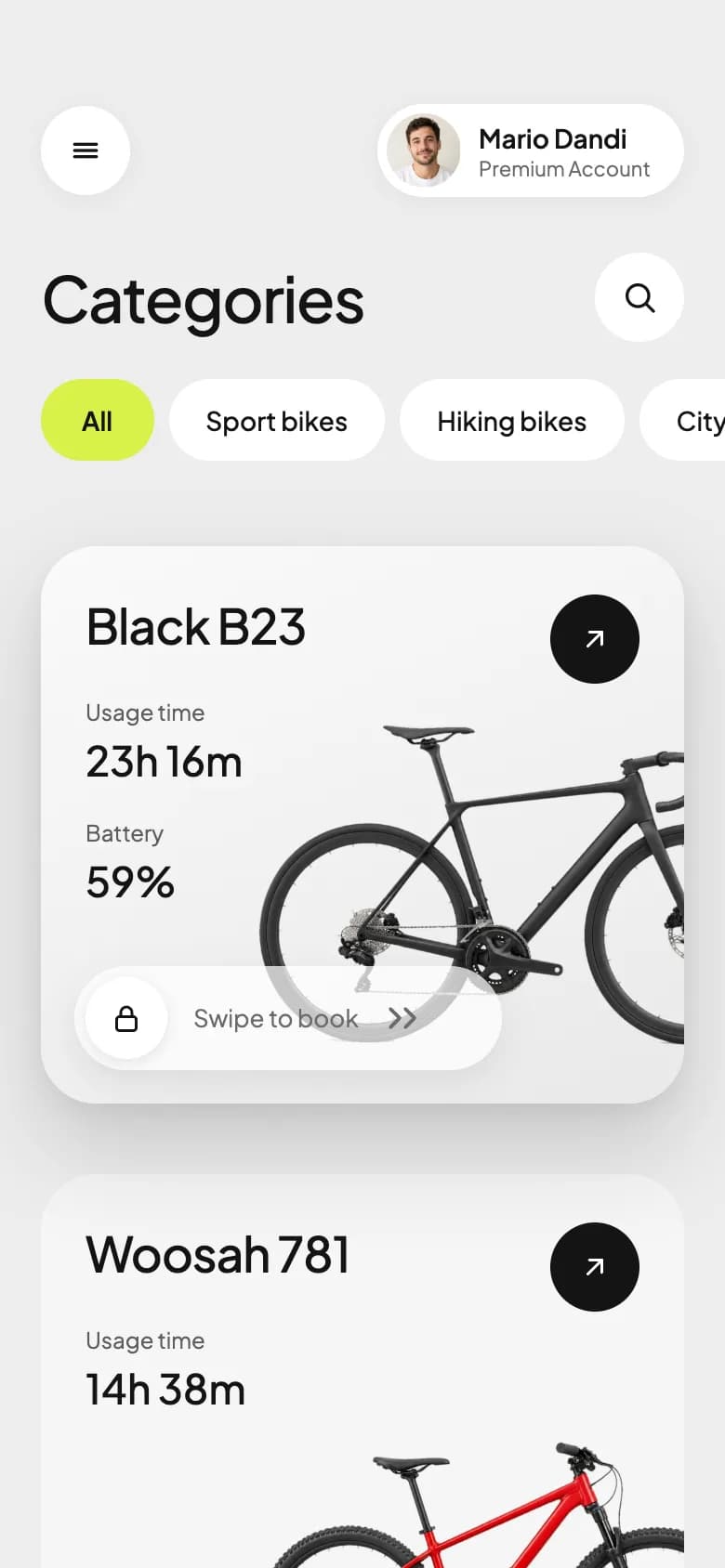
Categories
A menu, profile chip, category filters and overlapping bike cards with usage and battery.
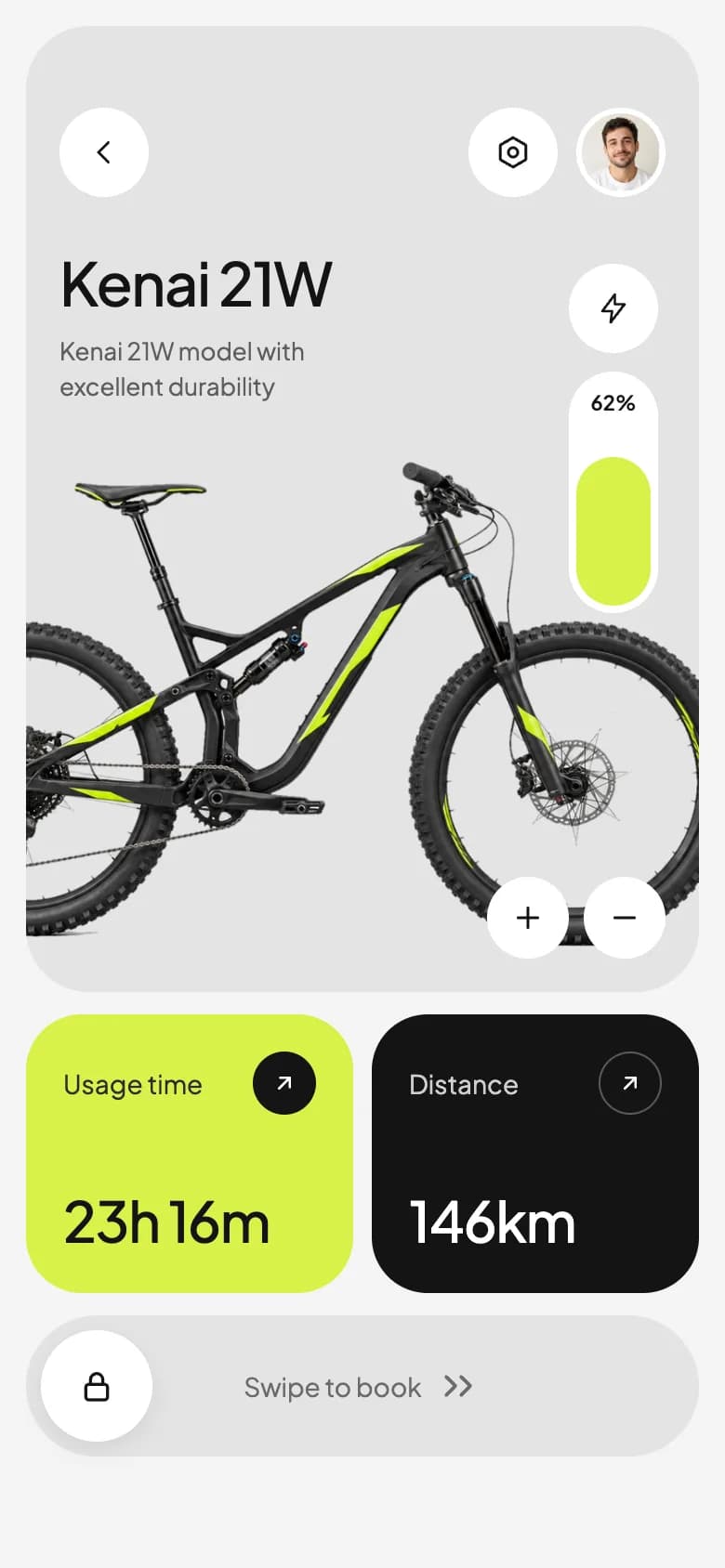
Bike detail
A mountain bike photo, zoom controls, a battery meter, usage and distance tiles and a swipe to book control.
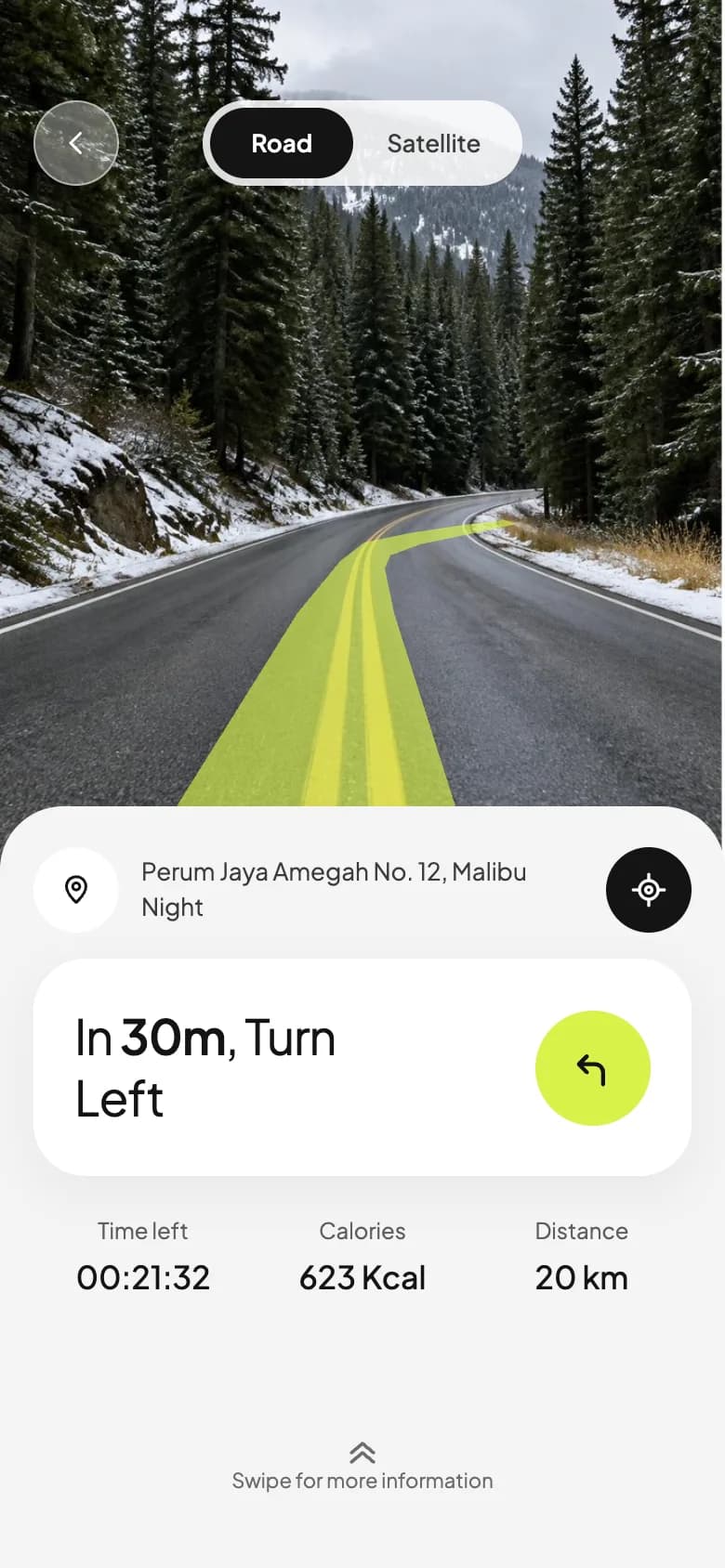
Ride navigation
A forest road with a lime route, a map type switch, destination and next turn card and ride stats.
Copy the Smart Bike Rental kit
Use the artifact as a design brief, the skill to generate the UI with an AI agent, or the code to run it right away.
Design artifact
The full design: tokens, screens and source
# Smart Bike Rental: design artifact
This smart bike rental app UI shows bikes as hero objects. Layered cards hold thin headings, cut-out photos and quick stats, with a swipe control ready for booking.
- Type: Transport mobile app UI
- Screens: 3
- Artboard: 390 × 844
- Target: Expo SDK 58, Expo Router, TypeScript, expo-image, expo-linear-gradient, react-native-svg
- Live page: https://developermill.com/app-designs/smart-bike-rental-app-ui-design
## Design direction
Soft greys with a lime highlight, layered rounded cards, thin large type and bike cut-outs that overlap their containers.
- Layered bike cards with soft shadows
- Lime battery meter and stat tiles
- Swipe to book control
- Route drawn over a road photo with SVG
## Foundations
### Colour
| Token | Hex |
| --- | --- |
| Lime | `#D9F24B` |
| Ink | `#141414` |
| Platinum | `#E4E4E4` |
| Cloud | `#F4F4F4` |
| Fog | `#EDEDED` |
| Smoke | `#5E5E5E` |
### Typography
- Typefaces: Plus Jakarta Sans
- Common sizes (px): 11, 12, 13, 14, 17, 22, 26, 30
### Shape and depth
- Common corner radii (px): 28, 30, 34
- Shadows: `0 2px 10px rgba(0,0,0,0.05)`, `0 24px 50px rgba(0,0,0,0.16), 0 4px 12px rgba(0,0,0,0.06)`, `0 6px 18px rgba(0,0,0,0.08)`, `0 2px 8px rgba(0,0,0,0.1)`
## Screens
### 1. Categories
A menu, profile chip, category filters and overlapping bike cards with usage and battery.
Preview: https://developermill.com/app-designs/smart-bike-rental-app-ui-design/categories.webp
Copy on this screen:
- Mario Dandi
- Premium Account
- Categories
- All
- Sport bikes
- Hiking bikes
- City bikes
- Black B23
- Usage time
- 23h 16m
- Battery
- 59%
- Swipe to book
- Woosah 781
- 14h 38m
### 2. Bike detail
A mountain bike photo, zoom controls, a battery meter, usage and distance tiles and a swipe to book control.
Preview: https://developermill.com/app-designs/smart-bike-rental-app-ui-design/bike.webp
Copy on this screen:
- Kenai 21W
- Kenai 21W model with excellent durability
- 62%
- Usage time
- 23h 16m
- Distance
- 146km
- Swipe to book
### 3. Ride navigation
A forest road with a lime route, a map type switch, destination and next turn card and ride stats.
Preview: https://developermill.com/app-designs/smart-bike-rental-app-ui-design/navigation.webp
Copy on this screen:
- Road
- Satellite
- Perum Jaya Amegah No. 12, Malibu Night
- In
- 30m
- , Turn
- Left
- Time left
- 00:21:32
- Calories
- 623 Kcal
- Distance
- 20 km
- Swipe for more information
## Full source
The original artboards as HTML. Image URLs point at the hosted demo assets.
### Categories (Main)
```html
<!doctype html>
<html lang="en">
<head>
<meta charset="utf-8">
<title>Categories</title>
<script src="./support.js"></script>
</head>
<body>
<x-dc>
<helmet>
<link rel="preconnect" href="https://fonts.googleapis.com">
<link href="https://fonts.googleapis.com/css2?family=Plus+Jakarta+Sans:wght@400;500;600;700&display=swap" rel="stylesheet">
<style>
body{margin:0}
a{color:#141414}a:hover{color:#000}
</style>
</helmet>
<div style="width: 390px; height: 844px; box-sizing: border-box; background: #EDEDED; font-family: 'Plus Jakarta Sans', system-ui, sans-serif; color: #141414; position: relative; overflow: hidden; padding: 56px 0 0">
<header style="display: flex; justify-content: space-between; align-items: center; padding: 0 22px">
<button aria-label="Open menu" style="width: 48px; height: 48px; border-radius: 50%; border: none; background: #FFFFFF; display: flex; align-items: center; justify-content: center; box-shadow: 0 2px 10px rgba(0,0,0,0.05); cursor: pointer">
<svg width="20" height="20" viewBox="0 0 24 24" fill="none" stroke="#141414" stroke-width="2" stroke-linecap="round" aria-hidden="true"><line x1="5" y1="8" x2="19" y2="8"></line><line x1="5" y1="12" x2="19" y2="12"></line><line x1="5" y1="16" x2="19" y2="16"></line></svg>
</button>
<a href="#" style="display: flex; align-items: center; gap: 10px; background: #FFFFFF; border-radius: 999px; padding: 5px 18px 5px 5px; text-decoration: none; box-shadow: 0 2px 10px rgba(0,0,0,0.05)">
<img src="https://developermill.com/app-designs/smart-bike-rental-app-ui-design/assets/a83edae517.jpg" alt="Mario Dandi" style="width: 40px; height: 40px; border-radius: 50%; object-fit: cover">
<span style="display: flex; flex-direction: column; gap: 1px">
<span style="font-size: 14px; font-weight: 600; color: #141414">Mario Dandi</span>
<span style="font-size: 11px; color: #6B6B6B">Premium Account</span>
</span>
</a>
</header>
<div style="display: flex; justify-content: space-between; align-items: center; padding: 30px 22px 0">
<h1 style="margin: 0; font-size: 34px; font-weight: 500; letter-spacing: -0.8px">Categories</h1>
<button aria-label="Search bikes" style="width: 48px; height: 48px; border-radius: 50%; border: none; background: #FFFFFF; display: flex; align-items: center; justify-content: center; cursor: pointer">
<svg width="20" height="20" viewBox="0 0 24 24" fill="none" stroke="#141414" stroke-width="2" stroke-linecap="round" aria-hidden="true"><circle cx="11" cy="11" r="7"></circle><line x1="16.5" y1="16.5" x2="21" y2="21"></line></svg>
</button>
</div>
<nav aria-label="Bike categories" style="display: flex; gap: 8px; padding: 20px 22px 0; overflow: hidden; white-space: nowrap">
<button style="height: 44px; padding: 0 22px; border-radius: 999px; border: none; background: {{accent}}; font-family: inherit; font-size: 14px; font-weight: 600; color: #141414; cursor: pointer">All</button>
<button style="height: 44px; padding: 0 20px; border-radius: 999px; border: none; background: #FFFFFF; font-family: inherit; font-size: 14px; font-weight: 500; color: #141414; cursor: pointer">Sport bikes</button>
<button style="height: 44px; padding: 0 20px; border-radius: 999px; border: none; background: #FFFFFF; font-family: inherit; font-size: 14px; font-weight: 500; color: #141414; cursor: pointer">Hiking bikes</button>
<button style="height: 44px; padding: 0 20px; border-radius: 999px; border: none; background: #FFFFFF; font-family: inherit; font-size: 14px; font-weight: 500; color: #141414; cursor: pointer">City bikes</button>
</nav>
<article style="position: absolute; left: 22px; top: 294px; width: 346px; height: 300px; box-sizing: border-box; background: linear-gradient(160deg, #FAFAFA 0%, #E9E9E9 100%); border-radius: 30px; padding: 26px 24px; overflow: hidden; box-shadow: 0 24px 50px rgba(0,0,0,0.16), 0 4px 12px rgba(0,0,0,0.06); z-index: 2">
<div style="display: flex; justify-content: space-between; align-items: flex-start">
<h2 style="margin: 0; font-size: 26px; font-weight: 500; letter-spacing: -0.5px">Black B23</h2>
<a href="Detail.dc.html" aria-label="Open Black B23" style="width: 48px; height: 48px; border-radius: 50%; background: #141414; display: flex; align-items: center; justify-content: center">
<svg width="18" height="18" viewBox="0 0 24 24" fill="none" stroke="#FFFFFF" stroke-width="2" stroke-linecap="round" stroke-linejoin="round" aria-hidden="true"><line x1="7" y1="17" x2="17" y2="7"></line><polyline points="8 7 17 7 17 16"></polyline></svg>
</a>
</div>
<div style="display: flex; flex-direction: column; gap: 4px; margin-top: 8px">
<span style="font-size: 12px; color: #5E5E5E">Usage time</span>
<span style="font-size: 22px; font-weight: 500">23h 16m</span>
<span style="font-size: 12px; color: #5E5E5E; margin-top: 14px">Battery</span>
<span style="font-size: 22px; font-weight: 500">59%</span>
</div>
<img src="https://developermill.com/app-designs/smart-bike-rental-app-ui-design/assets/22b3caf0bf.png" alt="Black B23 road bike" style="position: absolute; right: -68px; top: 96px; width: 297px; height: auto">
<a href="#" style="position: absolute; left: 18px; bottom: 18px; width: 230px; height: 56px; border-radius: 999px; background: rgba(255,255,255,0.72); display: flex; align-items: center; gap: 14px; padding: 6px; box-sizing: border-box; text-decoration: none; box-shadow: 0 6px 18px rgba(0,0,0,0.08)">
<span style="width: 44px; height: 44px; border-radius: 50%; background: #FFFFFF; display: flex; align-items: center; justify-content: center; box-shadow: 0 2px 8px rgba(0,0,0,0.1)">
<svg width="18" height="18" viewBox="0 0 24 24" fill="none" stroke="#141414" stroke-width="2" stroke-linecap="round" stroke-linejoin="round" aria-hidden="true"><rect x="5" y="11" width="14" height="10" rx="2"></rect><path d="M8 11V8a4 4 0 0 1 8 0v3"></path></svg>
</span>
<span style="font-size: 13px; color: #6B6B6B">Swipe to book</span>
<svg width="22" height="14" viewBox="0 0 22 14" fill="none" stroke="#6B6B6B" stroke-width="1.8" stroke-linecap="round" stroke-linejoin="round" aria-hidden="true"><polyline points="3 2 8 7 3 12"></polyline><polyline points="11 2 16 7 11 12"></polyline></svg>
</a>
</article>
<article style="position: absolute; left: 22px; right: 22px; top: 632px; height: 260px; box-sizing: border-box; background: #F5F5F5; border-radius: 30px; padding: 26px 24px; overflow: hidden">
<div style="display: flex; justify-content: space-between; align-items: flex-start">
<h2 style="margin: 0; font-size: 26px; font-weight: 500; letter-spacing: -0.5px">Woosah 781</h2>
<a href="#" aria-label="Open Woosah 781" style="width: 48px; height: 48px; border-radius: 50%; background: #141414; display: flex; align-items: center; justify-content: center">
<svg width="18" height="18" viewBox="0 0 24 24" fill="none" stroke="#FFFFFF" stroke-width="2" stroke-linecap="round" stroke-linejoin="round" aria-hidden="true"><line x1="7" y1="17" x2="17" y2="7"></line><polyline points="8 7 17 7 17 16"></polyline></svg>
</a>
</div>
<div style="display: flex; flex-direction: column; gap: 4px; margin-top: 8px">
<span style="font-size: 12px; color: #5E5E5E">Usage time</span>
<span style="font-size: 22px; font-weight: 500">14h 38m</span>
</div>
<img src="https://developermill.com/app-designs/smart-bike-rental-app-ui-design/assets/cd9e94cf13.png" alt="Woosah 781 red mountain bike" style="position: absolute; right: -38px; top: 144px; width: 268px; height: auto">
</article>
</div>
</x-dc>
<script type="text/x-dc" data-dc-script data-props='{"accent":{"editor":"color","default":"#D9F24B","options":["#D9F24B","#B8F35A","#FFD84D","#7CE3FF"]},"$preview":{"width":390,"height":844}}'>
class Component extends DCLogic {
renderVals() {
return { accent: this.props.accent ?? '#D9F24B' };
}
}
</script>
</body>
</html>
```
### Bike detail (Detail)
```html
<!doctype html>
<html lang="en">
<head>
<meta charset="utf-8">
<title>Kenai 21W detail</title>
<script src="./support.js"></script>
</head>
<body>
<x-dc>
<helmet>
<link rel="preconnect" href="https://fonts.googleapis.com">
<link href="https://fonts.googleapis.com/css2?family=Plus+Jakarta+Sans:wght@400;500;600;700&display=swap" rel="stylesheet">
<style>
body{margin:0}
a{color:#141414}a:hover{color:#000}
</style>
</helmet>
<div style="width: 390px; height: 844px; box-sizing: border-box; background: #F4F4F4; font-family: 'Plus Jakarta Sans', system-ui, sans-serif; color: #141414; position: relative; overflow: hidden; padding: 14px 14px 22px; display: flex; flex-direction: column; gap: 12px">
<section style="position: relative; height: 520px; background: #E4E4E4; border-radius: 34px; padding: 44px 18px 0; box-sizing: border-box; overflow: hidden">
<header style="display: flex; justify-content: space-between; align-items: center">
<a href="Main.dc.html" aria-label="Back" style="width: 48px; height: 48px; border-radius: 50%; background: #FFFFFF; display: flex; align-items: center; justify-content: center">
<svg width="18" height="18" viewBox="0 0 24 24" fill="none" stroke="#141414" stroke-width="2" stroke-linecap="round" stroke-linejoin="round" aria-hidden="true"><polyline points="15 5 8 12 15 19"></polyline></svg>
</a>
<div style="display: flex; gap: 10px; align-items: center">
<button aria-label="Bike settings" style="width: 48px; height: 48px; border-radius: 50%; border: none; background: #FFFFFF; display: flex; align-items: center; justify-content: center; cursor: pointer">
<svg width="20" height="20" viewBox="0 0 24 24" fill="none" stroke="#141414" stroke-width="1.8" stroke-linecap="round" stroke-linejoin="round" aria-hidden="true"><path d="M12 2.5l8.2 4.75v9.5L12 21.5l-8.2-4.75v-9.5z"></path><circle cx="12" cy="12" r="3"></circle></svg>
</button>
<img src="https://developermill.com/app-designs/smart-bike-rental-app-ui-design/assets/a83edae517.jpg" alt="Profile" style="width: 48px; height: 48px; border-radius: 50%; object-fit: cover; border: 3px solid #FFFFFF; box-sizing: border-box">
</div>
</header>
<h1 style="margin: 26px 0 0; font-size: 32px; font-weight: 500; letter-spacing: -0.8px">Kenai 21W</h1>
<p style="margin: 8px 0 0; font-size: 13px; line-height: 1.45; color: #5E5E5E; width: 170px">Kenai 21W model with excellent durability</p>
<div aria-label="Battery 62 percent" role="img" style="position: absolute; right: 18px; top: 128px; width: 56px; display: flex; flex-direction: column; align-items: center; gap: 10px">
<span style="width: 48px; height: 48px; border-radius: 50%; background: #FFFFFF; display: flex; align-items: center; justify-content: center">
<svg width="18" height="18" viewBox="0 0 24 24" fill="none" stroke="#141414" stroke-width="1.8" stroke-linejoin="round" aria-hidden="true"><polygon points="13 2 4 14 11 14 10 22 20 9 13 9"></polygon></svg>
</span>
<span style="width: 48px; height: 130px; border-radius: 999px; background: #FFFFFF; display: flex; flex-direction: column; justify-content: space-between; align-items: center; padding: 10px 0 4px; box-sizing: border-box">
<span style="font-size: 11px; font-weight: 600">62%</span>
<span style="width: 40px; height: 80px; border-radius: 999px; background: {{accent}}"></span>
</span>
</div>
<img src="https://developermill.com/app-designs/smart-bike-rental-app-ui-design/assets/b94ae0e90b.png" alt="Kenai 21W full-suspension mountain bike" style="position: absolute; left: -84px; top: 234px; width: 466px; height: auto">
<div style="position: absolute; right: 18px; bottom: 18px; display: flex; gap: 8px">
<button aria-label="Zoom in" style="width: 44px; height: 44px; border-radius: 50%; border: none; background: #FFFFFF; display: flex; align-items: center; justify-content: center; cursor: pointer">
<svg width="18" height="18" viewBox="0 0 24 24" fill="none" stroke="#141414" stroke-width="2" stroke-linecap="round" aria-hidden="true"><line x1="12" y1="5" x2="12" y2="19"></line><line x1="5" y1="12" x2="19" y2="12"></line></svg>
</button>
<button aria-label="Zoom out" style="width: 44px; height: 44px; border-radius: 50%; border: none; background: #FFFFFF; display: flex; align-items: center; justify-content: center; cursor: pointer">
<svg width="18" height="18" viewBox="0 0 24 24" fill="none" stroke="#141414" stroke-width="2" stroke-linecap="round" aria-hidden="true"><line x1="5" y1="12" x2="19" y2="12"></line></svg>
</button>
</div>
</section>
<div style="display: grid; grid-template-columns: repeat(2, minmax(0, 1fr)); gap: 10px">
<div style="height: 150px; border-radius: 30px; background: {{accent}}; padding: 20px; box-sizing: border-box; display: flex; flex-direction: column; justify-content: space-between">
<div style="display: flex; justify-content: space-between; align-items: center">
<span style="font-size: 14px; color: #2B2B2B">Usage time</span>
<span style="width: 34px; height: 34px; border-radius: 50%; background: #141414; display: flex; align-items: center; justify-content: center">
<svg width="14" height="14" viewBox="0 0 24 24" fill="none" stroke="#FFFFFF" stroke-width="2.2" stroke-linecap="round" stroke-linejoin="round" aria-hidden="true"><line x1="7" y1="17" x2="17" y2="7"></line><polyline points="8 7 17 7 17 16"></polyline></svg>
</span>
</div>
<span style="font-size: 30px; font-weight: 500; letter-spacing: -0.6px">23h 16m</span>
</div>
<div style="height: 150px; border-radius: 30px; background: #141414; color: #FFFFFF; padding: 20px; box-sizing: border-box; display: flex; flex-direction: column; justify-content: space-between">
<div style="display: flex; justify-content: space-between; align-items: center">
<span style="font-size: 14px; color: #CFCFCF">Distance</span>
<span style="width: 34px; height: 34px; border-radius: 50%; border: 1.5px solid #5A5A5A; display: flex; align-items: center; justify-content: center; box-sizing: border-box">
<svg width="14" height="14" viewBox="0 0 24 24" fill="none" stroke="#FFFFFF" stroke-width="2.2" stroke-linecap="round" stroke-linejoin="round" aria-hidden="true"><line x1="7" y1="17" x2="17" y2="7"></line><polyline points="8 7 17 7 17 16"></polyline></svg>
</span>
</div>
<span style="font-size: 30px; font-weight: 500; letter-spacing: -0.6px">146km</span>
</div>
</div>
<a href="#" style="height: 76px; border-radius: 999px; background: #E4E4E4; display: flex; align-items: center; padding: 8px; box-sizing: border-box; text-decoration: none; position: relative">
<span style="width: 60px; height: 60px; border-radius: 50%; background: #FFFFFF; display: flex; align-items: center; justify-content: center; box-shadow: 0 4px 12px rgba(0,0,0,0.08)">
<svg width="20" height="20" viewBox="0 0 24 24" fill="none" stroke="#141414" stroke-width="2" stroke-linecap="round" stroke-linejoin="round" aria-hidden="true"><rect x="5" y="11" width="14" height="10" rx="2"></rect><path d="M8 11V8a4 4 0 0 1 8 0v3"></path></svg>
</span>
<span style="position: absolute; left: 0; right: 0; display: flex; justify-content: center; align-items: center; gap: 10px; font-size: 14px; color: #6B6B6B; pointer-events: none">Swipe to book
<svg width="22" height="14" viewBox="0 0 22 14" fill="none" stroke="#6B6B6B" stroke-width="1.8" stroke-linecap="round" stroke-linejoin="round" aria-hidden="true"><polyline points="3 2 8 7 3 12"></polyline><polyline points="11 2 16 7 11 12"></polyline></svg>
</span>
</a>
</div>
</x-dc>
<script type="text/x-dc" data-dc-script data-props='{"accent":{"editor":"color","default":"#D9F24B","options":["#D9F24B","#B8F35A","#FFD84D","#7CE3FF"]},"$preview":{"width":390,"height":844}}'>
class Component extends DCLogic {
renderVals() {
return { accent: this.props.accent ?? '#D9F24B' };
}
}
</script>
</body>
</html>
```
### Ride navigation (Navigation)
```html
<!doctype html>
<html lang="en">
<head>
<meta charset="utf-8">
<title>Ride navigation</title>
<script src="./support.js"></script>
</head>
<body>
<x-dc>
<helmet>
<link rel="preconnect" href="https://fonts.googleapis.com">
<link href="https://fonts.googleapis.com/css2?family=Plus+Jakarta+Sans:wght@400;500;600;700&display=swap" rel="stylesheet">
<style>
body{margin:0}
a{color:#141414}a:hover{color:#000}
</style>
</helmet>
<div style="width: 390px; height: 844px; box-sizing: border-box; background: #F4F4F4; font-family: 'Plus Jakarta Sans', system-ui, sans-serif; color: #141414; position: relative; overflow: hidden">
<div style="position: absolute; left: 0; top: 0; width: 390px; height: 520px; overflow: hidden">
<img src="https://developermill.com/app-designs/smart-bike-rental-app-ui-design/assets/743c479234.jpg" alt="Forest road ahead with snow on the verges" style="width: 390px; height: 520px; object-fit: cover; object-position: 50% 70%; display: block">
<svg width="390" height="520" viewBox="0 0 390 520" aria-hidden="true" style="position: absolute; left: 0; top: 0">
<polygon points="40,520 95,434 160,330 183,302 196,292 220,287 246,283 272,280 278,282 250,288 226,293 210,299 207,306 212,330 245,434 268,520" fill="{{accent}}" fill-opacity="0.65"></polygon>
</svg>
</div>
<header style="position: absolute; left: 18px; right: 18px; top: 54px; display: flex; justify-content: space-between; align-items: center">
<a href="Detail.dc.html" aria-label="Back" style="width: 46px; height: 46px; border-radius: 50%; background: rgba(255,255,255,0.35); border: 1px solid rgba(255,255,255,0.5); display: flex; align-items: center; justify-content: center; box-sizing: border-box">
<svg width="18" height="18" viewBox="0 0 24 24" fill="none" stroke="#FFFFFF" stroke-width="2" stroke-linecap="round" stroke-linejoin="round" aria-hidden="true"><polyline points="15 5 8 12 15 19"></polyline></svg>
</a>
<div role="group" aria-label="Map type" style="display: flex; background: rgba(255,255,255,0.85); border-radius: 999px; padding: 4px">
<button aria-pressed="true" style="height: 38px; padding: 0 22px; border-radius: 999px; border: none; background: #141414; color: #FFFFFF; font-family: inherit; font-size: 13px; font-weight: 600; cursor: pointer">Road</button>
<button aria-pressed="false" style="height: 38px; padding: 0 18px; border-radius: 999px; border: none; background: transparent; color: #3A3A3A; font-family: inherit; font-size: 13px; font-weight: 500; cursor: pointer">Satellite</button>
</div>
<span style="width: 46px"></span>
</header>
<section style="position: absolute; left: 0; right: 0; bottom: 0; height: 410px; background: #F4F4F4; border-radius: 34px 34px 0 0; padding: 22px 18px 0; box-sizing: border-box; display: flex; flex-direction: column; gap: 14px">
<div style="display: flex; align-items: center; gap: 12px">
<span style="width: 46px; height: 46px; border-radius: 50%; background: #FFFFFF; display: flex; align-items: center; justify-content: center; flex-shrink: 0">
<svg width="18" height="18" viewBox="0 0 24 24" fill="none" stroke="#141414" stroke-width="2" stroke-linecap="round" stroke-linejoin="round" aria-hidden="true"><path d="M12 21s-7-6.2-7-11.5A7 7 0 0 1 19 9.5C19 14.8 12 21 12 21z"></path><circle cx="12" cy="9.5" r="2.5"></circle></svg>
</span>
<span style="flex: 1; font-size: 13px; line-height: 1.45; color: #3A3A3A">Perum Jaya Amegah No. 12, Malibu Night</span>
<button aria-label="Recenter on my location" style="width: 46px; height: 46px; border-radius: 50%; border: none; background: #141414; display: flex; align-items: center; justify-content: center; cursor: pointer; flex-shrink: 0">
<svg width="20" height="20" viewBox="0 0 24 24" fill="none" stroke="#FFFFFF" stroke-width="2" stroke-linecap="round" aria-hidden="true"><circle cx="12" cy="12" r="6"></circle><circle cx="12" cy="12" r="2"></circle><line x1="12" y1="2" x2="12" y2="5"></line><line x1="12" y1="19" x2="12" y2="22"></line><line x1="2" y1="12" x2="5" y2="12"></line><line x1="19" y1="12" x2="22" y2="12"></line></svg>
</button>
</div>
<div style="background: #FFFFFF; border-radius: 28px; padding: 26px 22px; display: flex; justify-content: space-between; align-items: center; box-shadow: 0 8px 24px rgba(0,0,0,0.05)">
<p style="margin: 0; font-size: 26px; font-weight: 400; line-height: 1.25; letter-spacing: -0.5px">In <strong style="font-weight: 600">30m</strong>, Turn<br>Left</p>
<span role="img" aria-label="Turn left" style="width: 62px; height: 62px; border-radius: 50%; background: {{accent}}; display: flex; align-items: center; justify-content: center">
<svg width="26" height="26" viewBox="0 0 24 24" fill="none" stroke="#141414" stroke-width="2" stroke-linecap="round" stroke-linejoin="round" aria-hidden="true"><polyline points="9 6 5 10 9 14"></polyline><path d="M5 10h8a4 4 0 0 1 4 4v6"></path></svg>
</span>
</div>
<div style="display: grid; grid-template-columns: repeat(3, minmax(0, 1fr)); gap: 8px; padding: 8px 4px 0; text-align: center">
<div style="display: flex; flex-direction: column; gap: 6px">
<span style="font-size: 12px; color: #5E5E5E">Time left</span>
<span style="font-size: 17px; font-weight: 500">00:21:32</span>
</div>
<div style="display: flex; flex-direction: column; gap: 6px">
<span style="font-size: 12px; color: #5E5E5E">Calories</span>
<span style="font-size: 17px; font-weight: 500">623 Kcal</span>
</div>
<div style="display: flex; flex-direction: column; gap: 6px">
<span style="font-size: 12px; color: #5E5E5E">Distance</span>
<span style="font-size: 17px; font-weight: 500">20 km</span>
</div>
</div>
<button style="margin-top: auto; margin-bottom: 26px; align-self: center; border: none; background: transparent; display: flex; flex-direction: column; align-items: center; gap: 2px; font-family: inherit; font-size: 11px; color: #6B6B6B; cursor: pointer; min-height: 44px">
<svg width="22" height="14" viewBox="0 0 22 14" fill="none" stroke="#6B6B6B" stroke-width="1.8" stroke-linecap="round" stroke-linejoin="round" aria-hidden="true"><polyline points="5 8 11 3 17 8"></polyline><polyline points="5 13 11 8 17 13"></polyline></svg>
Swipe for more information
</button>
</section>
</div>
</x-dc>
<script type="text/x-dc" data-dc-script data-props='{"accent":{"editor":"color","default":"#D9F24B","options":["#D9F24B","#B8F35A","#FFD84D","#7CE3FF"]},"$preview":{"width":390,"height":844}}'>
class Component extends DCLogic {
renderVals() {
return { accent: this.props.accent ?? '#D9F24B' };
}
}
</script>
</body>
</html>
```SKILL.md
Save as .claude/skills/smart-bike-rental-app-ui/SKILL.md
---
name: smart-bike-rental-app-ui
description: Build the Smart Bike Rental mobile app UI in Expo React Native. Use when asked to create a smart bike app UI or a new screen in this visual style.
---

# Smart Bike Rental app UI

Build this transport app UI in an Expo Router project with TypeScript.

Reference: https://developermill.com/app-designs/smart-bike-rental-app-ui-design

## Visual direction

Soft greys with a lime highlight, layered rounded cards, thin large type and bike cut-outs that overlap their containers.

Keep these signature details:

- Layered bike cards with soft shadows
- Lime battery meter and stat tiles
- Swipe to book control
- Route drawn over a road photo with SVG

## Set up

```bash
npx expo install expo-image expo-linear-gradient react-native-svg @expo-google-fonts/plus-jakarta-sans expo-font
```

## Tokens

| Name | Hex |
| --- | --- |
| Lime | `#D9F24B` |
| Ink | `#141414` |
| Platinum | `#E4E4E4` |
| Cloud | `#F4F4F4` |
| Fog | `#EDEDED` |
| Smoke | `#5E5E5E` |

- Typefaces: Plus Jakarta Sans
- Text sizes (px): 11, 12, 13, 14, 17, 22, 26, 30
- Corner radii (px): 28, 30, 34

Define these once and reuse them. Do not add new colours.

## Screens

1. **Categories.** A menu, profile chip, category filters and overlapping bike cards with usage and battery.
2. **Bike detail.** A mountain bike photo, zoom controls, a battery meter, usage and distance tiles and a swipe to book control.
3. **Ride navigation.** A forest road with a lime route, a map type switch, destination and next turn card and ride stats.

## Build rules

- Draw each screen on a 390 × 844 artboard and scale it to the device width.
- Load each custom font weight by family name with expo-font. Do not set fontWeight with custom fonts.
- Draw icons, charts and illustrations with react-native-svg.
- Use Pressable with an accessibilityLabel for controls, with at least a 44px target.
- Navigate with router.navigate and keep sample data as constants at the top of the file.
- Use expo-image with contentFit for photos.

## Done when

- All routes are linked and reachable.
- Colours, type and radii match the tokens above.
- `npx tsc --noEmit` and `npx expo lint` pass.
- The layout holds up on small and large phones.
Set up the project
npx create-expo-app@latest smart-bike-rental-app --template default
cd smart-bike-rental-app
rm -rf src
npx expo install expo-image expo-linear-gradient react-native-svg @expo-google-fonts/plus-jakarta-sans expo-font
src/app/_layout.tsx
import {
  PlusJakartaSans_400Regular,
  PlusJakartaSans_500Medium,
  PlusJakartaSans_600SemiBold,
} from '@expo-google-fonts/plus-jakarta-sans';
import { useFonts } from 'expo-font';
import { Stack } from 'expo-router';

export default function RootLayout() {
  const [fontsLoaded] = useFonts({
    PlusJakartaSans_400Regular,
    PlusJakartaSans_500Medium,
    PlusJakartaSans_600SemiBold,
  });

  if (!fontsLoaded) return null;

  return <Stack screenOptions={{ headerShown: false }} />;
}
src/app/index.tsx
import { Image } from 'expo-image';
import { LinearGradient } from 'expo-linear-gradient';
import { router } from 'expo-router';
import { Pressable, StyleSheet, Text, View } from 'react-native';
import Svg, { Circle, Line, Path, Polyline, Rect } from 'react-native-svg';
import { Screen } from '@/components/screen';
import { asset } from '@/lib/assets';
const accent = '#D9F24B';
export default function MainScreen() {
return (
<Screen background="#EDEDED" statusBar="dark">
<View style={{ paddingTop: 56, paddingBottom: 0, paddingHorizontal: 0, flex: 1 }}>
<View
style={{
justifyContent: 'space-between',
alignItems: 'center',
paddingVertical: 0,
paddingHorizontal: 22,
flexDirection: 'row',
}}>
<Pressable
accessibilityRole="button"
accessibilityLabel="Open menu"
style={{
width: 48,
height: 48,
borderRadius: '50%',
borderWidth: 0,
backgroundColor: '#FFFFFF',
alignItems: 'center',
justifyContent: 'center',
boxShadow: '0 2px 10px rgba(0,0,0,0.05)',
flexDirection: 'row',
}}>
<Svg
width="20"
height="20"
viewBox="0 0 24 24"
fill="none"
stroke="#141414"
strokeWidth="2"
strokeLinecap="round">
<Line x1="5" y1="8" x2="19" y2="8" />
<Line x1="5" y1="12" x2="19" y2="12" />
<Line x1="5" y1="16" x2="19" y2="16" />
</Svg>
</Pressable>
<Pressable
accessibilityRole="link"
style={{
alignItems: 'center',
gap: 10,
backgroundColor: '#FFFFFF',
borderRadius: 999,
paddingVertical: 5,
paddingLeft: 5,
paddingRight: 18,
boxShadow: '0 2px 10px rgba(0,0,0,0.05)',
flexShrink: 1,
flexDirection: 'row',
}}>
<Image
source={{ uri: asset('a83edae517.jpg') }}
contentFit="cover"
accessibilityLabel="Mario Dandi"
style={{ width: 40, height: 40, borderRadius: '50%' }}
/>
<View style={{ gap: 1, flexShrink: 1 }}>
<Text
style={{
fontFamily: 'PlusJakartaSans_600SemiBold',
fontSize: 14,
color: '#141414',
}}>
Mario Dandi
</Text>
<Text
style={{
fontFamily: 'PlusJakartaSans_400Regular',
fontSize: 11,
color: '#6B6B6B',
}}>
Premium Account
</Text>
</View>
</Pressable>
</View>
<View
style={{
justifyContent: 'space-between',
alignItems: 'center',
paddingTop: 30,
paddingBottom: 0,
paddingHorizontal: 22,
flexDirection: 'row',
}}>
<Text
style={{
margin: 0,
flexShrink: 1,
fontFamily: 'PlusJakartaSans_500Medium',
fontSize: 34,
color: '#141414',
letterSpacing: -0.8,
}}>
Categories
</Text>
<Pressable
accessibilityRole="button"
accessibilityLabel="Search bikes"
style={{
width: 48,
height: 48,
borderRadius: '50%',
borderWidth: 0,
backgroundColor: '#FFFFFF',
alignItems: 'center',
justifyContent: 'center',
flexDirection: 'row',
}}>
<Svg
width="20"
height="20"
viewBox="0 0 24 24"
fill="none"
stroke="#141414"
strokeWidth="2"
strokeLinecap="round">
<Circle cx="11" cy="11" r="7" />
<Line x1="16.5" y1="16.5" x2="21" y2="21" />
</Svg>
</Pressable>
</View>
<View
style={{
gap: 8,
paddingTop: 20,
paddingBottom: 0,
paddingHorizontal: 22,
overflow: 'hidden',
flexDirection: 'row',
}}>
<Pressable
accessibilityRole="button"
style={{
flexShrink: 0,
height: 44,
paddingVertical: 0,
paddingHorizontal: 22,
borderRadius: 999,
borderWidth: 0,
backgroundColor: accent,
alignItems: 'center',
justifyContent: 'center',
}}>
<Text
style={{
fontFamily: 'PlusJakartaSans_600SemiBold',
fontSize: 14,
color: '#141414',
textAlign: 'center',
}}>
All
</Text>
</Pressable>
<Pressable
accessibilityRole="button"
style={{
flexShrink: 0,
height: 44,
paddingVertical: 0,
paddingHorizontal: 20,
borderRadius: 999,
borderWidth: 0,
backgroundColor: '#FFFFFF',
alignItems: 'center',
justifyContent: 'center',
}}>
<Text
style={{
fontFamily: 'PlusJakartaSans_500Medium',
fontSize: 14,
color: '#141414',
textAlign: 'center',
}}>
Sport bikes
</Text>
</Pressable>
<Pressable
accessibilityRole="button"
style={{
flexShrink: 0,
height: 44,
paddingVertical: 0,
paddingHorizontal: 20,
borderRadius: 999,
borderWidth: 0,
backgroundColor: '#FFFFFF',
alignItems: 'center',
justifyContent: 'center',
}}>
<Text
style={{
fontFamily: 'PlusJakartaSans_500Medium',
fontSize: 14,
color: '#141414',
textAlign: 'center',
}}>
Hiking bikes
</Text>
</Pressable>
<Pressable
accessibilityRole="button"
style={{
flexShrink: 0,
height: 44,
paddingVertical: 0,
paddingHorizontal: 20,
borderRadius: 999,
borderWidth: 0,
backgroundColor: '#FFFFFF',
alignItems: 'center',
justifyContent: 'center',
}}>
<Text
style={{
fontFamily: 'PlusJakartaSans_500Medium',
fontSize: 14,
color: '#141414',
textAlign: 'center',
}}>
City bikes
</Text>
</Pressable>
</View>
<View
style={{
position: 'absolute',
left: 22,
top: 294,
width: 346,
height: 300,
borderRadius: 30,
paddingVertical: 26,
paddingHorizontal: 24,
overflow: 'hidden',
boxShadow: '0 24px 50px rgba(0,0,0,0.16), 0 4px 12px rgba(0,0,0,0.06)',
zIndex: 2,
}}>
<LinearGradient
colors={['#FAFAFA', '#E9E9E9']}
locations={[0, 1]}
start={{ x: 0.329, y: 0.03 }}
end={{ x: 0.671, y: 0.97 }}
style={StyleSheet.absoluteFill}
/>
<View
style={{
justifyContent: 'space-between',
alignItems: 'flex-start',
flexDirection: 'row',
}}>
<Text
style={{
margin: 0,
flexShrink: 1,
fontFamily: 'PlusJakartaSans_500Medium',
fontSize: 26,
color: '#141414',
letterSpacing: -0.5,
}}>
Black B23
</Text>
<Pressable
accessibilityRole="link"
accessibilityLabel="Open Black B23"
onPress={() => router.navigate('/detail')}
style={{
width: 48,
height: 48,
borderRadius: '50%',
backgroundColor: '#141414',
alignItems: 'center',
justifyContent: 'center',
flexDirection: 'row',
}}>
<Svg
width="18"
height="18"
viewBox="0 0 24 24"
fill="none"
stroke="#FFFFFF"
strokeWidth="2"
strokeLinecap="round"
strokeLinejoin="round">
<Line x1="7" y1="17" x2="17" y2="7" />
<Polyline points="8 7 17 7 17 16" />
</Svg>
</Pressable>
</View>
<View style={{ gap: 4, marginTop: 8 }}>
<Text
style={{ fontFamily: 'PlusJakartaSans_400Regular', fontSize: 12, color: '#5E5E5E' }}>
Usage time
</Text>
<Text
style={{ fontFamily: 'PlusJakartaSans_500Medium', fontSize: 22, color: '#141414' }}>
23h 16m
</Text>
<Text
style={{
marginTop: 14,
fontFamily: 'PlusJakartaSans_400Regular',
fontSize: 12,
color: '#5E5E5E',
}}>
Battery
</Text>
<Text
style={{ fontFamily: 'PlusJakartaSans_500Medium', fontSize: 22, color: '#141414' }}>
59%
</Text>
</View>
<Image
source={{ uri: asset('22b3caf0bf.png') }}
contentFit="fill"
accessibilityLabel="Black B23 road bike"
style={{ position: 'absolute', right: -68, top: 96, width: 297, aspectRatio: 1.721 }}
/>
<Pressable
accessibilityRole="link"
style={{
position: 'absolute',
left: 18,
bottom: 18,
width: 230,
height: 56,
borderRadius: 999,
backgroundColor: 'rgba(255,255,255,0.72)',
alignItems: 'center',
gap: 14,
padding: 6,
boxShadow: '0 6px 18px rgba(0,0,0,0.08)',
flexDirection: 'row',
}}>
<View
style={{
width: 44,
height: 44,
borderRadius: '50%',
backgroundColor: '#FFFFFF',
alignItems: 'center',
justifyContent: 'center',
boxShadow: '0 2px 8px rgba(0,0,0,0.1)',
flexDirection: 'row',
}}>
<Svg
width="18"
height="18"
viewBox="0 0 24 24"
fill="none"
stroke="#141414"
strokeWidth="2"
strokeLinecap="round"
strokeLinejoin="round">
<Rect x="5" y="11" width="14" height="10" rx="2" />
<Path d="M8 11V8a4 4 0 0 1 8 0v3" />
</Svg>
</View>
<Text
style={{
flexShrink: 1,
fontFamily: 'PlusJakartaSans_400Regular',
fontSize: 13,
color: '#6B6B6B',
}}>
Swipe to book
</Text>
<Svg
width="22"
height="14"
viewBox="0 0 22 14"
fill="none"
stroke="#6B6B6B"
strokeWidth="1.8"
strokeLinecap="round"
strokeLinejoin="round">
<Polyline points="3 2 8 7 3 12" />
<Polyline points="11 2 16 7 11 12" />
</Svg>
</Pressable>
</View>
<View
style={{
position: 'absolute',
left: 22,
right: 22,
top: 632,
height: 260,
backgroundColor: '#F5F5F5',
borderRadius: 30,
paddingVertical: 26,
paddingHorizontal: 24,
overflow: 'hidden',
}}>
<View
style={{
justifyContent: 'space-between',
alignItems: 'flex-start',
flexDirection: 'row',
}}>
<Text
style={{
margin: 0,
flexShrink: 1,
fontFamily: 'PlusJakartaSans_500Medium',
fontSize: 26,
color: '#141414',
letterSpacing: -0.5,
}}>
Woosah 781
</Text>
<Pressable
accessibilityRole="link"
accessibilityLabel="Open Woosah 781"
style={{
width: 48,
height: 48,
borderRadius: '50%',
backgroundColor: '#141414',
alignItems: 'center',
justifyContent: 'center',
flexDirection: 'row',
}}>
<Svg
width="18"
height="18"
viewBox="0 0 24 24"
fill="none"
stroke="#FFFFFF"
strokeWidth="2"
strokeLinecap="round"
strokeLinejoin="round">
<Line x1="7" y1="17" x2="17" y2="7" />
<Polyline points="8 7 17 7 17 16" />
</Svg>
</Pressable>
</View>
<View style={{ gap: 4, marginTop: 8 }}>
<Text
style={{ fontFamily: 'PlusJakartaSans_400Regular', fontSize: 12, color: '#5E5E5E' }}>
Usage time
</Text>
<Text
style={{ fontFamily: 'PlusJakartaSans_500Medium', fontSize: 22, color: '#141414' }}>
14h 38m
</Text>
</View>
<Image
source={{ uri: asset('cd9e94cf13.png') }}
contentFit="fill"
accessibilityLabel="Woosah 781 red mountain bike"
style={{ position: 'absolute', right: -38, top: 144, width: 268, aspectRatio: 1.779 }}
/>
</View>
</View>
</Screen>
);
}src/app/detail.tsx
import { Image } from 'expo-image';
import { router } from 'expo-router';
import { Pressable, Text, View } from 'react-native';
import Svg, { Circle, Line, Path, Polygon, Polyline, Rect } from 'react-native-svg';
import { Screen } from '@/components/screen';
import { asset } from '@/lib/assets';
const accent = '#D9F24B';
export default function DetailScreen() {
return (
<Screen background="#F4F4F4" statusBar="dark">
<View style={{ paddingTop: 14, paddingBottom: 22, paddingHorizontal: 14, gap: 12, flex: 1 }}>
<View
style={{
height: 520,
backgroundColor: '#E4E4E4',
borderRadius: 34,
paddingTop: 44,
paddingBottom: 0,
paddingHorizontal: 18,
overflow: 'hidden',
}}>
<View
style={{ justifyContent: 'space-between', alignItems: 'center', flexDirection: 'row' }}>
<Pressable
accessibilityRole="link"
accessibilityLabel="Back"
onPress={() => router.navigate('/')}
style={{
width: 48,
height: 48,
borderRadius: '50%',
backgroundColor: '#FFFFFF',
alignItems: 'center',
justifyContent: 'center',
flexDirection: 'row',
}}>
<Svg
width="18"
height="18"
viewBox="0 0 24 24"
fill="none"
stroke="#141414"
strokeWidth="2"
strokeLinecap="round"
strokeLinejoin="round">
<Polyline points="15 5 8 12 15 19" />
</Svg>
</Pressable>
<View style={{ gap: 10, alignItems: 'center', flexShrink: 1, flexDirection: 'row' }}>
<Pressable
accessibilityRole="button"
accessibilityLabel="Bike settings"
style={{
width: 48,
height: 48,
borderRadius: '50%',
borderWidth: 0,
backgroundColor: '#FFFFFF',
alignItems: 'center',
justifyContent: 'center',
flexDirection: 'row',
}}>
<Svg
width="20"
height="20"
viewBox="0 0 24 24"
fill="none"
stroke="#141414"
strokeWidth="1.8"
strokeLinecap="round"
strokeLinejoin="round">
<Path d="M12 2.5l8.2 4.75v9.5L12 21.5l-8.2-4.75v-9.5z" />
<Circle cx="12" cy="12" r="3" />
</Svg>
</Pressable>
<Image
source={{ uri: asset('a83edae517.jpg') }}
contentFit="cover"
accessibilityLabel="Profile"
style={{
width: 48,
height: 48,
borderRadius: '50%',
borderWidth: 3,
borderColor: '#FFFFFF',
}}
/>
</View>
</View>
<Text
style={{
marginTop: 26,
marginBottom: 0,
marginHorizontal: 0,
fontFamily: 'PlusJakartaSans_500Medium',
fontSize: 32,
color: '#141414',
letterSpacing: -0.8,
}}>
Kenai 21W
</Text>
<Text
style={{
marginTop: 8,
marginBottom: 0,
marginHorizontal: 0,
width: 170,
fontFamily: 'PlusJakartaSans_400Regular',
fontSize: 13,
color: '#5E5E5E',
lineHeight: 18.85,
}}>
Kenai 21W model with excellent durability
</Text>
<View
accessibilityRole="image"
accessibilityLabel="Battery 62 percent"
style={{
position: 'absolute',
right: 18,
top: 128,
width: 56,
alignItems: 'center',
gap: 10,
}}>
<View
style={{
width: 48,
height: 48,
borderRadius: '50%',
backgroundColor: '#FFFFFF',
alignItems: 'center',
justifyContent: 'center',
flexDirection: 'row',
}}>
<Svg
width="18"
height="18"
viewBox="0 0 24 24"
fill="none"
stroke="#141414"
strokeWidth="1.8"
strokeLinejoin="round">
<Polygon points="13 2 4 14 11 14 10 22 20 9 13 9" />
</Svg>
</View>
<View
style={{
width: 48,
height: 130,
borderRadius: 999,
backgroundColor: '#FFFFFF',
justifyContent: 'space-between',
alignItems: 'center',
paddingTop: 10,
paddingBottom: 4,
paddingHorizontal: 0,
}}>
<Text
style={{
fontFamily: 'PlusJakartaSans_600SemiBold',
fontSize: 11,
color: '#141414',
}}>
62%
</Text>
<View style={{ width: 40, height: 80, borderRadius: 999, backgroundColor: accent }} />
</View>
</View>
<Image
source={{ uri: asset('b94ae0e90b.png') }}
contentFit="fill"
accessibilityLabel="Kenai 21W full-suspension mountain bike"
style={{ position: 'absolute', left: -84, top: 234, width: 466, aspectRatio: 1.779 }}
/>
<View
style={{ position: 'absolute', right: 18, bottom: 18, gap: 8, flexDirection: 'row' }}>
<Pressable
accessibilityRole="button"
accessibilityLabel="Zoom in"
style={{
width: 44,
height: 44,
borderRadius: '50%',
borderWidth: 0,
backgroundColor: '#FFFFFF',
alignItems: 'center',
justifyContent: 'center',
flexDirection: 'row',
}}>
<Svg
width="18"
height="18"
viewBox="0 0 24 24"
fill="none"
stroke="#141414"
strokeWidth="2"
strokeLinecap="round">
<Line x1="12" y1="5" x2="12" y2="19" />
<Line x1="5" y1="12" x2="19" y2="12" />
</Svg>
</Pressable>
<Pressable
accessibilityRole="button"
accessibilityLabel="Zoom out"
style={{
width: 44,
height: 44,
borderRadius: '50%',
borderWidth: 0,
backgroundColor: '#FFFFFF',
alignItems: 'center',
justifyContent: 'center',
flexDirection: 'row',
}}>
<Svg
width="18"
height="18"
viewBox="0 0 24 24"
fill="none"
stroke="#141414"
strokeWidth="2"
strokeLinecap="round">
<Line x1="5" y1="12" x2="19" y2="12" />
</Svg>
</Pressable>
</View>
</View>
<View style={{ flexDirection: 'row', gap: 10 }}>
<View
style={{
height: 150,
borderRadius: 30,
backgroundColor: accent,
padding: 20,
justifyContent: 'space-between',
flex: 1,
}}>
<View
style={{
justifyContent: 'space-between',
alignItems: 'center',
flexDirection: 'row',
}}>
<Text
style={{
flexShrink: 1,
fontFamily: 'PlusJakartaSans_400Regular',
fontSize: 14,
color: '#2B2B2B',
}}>
Usage time
</Text>
<View
style={{
width: 34,
height: 34,
borderRadius: '50%',
backgroundColor: '#141414',
alignItems: 'center',
justifyContent: 'center',
flexDirection: 'row',
}}>
<Svg
width="14"
height="14"
viewBox="0 0 24 24"
fill="none"
stroke="#FFFFFF"
strokeWidth="2.2"
strokeLinecap="round"
strokeLinejoin="round">
<Line x1="7" y1="17" x2="17" y2="7" />
<Polyline points="8 7 17 7 17 16" />
</Svg>
</View>
</View>
<Text
style={{
fontFamily: 'PlusJakartaSans_500Medium',
fontSize: 30,
color: '#141414',
letterSpacing: -0.6,
}}>
23h 16m
</Text>
</View>
<View
style={{
height: 150,
borderRadius: 30,
backgroundColor: '#141414',
padding: 20,
justifyContent: 'space-between',
flex: 1,
}}>
<View
style={{
justifyContent: 'space-between',
alignItems: 'center',
flexDirection: 'row',
}}>
<Text
style={{
flexShrink: 1,
fontFamily: 'PlusJakartaSans_400Regular',
fontSize: 14,
color: '#CFCFCF',
}}>
Distance
</Text>
<View
style={{
width: 34,
height: 34,
borderRadius: '50%',
borderWidth: 1.5,
borderColor: '#5A5A5A',
alignItems: 'center',
justifyContent: 'center',
flexDirection: 'row',
}}>
<Svg
width="14"
height="14"
viewBox="0 0 24 24"
fill="none"
stroke="#FFFFFF"
strokeWidth="2.2"
strokeLinecap="round"
strokeLinejoin="round">
<Line x1="7" y1="17" x2="17" y2="7" />
<Polyline points="8 7 17 7 17 16" />
</Svg>
</View>
</View>
<Text
style={{
fontFamily: 'PlusJakartaSans_500Medium',
fontSize: 30,
color: '#FFFFFF',
letterSpacing: -0.6,
}}>
146km
</Text>
</View>
</View>
<Pressable
accessibilityRole="link"
style={{
height: 76,
borderRadius: 999,
backgroundColor: '#E4E4E4',
alignItems: 'center',
padding: 8,
flexDirection: 'row',
}}>
<View
style={{
width: 60,
height: 60,
borderRadius: '50%',
backgroundColor: '#FFFFFF',
alignItems: 'center',
justifyContent: 'center',
boxShadow: '0 4px 12px rgba(0,0,0,0.08)',
flexDirection: 'row',
}}>
<Svg
width="20"
height="20"
viewBox="0 0 24 24"
fill="none"
stroke="#141414"
strokeWidth="2"
strokeLinecap="round"
strokeLinejoin="round">
<Rect x="5" y="11" width="14" height="10" rx="2" />
<Path d="M8 11V8a4 4 0 0 1 8 0v3" />
</Svg>
</View>
<View
style={{
position: 'absolute',
left: 0,
right: 0,
justifyContent: 'center',
alignItems: 'center',
gap: 10,
flexDirection: 'row',
}}>
<Text
style={{
fontFamily: 'PlusJakartaSans_400Regular',
fontSize: 14,
color: '#6B6B6B',
flexShrink: 1,
}}>
Swipe to book
</Text>
<Svg
width="22"
height="14"
viewBox="0 0 22 14"
fill="none"
stroke="#6B6B6B"
strokeWidth="1.8"
strokeLinecap="round"
strokeLinejoin="round">
<Polyline points="3 2 8 7 3 12" />
<Polyline points="11 2 16 7 11 12" />
</Svg>
</View>
</Pressable>
</View>
</Screen>
);
}src/app/navigation.tsx
import { Image } from 'expo-image';
import { router } from 'expo-router';
import { Pressable, Text, View } from 'react-native';
import Svg, { Circle, Line, Path, Polygon, Polyline } from 'react-native-svg';
import { Screen } from '@/components/screen';
import { asset } from '@/lib/assets';
const accent = '#D9F24B';
export default function NavigationScreen() {
return (
<Screen background="#F4F4F4" statusBar="dark">
<View style={{ flex: 1 }}>
<View
style={{
position: 'absolute',
left: 0,
top: 0,
width: 390,
height: 520,
overflow: 'hidden',
}}>
<Image
source={{ uri: asset('743c479234.jpg') }}
contentFit="cover"
contentPosition={{ left: '50%', top: '70%' }}
accessibilityLabel="Forest road ahead with snow on the verges"
style={{ width: 390, height: 520 }}
/>
<Svg
width="390"
height="520"
viewBox="0 0 390 520"
style={{ position: 'absolute', left: 0, top: 0 }}>
<Polygon
points="40,520 95,434 160,330 183,302 196,292 220,287 246,283 272,280 278,282 250,288 226,293 210,299 207,306 212,330 245,434 268,520"
fill={accent}
fillOpacity="0.65"
/>
</Svg>
</View>
<View
style={{
position: 'absolute',
left: 18,
right: 18,
top: 54,
justifyContent: 'space-between',
alignItems: 'center',
flexDirection: 'row',
}}>
<Pressable
accessibilityRole="link"
accessibilityLabel="Back"
onPress={() => router.navigate('/detail')}
style={{
width: 46,
height: 46,
borderRadius: '50%',
backgroundColor: 'rgba(255,255,255,0.35)',
borderWidth: 1,
borderColor: 'rgba(255,255,255,0.5)',
alignItems: 'center',
justifyContent: 'center',
flexDirection: 'row',
}}>
<Svg
width="18"
height="18"
viewBox="0 0 24 24"
fill="none"
stroke="#FFFFFF"
strokeWidth="2"
strokeLinecap="round"
strokeLinejoin="round">
<Polyline points="15 5 8 12 15 19" />
</Svg>
</Pressable>
<View
style={{
backgroundColor: 'rgba(255,255,255,0.85)',
borderRadius: 999,
padding: 4,
flexShrink: 1,
flexDirection: 'row',
}}>
<Pressable
accessibilityRole="button"
style={{
height: 38,
paddingVertical: 0,
paddingHorizontal: 22,
borderRadius: 999,
borderWidth: 0,
backgroundColor: '#141414',
flexShrink: 1,
alignItems: 'center',
justifyContent: 'center',
}}>
<Text
style={{
fontFamily: 'PlusJakartaSans_600SemiBold',
fontSize: 13,
color: '#FFFFFF',
textAlign: 'center',
}}>
Road
</Text>
</Pressable>
<Pressable
accessibilityRole="button"
style={{
height: 38,
paddingVertical: 0,
paddingHorizontal: 18,
borderRadius: 999,
borderWidth: 0,
flexShrink: 1,
alignItems: 'center',
justifyContent: 'center',
}}>
<Text
style={{
fontFamily: 'PlusJakartaSans_500Medium',
fontSize: 13,
color: '#3A3A3A',
textAlign: 'center',
}}>
Satellite
</Text>
</Pressable>
</View>
<View style={{ width: 46 }} />
</View>
<View
style={{
position: 'absolute',
left: 0,
right: 0,
bottom: 0,
height: 410,
backgroundColor: '#F4F4F4',
borderTopLeftRadius: 34,
borderTopRightRadius: 34,
borderBottomRightRadius: 0,
borderBottomLeftRadius: 0,
paddingTop: 22,
paddingBottom: 0,
paddingHorizontal: 18,
gap: 14,
}}>
<View style={{ alignItems: 'center', gap: 12, flexDirection: 'row' }}>
<View
style={{
width: 46,
height: 46,
borderRadius: '50%',
backgroundColor: '#FFFFFF',
alignItems: 'center',
justifyContent: 'center',
flexShrink: 0,
flexDirection: 'row',
}}>
<Svg
width="18"
height="18"
viewBox="0 0 24 24"
fill="none"
stroke="#141414"
strokeWidth="2"
strokeLinecap="round"
strokeLinejoin="round">
<Path d="M12 21s-7-6.2-7-11.5A7 7 0 0 1 19 9.5C19 14.8 12 21 12 21z" />
<Circle cx="12" cy="9.5" r="2.5" />
</Svg>
</View>
<Text
style={{
flex: 1,
fontFamily: 'PlusJakartaSans_400Regular',
fontSize: 13,
color: '#3A3A3A',
lineHeight: 18.85,
flexShrink: 1,
}}>
Perum Jaya Amegah No. 12, Malibu Night
</Text>
<Pressable
accessibilityRole="button"
accessibilityLabel="Recenter on my location"
style={{
width: 46,
height: 46,
borderRadius: '50%',
borderWidth: 0,
backgroundColor: '#141414',
alignItems: 'center',
justifyContent: 'center',
flexShrink: 0,
flexDirection: 'row',
}}>
<Svg
width="20"
height="20"
viewBox="0 0 24 24"
fill="none"
stroke="#FFFFFF"
strokeWidth="2"
strokeLinecap="round">
<Circle cx="12" cy="12" r="6" />
<Circle cx="12" cy="12" r="2" />
<Line x1="12" y1="2" x2="12" y2="5" />
<Line x1="12" y1="19" x2="12" y2="22" />
<Line x1="2" y1="12" x2="5" y2="12" />
<Line x1="19" y1="12" x2="22" y2="12" />
</Svg>
</Pressable>
</View>
<View
style={{
backgroundColor: '#FFFFFF',
borderRadius: 28,
paddingVertical: 26,
paddingHorizontal: 22,
justifyContent: 'space-between',
alignItems: 'center',
boxShadow: '0 8px 24px rgba(0,0,0,0.05)',
flexDirection: 'row',
}}>
<Text
style={{
margin: 0,
flexShrink: 1,
fontFamily: 'PlusJakartaSans_400Regular',
fontSize: 26,
color: '#141414',
letterSpacing: -0.5,
lineHeight: 32.5,
}}>
{'In '}
<Text style={{ fontFamily: 'PlusJakartaSans_600SemiBold' }}>30m</Text>, Turn{'\n'}Left
</Text>
<View
accessibilityRole="image"
accessibilityLabel="Turn left"
style={{
width: 62,
height: 62,
borderRadius: '50%',
backgroundColor: accent,
alignItems: 'center',
justifyContent: 'center',
flexDirection: 'row',
}}>
<Svg
width="26"
height="26"
viewBox="0 0 24 24"
fill="none"
stroke="#141414"
strokeWidth="2"
strokeLinecap="round"
strokeLinejoin="round">
<Polyline points="9 6 5 10 9 14" />
<Path d="M5 10h8a4 4 0 0 1 4 4v6" />
</Svg>
</View>
</View>
<View
style={{
paddingTop: 8,
paddingBottom: 0,
paddingHorizontal: 4,
flexDirection: 'row',
gap: 8,
}}>
<View style={{ gap: 6, flex: 1 }}>
<Text
style={{
fontFamily: 'PlusJakartaSans_400Regular',
fontSize: 12,
color: '#5E5E5E',
textAlign: 'center',
}}>
Time left
</Text>
<Text
style={{
fontFamily: 'PlusJakartaSans_500Medium',
fontSize: 17,
color: '#141414',
textAlign: 'center',
}}>
00:21:32
</Text>
</View>
<View style={{ gap: 6, flex: 1 }}>
<Text
style={{
fontFamily: 'PlusJakartaSans_400Regular',
fontSize: 12,
color: '#5E5E5E',
textAlign: 'center',
}}>
Calories
</Text>
<Text
style={{
fontFamily: 'PlusJakartaSans_500Medium',
fontSize: 17,
color: '#141414',
textAlign: 'center',
}}>
623 Kcal
</Text>
</View>
<View style={{ gap: 6, flex: 1 }}>
<Text
style={{
fontFamily: 'PlusJakartaSans_400Regular',
fontSize: 12,
color: '#5E5E5E',
textAlign: 'center',
}}>
Distance
</Text>
<Text
style={{
fontFamily: 'PlusJakartaSans_500Medium',
fontSize: 17,
color: '#141414',
textAlign: 'center',
}}>
20 km
</Text>
</View>
</View>
<Pressable
accessibilityRole="button"
style={{
marginTop: 'auto',
marginBottom: 26,
alignSelf: 'center',
borderWidth: 0,
alignItems: 'center',
gap: 2,
minHeight: 44,
}}>
<Svg
width="22"
height="14"
viewBox="0 0 22 14"
fill="none"
stroke="#6B6B6B"
strokeWidth="1.8"
strokeLinecap="round"
strokeLinejoin="round">
<Polyline points="5 8 11 3 17 8" />
<Polyline points="5 13 11 8 17 13" />
</Svg>
<Text
style={{ fontFamily: 'PlusJakartaSans_400Regular', fontSize: 11, color: '#6B6B6B' }}>
Swipe for more information
</Text>
</Pressable>
</View>
</View>
</Screen>
);
}src/components/screen.tsx
import { StatusBar } from 'expo-status-bar';
import type { ReactNode } from 'react';
import { ScrollView, useWindowDimensions, View } from 'react-native';

// Every screen is drawn on a 390 wide artboard, then scaled to the device width.
const ARTBOARD_WIDTH = 390;

type Props = {
  background: string;
  statusBar: 'light' | 'dark';
  height?: number;
  children: ReactNode;
};

export function Screen({ background, statusBar, height: artboardHeight = 844, children }: Props) {
  const { width, height } = useWindowDimensions();
  const scale = width / ARTBOARD_WIDTH;

  return (
    <ScrollView
      bounces={false}
      showsVerticalScrollIndicator={false}
      style={{ flex: 1, backgroundColor: background }}
      contentContainerStyle={{ height: Math.max(artboardHeight * scale, height) }}>
      <StatusBar style={statusBar} />
      <View
        style={{
          width: ARTBOARD_WIDTH,
          height: artboardHeight,
          overflow: 'hidden',
          transformOrigin: 'left top',
          transform: [{ scale }],
        }}>
        {children}
      </View>
    </ScrollView>
  );
}
src/lib/assets.ts
// Demo images are hosted by DeveloperMill. Point this at your own CDN, or swap to require().
const ASSET_BASE = 'https://developermill.com/app-designs/smart-bike-rental-app-ui-design/assets';

export const asset = (name: string) => `${ASSET_BASE}/${name}`;
About this design
A navigation screen projects a lime route onto the road, and a sheet shows the next turn and ride stats. It is a useful reference for premium mobility and connected device companion apps.
Soft greys with a lime highlight, layered rounded cards, thin large type and bike cut-outs that overlap their containers.
- Layered bike cards with soft shadows
- Lime battery meter and stat tiles
- Swipe to book control
- Route drawn over a road photo with SVG
Colour palette
Lime
#D9F24B
Ink
#141414
Platinum
#E4E4E4
Cloud
#F4F4F4
Fog
#EDEDED
Smoke
#5E5E5E
How to use this design
- 01
Pick what to copy
Copy the Smart Bike Rental artifact, skill or code from this page.
- 02
Run it or generate it
Paste the code into a new Expo app and start it, or give the skill to your AI coding agent.
- 03
Make it yours
Replace the demo images and sample content, then connect your own data.
Frequently asked questions
How is the route drawn on the road?
It is an SVG polygon placed over the photo, using the accent colour at partial opacity.
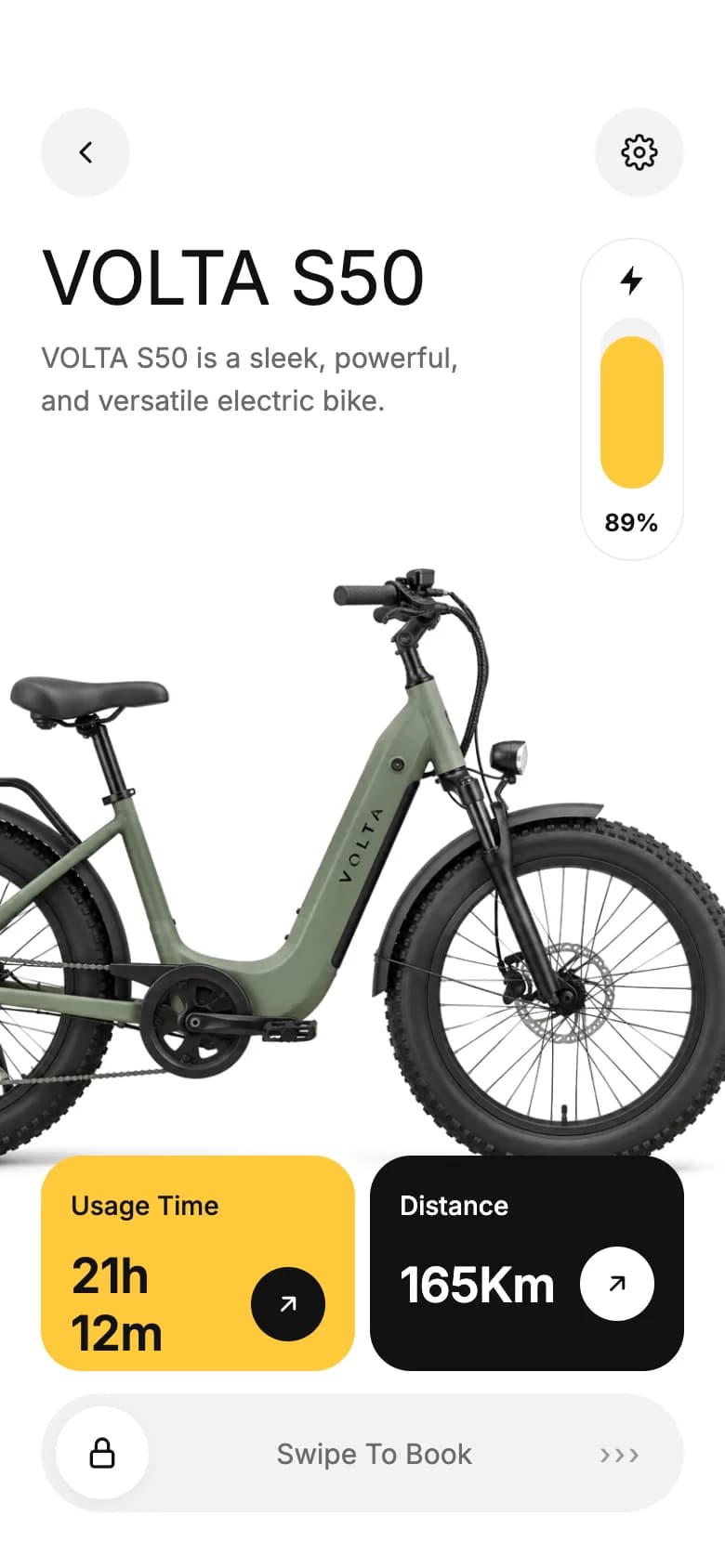
How does it differ from the Volta e-bike design?
Volta uses a yellow, product-first style, while this design uses layered lime and grey cards and leans into smart ride guidance.
Can I connect it to real bike data?
Yes. Battery, usage and distance are plain values, so a Bluetooth or API feed can replace them.
Is the Smart Bike Rental design free to use?
Yes. The design, skill and Expo code are free and MIT licensed, including for commercial apps. Replace the demo images and sample content with your own before you ship.
What is the difference between the artifact, skill and code?
The artifact is the full design: tokens, screens and source. The skill is a SKILL.md that teaches an AI coding agent to build the UI. The code is the finished Expo app you can paste in and run.
Which Expo version does the code use?
It targets Expo SDK 58 with Expo Router and TypeScript. It uses packages installed through npx expo install, with no custom native code.